
Build a Simple LLM Agent
Most beginners expect an agent to be a special kind of model—something with built-in magic that can browse the web, run code, and get things done. Then…

Most beginners expect an agent to be a special kind of model—something with built-in magic that can browse the web, run code, and get things done. Then they build their first chatbot, discover it can only produce text, and wonder where they went wrong.
Here's the reframe that makes everything click: an agent is not a new model. It's an ordinary LLM wrapped in a loop that lets it call tools, read the results, and decide what to do next. The loop is the agent. The model is just the decision-maker inside it.
Once you see that, building your first agent becomes a much smaller problem than you expected. You need a task, a couple of tools, a system prompt that sets the rules, and a loop that connects them. Let's build one.
What an Agent Actually Is
An agent has three parts: an LLM, tools, and a loop that decides when to call each tool and when to stop.
The model does not know how to use your tools by default. It only knows what you tell it through the system prompt and the tool definitions you provide. Write a tool called search_web with a clear description, and the model can decide to call it. Omit the description, and the model won't know the tool exists.
Contrast that with a plain chatbot. A chatbot returns text. It cannot take an action, observe the outcome, and adjust. An agent can call a function, receive the output, and use that output to decide its next move. That difference—acting and observing instead of just answering—is the entire point.
Note: If you haven't read the concept-level introduction to agents yet, the short version is this: agents are useful when the path to a goal isn't known in advance and the model must make decisions along the way. This tutorial assumes you have that mental model and want to see one built.
Knowledge check
Check your understanding
Answer this question before you continue.
Pick a Task Small Enough to Finish
The most common beginner failure is an over-ambitious goal. You decide to build an agent that manages your entire email inbox, and three hours later you're still debugging tool calls instead of learning how agents work.
A good first agent task has three properties:
- A clear goal you can state in one sentence
- A small set of tools—two or three at most
- An obvious stopping point
Here are two examples that fit:
A research assistant. Give it a topic, let it search for information, and have it summarize what it finds. Two tools: a search function and maybe a text formatter.
A calculator agent. Give it a math expression, let it decide whether to compute the answer or respond directly. Two tools: a calculator and a lookup table for constants.
What makes a task too big? Too many tools, open-ended goals, or tools with unpredictable output. If you cannot describe what success looks like in one sentence, the task is too big.
My rule: pick the smallest task that still requires the model to make a real decision between tools. That decision is what makes it an agent rather than a script.
Knowledge check
Check your understanding
Answer this question before you continue.
Choose Your Tools
A tool is a function the model can call. You expose it with three things: a name, a description, and an input schema that defines what arguments it accepts.
The description matters more than beginners expect. The model reads it to decide whether to call the tool, so write it like a label, not a novel. Compare these two descriptions for the same function:
- Weak: "This function takes a query and returns results."
- Strong: "Search the web for current information. Use this when the user asks about recent events, facts you are unsure about, or topics that may have changed since your training data."
The second version teaches the model when to reach for the tool. That guidance is what separates an agent that uses its tools well from one that guesses.
Start with two tools: one for retrieval or search, one for computation or formatting. You can build the loop by hand to see the mechanism, or use a framework like LangChain or the OpenAI Agents SDK to handle the plumbing. For a first build, I recommend writing the loop yourself once. It's not much code, and it makes the architecture visible in a way frameworks tend to hide.
Common mistake: Adding too many tools. Every extra tool gives the model more chances to choose wrong. Add tools only when the task demands them.
Knowledge check
Check your understanding
Answer this question before you continue.
Write the System Prompt That Runs the Show
The system prompt is the agent's operating manual. It tells the model who it is, what tools exist, and the rules for using them. Most agent quality is won or lost here.
A good agent system prompt includes three things:
Role and context. Who the agent is and what it's trying to accomplish.
Tool-use rules. When to call each tool, and what to do with the results.
A stopping rule. When the task is done, so the model doesn't loop forever.
A fallback rule. What to do when a tool fails or returns nothing useful.
A compact structure looks something like this:
You are a research assistant. Your job is to answer questions about
current events.

You have access to one tool: search_web.

Use search_web when:
- The user asks about recent events
- You are unsure whether your knowledge is current
- The question involves specific facts that may have changed

After you receive search results, base your answer on them.
If the search returns nothing useful, say so and ask for a
more specific question.

When you have enough information to answer, stop and provide
your final response.
Notice what's missing: vague instructions like "be helpful" or "use tools when appropriate." The model needs concrete triggers. When you see this, do that.
Common mistake: Vague instructions produce agents that call tools unnecessarily or never call them at all. If your agent isn't using a tool when it should, the system prompt is the first place to look.
Knowledge check
Check your understanding
Answer this question before you continue.
Wire Up the Loop: Think, Act, Observe
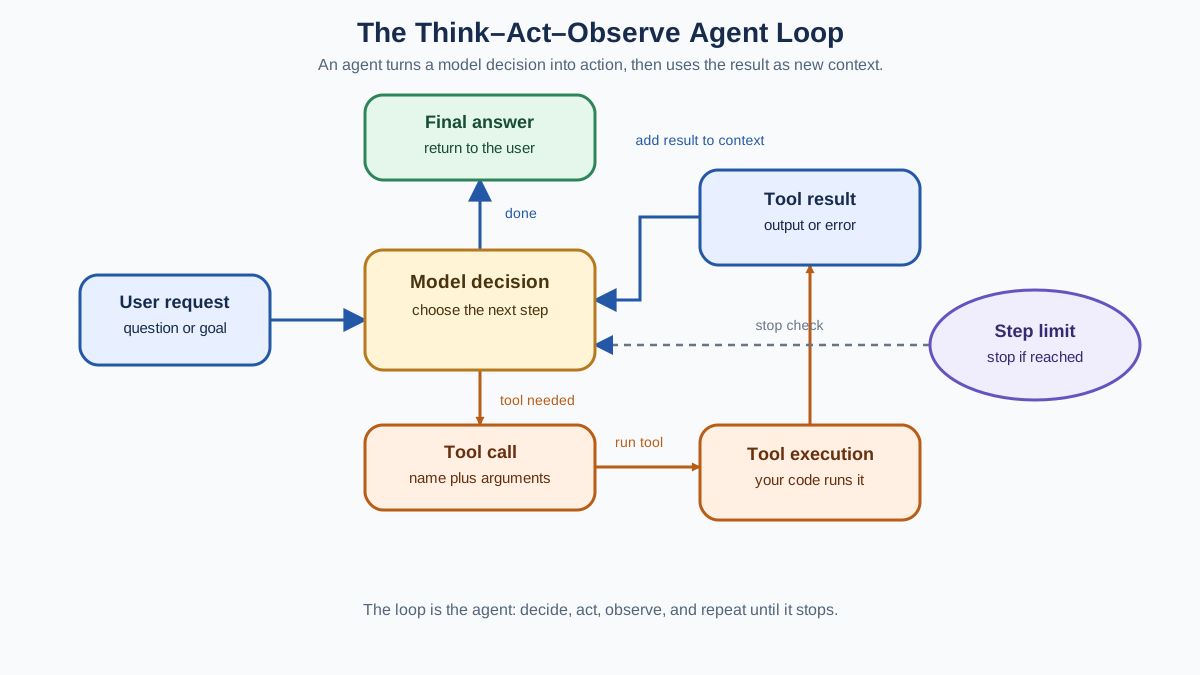
Now we reach the heart of the agent. The loop has three beats:
- Think. The model looks at the conversation so far and decides what to do next—either call a tool or give a final answer.
- Act. Your code executes the tool the model requested. The model never runs the tool itself; it only proposes the call.
- Observe. The tool's output is added to the conversation as a new message, and the model sees it on its next turn.
Then the cycle repeats: think, act, observe, until the model decides it has enough information to stop.
The flow looks like this:
User request
    ↓
Model decides: call a tool or answer?
    ↓
Tool runs (your code executes it)
    ↓
Result feeds back into the conversation
    ↓
Model decides again
    ↓
...repeat until the model stops
The critical detail is step three. The tool output must be fed back into the conversation history. If you forget this, the model is left guessing about what the tool returned, and it will start inventing answers from memory.
You also need a step limit. Decide the maximum number of iterations before you start, and enforce it in code. A runaway agent that loops forty times is not just slow—it's expensive, since every iteration is another model call.
Common mistake: Forgetting to feed tool output back into the conversation. The model proposes the call, your code runs it, and then the result vanishes. The next model call has no idea what happened, so it guesses—and guessing is where agents fall apart.
Test It, Break It, Fix It
Testing is where you actually learn how agents work. Run your agent on a task it should handle, then on an edge case it will likely mishandle. Watch what happens.
Three failures show up constantly in first builds:
The model calls the wrong tool or invents arguments. The tool descriptions are probably too vague. Tighten them. Be explicit about when each tool applies and what inputs it expects.
The model loops without finishing. Your stopping rule is unclear, or your step limit is too generous. Add a clearer rule about what counts as done, and check that the model has enough information to make that call.
The model ignores tool output and answers from memory. This usually means the tool results aren't being fed back correctly. Trace the conversation history and confirm the output is actually there.
The debugging rule that saves the most time: read the trace of model calls and tool outputs before you change anything. The failure is evidence about what the loop or prompt is doing wrong. The model is almost never the problem—the architecture around it is.
Tip: If you're using a framework, turn on tracing from day one. Seeing the full sequence of model calls and tool outputs makes debugging dramatically faster than adding print statements.
When an Agent Is the Wrong Tool
Agents are not always the right answer. In fact, they're often overkill.
If your task has a fixed sequence of steps, a script or workflow beats an agent. You don't need a model deciding what to do next when the path is already known. A deterministic pipeline is faster, cheaper, and more reliable.
If your task needs no external data or action, a plain LLM call is simpler. No tools, no loop, no step limit. Just a prompt and an answer.
Agents earn their complexity only when the path is unknown in advance and the model must decide between tools based on what it observes. That's the sweet spot: enough ambiguity that a fixed script can't handle it, but enough structure that the model can make good decisions.
There's also a cost tradeoff to respect. Every loop iteration is another model call. An agent that takes five steps costs five times as much as a single LLM call, and it can fail in five times as many ways.
My decision rule: start with the simplest thing that works. Add agentic behavior only when the task demands it.
Your Next Step
Take the small task you chose earlier—the research assistant or calculator agent—and build the loop around it. Write the system prompt, define two tools, and wire up think-act-observe with a step limit. Then run it, watch it fail, and fix what the failure reveals.
Once the hand-built loop makes sense, the natural progression opens up. Add a third tool. Connect a RAG pipeline as one of the tools so the agent can retrieve from your own documents. Or move to a framework once you understand the mechanism it's abstracting.
Keep the core insight close: the loop is the agent, and the model is just the decision-maker inside it. When something goes wrong, don't blame the model. Watch the loop. Read the trace. Find where the decision, the tool, or the feedback broke—and fix that.
Knowledge check
Final check
Finish the article by checking the ideas you just learned.
References
Want a more structured LLMOps path?
Use the LLMOps Practical Starter Bundle to connect RAG, evaluation, observability, and production patterns.
Large Language Models Starter Pack
A 12-chapter guide connecting LLM fundamentals with prompting, RAG, agents, tool calling, evaluation, security, and application engineering.
- 227-page Illustrated PDF edition
- 12 guided LLM engineering chapters
- Visual concept diagrams
- Self-assessment quizzes
- Bonus deep-dive sections
- Prompt design, structured output, context windows & RAG pipelines
- Agents, tool calling, prompt injection, evaluation & application lifecycles
Coming soon


