
Build and Inspect a Bounded Tool-Using Agent
The agent worked in the demo. Then you ran it on your own task, and it called a tool you never expected — or kept calling tools after the answer was…

Key topics
The agent worked in the demo. Then you ran it on your own task, and it called a tool you never expected — or kept calling tools after the answer was already sitting in the message history. You cannot explain the run, so you rewrite the prompt and hope.
That is not debugging. That is guessing with extra steps.
Here is the reframe that changes everything: a bounded agent is a loop with three inspectable surfaces — the tool contract, the permission gate, and the stopping rule. Most failures land on one of them. Once you can see which surface broke, you stop rewriting prompts and start fixing the actual mechanism.
By the end of this tutorial you will have a small runnable agent, a printed execution trace, and one deliberately broken run you can diagnose line by line.
What You Are Actually Building
Strip away the framework and an agent is a while loop:
- Send the message history plus tool schemas to the model.
- Read the model's tool request (or its final answer).
- Execute the tool yourself — or refuse to.
- Append the result to the history.
- Repeat, until a stopping rule fires.
The model never executes anything. Your code is the executor. That is not a limitation; it is the entire point. Permissions and limits live in the executor, which means they live in code you can read.
Three surfaces matter, and each one is a place a failure can hide:
| Surface | What it controls | Failure it produces |
|---|---|---|
| Tool contract | What the model believes each tool does | Wrong tool selection |
| Permission gate | What your code will actually run | Denied or unsafe calls |
| Stopping rule | When the loop ends | Infinite retries, wasted budget |
This is a single-agent, single-tool-set loop. No multi-agent handoffs, no framework. Frameworks are fine later — the point here is to see the mechanism without an abstraction layer standing between you and the trace.
If you already understand that tool calling is schema selection plus application execution, and that budgets bound autonomy, you have the prerequisites. We are going straight to the runnable version.
Setup, Assumptions, and the Tool Contract
You need Python 3.10+, one model API key in an environment variable, and no framework. Install the client library and set the key:
pip install anthropic
export ANTHROPIC_API_KEY="your-key-here"
Two tools, deliberately small:
lookup— read-only. Returns a value from a fixed local dictionary.append_note— write-ish. Appends a line to a local file.
Two tools is enough to create a real selection decision. One tool is not.
import json
import anthropic

client = anthropic.Anthropic()
MODEL = "claude-sonnet-4-5"

DATA = {"retry_limit": 3, "timeout_seconds": 30}

TOOLS = [
    {
        "name": "lookup",
        "description": "Return the stored value for a known key. "
                       "Use for reading facts. Never writes anything.",
        "input_schema": {
            "type": "object",
            "properties": {"key": {"type": "string"}},
            "required": ["key"],
        },
    },
    {
        "name": "append_note",
        "description": "Append one line of text to the notes file. "
                       "Use only when the user explicitly asks to save something.",
        "input_schema": {
            "type": "object",
            "properties": {"text": {"type": "string"}},
            "required": ["text"],
        },
    },
]
Read those descriptions again. They are not documentation. They are prompt engineering. A vague description is the leading cause of wrong-tool selection, and you will prove that to yourself shortly.
Now the permission gate — stated in code, not in a comment:
ALLOWED = {"lookup"}
WRITE_ENABLED = False  # flip to True to allow append_note

def permitted(name: str) -> bool:
    if name in ALLOWED:
        return True
    if name == "append_note" and WRITE_ENABLED:
        return True
    return False
Two rules, both visible: a set of allowed tool names, and a write tool that stays off until you explicitly enable it.
Knowledge check
Check your understanding
Answer this question before you continue.
The Loop, the Trace, and the Stopping Rule
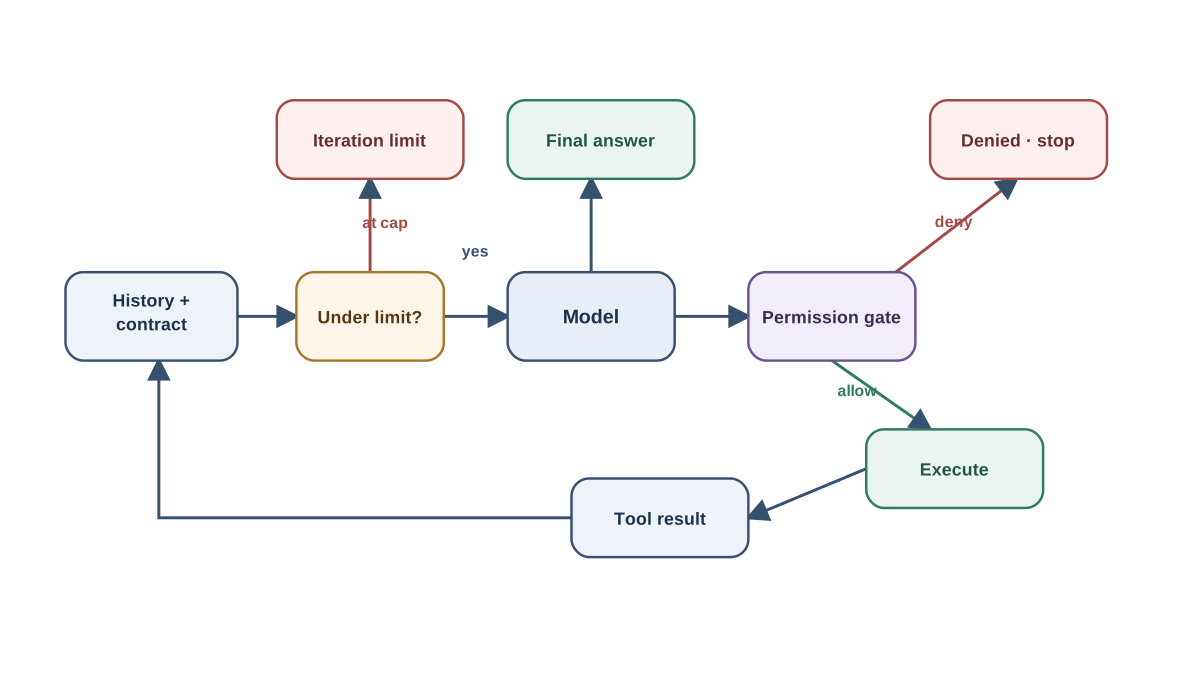
The loop gets three hard limits: a max iteration count, a step budget, and a terminal condition when the model returns a final answer with no tool request.
MAX_ITERATIONS = 5

def execute(name, args):
    if name == "lookup":
        key = args.get("key")
        if key in DATA:
            return {"value": DATA[key]}
        return {"error": f"unknown key: {key}"}
    if name == "append_note":
        with open("notes.txt", "a") as f:
            f.write(args["text"] + "\n")
        return {"saved": True}
    return {"error": f"unknown tool: {name}"}

def run_agent(client, messages):
    trace = []
    for i in range(MAX_ITERATIONS):
        response = client.messages.create(
            model=MODEL, max_tokens=1024,
            tools=TOOLS, messages=messages,
        )
        remaining = MAX_ITERATIONS - i - 1

        if response.stop_reason != "tool_use":
            trace.append({"iter": i, "type": "final",
                          "remaining": remaining})
            return response, trace

        call = next(b for b in response.content if b.type == "tool_use")
        allowed = permitted(call.name)

        if not allowed:
            result = {"error": f"tool '{call.name}' is not permitted"}
        else:
            result = execute(call.name, call.input)

        trace.append({
            "iter": i, "type": "tool_call", "tool": call.name,
            "args": call.input, "allowed": allowed,
            "result": result, "remaining": remaining,
        })

        messages.append({"role": "assistant", "content": response.content})
        messages.append({"role": "user", "content": [{
            "type": "tool_result",
            "tool_use_id": call.id,
            "content": json.dumps(result),
        }]})

    trace.append({"iter": MAX_ITERATIONS, "type": "limit_hit"})
    return None, trace
One structured record per iteration: iteration number, output type, tool name, arguments, permission decision, result or error, and remaining budget.
That trace is the artifact that matters. Without it, every failure becomes archaeology — you dig through logs and reconstruct what happened from memory. With it, a failure becomes a line number.
Note: A loop that hits
MAX_ITERATIONSwithout a final answer is not a model problem yet. It is a stopping-rule problem or a tool-result problem. Resist the urge to blame the model first.
Knowledge check
Check your understanding
Answer this question before you continue.
Run It: One Task, Two Tools, One Decision
Give it a task that forces a genuine choice:
messages = [{"role": "user",
             "content": "What is the value for 'retry_limit'?"}]
answer, trace = run_agent(client, messages)
print(json.dumps(trace, indent=2))
A healthy trace looks like this:
[
  {"iter": 0, "type": "tool_call", "tool": "lookup",
   "args": {"key": "retry_limit"}, "allowed": true,
   "result": {"value": 3}, "remaining": 4},
  {"iter": 1, "type": "final", "remaining": 3}
]
Walk it line by line. The model asked for lookup with a plausible key. The gate allowed it because lookup is in ALLOWED. The tool returned {"value": 3}. The loop continued because the model still wanted to act. On the next pass, the model returned a final answer, so the terminal condition fired and the loop stopped with three iterations to spare.
Notice the moment the agent had enough information to answer. It stopped there. That is the behavior you want, and now you can see it happening rather than assuming it.
The loop is not smart. It is a state machine whose state is the message history plus the remaining budget. Everything else is bookkeeping.
Knowledge check
Check your understanding
Answer this question before you continue.
Break It on Purpose: Wrong Tool and No Stop
Now the useful part. Three failures, each reproducible, each mapping to one surface.
Failure A — Wrong tool selection
Weaken the descriptions until they overlap:
"description": "Handles data."   # lookup
"description": "Handles data."   # append_note
Rerun the same task. Read the trace. The model picks the plausible-but-wrong tool, because from its side the two tools are now indistinguishable. The fix is in the contract — restore specific, non-overlapping descriptions — not in the loop.
Failure B — No stop
Make lookup return an empty result:
def execute(name, args):
    if name == "lookup":
        return {}   # unhelpful on purpose
Watch the trace. The agent retries the same call, iteration after iteration, until the limit fires. The model is not confused; it is missing the information it needs and has no way to know that retrying will not help. The fix is a stopping rule or a result-quality check — not more retries.
Failure C — Permission denial
Ask for something that requires the write tool while WRITE_ENABLED is False:
messages = [{"role": "user",
             "content": "Save a note that says 'deploy on Friday'."}]
The trace records "allowed": false and feeds the denial back to the model as a tool result. The program does not crash. The model sees the refusal and can respond to it. That is the difference between a permission gate and an exception.
For each failure, name the handle: contract problem, stopping problem, or permission problem. That mapping is the reusable skill — it transfers to every agent you build, framework or not.
Common mistake: Treating the trace as a verdict on the model's reasoning. A trace tells you what happened, not why the model preferred one tool. Treat it as evidence about the system, and treat model reasoning as a hypothesis you test by changing one variable at a time.
Knowledge check
Check your understanding
Answer this question before you continue.
One Experiment to Run Next
Add a third tool that partially overlaps with lookup — say, lookup_cached, which returns the same values but claims to be faster. Before you run anything, write down which tool you predict the agent picks for the retry_limit task.
Then run it. Compare your prediction to the trace.
Prediction before execution is how you find out whether your mental model is real. If you guessed wrong, you just learned something the documentation could not have told you.
An alternative experiment: lower MAX_ITERATIONS to one and observe which tasks now fail. That shows you how much of the agent's apparent competence comes from the loop rather than the model. Record the trace before and after the change so the comparison is evidence, not memory.
Where This Leaves You
When an agent misbehaves, read the trace first. Classify the failure as contract, permission, or stopping — before you touch the prompt. That single rule will save you more time than any prompt-engineering trick.
The natural next step is adding observability or a human checkpoint to the loop: a pause before write actions, or a log that ships to a real tracing system. The same three surfaces scale to larger systems, even when a framework handles the plumbing. The framework hides the loop; it does not remove it.
Knowledge check
Final check
Finish the article by checking the ideas you just learned.
References
Want a more structured LLMOps path?
Use the LLMOps Practical Starter Bundle to connect RAG, evaluation, observability, and production patterns.
Large Language Models Starter Pack
A 12-chapter guide connecting LLM fundamentals with prompting, RAG, agents, tool calling, evaluation, security, and application engineering.
- 227-page Illustrated PDF edition
- 12 guided LLM engineering chapters
- Visual concept diagrams
- Self-assessment quizzes
- Bonus deep-dive sections
- Prompt design, structured output, context windows & RAG pipelines
- Agents, tool calling, prompt injection, evaluation & application lifecycles
Coming soon


