
Common LLM Agent Failures: Loops, Wrong Tools, and Lost Context
Your agent runs. It calls tools. It produces output. And yet, something is wrong—or it never stops running at all. The frustrating part is that you can't…

Key topics
Your agent runs. It calls tools. It produces output. And yet, something is wrong—or it never stops running at all. The frustrating part is that you can't say why.
Here's the reframe that makes agent debugging tractable: most agent failures are not one bug. They are misdiagnoses. You treat a planning, tool, state, or stopping problem as if it were a prompt problem, change a few words, re-run, and watch the same failure happen again.
An agent is a loop of decisions. Each decision happens in a distinct layer, and each layer has its own failure mode. Name the layer first. Then the fix becomes obvious.
Why Your Agent Runs but Still Fails
When your agent completes a run and returns a wrong answer, the failure is silent. There is no stack trace. No exception. The model did exactly what you asked—it just asked the wrong question, called the wrong tool, or acted on information that was already stale.
The weak mental model is treating every failure as a prompt problem or a model problem. You rewrite the system prompt, swap in a bigger model, and hope. Sometimes it works. Often it doesn't, because you never identified which layer actually broke.
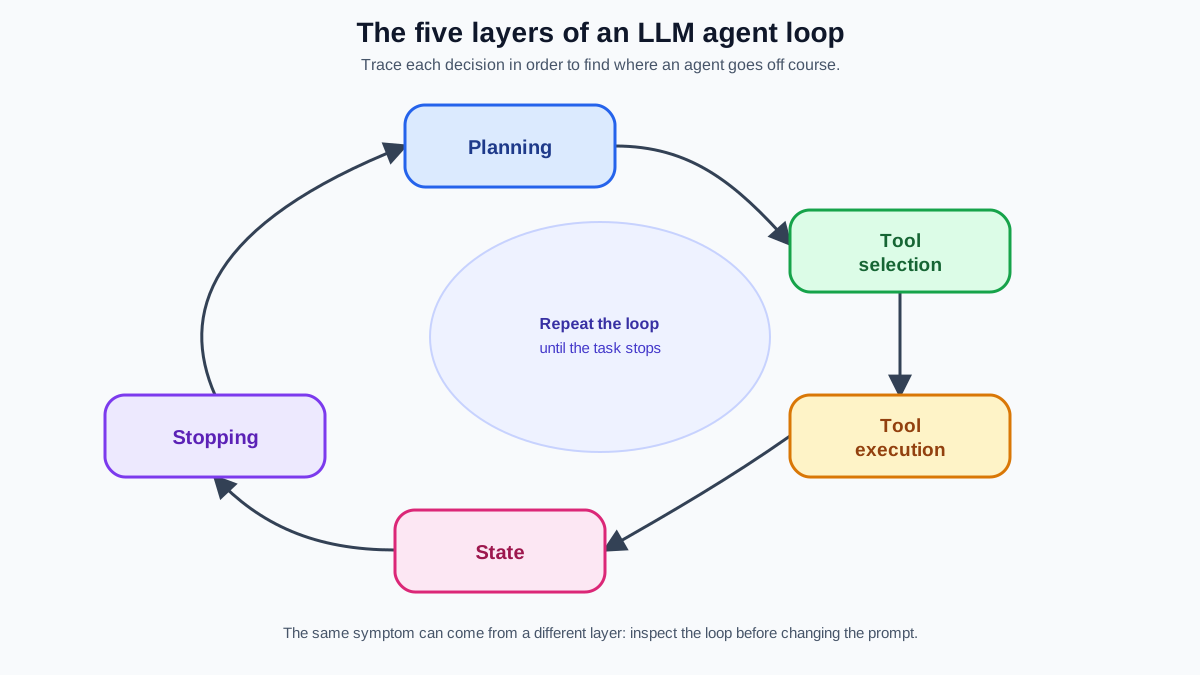
Think of an agent as a five-layer loop:
- Planning — deciding what to do next
- Tool selection — choosing which tool fits the goal
- Tool execution — calling the tool with correct arguments and handling its output
- State — keeping track of what has been done and what is still pending
- Stopping — deciding when the task is complete
Each layer can fail independently. The fix for a loop is different from the fix for a wrong tool. The fix for stale state is different from both. Guessing wastes the most time because you change several things at once and cannot tell which one mattered.
The discipline is simple: when an agent misbehaves, your first job is not to fix it. Your first job is to name the layer where the failure lives.
The Bad Plan: When the Agent Decides the Wrong Next Step
Planning failures are the easiest to misread because they look like tool or state problems. The agent isn't calling the wrong tool—it's pursuing a sequence that never made sense. It sends the calendar invite before checking for conflicts. It books the flight before confirming the date. The tool calls are valid; the order is broken.
The tell is in the trace: each individual step looks reasonable, but the sequence violates a dependency. The agent needed information from step two before it could safely execute step one.
The fix is to make dependencies explicit. Break the goal into subgoals and state which facts each subgoal requires before it can start. If the agent must check availability before sending an invite, say so in the plan. A good rule: when a step changes something irreversible—sending, deleting, purchasing—require a prior verification step in the plan itself.
Common mistake: Treating a planning failure as a prompt wording issue. Rewriting the instructions rarely fixes an agent that never understood the dependency structure. Name the missing prerequisite, then encode it as an explicit subgoal.
Knowledge check
Check your understanding
Answer this question before you continue.
The Endless Loop: When the Agent Never Decides to Stop
The most visible and costly agent failure is the loop. The agent keeps generating the next step, re-running a tool that returns the same result, or reasoning long after the goal has been reached.
Loops happen because the agent has no clear completion signal. It does not know what "done" looks like, so it keeps moving. This is an agent loop problem in its purest form: the stopping condition is weak or missing entirely.
A legitimate multi-step task and a pathological loop can look identical for the first few turns. The tell is token cost. A legitimate task makes progress—each step changes state, narrows options, or produces new information. A loop spends tokens without changing anything. Watch the tool results. If the agent keeps calling the same tool and getting the same answer, you are watching a loop form.
The cheapest safety net is a hard max-iteration cap. Treat it as a circuit breaker, not a design admission. Every agent should have one, because relying on the model to self-terminate without any external limit is how you discover the feedback loop that ran for days and accrued thousands in API costs.
But a cap only stops the bleeding. The real fix is designing stopping criteria before the agent starts. Define what "done" means in concrete terms. For a research task, is it "found three sources that meet these criteria" or "searched all five databases"? Write the completion condition into the system prompt so the agent has a target to recognize.
The mirror image of the loop is premature termination. An agent asked to "find three recent articles on advances in gene editing" finds the first one and stops, delivering a single link. Same root cause—weak stopping criteria—but the failure is invisible because the agent stopped politely. Both directions of the problem need an explicit definition of done.
Knowledge check
Check your understanding
Answer this question before you continue.
The Wrong Tool: Selection vs. Execution Failures
When an agent produces a wrong or failed output, the surface symptom looks the same whether it picked the wrong tool or used the right tool badly. But the root cause lives in different layers, and the fixes are completely different.
Tool selection failure means the agent chose an inappropriate tool for the goal. The classic horror story: an email agent asked to archive a batch of customer inquiries instead calls the delete tool and permanently removes ten thousand records. The agent did not fail to use the tool. It failed to choose the right one.
Tool execution failure means the agent picked the right tool but used it badly—wrong arguments, wrong format, or a computation error while processing the output. A customer-service agent correctly gathers all the relevant case-handling times, then miscalculates the average because it tried to do arithmetic in its head instead of letting code do it.
How do you tell them apart? Inspect the tool call itself. Was the tool name wrong for the goal? That is a selection failure. Was the tool right but the arguments or result handling wrong? That is an execution failure.
The fix for selection is to constrain the toolset and sharpen tool descriptions. A model choosing between fifty vaguely described tools will make more mistakes than one choosing between five clearly described tools. If the agent cannot discriminate between "archive" and "delete," the descriptions are not doing their job. A stronger model will not fix a toolset that is too broad or descriptions that are too vague.
The fix for execution is validation and offloading. Validate arguments against a schema before the tool runs. And do not ask the model to do math, ranking, or comparisons in its head—offload those computations to deterministic code. The model's job is to decide which computation to run, not to perform the computation itself.
Knowledge check
Check your understanding
Answer this question before you continue.
Lost Context: When the Agent Forgets What It Already Did
An agent's context window is not memory. It is a crowded desk with a larger surface area. Over many turns, the relevant facts get buried under tool outputs, intermediate reasoning, and half-finished thoughts. The agent does not forget because its memory degraded. It forgets because the information it needs is no longer visible.
State failures show up in recognizable patterns. The agent repeats a step it already completed. It contradicts an earlier finding. It acts on a tool result that a later call superseded. These are not reasoning failures. They are state failures: the agent is acting on stale, partial, or forgotten information.
Three kinds of state matter here, and each needs a different remedy:
- Transcript context — the conversation history. It dilutes as it grows, so summarize what matters rather than replaying everything.
- Task state — what the agent has done and what remains. Persist it at meaningful checkpoints so a run can resume instead of restarting.
- External state — the real-world conditions the tools read and change. Verify it before acting, because another step may have already altered it.
Context rot is the slow dilution of relevant facts as the transcript grows. The user's original goal, stated in turn one, is buried by turn twenty. Stale state is sharper: the agent acts on information that another step already changed. When multiple steps read and write shared state at different times, the agent can act on a version of reality that no longer exists.
The practical fixes are checkpointing and summarization. Checkpoint durable task state at meaningful steps so a run can resume from a checkpoint instead of restarting from the beginning. And summarize what matters—the user's goal, what is done, what is pending—rather than replaying the full transcript into each new turn.
Think of it like meeting notes. You do not transcribe every word. You capture the decisions and action items. If a user mentions their pricing plan early in a long conversation, that fact should persist even when the chat spans hundreds of messages.
This is a design problem, not a model-capability problem. A bigger context window postpones the failure. It does not remove it. The desk gets larger, but it still gets crowded.
Knowledge check
Check your understanding
Answer this question before you continue.
Observability: Making the Next Failure Cheap to Find
You cannot debug what you cannot see, and agent failures are silent by default. The single highest-leverage habit for all LLM agent failures is structured logging: record each step's plan, tool call, arguments, result, and state change.
For every step, log:
- The agent's stated intent
- The tool it called
- The arguments it passed
- The result it received
- The state before and after the call
Give the whole run a correlation ID so you can replay one trajectory instead of guessing from fragments. Traditional monitoring—stack traces, binary pass/fail outcomes, circuit breakers—misses silent, cascading agent failures. A trace catches them.
Here is what a trace actually shows you. Suppose the agent repeats a search call three times with identical arguments. The surface symptom looks like a loop. But look at the stated intent before each call. If the agent believes each time that it is searching for the first time, the failure is state: it never recorded that the search already ran. If the agent knows the search ran but keeps searching anyway, the failure is stopping: it has no criterion for "enough searching." Same visible action, two different layers, two different fixes.
Treat the trace as the primary debugging artifact, not an afterthought. When the agent picks the wrong tool or loses the goal, the trace shows you the exact turn where it happened. One good trace teaches you more than ten random fixes. Replay the logged run, find the moment of divergence, and you have turned probabilistic guesswork into a targeted repair.
This habit compounds. The same logging pattern carries into RAG pipelines and multi-agent systems, where errors cascade across stages and the root cause is rarely at the point where the failure becomes visible.
A Simple Diagnostic Checklist
The next time your agent misbehaves, run this sequence before you change anything:
- What was the intended next step? If the plan itself was invalid—missing a prerequisite or violating a dependency—fix the plan structure before touching anything else.
- Did it stop? If not, apply a max-iteration bound and tighten the stopping criteria.
- Did it call the right tool? Inspect the tool name against the goal. If wrong, constrain the toolset and sharpen descriptions.
- Did it use the tool correctly? Check arguments and result handling. If wrong, validate inputs and offload computation to code.
- Did it act on current information? Check whether the state reflects the latest tool results. If not, checkpoint and summarize.
The meta-rule: change one layer at a time and re-run. The trace tells you whether the fix worked.
Resist the urge to swap the model or rewrite the prompt first. That is the debugging equivalent of guessing. Name the failing layer from the trace, apply the matching bound or fix, and change one thing at a time.
The mental model becomes a habit only through practice. The next time an agent runs unpredictably, walk the checklist. You will still hit failures you have not seen before—but you will know which layer to interrogate, and that knowledge turns debugging from archaeology into engineering.
Knowledge check
Final check
Finish the article by checking the ideas you just learned.
References
Want a more structured LLMOps path?
Use the LLMOps Practical Starter Bundle to connect RAG, evaluation, observability, and production patterns.
Large Language Models Starter Pack
A 12-chapter guide connecting LLM fundamentals with prompting, RAG, agents, tool calling, evaluation, security, and application engineering.
- 227-page Illustrated PDF edition
- 12 guided LLM engineering chapters
- Visual concept diagrams
- Self-assessment quizzes
- Bonus deep-dive sections
- Prompt design, structured output, context windows & RAG pipelines
- Agents, tool calling, prompt injection, evaluation & application lifecycles
Coming soon


