
LLM Agent Memory Explained: Context, Retrieval, and Stored State
You build an agent. You chat with it for a few turns. It helps you draft a plan, picks a tool, runs it, reports back. Then you ask: "What was the second…

Key topics
You build an agent. You chat with it for a few turns. It helps you draft a plan, picks a tool, runs it, reports back. Then you ask: "What was the second step of that plan again?" And the agent stares back at you like the question never happened.
This is not a bug. It is not a model quality problem. It is the single most important fact about how LLM agents actually work: the model does not automatically remember anything between requests. Each request starts fresh. Whatever the agent "remembers" is whatever your system chose to place in front of it on that particular request.
That reframe changes everything. "Memory" stops being a magic property of the model and becomes a design decision about what tokens enter the context window. And once you see it that way, you can stop asking "how much can my agent remember?" and start asking the question that actually matters: "what deserves space on the desk before the model decides?"
Why Your Agent Forgets (and It's Not a Bug)
Here is the mechanism underneath the disappointment: an LLM is a stateless function. You send it a prompt, it returns text, and then the interaction is over. The model does not carry conversational state between turns, sessions, or even between two calls made one second apart. Persistence comes from the surrounding system—your application code, stored data, or the model's own parameters—not from the model invocation itself.
What looks like memory in a chat interface is actually context engineering. The application surrounding the model keeps a transcript of your conversation and prepends it to each new request. The model "remembers" your earlier turns because the system re-sent them. If the system stops sending them, the model forgets instantly.
This is why the context window matters so much. If you have worked through how context windows behave, you already know the key constraint: they are a limited working surface, not a storage device. Everything competes for the same bounded space—your system prompt, the conversation history, retrieved documents, tool outputs. The moment something does not fit, something gets dropped, summarized, or pushed out.
So when your agent forgets, it is not malfunctioning. It is revealing what your system did not put in front of it.
Knowledge check
Check your understanding
Answer this question before you continue.
What People Actually Mean by "Agent Memory"
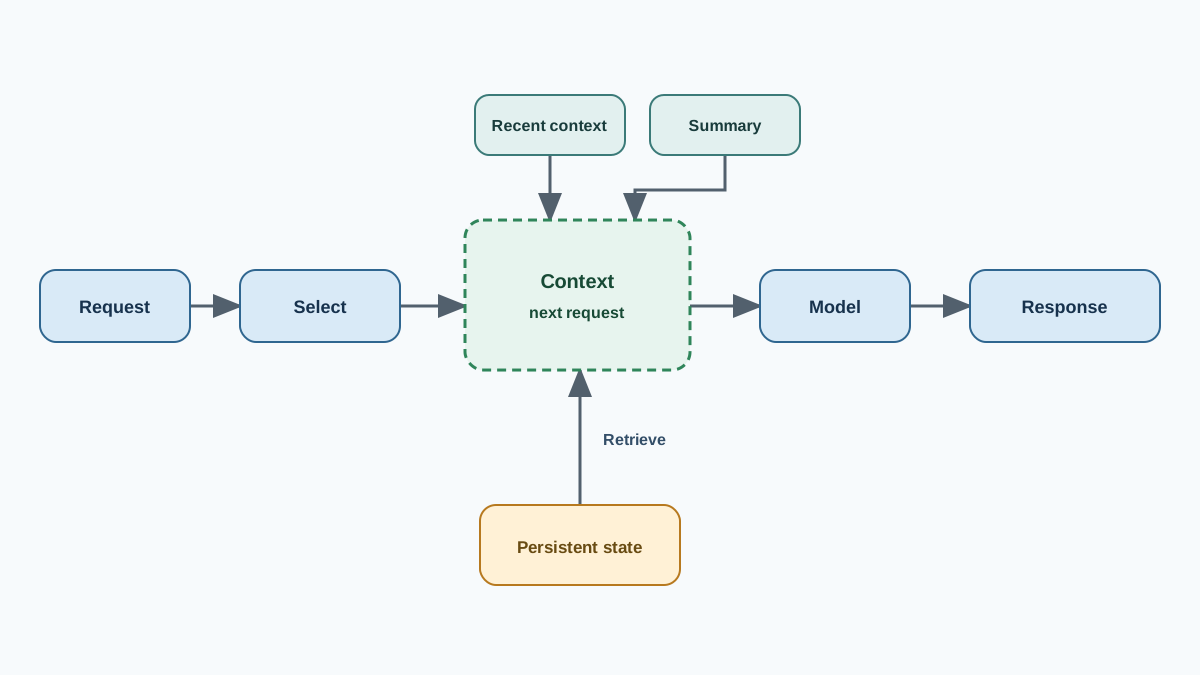
Beginners conflate several distinct mechanisms under the single label "agent memory." They feel similar because they all influence what the model can "remember." But they answer different questions, cost different amounts of engineering, and fail in different ways.
Live context. The conversation turns, system instructions, and any other text sitting in the context window right now. This is what the model can see on this request. It is fast, exact, and bounded.
Compressed summaries. Rolling or hierarchical condensations of earlier conversation. Instead of keeping the full transcript, you keep a compact version that preserves the gist.
Persistent state. Data your own code stores outside the model—a database, a file, a variable—that the agent can query or update through tools. The model does not hold this; your application does.
Retrieval. The mechanism for finding and returning stored information into the context window—via search, vector lookup, or database query. Retrieval is how the agent accesses memory, not a kind of memory itself.
The key distinction: persistent state describes what your application stores durably, while retrieval describes how stored material gets selected and brought back into context. They are not competing choices. A preference can be persistent state stored in a database and retrieved by an exact key. A past interaction can also be stored persistently and retrieved by semantic relevance. The real design work is deciding what to store, how to represent it, and which access path fits each kind of information.
Keep those dimensions separate, and you will stop building the wrong memory for the job.
Knowledge check
Check your understanding
Answer this question before you continue.
Live Context: The Working Desk, Not the Archive
The context window is the agent's working desk. Everything the model needs to reason about the current task sits on that desk, in plain view. The desk is fast and exact—the model can reference anything on it with high fidelity. But the desk has a finite surface area, and everything competes for space.
This is the trap of huge context windows. Even when a model accepts a million tokens, attention dilution sets in: information in the middle of a long prompt gets less reliable focus than information at the start and end. The model technically has all the tokens. It just cannot pay equal attention to all of them at the moment of decision.
Use live context when the full recent transcript matters: short sessions, single tasks, in-progress work where the exact wording of an earlier turn is load-bearing. Do not use it as an archive. Anything spanning days, many sessions, or large external knowledge will either overflow the desk or bury the important details under noise.
The desk is for the work in front of you. The archive lives somewhere else.
Summaries: Compressing the Past to Keep It in Reach
Summaries are the middle path. Instead of retrieving individual records or keeping the full transcript, you compress what happened into a compact form that stays in the context window. The agent retains the gist without carrying the entire history.
Summaries feel clean. They keep the window small. They preserve the shape of the work—what was decided, what was tried, what the user cares about. For long single sessions where the full transcript no longer fits but the direction of the work still matters, they are often the right tool.
But summaries have a failure mode that makes them seductive and dangerous: summarization drift. Each compression throws away detail. Compress a conversation, then compress the summary, then compress that summary, and after several rounds the memory no longer matches what actually happened. Details get flattened. Qualifications disappear. The agent confidently "remembers" a version of events that is subtly wrong.
The guardrail is to keep raw records linked to summaries. When precision matters, the agent can retrieve the original transcript instead of trusting the compressed version. Summary for the gist; retrieve for the exact words.
Knowledge check
Check your understanding
Answer this question before you continue.
Persistent State: What Your Code Remembers for the Agent
Here is the mechanism beginners overlook most often: the most reliable memory in an agent system is not in the model at all. It is in your application.
Persistent state is data your code owns—user profiles, preferences, task results, tool outputs—stored in a database or file. The agent does not hold this information in its weights or its context. It reads and writes it through tools, the same way it would query an API or update a spreadsheet.
This is often the smallest, most reliable mechanism for facts that must never be misremembered. If a user has a preferred time zone, a spending limit, or a saved setting, do not trust the model to recall it from conversation prose. Store it as a field. Retrieve it when needed. Write it back when it changes.
The common beginner mistake is letting the model "remember" a preference in conversation when a simple stored field would be exact and cheap. The model might infer the preference correctly from context—until the context gets summarized, or truncated, or the session ends. A database field does not drift. It does not get compressed. It is either there or it is not.
If a fact must be exact and durable, store it in state. Do not trust conversation.
Knowledge check
Check your understanding
Answer this question before you continue.
Retrieval: Pulling the Right Memory In on Demand
Retrieval solves the archive problem by keeping text outside the context window and searching it at query time. When the agent needs a specific fact or past interaction, the system searches the store, finds the best matches, and injects them into the context window.
If you have built a RAG pipeline, you already know this pattern: store text externally, embed it for search, retrieve the most relevant chunks at query time, and stuff them into the prompt. Agent memory retrieval is the same pattern applied to a different corpus—the agent's own history, notes, and observations instead of a document collection.
Retrieval's strength is that external storage expands what can be retained far beyond any context window. You can keep millions of past interactions and pull out the handful that matter for the current question.
But there is an important boundary to understand before you add retrieval: exact lookup and relevance search are different access paths. If you need a user's saved time zone or spending limit, you do not want semantic search—you want a direct query by key. Retrieval by relevance is for when you do not know which record matters in advance: "which past debugging session looks most similar to this error?" Use a direct key or query for exact durable fields. Use retrieval when the relevant record is unknown and must be selected by relevance. Use both when durable data is stored and then retrieved.
Retrieval also carries the weaknesses you already know from RAG. It can miss the right record entirely. It can rank the wrong results on top. It can surface stale or contradictory information. And the quality of what comes back depends entirely on the quality of your store and your query—garbage in, garbage retrieved.
There is also a security surface you should not ignore. Research on privacy risks in LLM agent memory has shown that stored interaction history can leak sensitive data. The memory store is not a neutral archive; it is a database full of private user-agent exchanges. Treat it with the same access controls you would apply to any system holding personal information.
Common mistake: Adding retrieval does not create memory by itself. Retrieval only works if you have already decided what to store, how to represent it, and which items are authoritative. Store everything without retention rules, and you get noise, contradiction, and bloated searches.
Choosing the Smallest Memory That Fits
The decision rule I use for agent memory is simple: start with the question the memory must answer, then choose the smallest mechanism that answers it.
- Need the full recent transcript for an in-progress task? Use live context.
- Need a fact that must be exact and durable across sessions? Store it in persistent state.
- Need the shape of a long session that no longer fits in the window? Summarize it, and keep the raw records linked.
- Need recall across a large history where the relevant record is not known in advance? Add retrieval.
The smallest mechanism that works is the right one. Every layer you add is another failure surface—another place where retrieval can miss, a summary can drift, or state can go stale.
| Mechanism | What it's good at | Where it breaks | Reach for it when |
|---|---|---|---|
| Live context | Exact recall of recent turns, in-progress work | Bounded size, attention dilution in long prompts | Short sessions, single tasks |
| Persistent state | Exact durable facts, user preferences, settings | Requires your code to read/write it | Facts that must never be misremembered |
| Summaries | Keeping the gist of long sessions in the window | Summarization drift over repeated compression | Long sessions where the transcript no longer fits |
| Retrieval | Finding relevant material in stores too large for context | Can miss, rank poorly, surface stale records | The relevant record is unknown and must be selected by relevance |
The overbuilding warning is worth stating plainly: many beginners bolt on a vector database before they have a single durable fact worth storing. Start with context and state. Add summaries when sessions get long. Add retrieval when the store outgrows what summaries can hold.
A Practical Memory Audit for Your Agent
If you have an agent already, run this audit. It takes ten minutes and will show you exactly where your memory design is over- or under-engineered.
First, list every fact or piece of history your agent relies on across turns. Not what the model could theoretically know—what your agent actually depends on to do its job. User preferences. Task results. Decisions from earlier in the session. Facts from previous sessions.
Second, for each item, ask two questions. Where does it live? Is it sitting in the context window, compressed into a summary, or held in your application's state? How is it accessed? Is it always present, fetched by an exact key, or selected by relevance?
Third, ask whether a smaller mechanism would do. Is that preference living in conversation prose when a stored field would be exact? Is that multi-session history being stuffed into context when retrieval would be more reliable? Is that summary being trusted for exact facts when the raw record is one query away?
Watch for the two classic mistakes. The first is expecting the model to recall exact facts from conversation—it will not, once the conversation gets long enough to summarize or truncate. The second is storing everything in context when a field would be exact and cheap.
Then make it a habit: before you add any memory feature, name where the information will live and how it will be accessed. Confirm it is the smallest mechanism that works. If you cannot name both, you are not designing memory—you are guessing.
The forgetting problem is not a flaw to fix. It is the constraint that makes memory a design decision instead of an assumption. Name the mechanism. Choose the smallest one that fits. Your agent will remember exactly what it needs to, and nothing else.
Knowledge check
Final check
Finish the article by checking the ideas you just learned.
References
Want a more structured LLMOps path?
Use the LLMOps Practical Starter Bundle to connect RAG, evaluation, observability, and production patterns.
Large Language Models Starter Pack
A 12-chapter guide connecting LLM fundamentals with prompting, RAG, agents, tool calling, evaluation, security, and application engineering.
- 227-page Illustrated PDF edition
- 12 guided LLM engineering chapters
- Visual concept diagrams
- Self-assessment quizzes
- Bonus deep-dive sections
- Prompt design, structured output, context windows & RAG pipelines
- Agents, tool calling, prompt injection, evaluation & application lifecycles
Coming soon


