
LLM Context Windows Explained: What Models Can See at Once
You tell a chatbot your name early in a conversation. Twenty messages later, it uses your name correctly. It feels like the model has been paying attention…

You tell a chatbot your name early in a conversation. Twenty messages later, it uses your name correctly. It feels like the model has been paying attention the whole time, quietly storing details the way a friend would.
It hasn't. The model is doing something stranger and simpler: it is re-reading the conversation you and the app have assembled, every time you send a new message.
That distinction—between remembering and re-reading—is the heart of the LLM context window. Get this mental model right, and you will stop fighting your tools and start using them well. Get it wrong, and you will spend hours confused about why a model "forgot" something it definitely saw.
Why Your Chat Seems to Remember (But Doesn't)
Here is the weak mental model most beginners carry: the chatbot has a memory, like a database or a human friend. You tell it something, it stores that fact away, and it can pull the fact back up whenever needed.
That model is wrong in a way that matters.
When you send a message in a chat, the model does not reach into a storage vault to recall your earlier messages. Instead, the application gathers the conversation so far—your first question, the model's first answer, your second question, everything—and sends it to the model as one request. The model reads the whole pile and generates the next response.
Think of it as a working desk. The context window is the surface area of that desk: everything the model can see at one moment. Your conversation history, your latest question, any document you included, the system instructions—all of it sits on the desk. Anything not on the desk is invisible to the model. It might as well not exist.
One important note: text is measured in tokens, not words. If you have not met tokens yet, the short version is that a token is a chunk of text—roughly three-quarters of a word for English. The desk's size is measured in tokens, and different models have different desk sizes.
Where does this metaphor break down? A real desk can hold more papers than you can focus on at once. The same is true for the model, and we will get to why that matters in a moment.
Knowledge check
Check your understanding
Answer this question before you continue.
What Actually Fills the Context Window
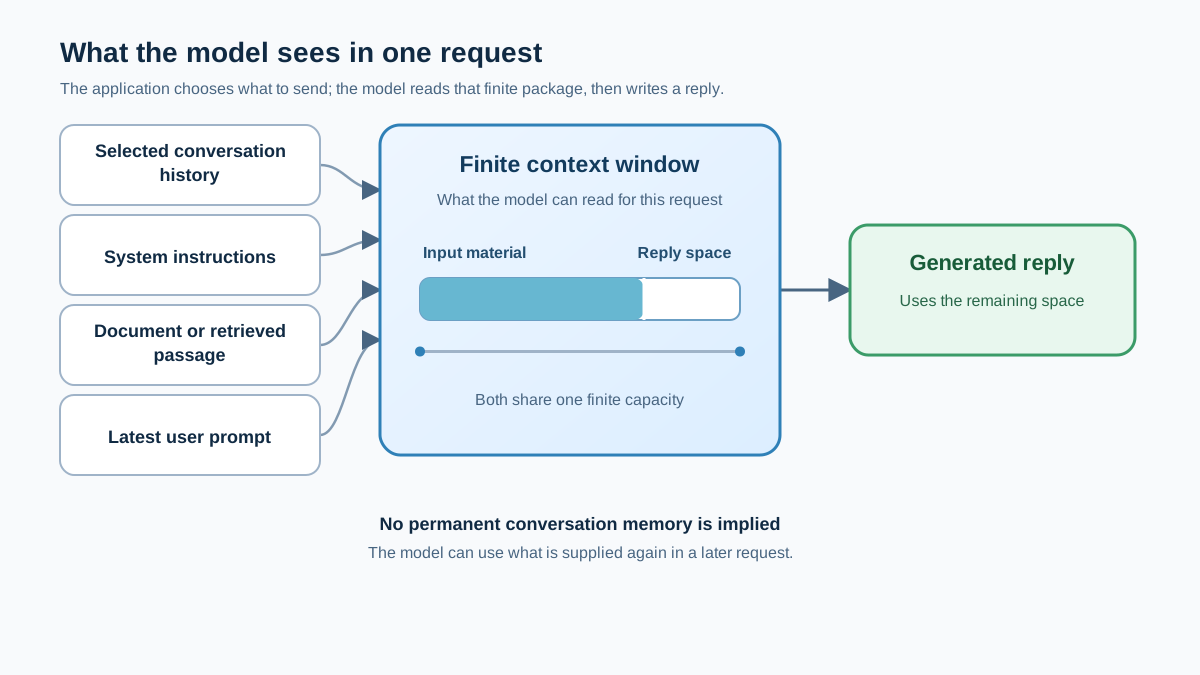
When you send a message to a chatbot, everything below is sitting on the desk at once:
- Your latest prompt
- The conversation history the application includes
- Any document, file, or retrieved passage the application adds
- The system instructions that shape the model's behavior
- The model's own reply, which it generates within the same request
That last point surprises people. The response the model produces also counts against the limit. If you ask for a very long output, the model can run out of room mid-sentence.
Here is a concrete example. Imagine a 10-turn chat where each turn is a short paragraph. When you send message 10, the model does not just read message 10. It reads messages 1 through 9, the model's responses to each, and your new message. The desk fills up a little more with every exchange.
This is why you eventually hit the error that every LLM user meets: "context window exceeded." It usually happens when you paste a long document into a chat that already has substantial history. The desk was already crowded. The document was the last straw.
Note: The model itself does not decide what history to include. The chat application does. Many apps resend your full conversation, but some summarize older turns, drop them, or add stored notes from other sessions. That is why a model can appear to "remember" something you said days ago in a different chat—the app fed it back in, not the model's own memory.
Knowledge check
Check your understanding
Answer this question before you continue.
Bigger Isn't Automatically Better
Here is the counterintuitive part: a larger context window does not guarantee better answers.
Researchers have documented a phenomenon sometimes called context rot or "lost in the middle." As the number of tokens in the context window grows, the model's ability to accurately recall information from that context decreases. The model weighs all the tokens it can see, and when there is a huge pile of text, details buried in the middle receive less attention than the material at the start and end.
Imagine a 50-page document where the key fact sits on page 30. The model can technically see that fact—it is within the context window. But it may still miss it, because the fact is buried under thousands of tokens of surrounding text competing for the model's attention.
This is a known limitation across models, not a sign that you are doing something wrong. It is also why I want you to hold onto this framing: a bigger context window is a larger desk, not a better memory. A crowded desk makes it harder to find the one fact you need, even when that fact is sitting right in front of you.
Knowledge check
Check your understanding
Answer this question before you continue.
Context Window vs. Real Memory
Beginners often conflate three very different things: the context window, the model's training data, and the memory systems built around the model.
| What it is | Plain-language answer | Example |
|---|---|---|
| Training data | What the model learned before you ever talked to it | General knowledge of history, science, and language |
| Context window | What the model can see for this one request | Your current conversation and any documents included |
| Application memory | What the surrounding system stores and feeds back in later | Saved notes, summaries, or retrieved passages from a knowledge base |
The context window is working memory, temporary by nature. It exists for the current request and is cleared when that request ends.
The model's training data is where its general knowledge comes from. That knowledge is baked into the model's internal settings during training. It is not something the model "looks up" when you ask a question.
The model cannot recall anything from a previous session on its own. When you start a new chat, the new request begins without the old transcript—unless the application chooses to include stored history, summaries, or memory. Closing the browser tab does not necessarily erase the conversation from the product's storage, but it does mean the next request will not automatically contain that old text.
So where does "memory" come from in real AI products? It comes from systems built around the model. Storing notes, summaries, or documents outside the context window, then feeding only the relevant pieces back in when needed. This is often called retrieval, and it is the seed of a bigger concept you will meet later: RAG, or retrieval-augmented generation. For now, just hold this idea: memory is usually a system you build around the model, not something the model has on its own.
Knowledge check
Check your understanding
Answer this question before you continue.
Three Ways to Work Within the Limit
Once you see the context window as a finite desk, the practical strategies come into focus. Here are three moves I use constantly, with the signal that tells you when to reach for each.
Summarize older conversation turns. When the history grows long but the old turns are mostly background, condense them. A summary of what you have established takes far less desk space than the full exchange. Use this when the earlier conversation matters for context but not for exact detail.
Retrieve only the relevant passage. When you have a big document but only need part of it, do not paste the whole thing. Ask for the specific section, or search the document yourself and paste just the relevant excerpt. This keeps the desk clean and the model's attention focused. Use this when you can identify the needed material in advance.
Start a fresh conversation. When the topic changes and the new question no longer depends on the old thread, open a new chat. Every turn in the old conversation is still occupying desk space. Why carry it into a question that does not need it? Use this when prior state is irrelevant to the new question.
Here is a realistic example. A student researching a long article wants to understand one specific argument the author makes. Pasting the entire article might blow past the context limit, and even if it fits, the key passage will be buried in the middle. The better move: find the relevant section, paste just that section, and ask a focused question about it.
Be honest about the tradeoff. Summarization and retrieval can drop details. Retrieval can also miss the passage you actually need, especially when the answer depends on relationships across many parts of a document. For tasks where every detail matters—a legal contract, a precise specification—a larger window or a fresh, focused prompt may serve you better. The point is not that one strategy is always right. The point is that you now have a way to choose.
Common Beginner Mistakes
Let me save you the trouble of making these mistakes yourself. I have seen all four, and each one traces back to the same misunderstanding.
Mistake 1: Assuming the model read a document you only mentioned by name. You say "I attached the report" or "look at the file called notes.txt," and the model has no idea what you mean. It only sees what the application actually includes in the request. Fix: paste the content, not the filename.
Mistake 2: Keeping one giant chat alive for unrelated topics. Every turn in that chat is eating desk space, even the turns about last week's completely different project. Fix: start a new conversation when the topic changes.
Mistake 3: Pasting an entire long document when only a section matters. The model may miss the buried detail, and you will blame the model. Fix: paste the relevant section and keep the desk clean.
Mistake 4: Confusing a long context window with reliable recall. Bigger windows still suffer from lost-in-the-middle effects. A 200,000-token window does not mean the model reliably uses all 200,000 tokens. Fix: curate what you put in, even when you have room to spare.
Try It Yourself
The fastest way to make this mental model stick is a small experiment. Find a long document—an article, a chapter, anything with a few specific facts in different sections. Paste the whole thing into a chat. Ask a question about a detail near the start, one about a detail in the middle, and one about a detail near the end.
Then repeat the same questions a few times, or try them in a fresh chat with only the relevant section pasted. Watch how the answers compare.
What you are testing is not whether the model can see the middle. It can. You are testing whether being inside the window guarantees reliable use—and whether a focused desk produces more consistent answers than a crowded one.
That surprise is the lesson. The context window is a finite desk, and what earns space on that desk deserves your deliberate attention. Curate what you place there. Summarize when the old turns are just background. Retrieve when you only need part of a large document. Start fresh when the topic changes.
The natural next concept to learn is retrieval—how systems decide which pieces of a large knowledge base deserve a spot on the desk. That is where RAG comes in, and it is the bridge between chatting with a model and building something that genuinely remembers.
Knowledge check
Final check
Finish the article by checking the ideas you just learned.
References
Want a more structured LLMOps path?
Use the LLMOps Practical Starter Bundle to connect RAG, evaluation, observability, and production patterns.
Large Language Models Starter Pack
A 12-chapter guide connecting LLM fundamentals with prompting, RAG, agents, tool calling, evaluation, security, and application engineering.
- 227-page Illustrated PDF edition
- 12 guided LLM engineering chapters
- Visual concept diagrams
- Self-assessment quizzes
- Bonus deep-dive sections
- Prompt design, structured output, context windows & RAG pipelines
- Agents, tool calling, prompt injection, evaluation & application lifecycles
Coming soon


