
Agent Loops, Budgets, and Stopping Rules: How to Bound Autonomy
Here's the scene I've watched play out more times than I can count: someone builds their first agent, gives it a task, and watches it loop. It calls a…

Key topics
An agent that "keeps trying" isn't persistent. It's ungoverned.
Here's the scene I've watched play out more times than I can count: someone builds their first agent, gives it a task, and watches it loop. It calls a tool, gets a result, calls the tool again with slightly different wording, gets another result, and keeps going. Nothing told it what "done" looks like, so it defaults to "keep trying." The only thing that finally stops it is a budget silently running out—or a bill that makes the developer wince.
The weak mental model underneath this failure is the belief that the model's own judgment is a sufficient exit signal. It isn't. An agent loop needs an exit strategy designed before it runs, not a hope that the model will stop on its own.
Why "the model decides when it's done" is a trap
An agent loop's default state is keep trying. Without explicit rules, the only termination signal left is running out of budget—tokens, time, or patience.
The problem is that models are unreliable self-evaluators. A model can confidently declare a task done when the output is still wrong. It can also keep iterating when it genuinely cannot assess whether it has succeeded, because the goal was never stated in checkable terms. Asking the same system that did the work to judge the work is asking for trouble.
The fix is architectural. Stopping rules belong in the orchestration layer—the code that runs the loop—not in the prompt alone. You can prompt a model to "stop when finished," but prompts are requests. Runtime checks are guarantees.
Here's the mental model that matters: an agent loop is a while-loop that needs a designed exit, not a conversation that ends when the model feels finished. You wouldn't write while True: in production code without a break condition. An agent loop without stopping conditions is exactly that.
Knowledge check
Check your understanding
Answer this question before you continue.
The anatomy of a bounded agent loop
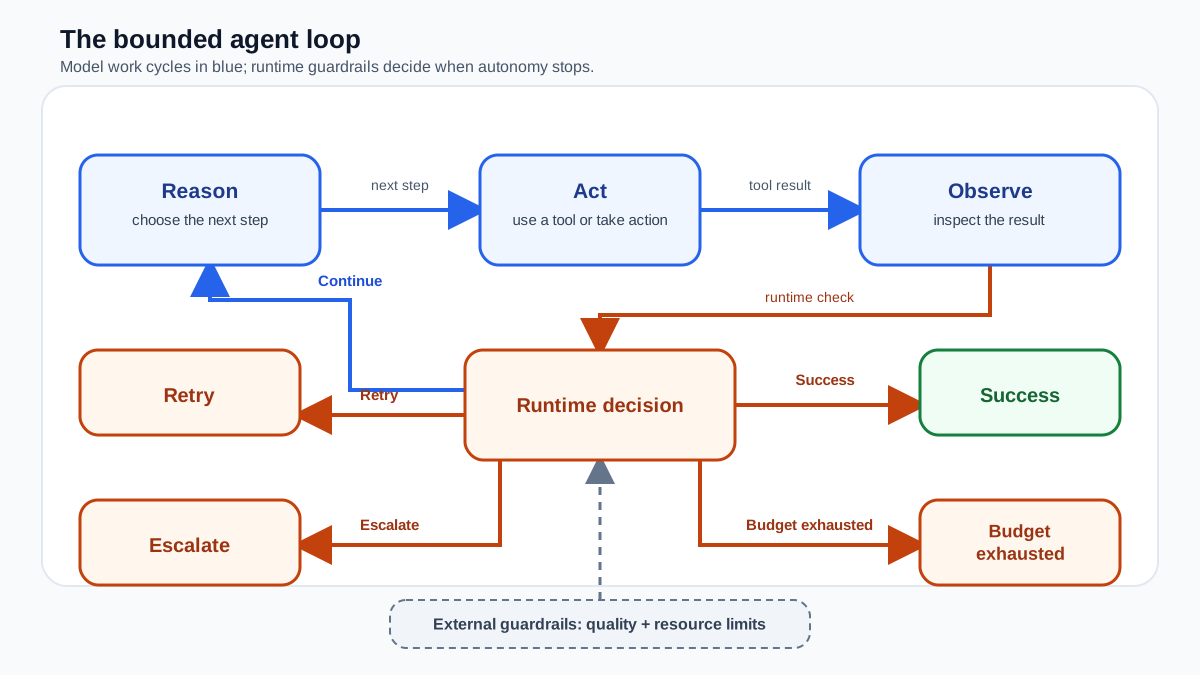
Every agent loop follows the same shape: reason, act, observe, decide whether to continue. The model looks at its context, decides on a tool call, executes it, sees the result, and repeats. This cycle continues until something stops it.
The key insight is that stopping conditions live outside the model's reasoning. They are checks the runtime evaluates each iteration, independent of what the model thinks or says. Think of them as guardrails on a road: the driver (the model) decides where to steer, but the guardrails determine how far off course it can go before something stops the ride.
Stopping conditions fall into two families:
- Resource budgets are hard caps: maximum iterations, maximum time, maximum cost. They answer "how much are we willing to spend?"
- Quality conditions check whether the task actually succeeded. They answer "is the output actually correct?"
You need both. Resource budgets prevent runaway loops. Quality conditions prevent confident-but-wrong completion. A loop with only a budget stops eventually but may stop with garbage. A loop with only quality conditions may never stop at all.
Knowledge check
Check your understanding
Answer this question before you continue.
What happens when the loop stops: five terminal outcomes
A stopping rule doesn't just end execution. It classifies why the loop ended. Every iteration should produce one of five outcomes:
| Outcome | Meaning | Example |
|---|---|---|
| Success | An independent check verified the output | JSON validation passed; all required fields present |
| Continue | No condition fired; run another iteration | Tool returned useful data; more research needed |
| Retry | A transient failure occurred; try again | API timeout; rate limit hit |
| Escalate | The loop can't proceed safely; hand to a human | Repeated tool failures; ambiguous state |
| Budget exhausted | A hard cap fired before success | Hit 20 iterations; cost cap reached |
This model matters because "stop" does not mean "succeeded." A budget firing means the loop failed to finish. A retry threshold firing means the loop hit a wall. Only a verified success condition means the output is actually correct.
The runtime should record which outcome fired and why. When you inspect a run later, you want to see success, retry_limit, or budget_exhausted—not a blank screen and a mystery.
Knowledge check
Check your understanding
Answer this question before you continue.
Resource budgets: iteration, time, and cost caps
Iteration limits are the mechanical safety net. A counter increments each time the loop runs, and when it hits your cap, the loop stops. This works regardless of output quality, which is why it's the non-negotiable baseline. The tradeoff: it doesn't guarantee completion. It guarantees the loop ends.
Time budgets put a wall-clock deadline on the whole run. These matter when latency is a constraint or when you're calling external systems that can stall. An API that hangs shouldn't hang your agent forever.
Cost budgets cap spend per run, measured in tokens or dollars. This is the protection you want for production systems running unattended. When something goes wrong at 3 a.m., a cost cap is what keeps the incident from becoming a financial one.
How do you choose the cap? Don't copy a number from a blog post. Calibrate it:
- Start from what you know. If you've run the task successfully by hand, count the steps it took. If you're building on an existing workflow, trace its typical length.
- Add a deliberate safety margin. For predictable tasks, a margin of 2–3× the expected steps is reasonable. For exploratory tasks—research, debugging, open-ended analysis—be more generous, because the model may legitimately need to wander.
- Keep the hard ceiling regardless. The cap is not a target. It's the line that must never be crossed.
- Inspect traces and revise. After a few real runs, look at where loops actually stopped. If every run hits the cap, your ceiling is too tight or your success criterion is unclear. If runs finish in 3 steps but the cap is 50, tighten it.
Common mistake: When a limit fires, the agent stops silently. It should return its best partial result and say why it stopped. "I hit the iteration cap after 15 tool calls and here's what I found so far" is useful. A blank screen is not.
Success criteria: making "done" checkable
Resource budgets tell you when to stop spending. Success criteria tell you when the task is actually complete. But as the outcome model above shows, a success criterion firing is just one way a loop can end—and it's the only one that means the output is trustworthy.
Weak success criteria are uncheckable. "Keep researching until you feel thorough" gives the model nothing it can verify. Strong criteria are concrete and testable: "Stop when all five questions have at least one cited source" or "Stop when the output passes JSON validation."
The critical move is separating the work from the check. Don't ask the same agent that did the work to judge it. Use a distinct evaluation step: a code validation, an API check, or a separate LLM call with a strict output format that returns a clean binary result. The loop acts on that result, not on the main agent's self-assessment.
The most reliable conditions are mechanical. Count-based conditions—"stop after 10 records processed"—and state-change conditions—"stop when the external API returns status complete"—don't depend on output quality at all. They're checkable by construction.
Warning: Treating "no error" as success is a classic trap. A tool call can return cleanly while producing output that's subtly wrong. Success criteria should verify the content of the result, not just the absence of exceptions.
Knowledge check
Check your understanding
Answer this question before you continue.
A worked run: seeing the controls act together
Let's trace a document-research agent to see how these controls compose. The task: gather five cited sources answering a specific question, then summarize.
Iteration 1. The model calls a search tool and gets three promising results. The evaluator checks: does the model have five sources? No. Outcome: continue. Remaining budget: 19 iterations, $1.80.
Iteration 2. The model calls the search tool again with refined terms. One result is a duplicate; two are new. The evaluator counts four distinct sources. Outcome: continue. Remaining budget: 18 iterations, $1.60.
Iteration 3. The model calls a fetch tool to read a full article. The API times out. The retry policy allows one more attempt. Outcome: retry. The model tries again and succeeds.
Iteration 4. The model now has five sources and calls the summarization tool. The evaluator verifies: five cited sources present, summary under 500 words, all required fields populated. Outcome: success. The loop returns the summary.
Now imagine the failure case. The model keeps calling the search tool with slightly different phrasing, never accumulating enough distinct sources. At iteration 20, the iteration cap fires. Outcome: budget exhausted. The runtime returns the four sources gathered so far, labeled as a partial result, with the reason logged.
Notice what didn't happen: the model didn't get to decide it was done with three sources, and the loop didn't run until the cost cap drained the account. The controls acted as designed—and the partial result is still useful.
Retries, error thresholds, and escalation paths
Failures are a fact of agent life. APIs time out. Tool calls error. Output arrives in an unexpected format. The question isn't whether failures happen—it's how your loop responds to them.
The retry-on-failure pattern is straightforward: run the task, and if it fails, retry up to N times. Stop on success or when N is reached. This works well for flaky APIs and unpredictable formatting issues.
But retries need their own limits. After N consecutive tool failures, continuing is just burning tokens on a broken tool. That's where error thresholds come in: halt after a set number of consecutive failures and escalate. Escalation is a stopping rule too. Define when the agent should hand control to a human instead of continuing to spin.
It's also worth distinguishing productive retries from infinite loops. A productive retry means the agent tried something different and made progress. An infinite loop means the same action produced the same result repeatedly. Logging which condition fired and what the loop state was at that moment is what lets you tell the difference later.
Note: When loop state is unclear, stopping is the safer default. An unnecessary stop costs almost nothing. Continuing from a state you can't characterize risks making the mess larger.
When a fixed workflow beats an agent
All this bounding effort raises a fair question: do you even need an agent?
If the number of steps is predictable and the sequence is fixed, a deterministic pipeline is simpler, cheaper, and easier to debug. You don't need a model deciding what to do next when the next step is always the same. Single-step tasks—one LLM call, one tool invocation—gain nothing from loop overhead. And latency-sensitive tasks suffer, because each loop iteration adds an LLM call.
The decision rule I use: choose the least complex approach that meets the task's uncertainty and control requirements. Reach for an agent only when the steps genuinely can't be predicted in advance—when the model must adapt based on intermediate results. If you can sketch the workflow as a fixed sequence of steps, a workflow is the better engineering choice.
A practical recipe for your first bounded agent
When you're ready to build, here's the order I'd work through:
- Start with a hard iteration cap. This is your safety net. Nothing else matters until the loop is guaranteed to end.
- Write the success criterion as a checkable statement before you write any loop code. If you can't state what "done" means in testable terms, you're not ready to build the loop.
- Add a cost or time budget if the loop runs unattended or touches paid APIs.
- Define retry and escalation rules before you ship. Stopping and recovering are separate concerns. Know both.
- Log which condition fired and why. When an unexpected exit happens, you want a diagnosis, not a blank screen.
Before you let any agent run, write down its exit strategy: the iteration cap, the checkable success criterion, the budget, and the escalation path. If you can't name all four, you're not ready to let the loop run.
The good news is that these controls are composable and reusable. Once you've built one bounded agent, the pattern transfers. You'll stop hoping the model knows when to quit—and start knowing it will.
Knowledge check
Final check
Finish the article by checking the ideas you just learned.
References
Want a more structured LLMOps path?
Use the LLMOps Practical Starter Bundle to connect RAG, evaluation, observability, and production patterns.
Large Language Models Starter Pack
A 12-chapter guide connecting LLM fundamentals with prompting, RAG, agents, tool calling, evaluation, security, and application engineering.
- 227-page Illustrated PDF edition
- 12 guided LLM engineering chapters
- Visual concept diagrams
- Self-assessment quizzes
- Bonus deep-dive sections
- Prompt design, structured output, context windows & RAG pipelines
- Agents, tool calling, prompt injection, evaluation & application lifecycles
Coming soon


