
LLM Tool Calling Explained: From Model Choice to Real-World Action
When people first hear that an LLM can "use tools," they usually picture the model reaching out and doing something itself—searching the web, running code,…

When people first hear that an LLM can "use tools," they usually picture the model reaching out and doing something itself—searching the web, running code, sending an email. That picture is wrong in exactly the place that matters.
The model never touches the tool. It writes a structured note describing what it wants done, and your application reads that note, decides whether to allow it, and does the work. Understanding that boundary is the difference between building systems that work and debugging systems that mysteriously don't.
The Tool Call Is a Request, Not an Action
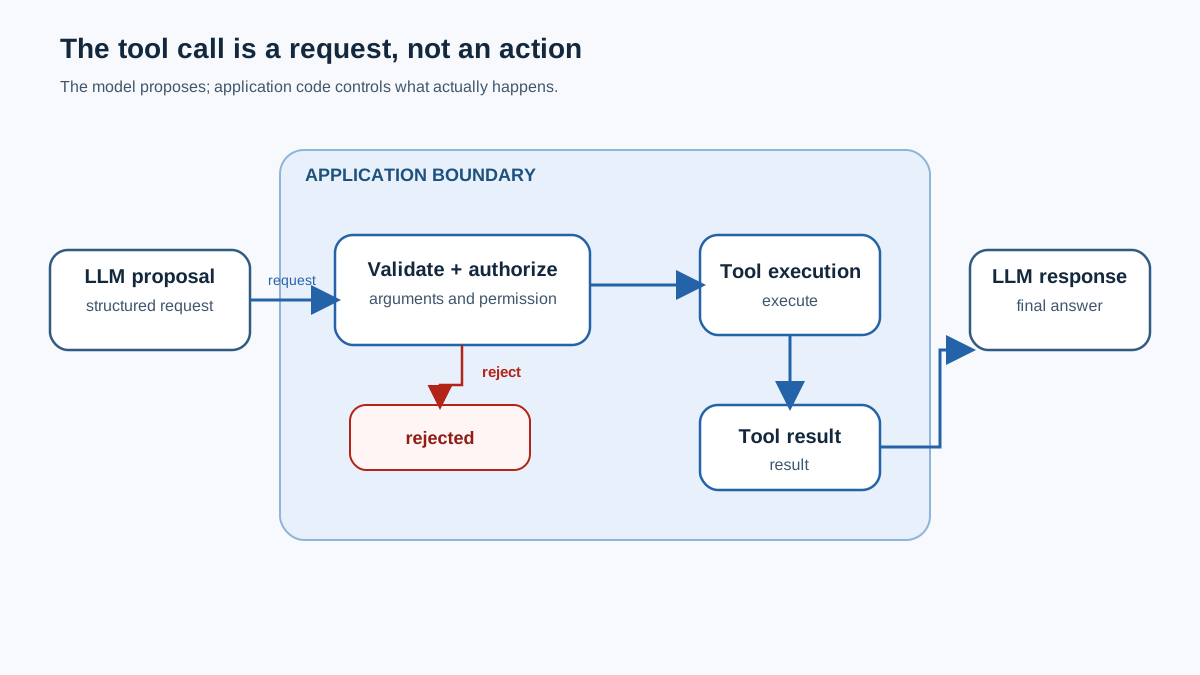
Here is the mental model that anchors everything else: the LLM is the planner, and your code is the doer.
When you use llm tool calling, the model produces a structured request—usually JSON—containing the name of the tool it wants invoked and the arguments it wants passed. Something like this:
{
  "name": "get_weather",
  "arguments": {
    "city": "London"
  }
}
That JSON is not the weather lookup happening. It is the model saying, "If someone runs get_weather with city set to London, that would answer the user's question."
Your application code is the executor. It receives the model's proposal, validates it, checks permissions, runs the actual function or API call, captures the result, and sends that result back to the model. The model then reads the output and turns it into a human-readable answer.
Why does this division matter? Because it tells you where responsibility lives. The model can suggest an action, but it cannot authorize one. It can propose arguments, but it cannot validate them. Every safety boundary, every permission check, every piece of authentication belongs in your code—not in the model's output.
Knowledge check
Check your understanding
Answer this question before you continue.
What Actually Counts as a Tool
A tool is any external function, API, database, or code environment the model can invoke. The category is broad, but common types fall into a few buckets:
| Tool category | What it does | Example |
|---|---|---|
| Information retrieval | Fetches live or external data | Web search, stock price API |
| Code execution | Runs calculations or scripts | Python interpreter, math engine |
| Database access | Queries or modifies stored data | SQL query against a customer table |
| Process automation | Triggers multi-step workflows | Booking a calendar slot |
| Action-taking APIs | Performs real-world operations | Sending an email, creating a ticket |
You have already used tool calling without realizing it. When ChatGPT searches the web for current information or runs Python to analyze data, that is tool calling behind the scenes. The model did not browse anything itself—it emitted a structured request, and the application layer executed it.
The contrast with plain text generation is the whole point. Without tools, the model answers only from what it learned during training. With tools, it can reach past that boundary into live data, external computation, and real actions. That extension is what turns a chatbot into something closer to an agent.
Who Decides What the Model Can Call
Beginners often assume the model autonomously decides whether it needs a tool and which one fits. The reality is more controlled—and more useful to understand.
Your application defines the conditions. It decides which tools exist, which ones the model can see, and whether a tool call is required, optional, or forbidden for a given request. The model works inside those boundaries. It does not browse an infinite toolbox; it chooses from the menu your code put in front of it.
This matters because the model's judgment has real limits. It cannot reliably know when its training data is insufficient. Ask about the capital of France, and it answers directly. Ask for the current temperature in London, and it may recognize the need for live data—or it may confidently invent a number. The model does not "know" what it does not know. It produces its best guess about whether a tool would help, and that guess can be wrong in both directions: it can skip a needed tool or call an unnecessary one.
So treat tool selection as a proposal, not a verdict. The model proposes which tool to call and with what arguments. Your application decides whether that proposal makes sense, whether the tool is available, and whether the action is permitted.
Here is the part beginners miss: the model does not know your tools. It only knows what you told it in the schema and description.
The tool descriptions you provide act as the model's menu. If two tools have vague or overlapping descriptions, the model will pick wrong. If a tool's description says "use this for customer questions" when it actually handles billing, the model will route the wrong requests to it. The quality of your tool selection is downstream of the quality of your descriptions.
There is also a practical limit on menu size. Give a model fifty tools and its selection quality degrades—too many options create confusion about which one fits. Production systems often add a tool-discovery step that filters the available tools down to a relevant subset before the model makes its choice.
Knowledge check
Check your understanding
Answer this question before you continue.
The Schema: Your Tool's Job Description
When the model decides it needs a tool, it needs to know how to ask for it correctly. That is what the schema provides.
A function schema declares the tool's name, its description, and its expected parameters with their types. It is the contract the model reads to construct a call. If you declare a get_weather tool with a city parameter of type string, the model knows it can request that tool with a city name.
But here is the distinction that saves you from debugging the wrong layer: the schema guides the model; runtime validation enforces the contract. The schema is a model-facing description, not an enforcement mechanism. A model can still emit malformed arguments, invent parameters you never declared, or produce a call that is structurally valid but semantically wrong. The schema reduces those failures; it does not make them impossible.
Schema quality drives call quality. Well-written descriptions and parameter names measurably improve whether the model picks the right tool and fills in the right arguments. A schema that says city: string invites ambiguity. A schema that says city: string — the city name, e.g. "London" gives the model something to work with.
Think of the schema as a job description, not a cage. It tells the model what a good request looks like. Your validation code is the cage—and it needs to exist.
Knowledge check
Check your understanding
Answer this question before you continue.
Who Executes the Call (and Where Validation Lives)
Now we reach the stage where beginners most often build broken systems.
Your application parses the model's request and runs the actual function or API call. This is the moment where the model's suggestion becomes a real-world action—and it is exactly where you must stop trusting the model.
Never treat the model's structured output as already-safe input. The model can hallucinate arguments. It can produce a parameter you never defined. It can request an action that the user is not authorized to take. None of that output has been validated just because it arrived in valid JSON.
Validation belongs in your application layer. Before you execute anything, check the arguments against the schema. Confirm that required parameters exist and have the right types. Confirm that the requested action is permitted for this user.
Permissions and authentication belong in your code as well. The model should never hold credentials, and it should never decide who is authorized to do what. Apply least-privilege: give each tool only the minimum access the task needs. If a tool reads customer records, it should not also be able to delete them.
This connects to a lesson from structured output prompting: schema-like contracts improve reliability, but they do not remove the need for validation. The model's output is a suggestion with good formatting, not a verified instruction.
Knowledge check
Check your understanding
Answer this question before you continue.
Handling the Result and Closing the Loop
The tool runs, and now your application has a result. That result needs to go back to the model.
Your code captures the tool's output and returns it to the model as a tool result message. The model reads that output and produces a final answer grounded in what the tool returned. If the user asked for the weather in London and the tool returned "15°C, light rain," the model says, "It's currently 15 degrees and rainy in London."
This loop can repeat. The model may decide it needs more information after seeing the first result, so it calls another tool. Each result feeds the next decision. A model researching a question might search the web, read a page, search again for a follow-up detail, and only then compose its answer.
Result handling is also where errors surface. A failed API call, a malformed response, a timeout—all of these must be caught by your code. Do not silently pass a broken tool output back to the model and hope it figures things out. Catch the error, decide whether to retry or inform the user, and keep the failure visible.
There is a security dimension here too. Tool outputs can carry injected instructions—text that tries to manipulate the model into taking actions it should not. Treat returned data as untrusted input, not as reliable content. Your code should sanitize and validate tool outputs just as it validates the model's requests.
Common Tool-Calling Failures and How to Debug Them
When tool calling goes wrong, the failure usually falls into one of a few recognizable patterns. Knowing which one you are looking at saves hours of guessing.
Wrong tool selected. The model picked a tool that does not fit the task. Vague or overlapping descriptions are a likely cause, but not the only one. The model's capability, ambiguous user intent, and the set of tools you exposed all play a role. Start with the descriptions, but test each layer before blaming one.
Invalid or missing arguments. The model produced a call with parameters that do not exist or left out required ones. Your schema may have been too vague, or the model may have hallucinated something you never declared. Tighten the schema and add validation that catches the failure before execution.
Model claims to call a tool but nothing runs. The model emitted a tool call, but your application never parsed or executed it. This is an execution-code bug. The model did its job; your code dropped the ball.
Tool output ignored or misread. The tool returned a result, but the model's final answer does not reflect it. This points to a result-handling or prompt-structure problem. The output may not have been returned in the format the model expects.
Permission errors. The model requested an action your code correctly blocked. This is not a failure—it is the system working. The model proposed; your validation layer refused. That is exactly the division of responsibility you want.
The debugging rule that covers most cases: isolate whether the failure lives in the model's decision, the schema, or your execution code. Test each layer separately, and you will find the broken one quickly.
When Tool Calling Is the Right Move (and When It Is Not)
Tool calling is powerful, but it is not the default answer for every LLM application. It adds latency, failure modes, and security surface. Use it when the task genuinely needs something the model cannot do from knowledge alone.
Reach for tool calling when the task requires live data, external computation, or real actions. Current weather, stock prices, database queries, sending messages—these all demand tools because the model's training data cannot contain the answer.
Skip it when a plain prompt or structured output suffices. If the user asks a question the model can answer from what it already knows, adding a tool call just adds a round trip and a place for something to break.
There is also a middle ground worth considering. For deterministic, well-defined tasks, a fixed workflow may serve you better than a model-directed loop. If every request follows the same steps in the same order, you do not need the model deciding which tool to call—you need code that runs the steps. Tool calling earns its keep when the path is uncertain and the model's judgment about which tool to use adds real value.
My rule is simple: let the model propose when uncertainty makes selection useful; let deterministic code control the path when the sequence is known; let the application approve every real action.
Trace One Real Call
The fastest way to make this mental model stick is to trace one call end to end. Here is a miniature trace with a rejected proposal:
- User request: "What's the weather in London right now?"
- Model proposal: The model emits a tool call for
get_weatherwithcity: "London". - Application validation: Your code checks the arguments against the schema. The city parameter is present and is a string, so the call passes validation.
- Permission check: Your code confirms this user is allowed to call
get_weather. If they were not, the call would stop here—no weather API would ever be contacted. - Execution: Your code calls the weather API and captures the result.
- Model response: The tool result is returned to the model, which answers, "It's currently 15 degrees and rainy in London."
Now imagine step 3 fails: the model emits city: 12345 instead of a string. Your validation layer rejects the call before any API request is made. That is the boundary working exactly as it should.
Then do the same exercise with a system you build. For each stage, ask three questions: Who decides? Who executes? Where does validation and permission checking live?
The model plans. Your code acts. Trust lives in the application layer. Get that division right, and tool calling becomes a reliable extension of what your LLM can do. Get it wrong, and you will spend your evenings wondering why the model "called a tool" that never ran.
Knowledge check
Final check
Finish the article by checking the ideas you just learned.
References
Want a more structured LLMOps path?
Use the LLMOps Practical Starter Bundle to connect RAG, evaluation, observability, and production patterns.
Large Language Models Starter Pack
A 12-chapter guide connecting LLM fundamentals with prompting, RAG, agents, tool calling, evaluation, security, and application engineering.
- 227-page Illustrated PDF edition
- 12 guided LLM engineering chapters
- Visual concept diagrams
- Self-assessment quizzes
- Bonus deep-dive sections
- Prompt design, structured output, context windows & RAG pipelines
- Agents, tool calling, prompt injection, evaluation & application lifecycles
Coming soon


