
Cloud vs Local LLMs: Which Setup Fits Your First Project?
The "local is more private, cloud is more powerful" story sounds clean. It's also too simple to make a good decision with.

The "local is more private, cloud is more powerful" story sounds clean. It's also too simple to make a good decision with.
Here's what actually matters: where the model runs changes what you control, what you pay, and what you have to maintain. For a first project, the right choice depends less on which camp is "winning" and more on what you already own, what your data requires, and how much setup you want to do before you see results.
Let me walk you through the real tradeoffs so you can pick the setup that fits your first project—not the one that sounds most impressive.
What Cloud and Local LLMs Actually Mean
Before comparing, let's get the mental model straight.
A cloud LLM runs on a provider's servers. You send your prompt over the internet, their computers process it, and the response comes back to you. Think ChatGPT, Claude, or Gemini—tools you access through a website or an app.
A local LLM runs on hardware you control. For most beginners, that means your own laptop or desktop computer. The model files live on that machine, and your prompts are processed there instead of being sent to a third-party service.
Here's the key insight: the model itself isn't the difference. A cloud provider and your laptop could technically run the same model. What changes is where it runs and who handles the infrastructure around it.
Picture the same prompt—"Summarize this meeting notes file"—traveling two different paths:
- Cloud: Your prompt travels to a provider's server, gets processed there, and the response travels back.
- Local: Your prompt stays on your machine. The model processes it using your computer's memory and processor.
That single difference—where your data travels—ripples into everything else: cost, privacy, capability, and how much work you take on.
Knowledge check
Check your understanding
Answer this question before you continue.
The Real Question: What Does Your Project Need?
Beginners often ask "Which is better, cloud or local?" That's the wrong question. The right one is "What does my project actually need?"
Before you can answer that, name your project type:
- A quick experiment to see what an LLM can do?
- Private document work where the content shouldn't be sent to a third-party service?
- A learning exercise to understand how models run?
- Something you plan to keep using regularly?
Your answer changes the recommendation. Here are the six criteria that matter:
- Setup effort — How long until you get your first result?
- Data control — Where does your input travel?
- Hardware — What do you already own?
- Cost — What do you pay upfront and over time?
- Capability — What can the model actually do?
- Maintenance — Who keeps things running?
Here's the decision rule I'd start with: find your project's first bottleneck. Is it reaching a useful result quickly? Is it keeping certain data off someone else's servers? Is it understanding how the technology works under the hood? That bottleneck should drive your choice, with the other criteria refining it.
Setup Effort: Signing Up vs Installing
If you want results today, this criterion alone often settles it.
Cloud setup looks like this: Create an account, find the text box, type a prompt, get a response. You can go from zero to first result in minutes. No installation, no hardware requirements, no troubleshooting. This is why hosted tools are the natural starting point for most beginners.
Local setup looks like this: Download a runtime, pull a model file, figure out whether your computer has enough memory to run it, and troubleshoot when it doesn't. You'll likely spend an evening getting everything working before you see your first useful output.
For a first project, cloud wins on speed. That's not a judgment—it's just the honest tradeoff. Local asks for a real setup investment before the payoff.
But here's the nuance: the goal of your project changes which setup makes sense. If you want to learn what an LLM can do, start with cloud. If you want to learn how models actually run—memory, hardware, inference—local teaches far more. The setup is the lesson.
Tip: If you're not sure which goal matters to you, start cloud. You can always install a local model later once you know what you're trying to learn.
Knowledge check
Check your understanding
Answer this question before you continue.
Data Control and Privacy: Who Sees Your Input?
This is where the "local is more private" claim gets both more true and more complicated.
With cloud, your prompts travel to a provider's servers. That means your input passes through someone else's infrastructure. Before sending sensitive material, you need to check their data policies—what they store, how long they keep it, and whether they use it for training.
With local, your prompts are processed on your own computer. Nothing gets sent to a third-party model service. If your requirement is that certain data must not leave your control, local is the direct fit.
Here's the nuance beginners often miss: a "private" cloud tier still runs on someone else's servers. If your requirement is that data never leaves your infrastructure, a private cloud plan doesn't satisfy that. Local does.
Let me make this concrete. Drafting a public blog post? Cloud is fine. Pasting proprietary code, medical notes, or financial documents? That's a different decision entirely.
Warning: Local execution keeps data off a provider's servers, but it isn't a complete privacy guarantee. The computer running the model still needs basic security—a locked screen, updated software, and care about what else you install. Model location is one part of data safety, not the whole picture.
Note: This article focuses on the setup choice. If you need to classify how sensitive your data actually is, that's a separate decision—one worth making before you choose cloud or local.
Knowledge check
Check your understanding
Answer this question before you continue.
Hardware and Cost: What You Own vs What You Pay For
The cost models here are genuinely different, and beginners often misunderstand both.
Cloud pricing is straightforward: a subscription or pay-per-use fee. No hardware to buy. Costs scale with how much you use. Light usage means light cost.
Local pricing is trickier. You need a computer with enough memory to hold the model. Small models can run on a decent modern laptop. But the frontier-class models you hear about in the news? They need hardware most beginners don't own—powerful graphics cards with large memory pools.
Here's the beginner-friendly framing: you can run small local models on a decent laptop, but the biggest, most capable models need hardware that costs more than most first projects justify.
The cost reality cuts against local for beginners:
- Cloud is cheaper at low volume. Paying for a few hours of usage costs less than buying hardware.
- Local becomes more attractive when you already own capable hardware, or when your usage is frequent and predictable enough that per-request fees add up.
My rule of thumb: if you're experimenting and don't already own the hardware, cloud is almost always cheaper. Local makes more financial sense when you're running steady, repeatable workloads—and by then, you'll know it because you'll have outgrown the cloud bill.
Knowledge check
Check your understanding
Answer this question before you continue.
Capability and Maintenance: Power vs Responsibility
The final tradeoff is about what each setup can do—and what it demands from you afterward.
Capability: The largest hosted models generally handle complex reasoning, multimodal input (images, audio, and more), and reliability better than what most beginners can run locally. That's not a knock on local models—they're genuinely capable for many everyday tasks. But frontier-level reasoning and multimodal work still favor the biggest cloud models.
Maintenance: This is where beginners underestimate local. Cloud providers handle updates, security, and uptime for you. Local means you own model updates, driver issues, and troubleshooting. When something breaks—and it will—you're the support team.
Here's the honest trade: cloud trades control for convenience. Local trades convenience for control and responsibility.
For a first project, capability and zero-maintenance usually point beginners to cloud. Local becomes worth it when keeping data off third-party servers matters more than convenience, or when you specifically want to learn the mechanics of how models run.
A Simple Decision Rule for Your First Project
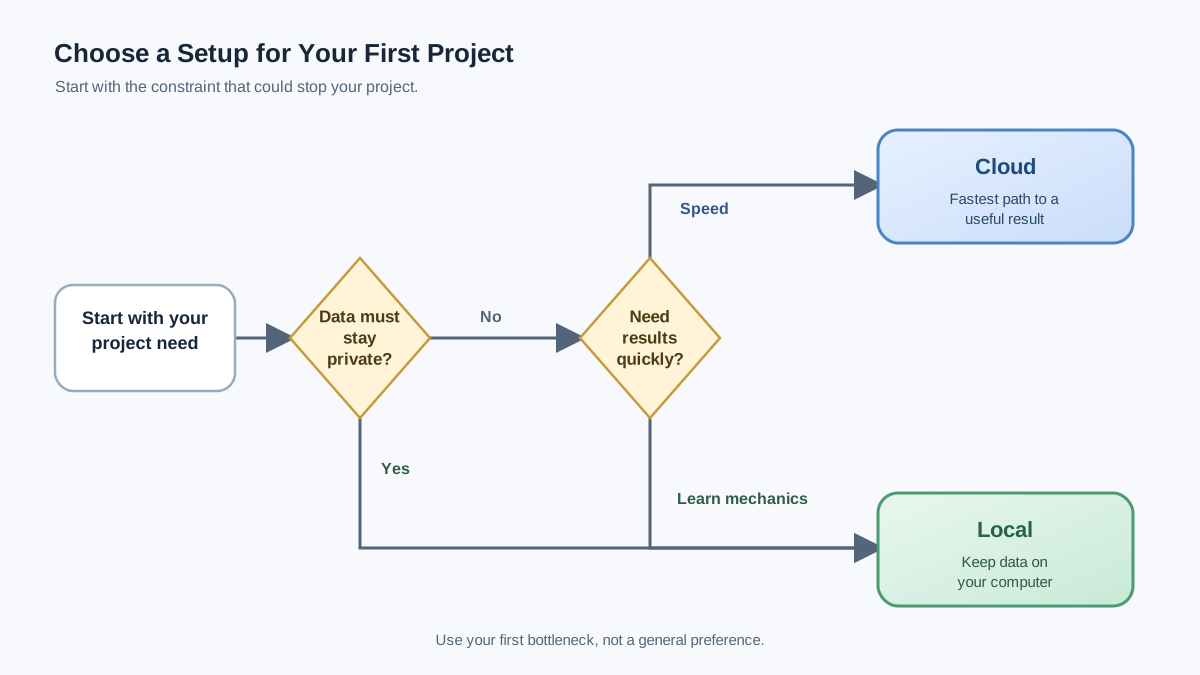
Let me consolidate all of this into a decision path you can actually use:
- Does your project have a hard data boundary? If specific files or prompts must never be sent to a third-party model service, local is the direct fit. This is a gating requirement—but only when that requirement actually exists.
- Is your first bottleneck reaching a useful result quickly? If yes, go cloud. Speed and convenience matter for a first project.
- Do you want to learn how models actually run? If yes, local is worth the setup investment—the learning is the payoff.
Here's the full comparison at a glance:
| Criterion | Cloud LLM | Local LLM |
|---|---|---|
| Setup effort | Minutes—sign up and start | Hours—install, download, configure |
| Data control | Data travels to provider's servers | Data stays on your machine |
| Hardware | None needed | Computer with enough memory for the model |
| Cost | Pay for what you use | Upfront hardware cost; cheaper at sustained high volume |
| Capability | Largest models, best complex reasoning | Capable for everyday tasks; lags on frontier work |
| Maintenance | Provider handles updates and uptime | You own updates, drivers, and troubleshooting |
One more thing worth knowing: this doesn't have to be permanent. Many people start with cloud and later add a local model for specific private or high-volume tasks. Hybrid setups are common—but that's a later step, not a first-project concern.
Your next step: Pick one small, real task—summarizing an article, drafting an email, explaining a concept—and try it in a cloud tool first. Observe what matters to you: Is speed the priority? Do you feel uneasy about the data? Does the capability impress you?
Then ask yourself whether local would change any of those feelings. That single experiment will tell you more about the right setup for your situation than any comparison article can.
Knowledge check
Final check
Finish the article by checking the ideas you just learned.
References
Want a more structured LLMOps path?
Use the LLMOps Practical Starter Bundle to connect RAG, evaluation, observability, and production patterns.
Large Language Models Starter Pack
A 12-chapter guide connecting LLM fundamentals with prompting, RAG, agents, tool calling, evaluation, security, and application engineering.
- 227-page Illustrated PDF edition
- 12 guided LLM engineering chapters
- Visual concept diagrams
- Self-assessment quizzes
- Bonus deep-dive sections
- Prompt design, structured output, context windows & RAG pipelines
- Agents, tool calling, prompt injection, evaluation & application lifecycles
Coming soon


