
Choosing an AI Tool
You have three tabs open. ChatGPT in one, Claude in another, Gemini in the third. You paste the same question into all three, and you get three different…

You have three tabs open. ChatGPT in one, Claude in another, Gemini in the third. You paste the same question into all three, and you get three different answers. One is too formal. One is surprisingly good. One misses the point entirely.
Welcome to the real problem with choosing an AI tool: there is no single "best" one. There is only the tool that fits the task you actually do, in the place you already work, at a price you can live with.
This guide walks you through how to make that call without drowning in comparison articles or vendor hype.
Why "Best AI Tool" Is the Wrong Question
The leading general-purpose assistants—ChatGPT, Claude, Gemini, and Microsoft Copilot—all run on large language models. They all draft text, summarize documents, answer questions, brainstorm ideas, and help with code. Their capabilities overlap far more than they differ.
So when you search for "the best AI tool," you are asking a question that has no stable answer. The tool that wins for a lawyer reviewing contracts is not the tool that wins for a student drafting an essay or a developer debugging a script.
The better question is simpler: What do I actually need this tool to do?
That single question changes everything. Instead of comparing features you will never use, you compare tools against the one or two tasks that matter to you. Instead of chasing the newest model release, you find the tool that fits your workflow well enough to use every day.
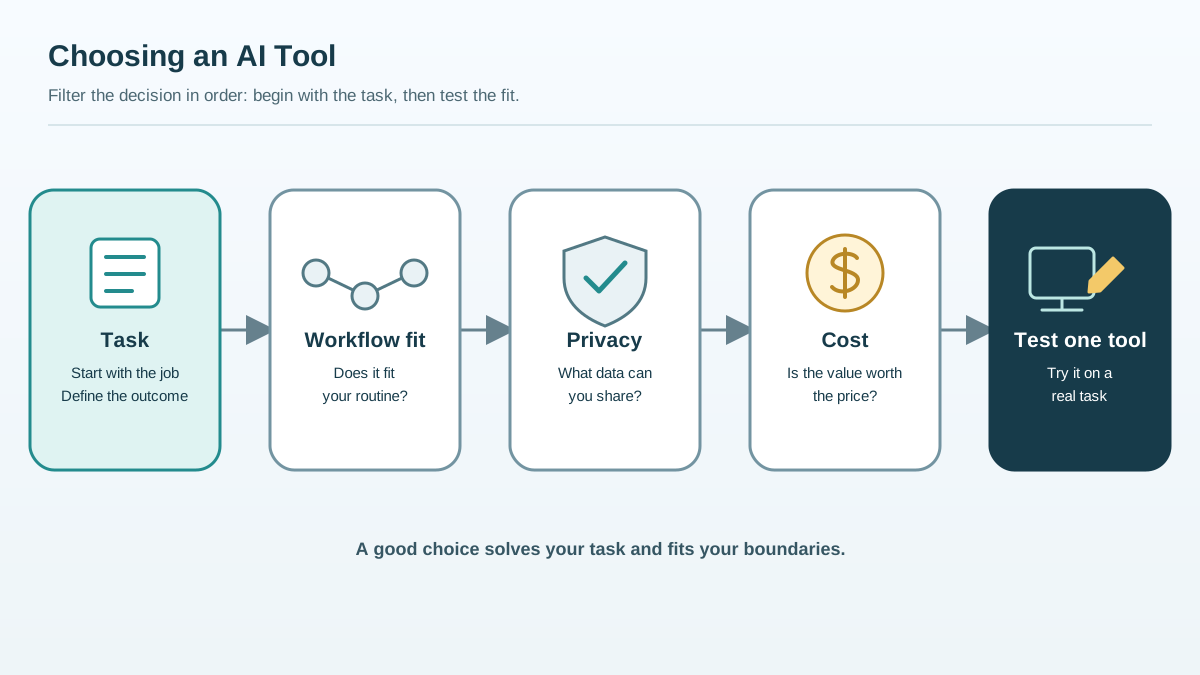
Here is the mental model this article will use. Four filters, applied in order:
- Task — What do you want the AI to do?
- Workflow fit — Where do you already work?
- Privacy — What data are you comfortable sharing?
- Cost — What is the tool worth for your use case?
Start with the task. Everything else follows.
Knowledge check
Check your understanding
Answer this question before you continue.
Start With the Task, Not the Tool
Before you open a single comparison page, write down the one or two things you will do most often. Be specific.
Common beginner tasks include:
- Drafting and summarizing text — emails, reports, meeting notes, articles
- Brainstorming — names, ideas, outlines, angles you have not considered
- Answering questions — explanations, definitions, research summaries
- Writing code — debugging, explaining, generating small scripts
- Analyzing documents — extracting key points from PDFs or long files
- Generating images — illustrations, concept art, social graphics
Different tasks favor different strengths. Some tools are stronger at long-form writing. Others are better at coding. Some shine when they work inside a specific app like Google Docs or Microsoft Word.
Here is a quick self-check before you compare anything:
Task check: Write down the one or two tasks you will do most often. If you cannot name them in one sentence, you are not ready to compare tools yet.
One thing I see beginners get wrong: they overestimate how much capability they need and underestimate how much the free tiers already cover. If your task is drafting emails and summarizing articles, the free version of almost any major assistant will handle it. You do not need the most powerful model to write a decent first draft.
Knowledge check
Check your understanding
Answer this question before you continue.
The Main General-Purpose AI Tools at a Glance
Four assistants dominate the beginner landscape. All are LLM-based. All handle the core tasks above. The real difference is where they fit.
| Tool | Best for | Where it fits | Beginner note |
|---|---|---|---|
| ChatGPT | General-purpose chat, writing, coding help | Standalone web app and mobile; works anywhere | The default choice for most beginners; huge feature set |
| Claude | Long-form writing, careful analysis, natural conversation | Standalone web app and mobile | Often feels the most "human" for drafting and editing |
| Gemini | Working inside Google tools | Google Docs, Gmail, Google Workspace | The choice if you live in Google's ecosystem |
| Microsoft Copilot | Working inside Microsoft tools | Word, Excel, Outlook, Microsoft 365 | The choice if you live in Microsoft's ecosystem |
Notice what this table does not say. It does not declare a winner. ChatGPT and Claude are strong standalone generalists. Gemini plugs into Google Workspace. Copilot plugs into Microsoft 365. The tool that fits where you already work will usually beat the one with the flashiest features.
These descriptions reflect what each company positions as its strength. Treat them as starting points, not benchmark verdicts. The only test that matters is the one you run yourself.
Knowledge check
Check your understanding
Answer this question before you continue.
Match the Tool to Your Workflow
Here is the principle that decides most cases: the right AI tool fits your workflow, not the other way around.
If you live in Google Docs and Gmail, a tool that plugs directly into those apps beats a standalone chat window you have to copy-paste between. Gemini can draft inside Google Docs. Copilot can do the same inside Word and Outlook. That integration saves you the friction of switching contexts dozens of times a day.
If you want a general assistant for many small tasks—brainstorming, quick questions, drafting a paragraph here and there—a standalone chat tool is simpler and often enough. You do not need deep integration for occasional use.
Consider two scenarios:
- A student drafting essays. They write in Google Docs, research in the browser, and want help structuring arguments and polishing prose. A standalone assistant works fine. They copy the draft in, get feedback, and paste the revision back.
- Someone who wants AI inside office documents. They write proposals in Word, manage email in Outlook, and want AI suggestions without leaving those apps. Copilot fits because the AI arrives where the work already happens.
Same underlying technology. Different answers. The student needs flexibility. The office worker needs integration.
One warning: do not choose a tool that forces you to change how you work just to use it. If you have to abandon your existing workflow, migrate your documents, or learn a new interface, that cost will quietly kill your adoption. The best AI tool is the one you actually use.
Knowledge check
Check your understanding
Answer this question before you continue.
Check Privacy, Data, and Cost Before You Commit
Two practical guardrails keep beginners out of trouble.
Privacy and data. Before you paste anything sensitive into an AI tool, ask what happens to it. Free tiers often have weaker data-handling protections than paid plans. Check whether your inputs can be used for training and whether you can opt out. Most beginners just need to read the privacy basics before pasting confidential documents, personal information, or proprietary code.
My rule: if you would not put it on a public whiteboard, check the privacy policy before you paste it into a free AI tool.
Cost. Free tiers cover a lot for beginners. Start there. Paid plans add higher usage limits, access to more capable models, and sometimes API access for developers. The question is not which plan is cheapest. It is which plan delivers what your use case requires at a price you can justify.
For most beginners, the honest answer is: start free, hit the limits, then decide whether the paid tier is worth it. You will know by then because you will have real usage to judge against.
A Simple Decision Rule for Beginners
Here is the whole process condensed into four steps you can run this week:
- Name your task. Write down the one or two things you will do most often. Be specific.
- Note where you already work. Google Docs? Microsoft Word? Nowhere in particular?
- Check privacy basics. Read what happens to your data before you paste anything sensitive.
- Test one tool on a real task for a week. Use actual work, not a toy prompt.
That last step matters more than any comparison table. A toy prompt—"write a poem about a cat"—tells you nothing about whether a tool fits your real workflow. A real task—"draft a response to this client email" or "summarize this 20-page report"—reveals exactly where the tool helps and where it gets in your way.
Run that test for a week before you judge. And remember: switching later is easy. For casual use, there is no lock-in. Your chats may not transfer, but your skills do. The ability to write a clear request, evaluate the output, and revise it travels with you to any tool.
The goal is not to find the tool with the best reputation. It is to find the tool that does your task, in your workflow, without making you fight it.
Your next step: Pick one real task from your own work. Choose the single tool that best fits where you already work. Run that task for a week. Then decide.
Knowledge check
Final check
Finish the article by checking the ideas you just learned.
References
Want a more structured LLMOps path?
Use the LLMOps Practical Starter Bundle to connect RAG, evaluation, observability, and production patterns.
Large Language Models Starter Pack
A 12-chapter guide connecting LLM fundamentals with prompting, RAG, agents, tool calling, evaluation, security, and application engineering.
- 227-page Illustrated PDF edition
- 12 guided LLM engineering chapters
- Visual concept diagrams
- Self-assessment quizzes
- Bonus deep-dive sections
- Prompt design, structured output, context windows & RAG pipelines
- Agents, tool calling, prompt injection, evaluation & application lifecycles
Coming soon


