
ChatGPT vs Claude vs Gemini: Compare Them on Real Tasks
That is the real beginner moment, and it does not get solved by reading one more "which AI is best" listicle. Those lists go stale the moment a new model…

Key topics
Three tabs open. Three confident answers. No way to tell which one to trust.
That is the real beginner moment, and it does not get solved by reading one more "which AI is best" listicle. Those lists go stale the moment a new model ships. So here is the reframe that holds up: these are not three contestants for one crown. They are three working styles. Your job is not to find the winner. Your job is to figure out which style fits the task in front of you.
One warning before we start. Model names, prices, free-tier limits, and privacy terms change constantly. This article teaches you a comparison method you can rerun next month. It cannot certify today's pricing or message caps, and it should not try.
Why "Which Chatbot Is Best?" Is the Wrong Question
The weak mental model goes like this: there is one best chatbot, someone on the internet knows which one it is, so I should find that answer and stop thinking.
That model breaks in three predictable places.
First, the answer changes with the task. The tool that writes a warm, natural email is not automatically the tool that reads a 90-page report without losing the beginning. Second, the answer changes with the length of your input. A short question and a long document are different problems. Third, the answer changes with your plan. Free tiers, paid tiers, and business accounts often behave differently even inside the same product.
So instead of a leaderboard, use one anchor criterion for everything that follows:
Judge every tool by the task you actually repeat, not by a ranking you read somewhere.
If you write three emails a day and summarize one article a week, your most frequent task is email. That is the task you should test. Not the task some reviewer with a different job tested.
And keep this in mind: whatever you pick today is a provisional choice, not a marriage. You can revise it in two weeks with better evidence than you have right now.
Knowledge check
Check your understanding
Answer this question before you continue.
The Three Tools in Plain Language
Before any comparison makes sense, you need one sentence per tool that you can hold in your head. These are tendencies people notice in practice, not permanent rankings. Every vendor ships new models frequently, and the gaps move.
ChatGPT: the broad default. The widest feature surface and the most third-party integrations. If you want one general-purpose starting point that connects to the most other things, this is usually it.
Claude: the careful writer and instruction-follower. Strong at long-form drafting, editing, and following detailed constraints. If your prompt has ten rules in it, this is the one most likely to honor all ten.
Gemini: the large-input and search-connected reader. Comfortable with very long documents and tied into Google's ecosystem. If your work already lives in Google's apps, that connection is worth more than a small quality difference.
Picture three overlapping circles labeled by working style. The overlap in the middle is labeled "all three can do this." That overlap is large. All three write, summarize, answer questions, and generate code. The differences live in the edges, and the edges are exactly where your repeated task sits.
Common mistake: Treating these identities as fixed facts. They are starting hypotheses. You still have to test them against your own work.
Knowledge check
Check your understanding
Answer this question before you continue.
Run the Same Task Through All Three
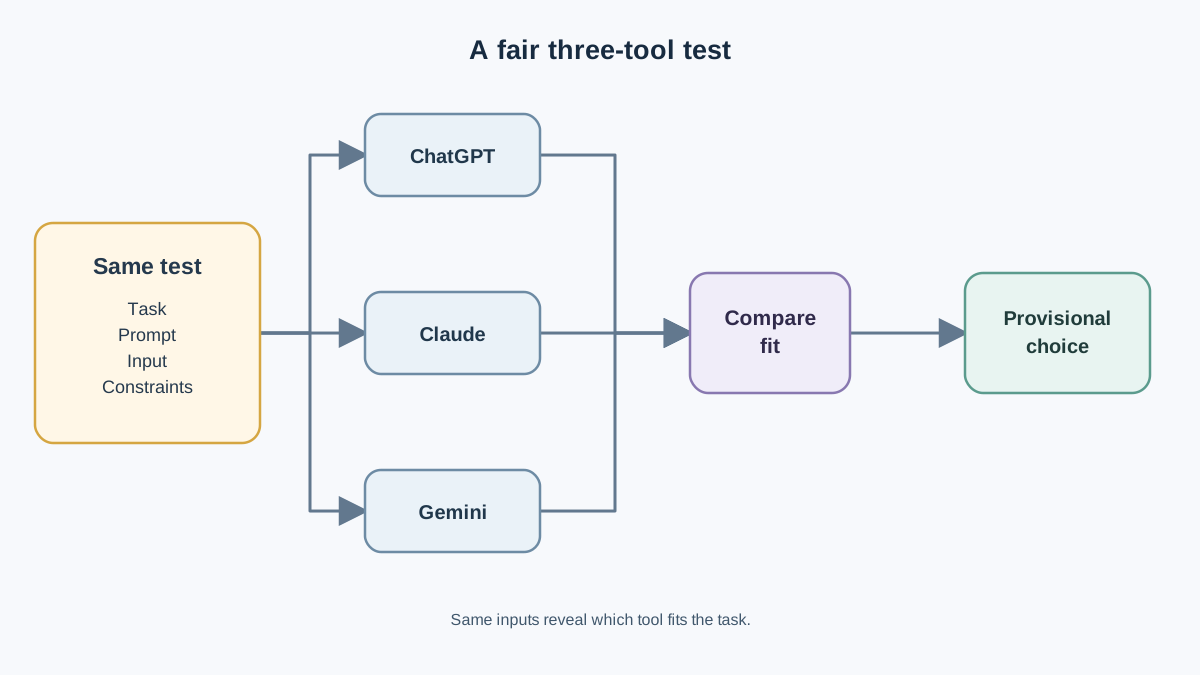
Here is where the method becomes real. Pick one bounded task you actually have this week. Good candidates: summarize a long article, rewrite an email so it sounds like you, or explain a confusing paragraph from a document you are reading.
Then run it through all three tools with the same prompt, the same input, and the same constraints. This is the part beginners skip, and skipping it invalidates everything. If you give ChatGPT a careful prompt and Claude a lazy one, you have compared your prompts, not the tools.
While you watch the three outputs, track four things:
- Did it follow the constraints? If you said "under 150 words, no bullet points, keep my opening sentence," count how many of those survived.
- Did it keep your meaning? A rewrite that changes your point is a failed rewrite, even if it reads beautifully.
- Did it invent facts? Watch for confident details that were not in your input.
- Did it need a second attempt? A tool that gets there on try two is different from one that gets there on try one.
A Worked Example You Can Copy
Say your task is a light edit. You paste the same paragraph into all three tools with this prompt:
"Lightly edit this paragraph. Preserve my meaning and voice. Show me what you changed."
Now watch what each one does with the same instruction.
One tool returns your paragraph with the meaning intact and the changes marked. Another returns a smoother paragraph that no longer sounds like you wrote it. A third follows the edit instruction but forgets to show the changes at all. None of these is a scandal. Each one tells you something about how much supervision that tool needs from you.
The point is not that one tool "won" this round. The point is that the same prompt produced three different kinds of friction, and friction is what you are actually measuring. A tool that needs one correction is cheaper to use than a tool that needs three, even if both eventually produce good output.
Use a simple three-column task card you can copy and fill in:
| What to record | ChatGPT | Claude | Gemini |
|---|---|---|---|
| Followed all constraints? | |||
| Kept my meaning? | |||
| Invented anything? | |||
| Tries needed | |||
| Would I use this output? |
One task is not a verdict. You are collecting evidence, not crowning a winner. Run the card on two or three tasks before you decide anything.
Knowledge check
Check your understanding
Answer this question before you continue.
The Constraints That Actually Change Your Choice
Task fit gets you close. These practical limits decide whether a tool is usable day to day.
Input size. How much text can you paste before the tool starts losing the beginning of your document or your conversation? This matters enormously for long reports, transcripts, and long back-and-forth sessions. It is also the single most volatile number in this article, so treat any figure you read as expired until you verify it.
Usage limits. Daily message caps and rate limits are often the first wall a heavy user hits, and they differ by plan. A tool you love but can only use twenty times a day may lose to a tool you merely like and can use all afternoon.
Grounding and freshness. Can the tool pull from live web results, or does it only know what it was trained on? For research tasks about recent events, this changes the answer more than writing quality does.
Ecosystem fit. If your documents, email, and meetings already live in one suite of apps, native integration can outweigh a small quality difference. Convenience compounds.
Output style. Some tools default to structured, formal answers. Others match a casual tone more naturally. You will feel this within three prompts.
| Constraint | Why it matters | Recheck before relying on it |
|---|---|---|
| Input size | Long documents and long chats | Yes — changes often |
| Usage limits | Heavy daily use | Yes — plan-dependent |
| Web grounding | Research on recent events | Yes — feature-dependent |
| Ecosystem fit | Your existing apps | Rarely — structural |
| Output style | Voice and tone match | No — test it yourself |
Tip: The bottom two rows are the durable ones. Ecosystem fit and output style rarely change under you. The top three can shift with a single product update.
Knowledge check
Check your understanding
Answer this question before you continue.
What You Should Recheck Before You Commit
Draw a hard line between two kinds of information, because confusing them is how people end up locked into the wrong tool.
Durable criteria — these come from you, not the vendor:
- Your most frequent task
- Your preferred working style
- How much text you typically handle
- Whether you need live information
Volatile details — these come from the vendor and change without notice:
- Model names and versions
- Free versus paid tier boundaries
- Price
- Context and input limits
- Privacy and data-retention terms
That last one deserves its own warning. Consumer accounts and business or API accounts often have different data-use defaults. Do not assume the free tier you are testing matches the enterprise terms your company signed. If you are handling client data, personal information, or anything regulated, open the provider's own current documentation before you paste it in. A comparison article, including this one, is the wrong place to verify a privacy term.
So here is what this article can and cannot do. It can teach you the method: pick a task, run it three ways, watch the constraints. It cannot tell you today's price, today's message cap, or today's data-retention policy. Those require the source.
Make a Provisional Choice and Move On
Here is the decision rule. Pick the tool that fits your most frequent task. Use it for two weeks. Write down where it annoys you.
That is it. Two weeks of real use beats two months of comparison reading, because your actual friction points are invisible until you hit them.
Switch when a real failure repeats:
- You keep hitting a usage limit mid-task
- You keep feeding it documents it cannot hold
- You keep rewriting its output to match your voice
Do not switch just because a new model launched. A release announcement is not evidence about your task. A repeated failure on your task is.
And if you end up using two tools, that is normal, not a lack of commitment. Plenty of people keep one generalist and one specialist. The generalist handles the everyday queue. The specialist handles the long document or the careful edit.
Your next action is small and specific. Take one task you have this week, run it through all three tools with the same prompt, and fill in the task card. Then notice which tool you reached for second — that instinct is data, and it is more honest than any ranking you will read.
Knowledge check
Final check
Finish the article by checking the ideas you just learned.
Want a more structured LLMOps path?
Use the LLMOps Practical Starter Bundle to connect RAG, evaluation, observability, and production patterns.
Large Language Models Starter Pack
A 12-chapter guide connecting LLM fundamentals with prompting, RAG, agents, tool calling, evaluation, security, and application engineering.
- 227-page Illustrated PDF edition
- 12 guided LLM engineering chapters
- Visual concept diagrams
- Self-assessment quizzes
- Bonus deep-dive sections
- Prompt design, structured output, context windows & RAG pipelines
- Agents, tool calling, prompt injection, evaluation & application lifecycles
Coming soon


