
What Data Should You Share With an LLM? A Privacy Decision Guide
You're staring at a chat window. You've drafted a prompt that would save you an hour of work—if you paste in the real document. The cursor blinks. Your…

You're staring at a chat window. You've drafted a prompt that would save you an hour of work—if you paste in the real document. The cursor blinks. Your hand hovers over Ctrl+V. And then you hesitate.
That hesitation is your brain doing something right.
Here's the problem: most of us treat a chat with an AI tool like a private conversation. It feels one-on-one. It feels like a search bar with better manners. But the question "is it safe to share data with ChatGPT?" misses the point. The real question is narrower and more useful: what happens to this specific input, and who can see it?
Think of a public AI tool less like a private note and more like a conversation in a room with unknown listeners. You don't know who's taking notes, how long they keep them, or what they'll do with what they heard. That doesn't mean you should never speak. It means you should choose your words deliberately.
This guide walks through a simple three-step decision framework you can run before every prompt: classify the data, check the controls, choose the alternative.
Why "Is It Safe?" Is the Wrong Question to Ask
Let's diagnose the mental model that gets people into trouble.
When you open a chat interface and type into that empty box, the design whispers privacy. It's just you and the bot. There's no audience icon, no "broadcasting" indicator, no warning label. Compare that to posting on social media, where the public nature is baked into the experience. A chat feels like a text message, so we treat it like one.
Two assumptions quietly reinforce that feeling. First, that the conversation is private because it's one-on-one. Second, that deleting your chat history erases the data. Both are wrong in ways that matter.
Deleting your history is like shredding your copy of a letter you already mailed. The recipient still has theirs.
So when someone asks "is it safe to share data with ChatGPT?"—or any public AI tool—they're asking the wrong question. Safety isn't a property of the tool. It's a property of the match between what you're sharing and what the tool will do with it. A tool can be perfectly safe for general questions and completely wrong for your medical records.
The better question: What happens to this specific input after I press send?
What Happens to Your Input After You Press Send
Here's the mechanism you need to understand.
When you type a prompt into a public AI tool, that text doesn't stay on your device. It travels over the internet to the provider's servers, where the model processes it and generates a response. Your input is not a private thought the model overhears. It's a data packet that arrives at someone else's infrastructure.
What happens to that packet after it answers your question? That depends on the tool and the plan you're using, but there are two main possibilities:
- Answering your request in the moment. The provider needs your input to generate a response. This is the obvious, immediate use.
- Storing or using your input later. Many providers keep conversation data. Some use it to improve their models. Some retain it for safety monitoring or abuse review. Some keep it for shorter or longer periods depending on your plan.
The details vary by tool, and they vary by plan within the same tool. Free tiers often have different data practices than paid tiers, which differ again from enterprise plans. That's why reading the privacy policy of your specific tool matters more than any general rule I can give you.
Here's what most beginners miss: turning off training and deleting your history are not the same as the provider deleting your data.
Let me make this concrete. Imagine you paste a customer email into a chatbot to draft a reply. That email contains a full name, an address, and an account number. To the model, that text is just tokens—but to the system, it's a data packet that may be logged, stored, reviewed by a human auditor, or used to improve future models. You can't tell which of those happened from the chat window.
The core lesson: classify the data before you send it, because you lose control the moment you press enter.
Knowledge check
Check your understanding
Answer this question before you continue.
A Simple Way to Classify What You're About to Share
"Be careful" is useless advice. You need a decision rule you can run in five seconds. Here's a three-bucket framework that works.
Bucket 1: Safe to Share
This bucket contains anything you'd be comfortable seeing on a billboard.
- General questions about concepts, history, or public facts
- Content that's already public
- Invented examples and hypothetical scenarios
- Drafts where you've removed identifying details
If you'd post it on a public forum without a second thought, it's safe to share with an AI tool.
Bucket 2: Share with Care
This bucket contains personal or business information that's sensitive but low-stakes, where the risk of exposure is embarrassment rather than catastrophe.
- Personal details that aren't tied to financial or legal identity
- Drafts you can redact before pasting
- Business content that isn't confidential
- Questions about your own projects where you've stripped out trade secrets
The key move here is redaction: replace real names, real numbers, and real identifying details with placeholders before you paste.
Bucket 3: Never Share with a Public or Unapproved Tool
This bucket is where the decision gets sharp. The categories below should never go into a public AI tool—one where you haven't verified the controls or gotten organizational approval:
- Passwords, passkeys, or security codes
- Credit card numbers or bank account details
- Government IDs like Social Security numbers or passport numbers
- Medical records or health information
- Confidential business documents or proprietary code
- Anything covered by a legal or regulatory obligation
- Trade secrets or unpublished business plans
Here's the self-test I want you to run before every prompt. Ask yourself: "Would I be comfortable if this exact text appeared in a public training set or on a stranger's screen?"
If the answer is no, the data doesn't belong in a public tool's prompt.
Knowledge check
Check your understanding
Answer this question before you continue.
What Product Controls Actually Do (and Don't Do)
By now you might be thinking: "But my AI tool has privacy settings. Doesn't that change things?"
Good instinct. Let's look at what those controls actually do.
Most tools offer some combination of these controls:
| Control | What it does | What it doesn't do |
|---|---|---|
| Chat history deletion | Removes conversations from your view | Doesn't guarantee the provider deleted their copies, logs, or backups |
| "Don't train on my data" toggle | Stops your inputs from being used to improve the model | Doesn't mean the provider never stores or reviews your inputs |
| Enterprise data-protection mode | Stronger guarantees about training and retention | Doesn't override your organization's data rules or make confidential data automatically safe |
The pattern here is worth naming: these controls reduce some risks but not all risks. Turning off training is meaningful—it means your data won't influence what the model says to other users. But it doesn't mean your data vanishes. Providers may still store inputs for safety monitoring, legal compliance, or debugging.
To evaluate any control, ask five plain questions:
- Is it stored? Does the provider keep your input after generating a response?
- Is it used for training? Could your input improve the model that other users see?
- Who can access it? Can human reviewers, auditors, or support staff read your conversations?
- Can it be deleted? Does deletion cover backups and logs, or just your chat view?
- Is there an agreement? Does your organization have a contract that binds the provider to specific handling?
Enterprise plans often answer these questions more favorably: no training on your data, stricter retention policies, and sometimes contractual commitments about how your data is handled. If you're using AI for work, check whether your employer provides an approved enterprise tool. Those guarantees are real, and they matter.
But here's the honest boundary: stronger controls mean governed risk, not zero risk. An approved enterprise tool can be the right place for confidential work when your organization has authorized it and the data's classification permits it. The question isn't "is this tool perfectly safe?" It's "does this tool's handling match what this data requires?"
Knowledge check
Check your understanding
Answer this question before you continue.
When Your Organization's Rules Matter More Than Your Judgment
Speaking of work: there's a whole category of situations where your personal judgment doesn't get the final say.
At work, the question isn't just "is this safe for me?" It's "does my organization allow this data in an external tool?" Those two questions can have very different answers.
Consider the regulated categories: health information, financial data, legal documents, student records, anything under a data-protection law like HIPAA or GDPR, or anything covered by a client contract. Even if you personally judge a document as low-risk, your employer's policies and legal obligations may override that judgment.
Picture this scenario: an employee pastes a code snippet into a free chatbot to debug it. The snippet contains proprietary logic. The employee didn't think twice—it was just a few lines. But once that data leaves the organization's control, it's no longer the organization's data. That's how intellectual property leaks happen.
The practical rule: when in doubt at work, ask before you paste. Check whether your employer provides an approved enterprise tool, and follow its data-classification rules. If no approved tool exists, that's a signal about what your organization thinks of public AI tools—not an invitation to use the free one anyway.
Knowledge check
Check your understanding
Answer this question before you continue.
Safer Alternatives When You Shouldn't Share the Real Data
Here's the good news: the answer to "what data can you share with AI" is rarely "none." It's usually "share a version that doesn't contain the sensitive parts."
The core technique is simple: replace real values with placeholders, fake-but-realistic examples, or redacted text.
Let me show you what this looks like in practice.
Before (don't send this):
Here's a customer complaint from Sarah Chen, account #48291-773, email sarah.chen@gmail.com, address 1420 Maple Street, Portland, OR. Draft a response offering a 20% refund.
After (safe to send):
Here's a customer complaint from a customer named [NAME], account #[ACCOUNT_ID], email [EMAIL], address [CITY]. Draft a response offering a 20% refund.
The model can still help you draft the response. It can still judge the tone, structure, and offer. What it can't do is learn Sarah Chen's account number.
But redaction has a limit, and beginners often miss it. Removing identifiers doesn't protect you when the content itself is the secret.
Consider a contract clause. If you paste the real wording but replace the company names, the pricing terms, payment structure, and obligations are still right there in the text. The sensitive part isn't just the name—it's the deal itself. The same applies to proprietary code: even with variable names changed, the logic and architecture can reveal your approach.
So for content that is itself confidential, redaction isn't enough. You need a different move entirely:
- Summarize the pattern instead of pasting the content. Ask about the structure of a clause, not the clause itself.
- Invent a parallel example. If you're debugging a pattern, create a small fake function that reproduces the issue without your real logic.
- Use an approved tool. If the real content genuinely needs processing, route it through a system your organization has authorized for that data class.
- Skip the AI assist. Sometimes the safest answer is to do the thinking yourself.
Here's the reusable decision rule:
If the real data matters, don't send it. If only the pattern matters, send a version with the real parts removed.
Your Quick Pre-Prompt Privacy Check
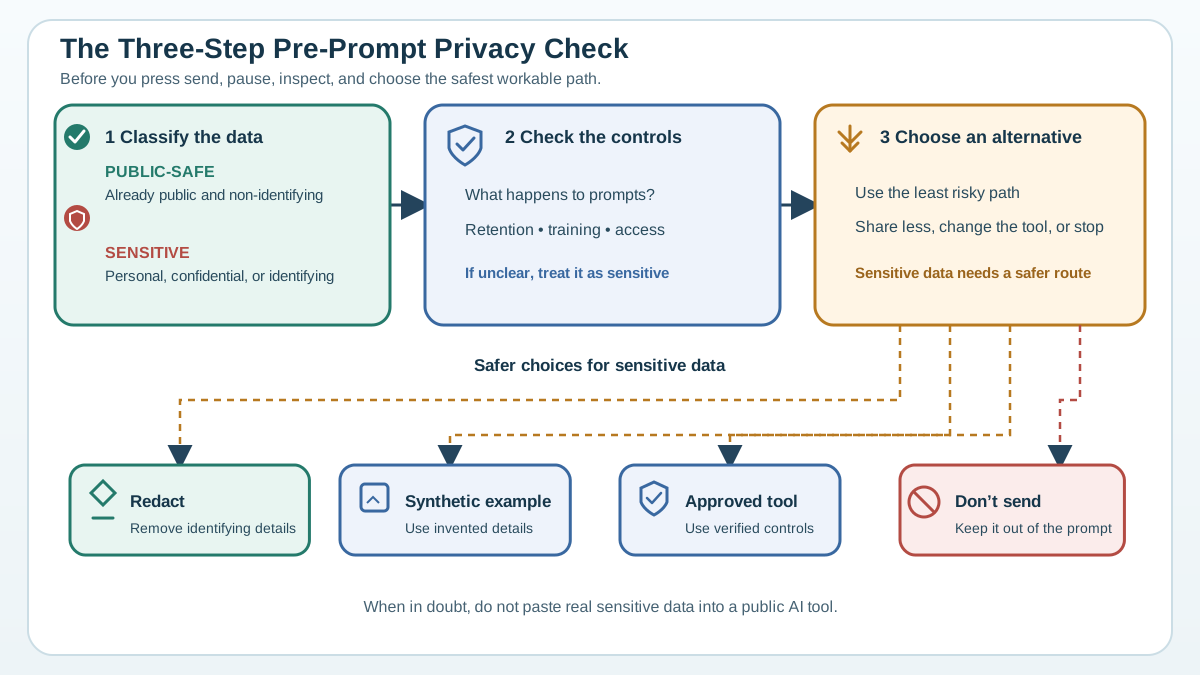
Let's turn this framework into a habit you can run in ten seconds before every prompt.
Step 1: Classify the data. Run the self-test: would I be comfortable if this exact text appeared in a public training set or on a stranger's screen? If no, it goes in the never-share-with-public-tools bucket.
Step 2: Check the controls. If you're sharing something sensitive-but-necessary, verify what your specific tool and plan actually guarantee. Ask the five questions: Is it stored? Used for training? Accessible by humans? Deletable? Covered by an organizational agreement? Read the privacy policy. Check the settings. Don't assume the toggle means what you hope it means.
Step 3: Choose the alternative. Redact the real values. Replace them with placeholders. Use a synthetic example. If the content itself is the secret, summarize the pattern instead. If none of those work, find an approved enterprise tool or skip the AI assist.
Here's your compact checklist of never-share categories for public tools:
- Passwords, passkeys, security codes
- Credit card or bank account numbers
- Government IDs
- Medical records
- Confidential business documents
- Proprietary code
- Anything under a legal or regulatory obligation
And here are the red flags to look for in a tool's settings or policy:
- No clear answer to "what is stored and for how long?"
- Inputs used for training by default
- Vague or opaque privacy language
- No clear deletion process for backups or logs
- No organizational approval for the data you're sharing
If the policy doesn't answer these questions clearly, treat that as your answer: don't send the real data.
Here's your next step: run this check on the next three prompts you send this week. Not the ones you plan carefully—the quick ones, the ones you fire off without thinking. Notice where the hesitation appears. That hesitation is your privacy instinct waking up. Listen to it.
The goal isn't to stop using AI tools. It's to use them without handing over the keys to things that should stay yours. Classify the data. Check the controls. Choose the alternative. Run the check, and you'll know exactly what data you can share with AI—and what stays with you.
Knowledge check
Final check
Finish the article by checking the ideas you just learned.
References
Want a more structured LLMOps path?
Use the LLMOps Practical Starter Bundle to connect RAG, evaluation, observability, and production patterns.
Large Language Models Starter Pack
A 12-chapter guide connecting LLM fundamentals with prompting, RAG, agents, tool calling, evaluation, security, and application engineering.
- 227-page Illustrated PDF edition
- 12 guided LLM engineering chapters
- Visual concept diagrams
- Self-assessment quizzes
- Bonus deep-dive sections
- Prompt design, structured output, context windows & RAG pipelines
- Agents, tool calling, prompt injection, evaluation & application lifecycles
Coming soon


