
Redacting Sensitive Data Before Using an LLM
You have a real document you want an LLM to help with—maybe a customer support ticket, a contract, or a set of notes. It's full of useful context. It's…

You have a real document you want an LLM to help with—maybe a customer support ticket, a contract, or a set of notes. It's full of useful context. It's also full of names, email addresses, account numbers, and other details you'd rather not hand to an outside model.
The instinct is to send everything or send nothing. The useful middle path is redaction: removing what's sensitive while keeping what the task actually needs. This guide walks through a practical workflow for deciding what to remove, what to mask, and what to preserve before your next LLM session.
Why You Can't Just Paste the Whole Document
Here's the core problem: an LLM does not know which parts of your text are sensitive. A credit card number and a city name are both just tokens in a prompt. The model has no built-in instinct for "this should stay private."
That judgment is yours.
When you paste text into a hosted model, that content leaves your environment. Depending on the provider's policy, it may be logged, stored, or used to improve models. You lose control over where that data goes and who might see it later.
But the answer isn't to strip all meaning from your documents. A document with every noun deleted is useless for almost any task. The real goal is narrower: remove what identifies or exposes people while keeping the information the task needs.
This builds on a prior decision: whether you should share the data at all. If you haven't thought through what kinds of information are safe to send to an LLM in the first place, that's the place to start. This guide assumes you've decided the document is worth using—and now need to prepare it safely.
Knowledge check
Check your understanding
Answer this question before you continue.
What Counts as Sensitive: A Quick Refresher
Before you can redact, you need to know what to look for. Here are the categories that commonly appear in real documents:
Direct identifiers. Names, email addresses, phone numbers, physical addresses, and government ID numbers. These are the obvious ones—the values that directly name or locate a person.
Financial and account data. Credit card numbers, bank account numbers, and account IDs. These matter even when they don't name a person directly, because they can be used to access accounts or commit fraud.
Health and regulated data. Patient details, medical record numbers, and anything covered by regulations like HIPAA or GDPR. If your document touches healthcare, the stakes are higher and the rules are stricter.
Contextual risk. This is the sneaky category. A job title alone might not identify anyone. A rare location alone might not either. But combine "Chief Financial Officer" with "the only town in the county with a population under 500"—and you may have just named someone without using their name.
Keep this list in mind as you scan. The full classification framework—including how to think about data sensitivity more systematically—deserves its own guide. For now, the practical question is simple: does this value identify a person, expose an account, or reveal something regulated?
Knowledge check
Check your understanding
Answer this question before you continue.
The Redaction Workflow: Remove, Mask, or Preserve
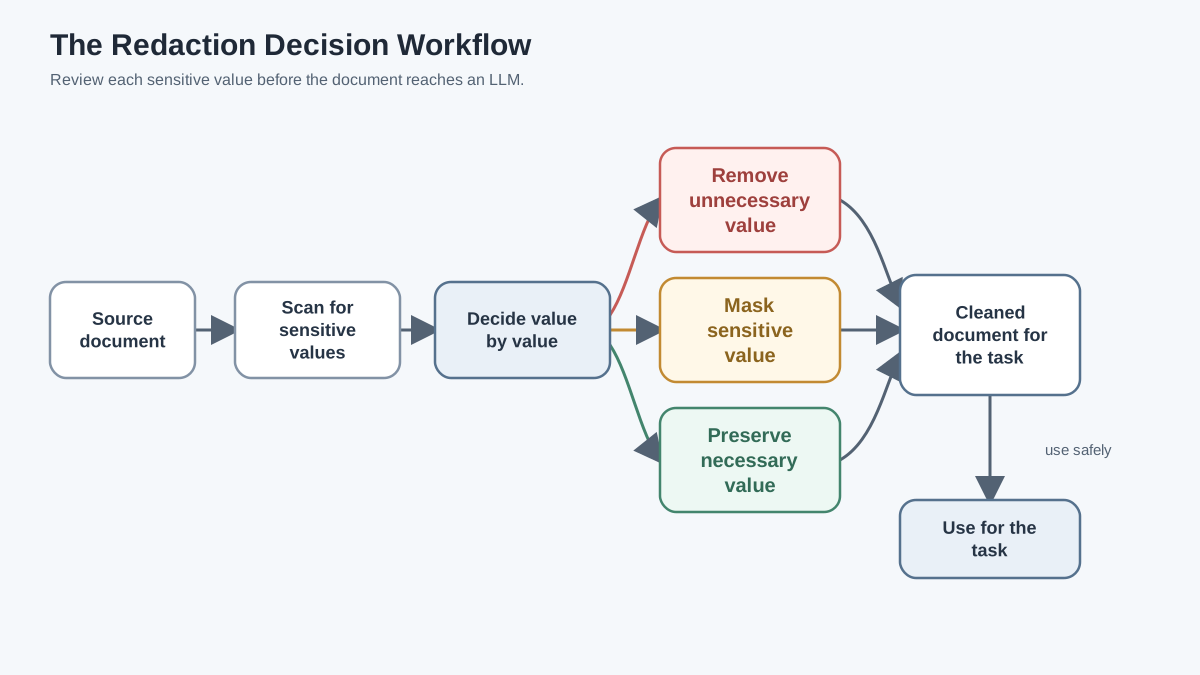
Redaction is not a single tool. It's a judgment workflow you apply to every sensitive value you find. Here's the process:
Step 1: Scan
Read the document and flag every value that could identify or expose a person or account. Go slowly. Look for names, emails, phone numbers, addresses, account IDs, and anything else from the categories above.
Step 2: Decide
For each flagged value, make one of three decisions:
Remove the value when the task doesn't need it at all. If you're asking an LLM to summarize the main argument of a contract, the client's phone number contributes nothing. Delete it and lose nothing.
Mask the value when its structure matters but the identity doesn't. Replace "John Smith" with [NAME] or an email address with [EMAIL]. The model still understands that a name or email occupies that position—it just can't see the real one.
Preserve the value only when the task genuinely cannot work without it. Even then, question whether the task is worth the exposure. Is there another way to phrase the question that avoids sending the real value?
Knowledge check
Check your understanding
Answer this question before you continue.
A Worked Example
Let's walk through a short document end to end:
"Maria Chen called on March 14 about her order #48291. She said the package was delivered to 742 Maple Street but she never received it. Her email is maria.chen@email.com and her phone is 555-0142. She'd like a replacement shipped."
Suppose your task is to summarize the issue and identify the resolution needed.
- Maria Chen → Mask as
[NAME]. The summary needs to reference a customer, but not this specific customer. - March 14 → Preserve. The date matters for understanding the timeline.
- Order #48291 → Mask as
[ORDER_ID]. The model needs to know an order is referenced, not which order. - 742 Maple Street → Mask as
[ADDRESS]. The delivery location matters contextually, but the specific address doesn't. - maria.chen@email.com → Remove or mask as
[EMAIL]. The task doesn't need contact information at all. - 555-0142 → Remove. Same reasoning.
The cleaned version:
"[NAME] called on March 14 about order [ORDER_ID]. She said the package was delivered to [ADDRESS] but she never received it. She'd like a replacement shipped."
That version still supports the task—summarize the issue, identify the resolution—without exposing a single piece of personal data.
Why Masking Beats Deleting (and When It Doesn't)
Deleting a value can break the structure of a sentence or record. Consider what happens if you simply remove the name from our example:
"called on March 14 about order ."
The model has to guess what belongs where. The sentence structure collapses, and the meaning gets muddier.
Masking with a typed placeholder like [NAME] or [ORDER_ID] keeps the grammatical and logical role intact. The model can still reason about the text because it knows a name appeared in that position, even though it can't see the real one.
The tradeoff: a masked value still reveals that a name or account exists at that position. For most documents, that's acceptable. For extremely sensitive contexts—where even the existence of a particular field is sensitive—you may need to remove rather than mask.
My rule of thumb: mask when the field's role matters to the task, remove when it doesn't, and preserve only when the task genuinely cannot proceed without the real value.
Knowledge check
Check your understanding
Answer this question before you continue.
Common Redaction Mistakes Beginners Make
Redaction looks simple until you do it wrong. Here are the failure modes I see most often:
Redacting only the obvious name. You remove "Maria Chen" but leave her email address, which contains her full name. Or you remove the name but leave the account ID that traces back to her. One identifier is enough to re-identify a person.
Forgetting indirect identifiers. A rare job title, a small-town location, or a distinctive date can re-identify someone even after names are gone. The contextual risk category isn't theoretical—it's how real re-identification happens.
Over-redacting until the document is useless. If you strip so much meaning that the model can't complete the task, you've defeated the purpose of processing the document at all. Redaction should preserve utility, not destroy it.
Assuming a tool caught everything. Automated detection helps, but it can miss unusual formats, misspellings, and context-dependent sensitivity. A human pass still matters.
Leaving the original in your logs. You clean the document, send it to the model, and then the trace history or logging system stores the original sensitive version anyway. The redaction didn't help if the unredacted copy is sitting in your own infrastructure.
Tools and Automation: When to Reach for Help
If you're processing documents by hand, you might wonder whether tools can do this for you. The honest answer: partially.
Automated redaction tools use pattern matching and named-entity recognition to flag likely PII. They're good at catching common formats—emails, phone numbers, credit card numbers—quickly and at scale. That speed is valuable when you're processing many documents.
But they're not perfect. Unusual formats slip through. Misspellings confuse them. Context-dependent sensitivity—the job title plus rare location problem—is exactly the kind of thing pattern matching struggles with. Tools also produce false positives, flagging non-sensitive information and triggering over-redaction.
The practical pattern: run an automated scan to catch the obvious, then do a focused human pass on the flagged results and the document as a whole. The tool handles the boring parts; you handle the judgment.
For small teams just starting out, a simple checklist plus a consistent placeholder convention often beats a heavy toolchain. You can always add automation once you understand where your manual process breaks down.
Your First Redaction Pass: A Simple Checklist
Here's a reusable starting point you can apply to your next real document:
- Scan for direct identifiers. Names, emails, phone numbers, addresses, government ID numbers.
- Scan for financial and account data. Credit card numbers, bank account numbers, account IDs.
- Scan for contextual risk. Combinations that identify someone when joined together.
- Decide remove, mask, or preserve for each flagged value.
- Re-read the cleaned version. Confirm it still supports the task you have in mind.
Then test the cleaned document before relying on it. Run the task and check whether the output quality holds up. If the model struggles because you removed too much, adjust and try again.
And keep the original sensitive version out of any tool that logs or stores your prompts. Redaction doesn't help if the unredacted copy is still floating through your infrastructure.
Here's your next step: take one real document you plan to process and run it through this checklist before your next LLM session. Not a hypothetical document—the actual one you're about to use.
Redaction is a repeatable habit, not a one-time chore. Every time new documents enter your workflow, the same discipline applies: remove what isn't needed, mask what keeps its role, and preserve only what the task truly requires. Get that rhythm down, and you can use LLMs on real documents without handing over the parts that should stay yours.
Knowledge check
Final check
Finish the article by checking the ideas you just learned.
References
Want a more structured LLMOps path?
Use the LLMOps Practical Starter Bundle to connect RAG, evaluation, observability, and production patterns.
Large Language Models Starter Pack
A 12-chapter guide connecting LLM fundamentals with prompting, RAG, agents, tool calling, evaluation, security, and application engineering.
- 227-page Illustrated PDF edition
- 12 guided LLM engineering chapters
- Visual concept diagrams
- Self-assessment quizzes
- Bonus deep-dive sections
- Prompt design, structured output, context windows & RAG pipelines
- Agents, tool calling, prompt injection, evaluation & application lifecycles
Coming soon


