
Practice Choosing a Local LLM Within a Memory Budget
That is the moment this exercise trains you for. You already know how to estimate weight storage, and you have already run one small model and watched its…

Key topics
One budget. Three model files. One task. No obvious winner.
That is the moment this exercise trains you for. You already know how to estimate weight storage, and you have already run one small model and watched its resource use. Now you have to do the thing that actually matters: look at a handful of plausible configurations, a fixed memory budget, and a real task, then decide which one you would try first — or admit you do not have enough evidence yet.
Most beginners skip straight to the wrong move. They find the biggest model whose parameter count "fits" the headline number and declare victory. Then they load it, watch the machine crawl, and wonder what went wrong.
Nothing went wrong. The estimate was just answering a smaller question than the one they asked.
The Mistake This Exercise Fixes
The beginner reflex is a one-line comparison: my machine has this much memory, this model is about this big, so it fits. That reflex treats memory as a single bucket and model size as a single number.
Both assumptions break immediately.
Weight storage and runtime overhead are two different budgets. The weights are the model file sitting on disk, loaded into memory. The overhead is everything else that has to exist while the model runs: the context you feed it, the runtime's working buffers, the operating system, your browser, your editor. A configuration can pass the weight check and still fail the moment overhead is added.
And a fit on paper is not a fit in practice. Passing the arithmetic means "this is worth trying." It does not mean the model will be fast, that it will be good at your task, or that the experience will be usable.
So the stronger model is this: two buckets, plus a task requirement. Weights in one bucket. A separately stated overhead allowance in the other. And a task the model must actually satisfy, written down before you start calculating.
You already derived the weight estimate and ran one small model. This article turns those two skills into a decision drill.
Set Up the Worksheet Before You Touch a Model
Before any arithmetic, build the artifact you will reuse for every configuration. Four columns:
| Configuration | Weight estimate | Overhead allowance | Task requirement |
|---|---|---|---|
| model, parameter count, precision | idealized bytes | separately stated | observable outcome |
Two rules make this worksheet honest.
Pick one budget boundary and stay on it. The cleanest choice for a beginner is to define the budget as memory available to the model and its runtime after the operating system and your normal applications are already running. That is the number you actually get to spend. If you instead start from total installed memory, then the operating system and your other applications belong inside the overhead allowance — and you must not count them twice. Decide which definition you are using, write it at the top of the worksheet, and apply it to every row.
State the task in observable terms. "Summarize a two-page document," "answer a question about a local file," "generate a small function from a description." Not "good at reasoning." A vague task requirement cannot be checked, so it cannot guide a decision.
Then mark every unknown input explicitly. If you do not know the real file size, write "unknown — estimate only." A guess you forget you made will quietly become a fact by the end of the exercise.
Common mistake: Filling in an unknown with a confident number because the blank feels uncomfortable. An honest blank is more useful than a fake value.
Knowledge check
Check your understanding
Answer this question before you continue.
Worked Example: Three Configurations, One Budget
Here is the baseline from the prerequisite: idealized weight storage is parameter count times effective bits, divided by 8, in decimal bytes.
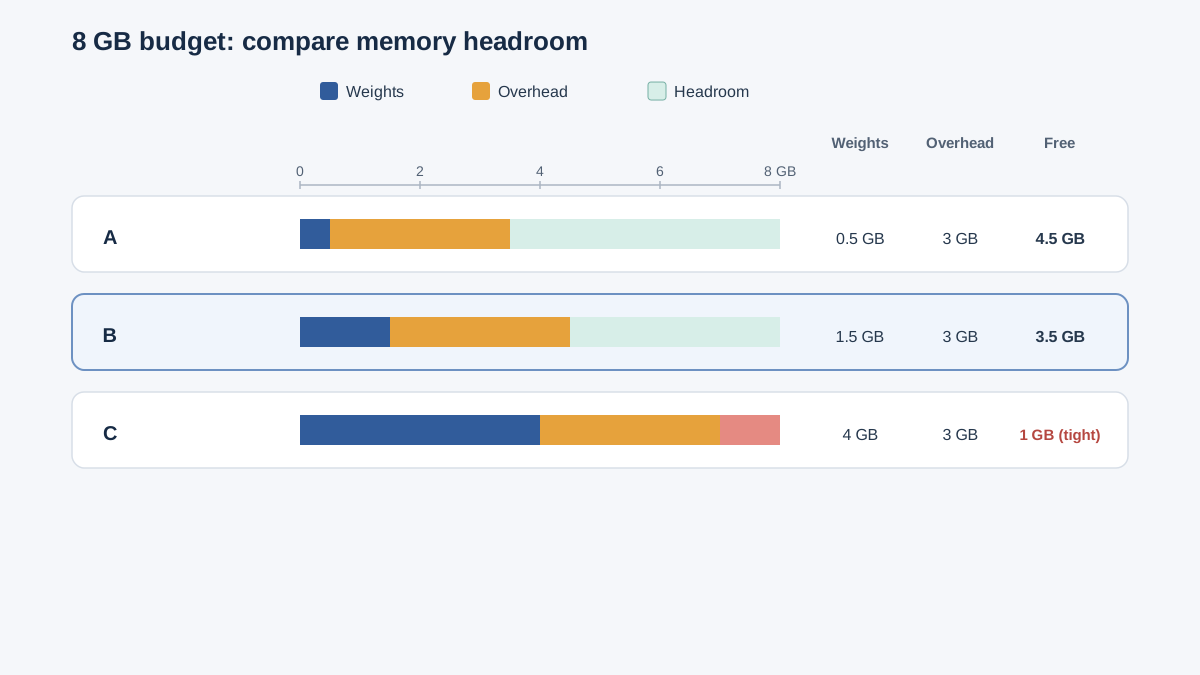
Now suppose the budget is 8 GB available to the model and its runtime, after the operating system and your usual applications are already accounted for. The task is: summarize a short document and answer two questions about it. Three hypothetical configurations:
Configuration A — 1B parameters at 4-bit. 1,000,000,000 × 4 ÷ 8 = 500,000,000 bytes ≈ 0.5 GB of idealized weights.
Configuration B — 3B parameters at 4-bit. 3,000,000,000 × 4 ÷ 8 ≈ 1.5 GB.
Configuration C — 8B parameters at 4-bit. 8,000,000,000 × 4 ÷ 8 ≈ 4.0 GB.
All three pass the weight check against 8 GB. That is exactly why the weight check alone is not a decision.
Now add the overhead bucket. Because the budget already excludes the operating system and your normal applications, this allowance covers only what the model itself needs beyond its weights: context, runtime buffers, and the growth that comes with a longer document. A reasonable starting allowance might be 2 to 4 GB, depending on how long your document is. Watch what happens:
| Configuration | Weights | Overhead allowance | Total | vs. 8 GB budget |
|---|---|---|---|---|
| A — 1B @ 4-bit | 0.5 GB | 3 GB | 3.5 GB | Plausible fit, clear headroom |
| B — 3B @ 4-bit | 1.5 GB | 3 GB | 4.5 GB | Plausible fit, some headroom |
| C — 8B @ 4-bit | 4.0 GB | 3 GB | 7.0 GB | Tight — depends on the overhead guess |
Configuration C passes the weight check and squeaks past the total check. But look at the margin: 1 GB of slack against an overhead number you guessed. If your document is longer than expected, or the runtime's buffers grow, that margin disappears.
Configuration C is not wrong. It is provisional, and the assumption it rests on is the overhead allowance.
Note: Every number here is an idealized estimate, not a measured result. The point is the method, not the answer.
Knowledge check
Check your understanding
Answer this question before you continue.
Read the Result: Fit, Tight Fit, or Unknown
A calculation is only useful if you can classify its outcome. There are three honest answers:
Plausible fit with headroom. Weights plus overhead leave comfortable room. Configurations A and B above land here. This is the easiest place to start.
Tight fit. The total is close to the budget, and the result depends heavily on your overhead assumption. Configuration C is a tight fit. This is a real answer, not a failure — it tells you exactly which assumption to test next.
Insufficient evidence. You cannot decide because a required input is missing. Maybe you do not know the real file size, or the runtime's actual memory use, or whether the task is even in range for the model class. "Unknown" is a legitimate output of the exercise.
Here is the part beginners resist: a passing estimate still does not promise speed, quality, or task success. The arithmetic screens for capacity. It says nothing about how many tokens per second you will see, whether the model summarizes well, or whether it will answer your two questions correctly. Those are separate questions with separate tests.
What moves an "unknown" to a decision? Concrete evidence: the model's actual file size on disk, the runtime's reported memory use during a run, or a measured run on your real task.
Knowledge check
Check your understanding
Answer this question before you continue.
Where the Arithmetic Quietly Lies
The clean formula is a screen, not a verdict. Five places it misleads:
Quantization is not a clean division. Metadata and format overhead mean the real file is larger than the idealized estimate. The 4.0 GB you calculated for Configuration C might land noticeably higher on disk.
Context length is a dial, not a constant. A longer conversation or a bigger document grows the overhead bucket during the run. Your starting allowance is not your peak allowance.
Offloading changes the picture. Weights that spill out of fast memory still load — they just run somewhere slower. The model fits, but the experience changes.
Mixture-of-experts models break the intuition. A model can have a huge total parameter count and still activate only a fraction per token. Parameter count stops mapping directly to memory pressure.
Other processes are not polite. Your browser, your editor, and your background sync all compete for the same budget.
Treat each of these as a reason to verify, not a reason to abandon estimating. The estimate tells you where to look.
Your Turn: Change One Variable at a Time
Take the worked example and change exactly one input. Pick one:
- Drop the budget from 8 GB to 6 GB.
- Move Configuration B from 4-bit to 8-bit.
- Double the parameter count on Configuration A.
- Make the task "summarize a ten-page document" instead of a short one.
Before you recalculate, predict the outcome. Which bucket moves? Does the configuration stay a plausible fit, become tight, or fall out entirely?
Then run the arithmetic and compare. Write one sentence explaining which bucket moved and why.
Only after the first change makes sense, change a second variable. One variable at a time is what makes the pattern visible. Change three at once and you learn nothing about which one mattered.
Tip: If your prediction and your calculation disagree, that disagreement is the lesson. Find the assumption you got wrong.
Knowledge check
Check your understanding
Answer this question before you continue.
From Estimate to Provisional Choice
A provisional choice has three parts: a configuration, the assumption you are least sure about, and the test that would confirm or kill it.
For Configuration C, that reads: 8B at 4-bit, assuming 3 GB of overhead, to be confirmed by watching actual memory use during a real run.
Two decision rules to carry forward:
When two options both pass, prefer the one with visible headroom. Headroom buys you the ability to be wrong. Configuration B has more slack than C, and slack is worth more than a slightly larger model you cannot comfortably run.
When the task requirement is the binding constraint, change the model class — do not squeeze the budget. If a small model simply cannot do the task well, no amount of memory arithmetic fixes that. The problem is capability, not capacity.
And name what you would measure next: actual file size, observed memory during a run, or response quality on your real task.
The Shortlist Was the Answer
Go back to the opening: one budget, three model files, one task. You were never going to find a single winner from arithmetic alone. The useful output was always a ranked shortlist with named assumptions and a next test — each configuration tagged with the assumption it depends on.
Order that shortlist by the criterion the arithmetic actually supports: memory headroom. On that criterion, B comes first, A second, and C last as a provisional stretch. If you want to argue that C deserves a try anyway, that argument rests on a capability hypothesis — that a larger model will do your task better — and that hypothesis has to be tested on the task, not inferred from the memory math.
That is how you choose a local LLM for a memory budget: estimate to screen, measure to decide.
Your next step is concrete. Take your own machine's usable memory and your own real task, build the four-column worksheet, and run three configurations through it. Then pick the one with the most headroom and actually run it. The estimate gets you to the starting line. The measurement tells you whether you were right.
Knowledge check
Final check
Finish the article by checking the ideas you just learned.
Want a more structured LLMOps path?
Use the LLMOps Practical Starter Bundle to connect RAG, evaluation, observability, and production patterns.
Large Language Models Starter Pack
A 12-chapter guide connecting LLM fundamentals with prompting, RAG, agents, tool calling, evaluation, security, and application engineering.
- 227-page Illustrated PDF edition
- 12 guided LLM engineering chapters
- Visual concept diagrams
- Self-assessment quizzes
- Bonus deep-dive sections
- Prompt design, structured output, context windows & RAG pipelines
- Agents, tool calling, prompt injection, evaluation & application lifecycles
Coming soon


