
Run a Small Local LLM and Measure Its Resource Use
The model finishes downloading. You type a prompt. The cursor blinks, the fan spins up, and nothing happens for a while. That pause is the whole question:…

Key topics
The model finishes downloading. You type a prompt. The cursor blinks, the fan spins up, and nothing happens for a while. That pause is the whole question: can this machine actually run a language model, or not?
Most beginners treat "local LLM" as a yes/no capability. It is not. It is a budget question with three numbers: memory (does it fit), latency (is it fast enough to tolerate), and quality (is the answer good enough for the job). You can measure all three in about ten minutes, and the numbers you record will tell you more than any spec sheet.
This tutorial walks you through one reproducible local inference using Ollama and a small model, then shows you how to record what actually happened. If you have already read about open-weight models and how model files are downloaded rather than trained, you have the background you need. If not, that is the one prerequisite worth covering first.
What You Are Actually Measuring
Running a model locally means inference — generating responses from downloaded weights. You are not training anything. You are loading a file into memory and asking it to produce tokens.
Three quantities decide whether the setup is usable:
| Quantity | What it answers | How you observe it |
|---|---|---|
| Memory footprint | Does the model fit without swapping? | Peak RAM/VRAM during generation |
| Latency | Is it fast enough for your task? | Wall-clock time from prompt to final token |
| Output quality | Is the answer good enough? | Your own read of the response |
A measurement is a result under specific conditions: your CPU or GPU, your RAM, your model file, your prompt length. It is not a benchmark. It does not transfer to other machines, and it should not be quoted as a general performance claim.
Before you measure anything, write down a task and a budget. Without them, the numbers mean nothing. For example: "Summarize a 200-word note in under 30 seconds on a laptop with 8 GB RAM." That sentence gives you a pass/fail criterion. Everything below is in service of testing it.
Knowledge check
Check your understanding
Answer this question before you continue.
Check Your Machine Before You Download Anything
You want to know how much memory you can spare before you commit to a model size.
Windows: Open Task Manager (Ctrl+Shift+Esc) and check the Performance tab for available RAM. If you have a discrete GPU, the GPU tab shows dedicated VRAM.
macOS: Open Activity Monitor and check the Memory tab. Apple Silicon shares memory between CPU and GPU, so the total unified memory is your ceiling.
Linux: Run free -h for RAM. For GPU memory, nvidia-smi works on NVIDIA cards.
Now the key concept: quantization. A model stored in 4-bit form takes roughly a quarter of the memory of its full-precision version. That is why small quantized models fit on ordinary laptops. A 0.5B parameter model at 4-bit is tiny — well under a gigabyte — while the same model at full precision would be several times larger.
Warning: Leave headroom for your operating system and the app itself. A model that exactly fills your RAM will run, badly. If the machine starts swapping to disk, latency collapses and the fan becomes the loudest part of the experiment.
"Small" is relative. A 0.5B model is small enough to be a first experiment, not a general-purpose assistant. Treat it as a measurement subject, not a replacement for the tools you already use.
Knowledge check
Check your understanding
Answer this question before you continue.
Install Ollama and Pull One Small Model
Ollama is a command-line runtime that downloads and runs models locally. Install it for your platform from the official site. The install and the first model download need internet; inference afterwards can run offline.
Once installed, verify the runtime is present:
ollama --version
Then pull a small model. Qwen2.5 0.5B is a reasonable first subject:
ollama pull qwen2.5:0.5b
The download is small — a few hundred megabytes for a model this size. Confirm the runtime sees it:
ollama list
You should see the model name and its size in the output. If you do not, the pull did not complete.
Assumptions for this tutorial: you are comfortable in a terminal, you have roughly 2 GB of free disk for the runtime plus a tiny model, and you are running on a machine with at least 4 GB of usable RAM.
Why the command line first? A GUI hides the numbers you came for. The CLI gives you clean, copyable output and timing, which is exactly what you need to measure.
Run One Reproducible Inference
Use one fixed prompt with a fixed output length so runs are comparable. Changing the prompt between runs invalidates the comparison.
ollama run qwen2.5:0.5b "Summarize this in exactly three sentences: A local language model runs on your own hardware. It loads weights from disk into memory. Generation happens one token at a time."
A successful response looks like a coherent three-sentence summary followed by a clean return to your shell prompt. No error output, no hang.
Here is what happens under the hood in one paragraph: your prompt is tokenized — split into pieces the model understands. The model then generates one token at a time, each token requiring a full forward pass through the network. Generation stops when the model emits an end token or hits your length limit. That sequential process is why output length dominates latency: more tokens means more forward passes, almost linearly.
Success criteria to check off:
- A coherent answer that addresses the prompt
- No error output in the terminal
- A clean exit back to your shell
If all three hold, you have a working local inference. Now measure it.
Knowledge check
Check your understanding
Answer this question before you continue.
Record Elapsed Time and Memory
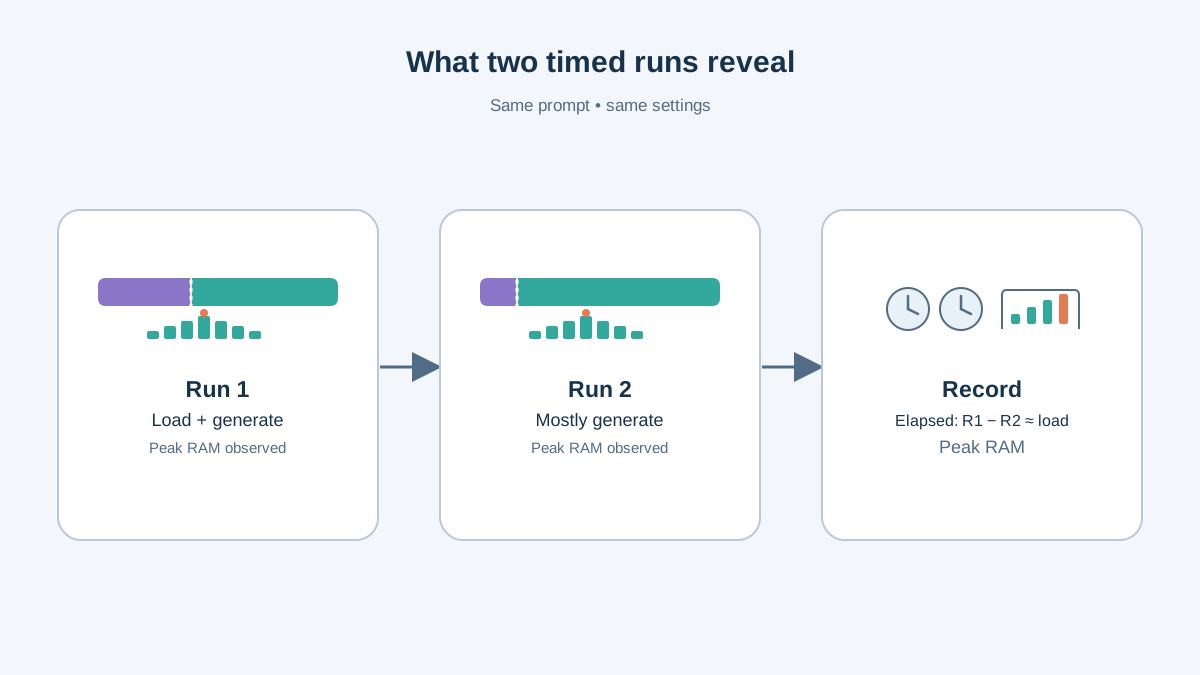
The simplest honest measurement is total elapsed time for the whole command. On macOS and Linux:
time ollama run qwen2.5:0.5b "Summarize this in exactly three sentences: A local language model runs on your own hardware. It loads weights from disk into memory. Generation happens one token at a time."
On Windows PowerShell, wrap the same call in a timer:
Measure-Command { ollama run qwen2.5:0.5b "Summarize this in exactly three sentences: A local language model runs on your own hardware. It loads weights from disk into memory. Generation happens one token at a time." }
Both commands report one number: the wall-clock time from launch to exit. That number mixes two different costs together:
- Load time — reading the model file from disk into memory. Paid once per session.
- Generation time — producing tokens. Paid on every run.
You cannot cleanly separate them from a single timed command. But you can estimate the split with a repeat run. Run the exact same command twice in a row. The second run usually skips most of the disk read because the model is already cached in memory. The difference between run one and run two is a rough estimate of load time; the second run's total is a rough estimate of generation time for that prompt.
Note: This is an estimate, not a precise decomposition. Caching behavior, disk speed, and background processes all blur the line. Record it as an estimate and say so when you report it.
For memory, open your system monitor and watch peak usage during generation, not idle usage. On Windows, Task Manager. On macOS, Activity Monitor. On Linux, htop or nvidia-smi if you have a GPU.
Record everything in a small table:
| Field | Your value |
|---|---|
| Model name | qwen2.5:0.5b |
| Quantization | (check the model card) |
| Prompt | (your fixed prompt) |
| Output length | (token count or sentence count) |
| Total time, run 1 | |
| Total time, run 2 | |
| Estimated load time | (run 1 minus run 2) |
| Estimated generation time | (run 2 total) |
| Peak memory |
Now compare your generation estimate against the budget you wrote down. If the answer arrives after you have lost interest, the setup fails the task — regardless of how good the answer is.
Knowledge check
Check your understanding
Answer this question before you continue.
When It Goes Wrong: Common Failures and What They Mean
A failed run is evidence about the system, not a dead end. Here is a debugging map:
Out-of-memory or heavy swapping. The model is too large for available memory. Drop to a smaller model or a more aggressive quantization.
Very slow first token. Usually model loading, not generation. Check whether the model is being read from disk on every run.
Garbage or repetitive output. Often a prompt or template mismatch, or a model too small for the task. Not necessarily a broken install.
Command not found or connection refused. The runtime is not installed, or its background service is not running. Restart the Ollama service.
Common mistake: Changing three things at once when a run fails. Change one variable at a time and re-measure, so you know which change moved the number.
One Experiment: Change a Variable and Re-Measure
A single run is a data point. Two runs with one variable changed is an experiment.
Pick one variable: a larger model in the same family, a longer output limit, or a longer prompt. Predict the direction of the change before you run it. More parameters should mean more memory and slower generation. A longer output should mean longer total time.
Then re-run with the same fixed prompt and compare against your table.
What the comparison teaches: the tradeoff curve between quality, memory, and speed is the real decision surface, and it is specific to your machine. Keep the scope honest — two data points on one laptop describe your laptop, not the model.
Decide Whether This Setup Fits Your Task
Apply the criteria you wrote at the start:
- Does it fit in memory without swapping?
- Does it answer within the task's time budget?
- Is the quality good enough for the specific job?
When local fits: offline work, privacy-sensitive text, high-volume experimentation where per-call cost matters, and learning how inference behaves.
When local does not fit: tasks needing frontier-level reasoning, long-context document work, or multimodal input beyond what a tiny model supports.
State the uncertainty plainly. Your numbers are observations from one machine under one configuration. A different laptop, model file, or prompt length will produce different results.
The durable takeaway is the measurement habit — task, budget, run, record, compare — not the specific model you happened to pull.
Your next step: run the same measurement with a second model size in the same family. Two points give you a line. That line is your tradeoff curve, built from your hardware, not someone else's benchmark.
Knowledge check
Final check
Finish the article by checking the ideas you just learned.
References
Want a more structured LLMOps path?
Use the LLMOps Practical Starter Bundle to connect RAG, evaluation, observability, and production patterns.
Large Language Models Starter Pack
A 12-chapter guide connecting LLM fundamentals with prompting, RAG, agents, tool calling, evaluation, security, and application engineering.
- 227-page Illustrated PDF edition
- 12 guided LLM engineering chapters
- Visual concept diagrams
- Self-assessment quizzes
- Bonus deep-dive sections
- Prompt design, structured output, context windows & RAG pipelines
- Agents, tool calling, prompt injection, evaluation & application lifecycles
Coming soon


