
Prompting Best Practices
You've asked an AI assistant the same question twice with slightly different wording and gotten two very different answers. One was exactly what you…

You've asked an AI assistant the same question twice with slightly different wording and gotten two very different answers. One was exactly what you needed. The other missed the point entirely. If you've felt like the model was ignoring you, here's what's actually happening: you're treating a prompt like a question typed into a box, when it's really a short instruction set the model follows loosely.
Large language models don't read your mind. They read your words, then fill every gap you leave with their own assumptions. That's why prompting best practices exist—not as magic phrases, but as habits that close those gaps so the model's guesses match your intentions.
Why Your Prompts Sometimes Miss
Here's the mental model that changes everything: a prompt is not a question. It's an instruction set written in natural language, and the model follows it with room to improvise.
When you write something vague, the model doesn't ask for clarification. It makes its best guess about what you meant and runs with it. Natural language is flexible and ambiguous, so small wording changes can shift the model's guesses in wildly different directions.
Try this experiment. Ask a model: "Tell me about productivity." Then ask: "Give me three specific habits for staying focused during deep work, written as actionable steps for a software developer." The first request produces a generic essay. The second produces something you could actually use. Same topic, completely different usefulness.
The model isn't being difficult. You left the first prompt open, so it filled the space with generic content. Best practices exist because they narrow that guessing range.
Be Specific About What You Want
The single highest-leverage habit in effective prompting is specificity. Before you send a prompt, ask yourself: does this name the task, the audience, the format, and the length?
Compare these two prompts:
Weak: "Summarize this article for me."
Specific: "Summarize this article in 3 to 5 bullet points. Assume I've already read it and need a quick reference for the key arguments. Keep each bullet under 25 words."
The second version works better because it removes guesswork. The model knows the format (bullets), the length (3 to 5 points, short phrases), and the audience (someone who needs a reference, not an explanation).
Notice something important: the specific prompt says what to do, not just what to avoid. "Don't make it too long" is weaker than "Keep each bullet under 25 words." Concrete numbers beat fuzzy words every time. "3 to 5 sentences" produces more reliable output than "fairly short" because the model doesn't have to interpret what "fairly" means.
Knowledge check
Check your understanding
Answer this question before you continue.
Give the Model a Role and Context
One of the most useful prompting tips is also one of the simplest: tell the model who it is and what it should assume.
Starting a prompt with "You are a patient tutor who explains concepts to beginners" changes the tone, depth, and vocabulary of the response. The role line acts like a filter, steering the model toward the register you want.
Context works the same way. If you're asking for feedback on a product description, tell the model who the customers are and what you're trying to achieve. That context tells the model what to focus on and what to ignore.
But here's where role framing stops being useful: it shapes tone, it doesn't replace clear instructions. "You are an expert editor" won't fix a prompt that never says what kind of editing you want. Role and context are seasoning, not the meal. Keep them relevant to the task, and skip them when they add nothing. Padding a prompt with unnecessary identity lines just adds noise.
Knowledge check
Check your understanding
Answer this question before you continue.
Show Examples Instead of Only Telling
Instructions tell. Examples show. And when the two conflict, examples usually win.
If you need output in a specific format, tone, or structure, the fastest way to get it is to show the model what you mean. This technique is called few-shot prompting, but the idea is simpler than the name suggests: give the model one or two examples of the output you want, then ask for the next one.
Suppose you need product descriptions in a playful voice. You could write a paragraph describing the tone you want, or you could write one example and say "Write three more like this." The example does more work in less space.
Keep examples short and on-task. One or two well-chosen samples usually beat a long description, and too many examples can confuse the model or push it toward copying rather than understanding. Use examples when instructions alone aren't locking in the behavior you need.
Knowledge check
Check your understanding
Answer this question before you continue.
Structure Long Prompts for Clarity
Short prompts rarely need structure. Long prompts—the ones with instructions, background, and content all mixed together—fall apart without it.
The core habit is separation. Put the instruction before the text it applies to, and use simple markers to keep them distinct. Triple quotes or clear labels work well:
Summarize the text below as a bullet point list of the most important points.

Text:
"""
{paste your content here}
"""
Without the marker, the model has to figure out where your instructions end and the content begins. With it, the boundary is obvious.
For multi-step tasks, number the steps. A prompt that says "First do this, then do that, and finally check the other thing" is harder to follow than one that lists the steps in order. Structure makes your most important requirement easy to spot, which matters more as prompts grow longer.
Knowledge check
Check your understanding
Answer this question before you continue.
Test, Compare, and Refine
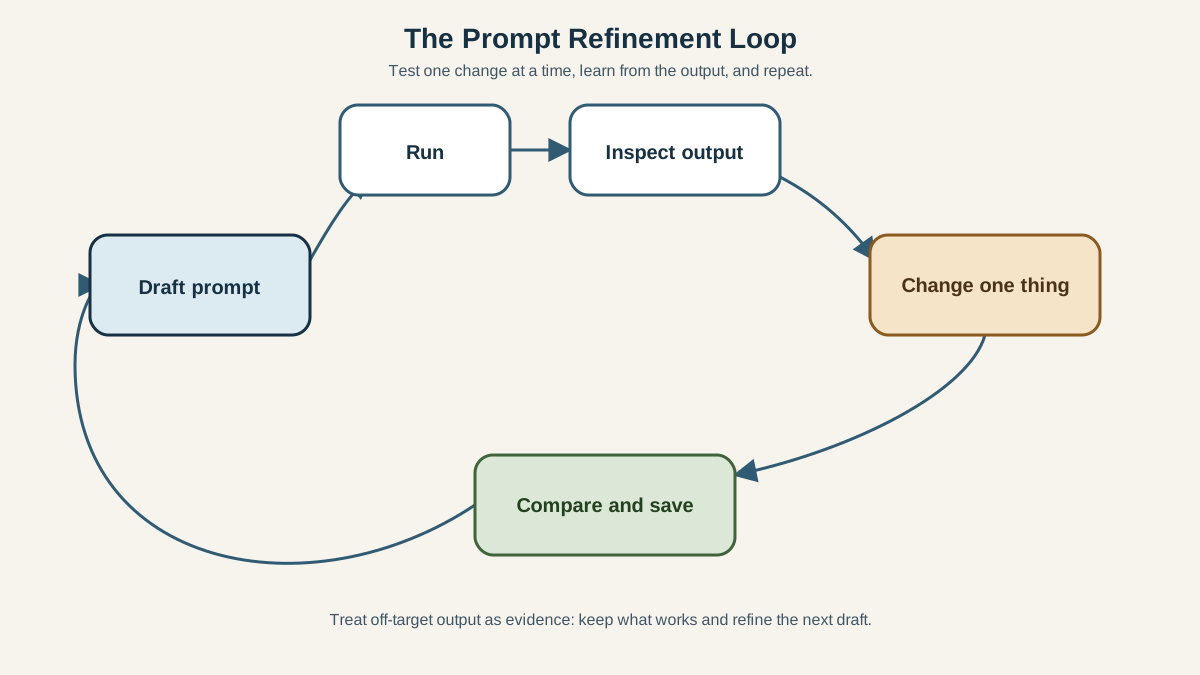
Here's the truth about prompting best practices: there is no perfect universal prompt. Results depend on the model you're using and the task you're doing. What works reliably for one model may need adjustment for another.
That's why the most important habit isn't writing—it's testing.
Run the same prompt a few times and look at the consistency of the output. If you get three wildly different answers, your prompt is probably leaving too much open. Change one thing at a time and compare the results. If you adjust three variables at once, you won't know which one mattered.
When you find a prompt that works, keep it. Build a small collection of reliable prompts for tasks you do repeatedly. They become reusable starting points you can adapt instead of reinventing each time.
And normalize this experience: getting an off-target answer isn't a personal failure. It's evidence. The output tells you what the model misunderstood, which tells you what to clarify next time. That's not a dead end. That's the refinement loop working.
Your Next Prompt
Before you send any prompt, run this quick check:
- Does it name the task?
- Does it specify the format and length?
- Does it give the model the context it needs?
If any answer is no, tighten that gap before you hit send.
Then put the habits into practice: take one prompt you use regularly—for work, study, or personal projects—and rewrite it using these guidelines. Run the old version and the new version side by side. Compare the output. You'll see the difference immediately, and that visible proof will stick with you far better than any list of rules.
Knowledge check
Final check
Finish the article by checking the ideas you just learned.
References
Want a more structured LLMOps path?
Use the LLMOps Practical Starter Bundle to connect RAG, evaluation, observability, and production patterns.
Large Language Models Starter Pack
A 12-chapter guide connecting LLM fundamentals with prompting, RAG, agents, tool calling, evaluation, security, and application engineering.
- 227-page Illustrated PDF edition
- 12 guided LLM engineering chapters
- Visual concept diagrams
- Self-assessment quizzes
- Bonus deep-dive sections
- Prompt design, structured output, context windows & RAG pipelines
- Agents, tool calling, prompt injection, evaluation & application lifecycles
Coming soon


