
Common Prompting Mistakes
You write a prompt. You press enter. The model replies with something generic, slightly off, or completely wrong. So you rewrite, try again, and get…

Key topics
You write a prompt. You press enter. The model replies with something generic, slightly off, or completely wrong. So you rewrite, try again, and get closer—but still not right. If this loop feels familiar, you are not doing anything wrong. You are doing the actual work of prompting.
Large language models are not mind readers. They respond to what you write, not what you meant. Most frustrating output is not a sign of a broken tool. It is a symptom of an input problem—and input problems are fixable.
Before we dig into the mistakes, one important distinction: not every bad answer is a prompting problem. Some failures come from the model's limits—stale knowledge, missing context, or tasks it simply cannot verify. So the first step in troubleshooting is classification. Ask yourself: Is this an instruction problem, a context problem, or a capability problem? Prompting fixes the first two. The third needs a different tool.
Here are the five most common prompting mistakes beginners make, why they produce weak output, and how to fix each one.
Mistake 1: Being Too Vague
The most common prompting mistake is also the simplest: asking for something so open-ended that almost any answer would qualify.
Vague prompt:
Write about time management.
The model will produce something. It will also be generic filler that could apply to anyone, anywhere, at any job. Why? Because you gave it no output contract. No audience. No purpose. No format. No length. Nothing to aim at.
Specific prompt:
Write a 300-word blog post for new remote workers about three time management techniques that help with focus. Use a friendly, practical tone. End with one question readers can ask themselves at the start of each workday.
Same topic. Completely different result. The second prompt tells the model who the content is for, what it should do, what shape it should take, and how long it should be.
Here is a useful rule of thumb: if you would not accept the request from a teammate, do not send it to the model. You would never walk up to a colleague and say "write about time management" without context. Give the model the same courtesy.
The fix: State who it is for, what it should do, and what shape the answer should take.
Knowledge check
Check your understanding
Answer this question before you continue.
Mistake 2: Overloading One Prompt with Too Many Tasks
When a prompt asks for several unrelated things at once, the model struggles to prioritize. The output often ends up shallow, disjointed, or missing parts entirely.
Overloaded prompt:
Write a product description for this coffee maker, summarize the history of coffee, and translate the description into Spanish.
That is three different jobs in one request. The model has to split its attention, and none of the tasks gets the focus it deserves.
The fix: Break the work into steps. This approach is called prompt chaining, and it gives you more control at every stage.
- First prompt: "Write a 100-word product description for this coffee maker in a friendly tone."
- Second prompt: "Summarize the description above into three bullet points."
- Third prompt: "Translate the bullet points into Spanish."
Each step builds on the previous one, and you can check the output at each stage before moving forward. If something goes wrong, you know exactly which step produced the problem.
Clarity beats complexity. Start simple, then build out.
Knowledge check
Check your understanding
Answer this question before you continue.
Mistake 3: Skipping the "Why" Behind the Task
Vagueness is about missing the shape of the answer. This mistake is different: you know what you want produced, but you have not told the model what good looks like for your situation.
Without context:
Make this sound better.
Better for whom? Better for what purpose? The model has no idea what "better" means, so it will guess—and its guess probably will not match yours.
With context:
Rewrite this draft for a newsletter read by busy software developers. The goal is clarity and practical value, not marketing. Keep a conversational tone and cut anything that sounds like hype.
When the model knows the audience and the goal, it makes better word choices, tone decisions, and structural judgments. One sentence of intent before the instruction can change the entire character of the response.
The fix: Add one sentence explaining the purpose and audience before you give the instruction.
Knowledge check
Check your understanding
Answer this question before you continue.
Mistake 4: Expecting Perfection in One Shot
Many beginners treat the first response as a final answer. When it is not perfect, they assume prompting does not work or that they are bad at it.
Neither is true. The first response is a rough draft.
First prompt:
Write a 100-word introduction to an article about building a daily reading habit.
Follow-up:
Make it less formal and address the reader directly.
Another follow-up:
Add a concrete example of how a busy person might fit in 20 minutes of reading.
Each refinement moves the output closer to what you want without starting from scratch. Prompting is a conversation, not a vending machine. You do not punch in a code and receive exactly what you ordered. You talk, adjust, and shape the response until it works.
Iteration is where the real skill lives. The first draft is just the starting point.
Knowledge check
Check your understanding
Answer this question before you continue.
Mistake 5: Ignoring What the Model Cannot Do
Large language models are trained on past data. They cannot reliably report current events, and they have no direct access to real-time information unless a tool provides it. They also can state wrong things with total confidence.
This is not a flaw you can prompt your way around. It is a fundamental property of how these systems work.
Problem prompt:
What are the top marketing trends for this year?
The model may produce a plausible-sounding list based on older data. Some of it might be accurate. Some of it might be invented. You have no easy way to tell which is which.
Better approach:
Here is a list of marketing articles from this year. Summarize the trends they mention and note any disagreements between them.
See the difference? The second prompt gives the model source material to work from instead of asking it to invent current facts. If you need up-to-date information, provide it—or use a tool that can retrieve it. Then ask the model to summarize, compare, or analyze what you gave it.
Use the model for what it is genuinely good at: explaining concepts, summarizing information, brainstorming ideas, and working with text you provide. Verify anything time-sensitive or factual yourself.
LLMs are masters of the known, not pioneers of the unknown. When in doubt, treat the output as a draft to check, not a fact to trust.
Troubleshoot by Symptom, Not by Guesswork
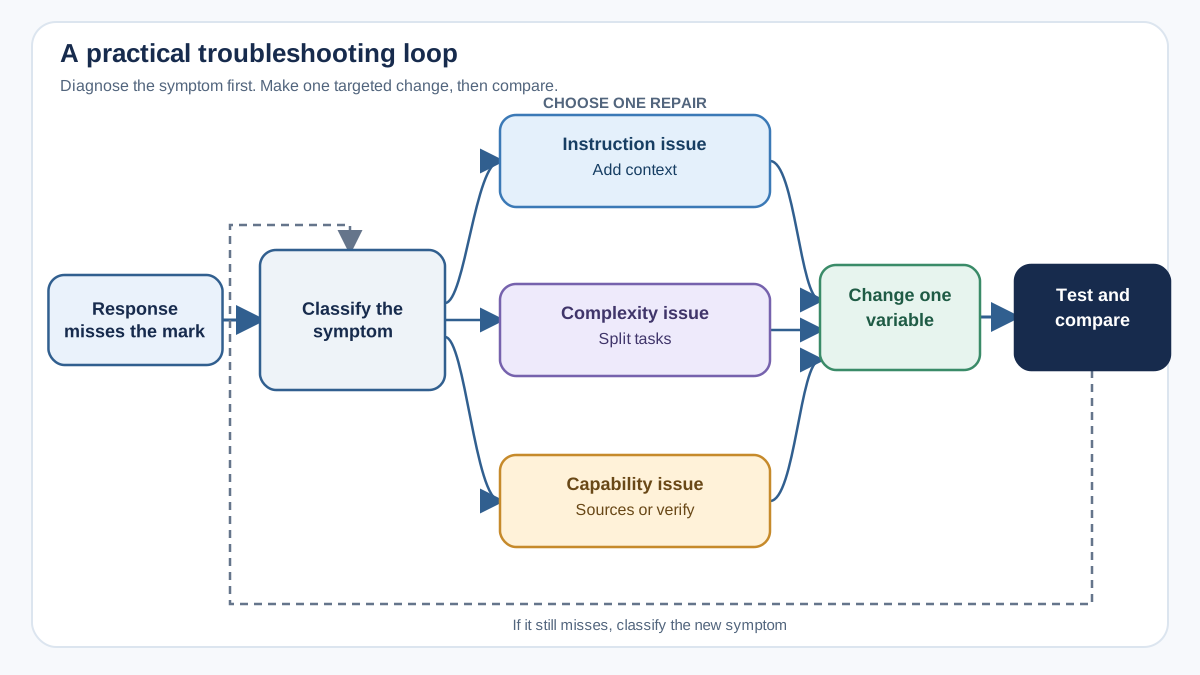
When output misses the mark, do not randomly rewrite and hope. Match the symptom to the most likely repair:
| Symptom | Likely cause | First thing to try |
|---|---|---|
| Generic, could-apply-to-anyone output | Missing audience, purpose, or format | Add who it is for, what it should do, and what shape the answer should take |
| Missing sections or mixed-quality output | Too many tasks in one prompt | Split into separate prompts and chain the steps |
| Wrong format or structure | Format not specified clearly | Show the exact structure or provide an example of the desired output |
| Almost right, but not quite | Needs refinement | Change one constraint at a time and compare results |
| Confident-sounding but unverifiable claims | Model limitation, not wording | Provide source material or use a retrieval tool; verify facts yourself |
Change one variable at a time and test, like debugging code. If you ask for a shorter version and get something longer, your instruction was probably ambiguous. If you ask for a formal tone and get casual language, make the tone constraint more explicit.
Keep a log of what worked and what did not. After a few sessions, patterns will emerge. You will stop guessing and start engineering your prompts.
Prompting mistakes are not failures. They are data. So here is your next move: take one prompt that gave you a disappointing result, label the failure category from the table above, change one variable, and run it again. Compare the two outputs. That loop—write, observe, adjust—is the skill. And like any skill, it improves with practice.
Knowledge check
Final check
Finish the article by checking the ideas you just learned.
References
Want a more structured LLMOps path?
Use the LLMOps Practical Starter Bundle to connect RAG, evaluation, observability, and production patterns.
Large Language Models Starter Pack
A 12-chapter guide connecting LLM fundamentals with prompting, RAG, agents, tool calling, evaluation, security, and application engineering.
- 227-page Illustrated PDF edition
- 12 guided LLM engineering chapters
- Visual concept diagrams
- Self-assessment quizzes
- Bonus deep-dive sections
- Prompt design, structured output, context windows & RAG pipelines
- Agents, tool calling, prompt injection, evaluation & application lifecycles
Coming soon


