
Prompt Design Basics
A clearer request is the fastest way to get a better answer from an AI model. The model does not know your audience, your standards, or what "good" looks…

A clearer request is the fastest way to get a better answer from an AI model. The model does not know your audience, your standards, or what "good" looks like for your task. It only knows the words you give it.
If you have ever received a generic, oddly wrong, or useless answer from a large language model, you already know the frustration. The fix is not mysterious. Most avoidable failures trace back to a prompt that left too much unsaid. Learn to spot the gaps in your request, and the quality of everything you get back will improve.
Why Your First Prompt Probably Failed
Here is the mental model that changes everything: think of the model as a talented but extremely literal new contractor. They show up on day one with no context about your business, your customers, or your standards. If you say "make this better," they will guess what "better" means. Sometimes the guess lands. Often it does not.
A vague prompt forces the model to fill every gap with its own assumptions. Compare these two requests:
- Vague: "Write about productivity."
- Specific: "Write a 300-word blog post for busy software developers about why deep work beats multitasking. Use a practical tone and end with three actionable tips."
The first prompt leaves the model to decide the audience, the length, the angle, and the tone. The second removes nearly all of that guesswork. The difference in output quality is not subtle.
Prompt design is the skill of making your intent hard to misread. Every sentence that narrows the task is a sentence the model does not have to spend guessing.
Knowledge check
Check your understanding
Answer this question before you continue.
What a Prompt Actually Does
A prompt is the instruction and context you hand the model before it starts generating text. That is the entire interface.
Here is a simplified model of what happens next: the model reads your words and produces the continuation most likely to follow them, based on everything it learned during training. That is why wording matters. Small changes in phrasing can steer the output in very different directions.
The new-contractor analogy holds up well here. If you hired someone brilliant but gave them no briefing, you would not blame them for missing the mark. You would recognize that you skipped the briefing. Writing a prompt is the same act: you are briefing the model before it starts working.
One important boundary: the model is not searching the internet or checking your files unless you explicitly give it access. It works from the context you provide. If you want it to summarize a specific document, include the document. If you want it to write for a specific audience, describe that audience. The model will not infer what you left out.
Note: What the model can access depends on the model and the application you are using. Some tools include retrieval, which means they can pull in relevant external information before answering. Others are limited to the conversation in front of them. When in doubt, provide the material yourself.
Knowledge check
Check your understanding
Answer this question before you continue.
The Building Blocks of a Clear Prompt
Most effective prompts share three components. You do not need a rigid template, but checking for these three things before you hit send will catch most of your mistakes.
Task. State exactly what you want the model to do. Use a direct verb: summarize, explain, list, compare, rewrite, outline. "Help me with my resume" is a fuzzy task. "Rewrite this job description bullet point to emphasize measurable results" is a clear one.
Context. Give the model what it needs to know about your situation. Who is the audience? What is the material? Why does this matter? What should the model assume? Context is the difference between an answer that is technically correct and one that is actually useful to you.
Format. Tell the model how you want the answer shaped. Bullets or paragraphs? A table? A specific word count? A numbered list of steps? If you do not specify, the model will choose its own structure, and its choice may not match how you want to use the result.
Watch what happens when you add these blocks one at a time:
- Weak: "Give me ideas for a team meeting."
- Add a task: "Give me five agenda topics for a team meeting."
- Add context: "Give me five agenda topics for a weekly sync with a five-person engineering team that is behind on a release."
- Add format: "Give me five agenda topics for a weekly sync with a five-person engineering team that is behind on a release. List each topic with one sentence explaining why it matters."
The final prompt is longer, but every word does work. The model knows what to produce, who it is for, and how to structure it. The output will be dramatically more usable than the answer to the first version.
Tip: If the answer you get back is generic, reread your prompt and ask what a literal-minded assistant would still be unsure about. The gap you find is usually the fix.
Knowledge check
Check your understanding
Answer this question before you continue.
Diagnosing What Went Wrong
When an answer misses the mark, the fix depends on the symptom. Match the problem to the part of your prompt that caused it:
| If the output is... | The likely gap is... | Try this... |
|---|---|---|
| Too generic or unfocused | Missing context | Add your audience, the material to use, or the goal of the answer |
| The wrong shape | Missing format | Specify bullets, a table, a word count, or a numbered list |
| Off topic or unfocused | A fuzzy task | Tighten the verb: "summarize" instead of "look at," "list" instead of "help with" |
| Factually uncertain | Missing evidence | Provide the source material yourself, or plan to verify the answer against a reliable source |
| Shallow on a complex topic | Too much packed into one request | Split it into smaller prompts, or ask for a structured breakdown first |
This is where prompt design becomes a diagnostic skill rather than a checklist. The output tells you which part of your prompt was ambiguous. Read the symptom, fix the matching element, and run it again.
Knowledge check
Check your understanding
Answer this question before you continue.
Common Prompt Mistakes Beginners Make
Most weak prompts fail in one of a few predictable ways. Once you can name the mistake, you can fix it quickly.
Being too vague. The model fills gaps with generic content because you left the gaps open. Fix it by naming the audience, the purpose, and any constraints that matter.
Overloading one prompt. Asking for a summary, a comparison, a rewrite, and a list of next steps in a single request usually produces a shallow answer on every front. Split unrelated requests into separate prompts. Each one will get fuller attention.
Forgetting the format. If you do not say "bullets" or "table" or "under 200 words," the model picks its own structure. State the output shape you want and you will save yourself a round of reformatting.
Assuming the model knows your context. It does not know your project history, your previous conversations, or the document you are thinking about unless you include it. Paste the relevant text. Describe the background. Treat every prompt as a fresh start.
Not iterating. The first answer is a draft, not a verdict. Treating it as final means you are leaving most of the value of prompt design on the table.
A Simple Workflow to Improve Any Prompt
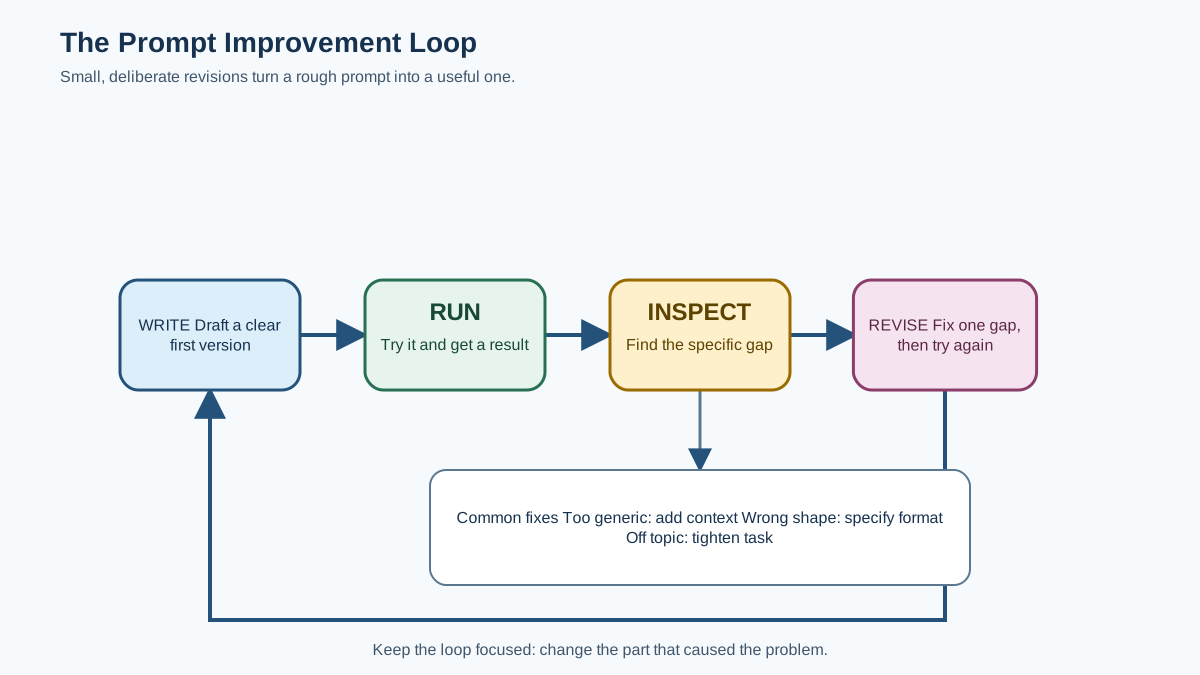
Prompt design is not a one-shot skill. It is an iteration loop, and the loop is simple: write, run, inspect, revise.
Start with a rough draft of what you want. Do not try to make it perfect. Then check it against the three building blocks. Did you state the task directly? Did you include the context the model needs? Did you specify the format?
Run the prompt and look at the output with a critical eye. What is missing? What did the model get wrong? What assumption did it make that you did not intend? A weak first answer is diagnostic evidence, not a sign that the tool is broken. It is telling you exactly which part of your prompt was ambiguous.
Revise the specific part that failed. If the output was too generic, add context. If it was the wrong structure, specify the format. If it drifted off topic, tighten the task. Then run it again.
Small, deliberate changes beat rewriting the whole prompt from scratch. When you change everything at once, you cannot tell which change mattered. When you adjust one element and observe the effect, you build an intuition for what works.
Common mistake: Treating the first answer as final. The habit that separates effective prompt users from frustrated ones is simple: they revise. Run the prompt, find the gap, fix the gap, run it again.
When Clear Prompts Are Not Enough
A clear prompt improves results, but it does not guarantee them. Set honest expectations now and you will avoid a lot of confusion later.
First, the model can sound confident while being wrong. Fluency is not the same as accuracy. If a task depends on facts you cannot verify yourself, check the output against a reliable source. A well-written prompt cannot turn an uncertain guess into a verified fact.
Second, for current events or highly specific information, the model may simply not know. A better prompt cannot conjure knowledge the model does not have. Those situations call for outside sources or retrieval tools, not more careful wording.
Third, some tasks benefit from techniques beyond the basics. Giving the model an example of the kind of output you want can dramatically improve results. For a complex task, asking for a structured solution—like a plan before the final answer—can help the model work through it more carefully. These are natural next steps once the fundamentals feel comfortable.
One caution: a step-by-step explanation is not proof of correctness. The model can reason confidently and still reach a wrong conclusion. Judge the final result against the task and the evidence, not against how convincing the reasoning sounds.
For now, the core habit is the same across every level: make your intent clear, inspect what comes back, and refine based on what you observe.
Your Next Step
Take one real task you already do and rewrite it using the task-context-format structure. Not a hypothetical exercise. Something you actually need: an email, a summary, a list of ideas, a draft of some kind.
Write the prompt. Run it. Look at the output and identify one thing it missed or got wrong. Revise the prompt to fix that specific gap, then run it again.
That loop—write, run, inspect, revise—is the whole game. The more you practice it on real tasks, the faster you will develop a sense for what your prompts are missing before the model ever tells you.
Knowledge check
Final check
Finish the article by checking the ideas you just learned.
References
Want a more structured LLMOps path?
Use the LLMOps Practical Starter Bundle to connect RAG, evaluation, observability, and production patterns.
Large Language Models Starter Pack
A 12-chapter guide connecting LLM fundamentals with prompting, RAG, agents, tool calling, evaluation, security, and application engineering.
- 227-page Illustrated PDF edition
- 12 guided LLM engineering chapters
- Visual concept diagrams
- Self-assessment quizzes
- Bonus deep-dive sections
- Prompt design, structured output, context windows & RAG pipelines
- Agents, tool calling, prompt injection, evaluation & application lifecycles
Coming soon


