
Prompt Templates and Variables: Turning Prompts into Reusable Workflows
You know the feeling. You write a prompt that gets you exactly what you need—a clear product description, a tidy meeting summary, a well-structured draft.…

You know the feeling. You write a prompt that gets you exactly what you need—a clear product description, a tidy meeting summary, a well-structured draft. Then next week, you need the same kind of output for a different product, a different meeting, a different topic. So you rewrite the whole thing, changing a few details and hoping you don't forget an instruction that worked last time.
That friction is the signal that you've outgrown one-off chats. When a task becomes a recurring pattern, rewriting the prompt from scratch each time is wasted effort—and worse, it invites inconsistency. One version forgets the tone rule. Another drops the format requirement. The results drift.
A prompt template fixes this by separating what stays the same from what changes. Instead of treating every prompt as a freshly written message, you build a stable skeleton with replaceable slots—variables—that you fill in for each new request.
If you already know the basics of writing clear prompts, this is the next step: turning a good one-time prompt into a reusable workflow.
What a prompt template actually is
A prompt template is a reusable prompt structure with placeholders that get filled in each time you run it. The surrounding instructions stay stable. The variables are the parts that change per request.
Here's a simple example. Suppose you regularly summarize articles for your team. Without a template, you write something like this each time:
Please summarize the following article in about 150 words. Focus on the main argument and key evidence. Use plain language that a non-expert can understand.
[Article text]
That works once. But notice what actually varies between runs: the article itself, and maybe the target length or the audience. Everything else—the task, the focus areas, the tone—stays the same.
A template version makes that structure visible:
Please summarize the following article in about {word_count} words. Focus on the main argument and key evidence. Use plain language that a {audience} can understand.
Article: {article_text}
When you run the template, you supply values for each variable:
word_count: 150audience: non-expertarticle_text: [the actual article]
The filled-in result is the prompt you send to the model. The template itself never changes. You can run it a hundred times with different articles, different lengths, different audiences—and the core instructions stay identical every time.
That consistency is the whole point. A template turns your best prompt into a repeatable asset instead of a one-time lucky guess.
Where the template ends and the workflow begins
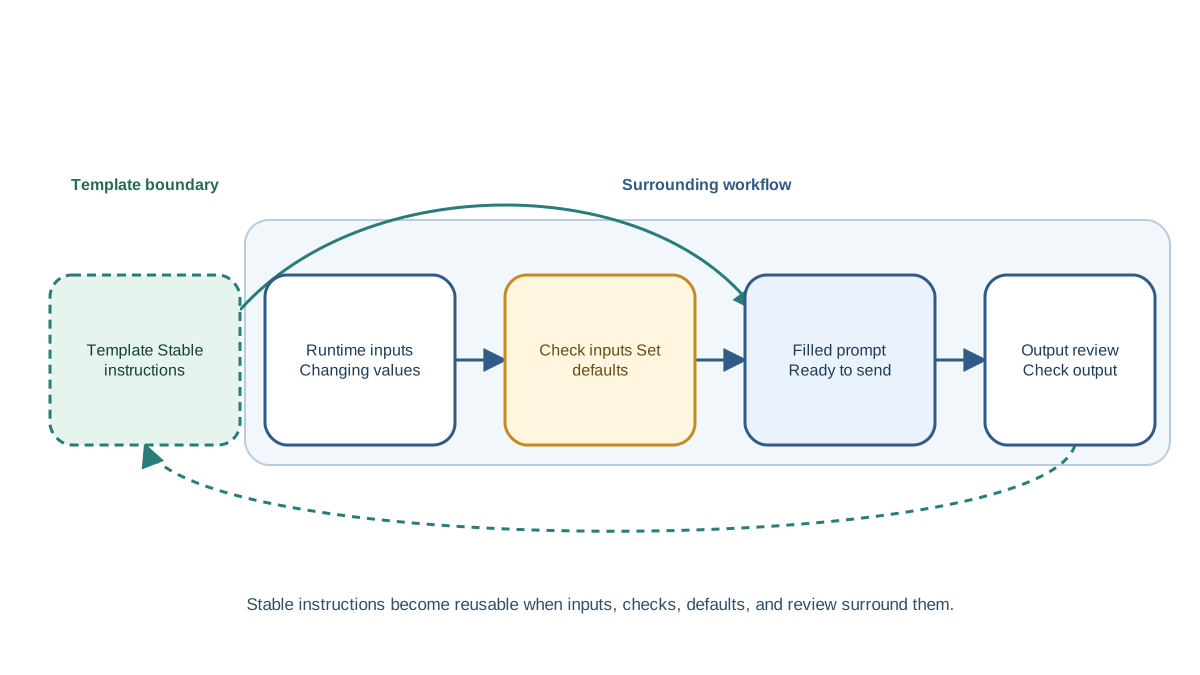
Here's a distinction that saves beginners a lot of confusion: the template is not the whole system. It's one piece of it.
Think of the template as the stable instruction sheet. The runtime inputs are the values you choose for each run. The rendered prompt is what you get after filling in those values. And the surrounding workflow is everything else you do around that prompt: checking that required values exist, deciding what happens when an optional value is missing, and inspecting the output after the model responds.
Why does this matter? Because beginners often try to cram workflow logic into the template itself. They write instructions like "if no style is given, use a professional tone" or "count the words and make sure there are at least 100." The model might follow those instructions—or it might not. Validation, defaults, and branching are jobs for the code or tool around the template, not for the prompt text.
Keep the template focused on instructing the model. Keep your own processing outside of it. That separation makes both sides easier to debug.
Knowledge check
Check your understanding
Answer this question before you continue.
What belongs in the template and what stays out
The key design judgment is deciding what counts as stable and what counts as dynamic.
Stable parts belong in the template: the task instruction, output expectations, tone rules, format guidance. These are the parts that make your results consistent.
Dynamic parts become variables: the specific content, data, or details that change between runs.
A common beginner mistake is burying assumptions inside the template. Imagine you build a template for writing social media posts, and you include the instruction: "The product is a project management app for small teams." That works until someone runs the template for a different product—and the model confidently writes about project management anyway, because the template told it to.
So when should something become a variable? Use this test: make a value a variable when it changes across valid runs without changing the task's identity. Keep it fixed when changing it would create a different task.
Here's the contrast. If your task is "write a product description," then the product name, features, and audience are variables. Each run is still the same kind of task. But if you change the task from "write a product description" to "fact-check this product's claims," that's not a new variable—that's a different template with different instructions.
An assumption you didn't realize was there will silently corrupt your results. A variable you can see, at least, is something you can question.
Knowledge check
Check your understanding
Answer this question before you continue.
Naming and filling variables well
Variable names matter more than beginners expect. A good name describes meaning, not just a data type.
Compare these two templates:
Write a {text1} for {text2} that appeals to {text3}.
Versus:
Write a {content_type} for {product_name} that appeals to {target_audience}.
The second version is readable at a glance. You can see what each slot expects without guessing. When you fill it in, you're less likely to swap the product name and the audience. And if something goes wrong, you can trace the problem to a specific variable instead of staring at text2 and wondering what it was supposed to hold.
You also need to decide which variables are required and which are optional. A required variable must be supplied on every run. If it's missing, the template produces a broken prompt—so check for it before you send anything to the model.
Optional variables need explicit behavior when absent. If a style variable isn't provided, decide in advance what happens. Does the template omit the style instruction entirely? Does it fall back to a default? Leaving it ambiguous means the model has to guess, and models guess inconsistently.
Keep your variable slots visually distinct so the template reads clearly. Curly braces or similar markers make the structure obvious: you can scan the template and immediately see which parts are fixed instructions and which parts get filled in.
Knowledge check
Check your understanding
Answer this question before you continue.
Designing your first reusable template
Building a template is a five-step process. Work through it slowly the first time, and it becomes faster with practice.
Step 1: Name the recurring task. Pick something you actually do more than once. Drafting client emails, summarizing research papers, generating product descriptions, turning notes into meeting minutes—any task where you find yourself writing near-identical prompts.
Step 2: List what changes between runs. Write down every detail that differs each time you do the task. Those become your variables. If you're writing product descriptions, the variables might be the product name, its features, and the target audience.
Step 3: Write the stable instruction. This is the part that stays the same every time. Use everything you know about clear prompt design: state the task directly, specify the tone, and remove ambiguity.
Step 4: State the expected output format. Tell the model what the result should look like. Should it be a paragraph, bullet points, a specific structure? The more precisely you describe the output, the more consistent your results will be.
Step 5: Run it with different inputs. Test the template with varied values, not just the first example that comes to mind. Compare the outputs and look for problems.
Let's see this in action. Say you regularly write short product descriptions for your online store. Your variables are the product name, its key features, and the audience. Your stable instruction covers the task and tone. Your output format is a short paragraph plus a bullet list of benefits.
The resulting template might look like this:
Write a product description for {product_name}.
Key features to highlight: {features}
The target audience is {audience}. Write in a friendly, enthusiastic tone. Keep the description under 100 words.
Format: one short introductory paragraph, followed by a bullet list of the top three benefits.
Run it with a coffee mug, a desk lamp, and a backpack. Each run produces a different description, but they all follow the same structure and tone. That's the template doing its job.
Knowledge check
Check your understanding
Answer this question before you continue.
Testing your template before you trust it
A template that works once is not proof it works generally. The whole value of a template is that it produces good results across different inputs—so you need to test it that way.
The simple habit: run the same template with three kinds of inputs and compare the outputs. Don't just change the product name. Change the audience. Change the length. Change the kind of content you're feeding in.
Case 1: A normal input. This is the happy path. Run the template with a typical value and confirm the output looks like what you wanted. This catches basic problems with your instructions.
Case 2: A boundary input. Try something unusually short, unusually long, or at the edge of what the template should handle. A very short article, a product with no clear features, an audience you haven't tested. This reveals whether your instructions are specific enough to survive variation.
Case 3: A missing or mismatched input. Leave out a required variable. Feed a video transcript into a slot that expects a document. Watch what happens. This is where hidden assumptions surface.
Watch for three common failure modes:
A variable that changes meaning. If your template says "summarize the {document}" and you feed it a video transcript, the instruction may no longer make sense. The variable name promised one thing, but the value delivered another.
An instruction that only worked for the first example. Maybe your template says "focus on the pricing section" because your first test document had one. The second document doesn't. The model dutifully looks for a pricing section and produces nonsense.
Output format drift. The first run gives you clean bullet points. The second run gives you a paragraph with dashes. The third gives you numbered items. The template's format guidance wasn't specific enough.
When you get a bad output, treat it as evidence about the template—not as a reason to abandon the approach. Ask which part of the template caused the problem. Was the instruction too narrow? Was the variable poorly named? Was the format specification too vague? Revise that part and test again.
This is why keeping templates small matters. A short template with a few clear variables is easy to debug. A sprawling template with dozens of instructions and variables makes every failure an archaeological dig.
When a template helps and when it does not
Templates are not always the right tool. The decision rule is simple: use a template when you repeat the same kind of task with different inputs. Skip it when the task is genuinely one-off or the inputs never vary.
Templates shine for recurring workflows: summaries, drafts, structured outputs, content variations, any task where you find yourself writing the same kind of prompt repeatedly. Each template you build is a small piece of reusable infrastructure—write it once, improve it over time, and benefit from it on every future run.
But a template is a starting point, not a magic fix. It still needs good instructions and honest testing. A template built from a weak prompt just produces weak results more consistently.
Your next step
Pick one task you repeat. It could be anything—summarizing articles, drafting emails, generating ideas for content. Identify what changes between runs. Those are your variables. Write the stable instruction that stays the same. Specify the output format. Then run it three times: once with a normal input, once with a boundary input, and once with a missing or mismatched value. Compare what breaks.
The goal is not to build the perfect template on your first try. It's to build one that's good enough to test, then improve it based on what you observe. That's the workflow that turns prompting from a one-off activity into something you can rely on.
Knowledge check
Final check
Finish the article by checking the ideas you just learned.
References
Want a more structured LLMOps path?
Use the LLMOps Practical Starter Bundle to connect RAG, evaluation, observability, and production patterns.
Large Language Models Starter Pack
A 12-chapter guide connecting LLM fundamentals with prompting, RAG, agents, tool calling, evaluation, security, and application engineering.
- 227-page Illustrated PDF edition
- 12 guided LLM engineering chapters
- Visual concept diagrams
- Self-assessment quizzes
- Bonus deep-dive sections
- Prompt design, structured output, context windows & RAG pipelines
- Agents, tool calling, prompt injection, evaluation & application lifecycles
Coming soon


