
LLM Message Roles and Context: How Instructions Are Organized
You type a question into a chat window, and the model answers. Simple enough. Then you open an API playground or peek at an app's developer docs, and…

You type a question into a chat window, and the model answers. Simple enough. Then you open an API playground or peek at an app's developer docs, and suddenly your words are wrapped in labels like system, user, and assistant. Who controls those labels? Do they actually change anything?
Most beginners assume a prompt is just one block of text you hand to the model. That mental model works for casual chatting, but it falls apart the moment you want consistent behavior, multi-turn conversations, or any real control over what the model does. The truth is simpler and more useful: every interaction with a large language model is a structured list of messages, and each message carries a role tag.
Here is the key insight: a role label describes where a message comes from and what job it is meant to do. It does not, by itself, guarantee authority or behavior. The application and the model decide how those roles actually play out.
Why Your Prompt Is Really a List of Messages
When you send a message, the application does not forward just your latest sentence. It assembles a list of everything relevant to the conversation so far, tags each item with a role, and sends the whole package to the model.
Think of it like a script for a play. The script does not contain only the line you just shouted from the audience. It contains the stage directions, the previous dialogue, and the character notes that tell the actor how to deliver the next line. Without the full script, the actor has no idea what is happening.
The model is in the same position. Large language models are stateless between calls. They do not privately remember your earlier questions, your name, or the preferences you mentioned last week. They only see what is in the current message list. If the application wants the model to act like a helpful assistant with a consistent personality, it has to rebuild that context from scratch on every single request.
This is why message roles exist. The role tag tells the model who is speaking in each part of the script: the application setting the rules, the end user making a request, or the model itself responding.
Knowledge check
Check your understanding
Answer this question before you continue.
The Three Core Roles: System, User, and Assistant
Most chat-based models recognize three core roles, and each has a distinct job.
System messages are the persistent instruction layer. They are typically written by the application developer, not the end user, and they appear before any user input. A system message might define the model's persona, set output format rules, establish boundaries, or provide background context the model should keep in mind throughout the conversation.
User messages are the actual requests or comments from the person using the app. This is the part you control directly when you type into a chat box.
Assistant messages are the model's previous responses, fed back into the conversation so later turns have context. When the model appears to remember what it said five minutes ago, it is not recalling anything. The application is simply re-sending the model's earlier replies as assistant-role messages.
Here is what a minimal conversation looks like when you strip away the chat interface:
- System: You are a concise technical writer who explains concepts in plain language.
- User: What is a context window?
- Assistant: A context window is the amount of text the model can consider at once when generating a response.
The system message carries the standing instructions. The user message makes the request. The assistant message carries the answer forward.
One important detail: the system message is optional. Many simple chat applications run with no system message at all. The model still works fine; it just has no special instructions about persona or behavior beyond its default training. If you have only used a basic chat app, you may have never encountered a system prompt, which is why the label feels mysterious when you finally see it.
Knowledge check
Check your understanding
Answer this question before you continue.
Instructions vs. Reference Material: Two Different Jobs
Once you understand the three roles, the next step is learning to separate two kinds of content that often get tangled together: instructions and reference material.
Instructions tell the model how to behave. They cover tone, format, boundaries, and rules. "Always respond in bullet points." "Never speculate about the future." "If you do not know the answer, say so." These are instructions.
Reference material gives the model something to work with. Documents, data, examples, background facts, and specific details the model should use in its response. "Here is our product documentation." "The user's account type is premium." "These are the three candidate answers to evaluate." This is reference material.
Beginners often mix the two into one blob, and the model struggles to tell a rule from a fact. Consider this muddled request:
You are a helpful assistant. Our company sells project management software. The free tier allows 5 projects. The pro tier allows unlimited projects. Always be polite. Answer questions about pricing.
The model has to guess which sentences are behavioral rules and which are factual data. It will probably figure it out, but the ambiguity costs clarity. Now look at the separated version:
System: You are a customer support agent for our project management software. Always be polite. Only answer questions about our product. If you do not know the answer, say so.
User: Here is our pricing information: the free tier allows 5 projects, and the pro tier allows unlimited projects. A customer asks: "Can I create more than 5 projects on the free plan?"
The instruction layer tells the model how to act. The reference material tells it what to say. When the two are cleanly separated, the model can apply the rules consistently while drawing on the facts you provided.
Where each type of content lives varies by application. Some apps put reference material in the system message alongside instructions. Others inject it into the user message or a separate context field. The general principle holds regardless: keep rules and facts distinguishable, because that separation makes it easier for you to see what the model is being told and easier for the application to manage the conversation.
Tip: When you inspect any LLM-powered tool, label each piece of content as instruction, user request, prior output, or evidence. Then check where the application inserts it. That single habit will tell you more about why a model behaves a certain way than any amount of guessing.
Knowledge check
Check your understanding
Answer this question before you continue.
How Context Builds Across Multiple Turns
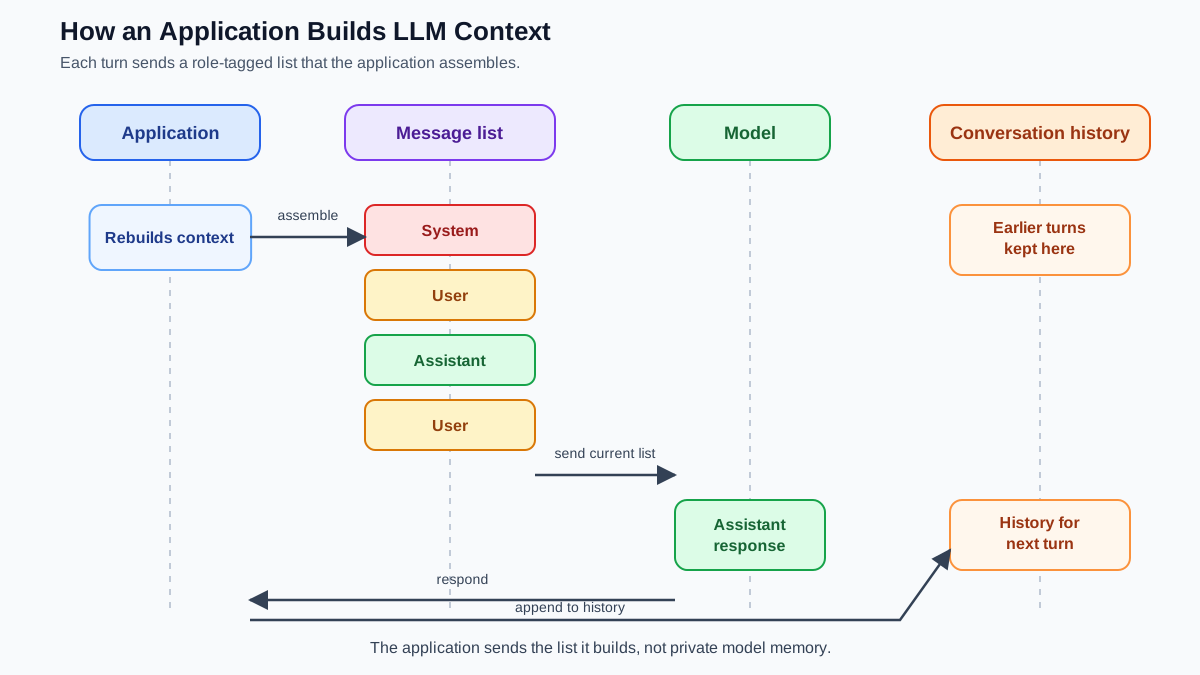
The message list does not stay static. Every time you send a new message, the application appends it and re-sends the entire history.
Imagine a two-turn conversation:
- User: What is the capital of France?
- Assistant: The capital of France is Paris.
- User: What is the population there?
For that final question, the application sends all four messages. The model reads the full history, understands that "there" means Paris, and answers accordingly. The model did not remember anything. The application rebuilt the context by including the earlier exchange.
This growing list has a cost. Every message consumes tokens—the small chunks of text that models read and generate—and models have a context limit, meaning they can only consider so much text at once. A long conversation with a detailed system prompt and several lengthy assistant replies can fill the available space, at which point older messages get truncated or dropped. This is why very long conversations sometimes lose the plot: the beginning literally falls out of the context window.
You do not need to manage token math yet. Just hold onto the mental model: the model sees only what is in the current message list, and that list grows with every turn until it hits a ceiling.
Knowledge check
Check your understanding
Answer this question before you continue.
Why Exact Behavior Depends on the Application
Here is where many beginners get stuck. They learn that system messages are powerful, then they test the idea across different tools and see inconsistent results. The system prompt works perfectly in one app and gets ignored in another.
That inconsistency is not a bug. It is the reality of how roles are implemented.
Different models and APIs format roles differently under the hood. Some use explicit role tags that wrap each message. Others use simpler templates that mark instructions and responses with plain text markers. A few models barely distinguish between system and user content at all. The same logical structure—system, user, assistant—gets translated into different concrete formats depending on the model and the API.
Application design also matters. Some apps let you view or influence the system prompt. Others lock it down completely. Some apps place your instructions in the system role; others quietly merge them into the user message. You cannot assume that a system prompt you write in one tool will behave identically in another.
There is a second limitation worth understanding: a system message is guidance, not a hard guarantee. The model can ignore it, drift from it over a long conversation, or be overridden by a strong user message. System prompts are remarkably effective at steering behavior, but they are not a security boundary and they are not an absolute rule. Treat them as a powerful influence, not a contract.
The practical takeaway is straightforward. Learn the roles as a mental model because they explain how LLM context and instructions are arranged across chat-style applications. Then check how your specific tool exposes those roles, because the details will vary.
A Practical Way to Think About Roles
If you take one thing from this article, let it be this two-part rule:
Roles identify the intended source and job of each message. The application and model determine how those messages are formatted, prioritized, and followed.
Now put it to work. Here is an experiment worth running.
Open a chat application or API playground that lets you see or modify the system prompt. Start with a simple instruction like "You are a cheerful travel guide who gives short, enthusiastic recommendations." Then ask a question about a city you know well. Observe the tone and length of the response.
Now change the system prompt to "You are a skeptical travel critic who gives detailed, cautious assessments." Ask the same question. The difference in behavior will be visible immediately, and you will have proven to yourself that the system message shapes the model's behavior.
Then take the experiment one step further. Move that same instruction out of the system field and paste it into your user message instead, before your actual question. Does the model still follow it? Does it follow it as consistently? The answer will show you how your specific tool treats different roles—and why you cannot assume every application handles them the same way.
This message-structure mental model is foundational. Once you see every interaction as a list of role-tagged messages, concepts like context windows, token limits, and generation settings start to make sense. And when you eventually build real LLM applications, this structure is exactly what you will be assembling under the hood. Master the roles now, and everything else gets easier.
Knowledge check
Final check
Finish the article by checking the ideas you just learned.
References
Want a more structured LLMOps path?
Use the LLMOps Practical Starter Bundle to connect RAG, evaluation, observability, and production patterns.
Large Language Models Starter Pack
A 12-chapter guide connecting LLM fundamentals with prompting, RAG, agents, tool calling, evaluation, security, and application engineering.
- 227-page Illustrated PDF edition
- 12 guided LLM engineering chapters
- Visual concept diagrams
- Self-assessment quizzes
- Bonus deep-dive sections
- Prompt design, structured output, context windows & RAG pipelines
- Agents, tool calling, prompt injection, evaluation & application lifecycles
Coming soon


