
Conversation History Management: How LLM Apps Handle Long Chats
Your chat app seems to forget things. You mentioned a preference twenty messages ago, and now the assistant answers as if you never said it. It feels…

Your chat app seems to forget things. You mentioned a preference twenty messages ago, and now the assistant answers as if you never said it. It feels broken, or maybe passive-aggressive. Neither is true. The app is not a memory bank that stores and retrieves every message equally. It is a system working around a hard limit—and the way it works around that limit determines what it remembers and what it drops.
Why Your Chat App Seems to Forget
Here is the core mechanism: a large language model does not remember anything between requests. When you send a message, the model reads the conversation fresh, generates a response, and then discards everything. The next time you send a message, it reads the conversation again from scratch.
This means your conversation history is not stored inside the model like memories in a brain. It is stored by the application, which gathers up the relevant messages and feeds them to the model as input on every single turn. The model never recalls what you said earlier. It only sees what the app decides to show it right now.
That decision is constrained by the context window—the limited amount of text the model can process at once, which you may remember from the earlier article on how context windows work. Every message in your conversation takes up space in that window. When the conversation grows long enough, the app cannot fit everything, and it has to make choices about what to keep.
The design problem for every chat application is simple to state and hard to solve: which parts of the conversation deserve space in the window?
Knowledge check
Check your understanding
Answer this question before you continue.
The Context Window Is a Crowded Desk, Not a Filing Cabinet
Think of the context window as a desk, not a filing cabinet. A filing cabinet stores everything neatly and lets you pull any file on demand. A desk only holds what is physically in front of you right now. The model can only work with what is on the desk at the moment it answers.
Every message you send gets placed on the desk. The desk has a fixed size. When you add a new message and the desk is full, something has to go. The app clears space by removing, compressing, or selecting parts of what was there before.
This is not the model being forgetful or lazy. It is a hard physical limit, like trying to spread a hundred pages across a desk that only fits forty. The application is the one deciding which pages stay visible and which ones get filed away, crumpled into a summary, or thrown out entirely.
Different apps make different choices, and that is why conversation memory can feel so inconsistent.
How Apps Build Each Request
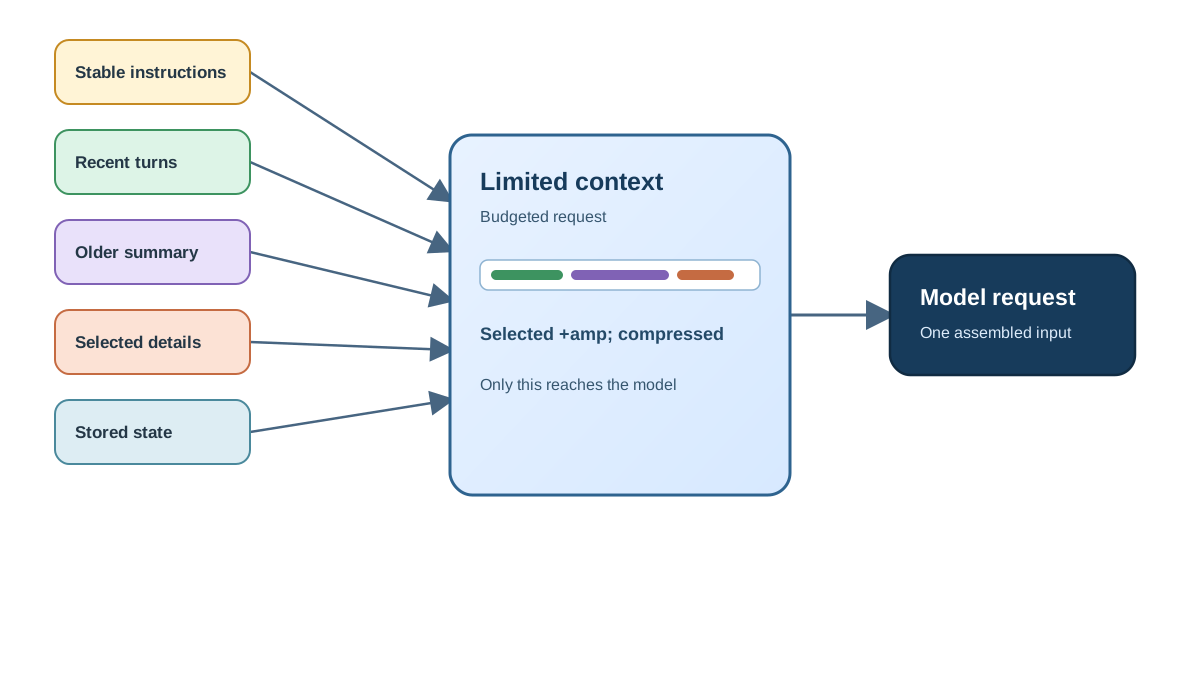
Before we look at the individual strategies, it helps to see the workflow an application follows before every message you send. The app does not simply forward your whole chat transcript. It assembles a request from several possible sources:
- Stable instructions — the system message that defines the assistant's role and rules.
- Recent turns — the latest exchanges, usually kept in full.
- Compressed older material — a summary of earlier parts of the conversation.
- Selected older details — specific past messages the app judges relevant to your current question.
- Stored user state — facts the app keeps outside the chat transcript, like your name, preferences, or account settings.
The model sees whatever the app inserts on that turn. It does not know whether a piece of text came from a recent message, a summary, or a database of saved preferences. From the model's perspective, it is all just context on the desk.
This is an important boundary to keep in mind: chat history is only one source of context. An application may also store structured user state or searchable records, and it can insert selected pieces of those into a later request. When a preference you stated early on seems to "stick," it may not be because the app kept your old message. It may be because the app extracted that fact, stored it separately, and reinserted it later.
Now let us look at the main strategies apps use to manage the chat history itself.
Truncation: Cutting the Oldest Messages
The simplest approach is truncation. When the conversation gets too long, the app keeps the most recent messages and drops the oldest ones.
Imagine a forty-message chat where the app decides to keep only the last fifteen turns. Everything before that disappears from what the model sees. If you ask a question that depends on something you said in message five, the assistant has no idea what you are talking about. From its perspective, that earlier message never existed.
One important detail: the system message, which contains the app's standing instructions, is usually protected. Even when older turns get cut, the app keeps those instructions intact so the assistant still knows its role and rules.
Truncation is cheap and simple, which is why many apps use it. It works fine for short, casual conversations where recent context is all that matters. It fails badly for long, goal-driven conversations where an early decision or detail still shapes what you are trying to do now.
Knowledge check
Check your understanding
Answer this question before you continue.
Rolling Windows: Keeping a Sliding Slice
A rolling window is a specific retention rule: the app always keeps a fixed number of recent turns and slides that window forward as the chat grows. Think of it as truncation applied consistently, rather than a separate memory system.
Picture a window that shows the last ten messages. Message eleven arrives, and message one slides out of view. The assistant stays coherent within that window, but it has no memory of anything before it.
Here is the practical consequence: you can have a long troubleshooting conversation where you describe a problem in detail at the start, and by turn thirty the assistant has completely lost that original description. It can still help you with whatever you just asked, but it cannot connect that question to the earlier context that would make the answer useful.
Rolling windows work well for chat apps where the immediate exchange matters most and earlier turns rarely resurface. They are a poor fit when you expect the assistant to carry a thread across a long session.
Summaries: Compressing the Past
Summarization is a smarter approach. Instead of dropping old messages entirely, the app condenses them into a short summary and keeps the recent messages in full.
Suppose you are in a long planning conversation. After thirty messages, the app summarizes the early part into a few sentences: the project goal, the key decisions made, the constraints you mentioned. The model still sees the big picture, but it no longer sees the exact wording of those early exchanges.
The tradeoff is real. Summaries preserve the gist but lose exact details. If you mentioned a specific date, a precise number, or a particular phrasing early on, the summary might keep the general idea and drop the specific fact. When you later need that exact detail, the assistant cannot recover it because the original message is gone.
Summarization also costs something. Creating a summary requires a separate model call, which takes time and tokens. It is not a free operation, and apps have to decide when the benefit of compression is worth the cost.
For long, goal-driven conversations where the overall thread matters more than exact wording, summaries are often the strongest choice.
Knowledge check
Check your understanding
Answer this question before you continue.
Selective History: Keeping What Matters
The most sophisticated approach is selective history. Instead of treating all messages equally, the app keeps recent turns plus specific earlier pieces that look relevant to the current question.
Imagine a support chat where you stated your preferences early on: you want concise answers, you prefer examples over theory, and you are working with a specific tool. The app might retain those stated preferences while dropping unrelated small talk from the middle of the conversation.
This approach is harder because the app must judge relevance, and relevance is itself a reasoning task. The app has to look at your current question, scan the history, and decide which older pieces might matter. That judgment can miss. The app might drop something you needed, or keep something irrelevant that crowds out more useful context.
Selective history is valuable for apps with clear user state: goals, preferences, constraints that need to survive across a long session. It is also the hardest strategy to get right, because the app is essentially guessing what you will need next.
Knowledge check
Check your understanding
Answer this question before you continue.
How the Strategies Combine in One Request
These approaches are not mutually exclusive. A single application can combine several of them in one request, and understanding that combination is the key to predicting what the model will see.
Let us walk through a long planning chat to make this concrete. Suppose you have been working with an assistant for an hour on a website redesign. Early on, you said the site needs to feel calm and minimal. Twenty messages later, you are discussing specific button colors.
Here is what the app might assemble before answering your latest question:
- System message — the assistant's role and general rules.
- Recent turns — your last few messages about button colors, kept in full.
- Summary — a compressed version of the earlier planning: "User is redesigning a website with a calm, minimal aesthetic. Prefers muted tones. Wants to avoid clutter."
- Stored state — your stated preference for concise answers, saved separately and reinserted.
- Dropped material — the middle exchanges about layout options you already rejected.
The model sees all of this as one input. It does not know that the summary came from a compression step or that your preference for concise answers was stored outside the transcript. It just reads the assembled context and answers.
This is why memory can look inconsistent in ways that seem arbitrary. The app is not choosing one strategy and sticking with it forever. It is applying a budget, and the budget gets tighter as the conversation grows. Early on, everything fits. Later, the app starts summarizing, truncating, or selecting—and the exact mix can change from turn to turn.
Why Memory Can Look Inconsistent
Now you can see why your chat app seems to remember some things and forget others with no obvious pattern.
Different apps use different strategies. The same app might even use different strategies at different moments, depending on how long the conversation has grown. One app might summarize your early messages, preserving your goal but losing your exact wording. Another might truncate aggressively, keeping only the last few exchanges. A third might try to keep the pieces it judges relevant, which means it can remember something obscure you said an hour ago while forgetting something obvious you said ten minutes ago.
The app is not selectively ignoring you. It is applying a budget you cannot see. Every message competes for space in the context window, and the app's strategy determines which messages win.
Here is a practical diagnostic for when the assistant seems to forget something: ask yourself which strategy the app likely used. Was the forgotten detail old enough to have been truncated? Was it specific enough to have been lost in a summary? Was it outside the rolling window? In most cases, the answer is one of those three.
Tip: When something matters to your current question, restate it in your current message. Do not assume the app carried it forward. A single sentence of context is cheap insurance against a lost detail.
Choosing the Right Approach
If you are building or evaluating an app, a compact decision rule helps you match the strategy to the information type:
| What you need to preserve | Best approach |
|---|---|
| Immediate back-and-forth flow | Recent window, kept in full |
| Durable preferences or constraints | Structured user state, stored outside the transcript |
| Broad understanding of an older thread | Summary of earlier messages |
| Exact wording or specific evidence from earlier | Retrieval of the original message, or ask the user to restate it |
The key boundary: summaries are poor substitutes when exact wording matters. If a contract term, a precise number, or a quoted phrase from early in the conversation could become important later, a summary will not reliably preserve it. The app either needs to retrieve the original message or the user needs to restate the detail.
What This Means for How You Chat
Understanding the mechanism gives you a decision rule for how to talk to these systems.
Recent context is usually safe. If you mentioned something in the last few messages, the assistant most likely has it—but that is a likelihood, not a guarantee. The app may transform, filter, or omit recent messages too, especially if it reserves space for instructions or retrieved material. The visible chat transcript is not always identical to what gets sent to the model.
Older context is a gamble. It might be in a summary, it might have been dropped, or it might have been judged irrelevant. Exact wording is the most fragile of all. Even when the app preserves the gist of an early exchange, it rarely preserves the precise phrasing.
When a fact or goal matters to the answer you want, put it in your current message. This is not about writing perfect prompts. It is about recognizing that you are the only part of the system that knows what you actually need. Restating the fact in the current request is the one reliable way to make it available.
When a conversation has drifted far from its original topic, consider starting a fresh chat. Old context may be crowding the window, pushing out the very information you need for the current question. A clean start gives the assistant more room to focus on what you are asking now.
Some apps expose memory controls or let you pin important context. Knowing the mechanism helps you use those features intelligently. When an app offers a way to preserve specific information, that is usually a sign that the default behavior would otherwise drop it.
Common mistake: Treating the assistant's forgetfulness as a personal failing or a broken product. The app is making a budget decision you cannot see. Your job is to work with that budget, not against it.
The next time an assistant seems to forget something, pause and ask yourself which strategy the app probably used. Was the detail old enough to be truncated? Was it specific enough to be lost in a summary? Was it outside the window? Then decide what to do about it: restate the fact, start fresh, or accept that the detail is gone and move on.
That habit—diagnosing the mechanism behind the symptom—is the difference between feeling confused by these systems and understanding how they actually work.
Knowledge check
Final check
Finish the article by checking the ideas you just learned.
References
Want a more structured LLMOps path?
Use the LLMOps Practical Starter Bundle to connect RAG, evaluation, observability, and production patterns.
Large Language Models Starter Pack
A 12-chapter guide connecting LLM fundamentals with prompting, RAG, agents, tool calling, evaluation, security, and application engineering.
- 227-page Illustrated PDF edition
- 12 guided LLM engineering chapters
- Visual concept diagrams
- Self-assessment quizzes
- Bonus deep-dive sections
- Prompt design, structured output, context windows & RAG pipelines
- Agents, tool calling, prompt injection, evaluation & application lifecycles
Coming soon


