
How to Debug a Bad LLM Response: A Step-by-Step Prompting Method
You rewrite the prompt. You get a different answer. It's still bad. So you rewrite it again, add more words this time, maybe change the tone. Another…

You rewrite the prompt. You get a different answer. It's still bad. So you rewrite it again, add more words this time, maybe change the tone. Another answer arrives—different, but somehow just as wrong. After three or four rounds, you have no idea which change helped, which change hurt, or whether anything you did mattered at all.
That loop is not a failure of effort. It's a failure of diagnosis.
Most weak AI responses are not one vague problem. They are one of a few distinct failure types, and each type needs a different fix. You cannot repair what you cannot name. This guide gives you a way to name the problem first—then change exactly one thing and test it.
Why Rewriting the Prompt Feels Like Gambling
Here is the default loop most beginners run:
- Get a weak answer.
- Rewrite the whole prompt.
- Get a different weak answer.
- Repeat.
The problem is that you changed everything at once. When you rewrite the whole prompt, you might alter the instruction, add context, change the format request, and adjust the tone in a single edit. If the next output is better, you do not know which change mattered. If it is worse, you do not know which change broke it.
Treat a bad output as a symptom, not the disease. The output itself carries evidence about what went wrong. Your job is to read that evidence before you touch the prompt.
Most bad responses fall into one of five failure categories:
| Failure category | What it looks like |
|---|---|
| Task ambiguity | The model answered a different question than you asked |
| Missing context | The model lacked the background information it needed |
| Format failure | The content is fine, but the structure is wrong |
| Unsupported claims | The model sounds confident but states things you cannot verify |
| Model limits | The task exceeds what this model can do |
One important warning before you start: these categories overlap. A single bad output can suffer from ambiguity and missing context and a missing format contract all at once. So treat the table as a set of hypotheses to test, not a verdict you pronounce. Your first fix should remove the largest uncertainty—the failure that would invalidate everything else.
Step 1: Read the Output Before You Touch the Prompt
Before rewriting anything, look at the bad output and ask one question: What is this output actually doing wrong?
That question gives you a hypothesis, not a proof. A generic answer, for example, could mean the task was unclear, the context was missing, or the model simply lacked the capability. So use the symptom to pick your first test, then run it.
A few starting points:
- Generic and vague? The model probably did not understand the task, or it lacked the specifics it needed. Test for ambiguity first, then missing context.
- Confidently wrong? The model stated facts you cannot verify. Test whether the claims hold up against a reliable source.
- Correct but messy? The substance is right, but it arrived as a wall of text when you wanted a table. Test the format contract.
- Incomplete or cut off? The task may exceed the model's output limits. Test with a smaller request or a different model.
Tip: Keep the original output open while you debug. Compare every new response against it. You cannot tell whether a fix worked unless you remember what "broken" looked like.
Step 2: Test for Task Ambiguity
Task ambiguity means the model did not understand what you were actually asking. The signs are easy to spot: the answer is generic, hedged, or addresses a slightly different question than the one you asked.
Here is a vague request:
Tell me about project management.
And here is the same request made specific:
I need a one-paragraph summary of the Agile project management framework, written for a non-technical stakeholder who wants to understand why the team works in two-week cycles.
The first prompt leaves the model to guess the audience, the goal, and the depth. The second prompt states all three. That is the core fix for ambiguity: state the goal, the audience, and the desired outcome explicitly instead of assuming the model will infer them.
How to confirm the diagnosis: Rerun the prompt with the added specifics. If the output becomes sharper and more relevant, ambiguity was your problem. If it stays generic, move to the next test.
Knowledge check
Check your understanding
Answer this question before you continue.
Step 3: Test for Missing Context
Ambiguity and missing context look similar, but they are different failures. Ambiguity means the task is unclear. Missing context means the task is clear, but the model lacks the background information it needs to do it well.
When context is absent, the model fills the gap with its most probable guess. And its most probable guess is usually average. That is why so many AI responses sound the same: not because everyone uses the same tool, but because everyone feeds it the same empty instruction.
The fix is to supply the specific facts, constraints, examples, or reference material the task depends on.
A weak request:
Summarize this article for me.
A better request:
Summarize the attached article in five bullet points. Focus only on the sections about pricing changes. Do not include background on the company's history.
If you ask for a summary without giving the source text, the model has nothing to work from. If you ask for a plan without stating your audience and constraints, the model invents an audience and guesses at constraints.
How to confirm the diagnosis: Add the missing material and rerun. If the output improves, missing context was your problem. If the output is still generic even with full context, check whether your success criteria are clear—or whether the task itself exceeds the model.
Knowledge check
Check your understanding
Answer this question before you continue.
Step 4: Test for Format Failure
Sometimes the content is fine and the structure is wrong. You asked for a comparison and received an essay. You asked for a list and received a paragraph. You asked for a table and received prose with the word "table" in it.
Format failure is the easiest category to fix, because the content is already correct. You just need to shape it.
State the format explicitly: length, structure, sections, tone, or output shape.
A weak request:
Compare these two project management tools.
A better request:
Compare these two project management tools in a table with three columns: feature, Tool A, Tool B. Add a final row for pricing.
The first prompt leaves the format open. The second prompt defines the shape of the answer.
Note: Format fixes do not repair wrong content. They only shape correct content. If the comparison itself is inaccurate, you have an unsupported-claims problem, not a format problem.
Knowledge check
Check your understanding
Answer this question before you continue.
Step 5: Check for Unsupported Claims
Sometimes the model sounds confident, specific, and entirely wrong. It states facts you cannot verify, cites sources that do not exist, or confidently asserts things beyond what you provided.
This is where the mental model matters. A large language model generates the most probable next words, not verified facts. Confident-sounding output is not evidence of truth. The model is not checking a database; it is predicting text that sounds like the answer.
What prompting can do:
- Ask the model to flag uncertainty.
- Ask it to work only from material you provide.
- Ask it to distinguish between what it knows and what it is inferring.
What prompting cannot do:
- Turn an ungrounded guess into a verified fact.
Verification is your job. If the output contains claims you cannot confirm, check them yourself. No prompt rewrite will make an invented fact true.
How to confirm the diagnosis: Ask the model to point to the source of each claim, or ask it to answer only from material you supply. If the unsupported claims disappear when you restrict the model to your provided context, you have confirmed the problem—and the fix is to keep supplying that context.
Step 6: Know When It Is a Model Limit, Not a Prompt Problem
Some failures are not prompt failures at all. The task may need knowledge past the model's training cutoff, reasoning beyond its capability, or output length beyond its token limit.
Here is the honest test: try a different model or a different tool before assuming your prompt is broken. If the failure persists across clear instructions, full context, and explicit format, the variable to change may be the model—not the wording.
Recognizing a model limit is a skill, not a failure. It saves you from endless prompt rewriting. I would rather spend five minutes switching models than thirty minutes polishing a prompt that no wording will ever fix.
Common mistake: Blaming yourself for a capability ceiling. A clear, specific, well-formatted prompt can still fail if the model simply cannot do the task. That is not your prompt's fault.
Knowledge check
Check your understanding
Answer this question before you continue.
The One-Variable Rule: Change One Thing, Then Test
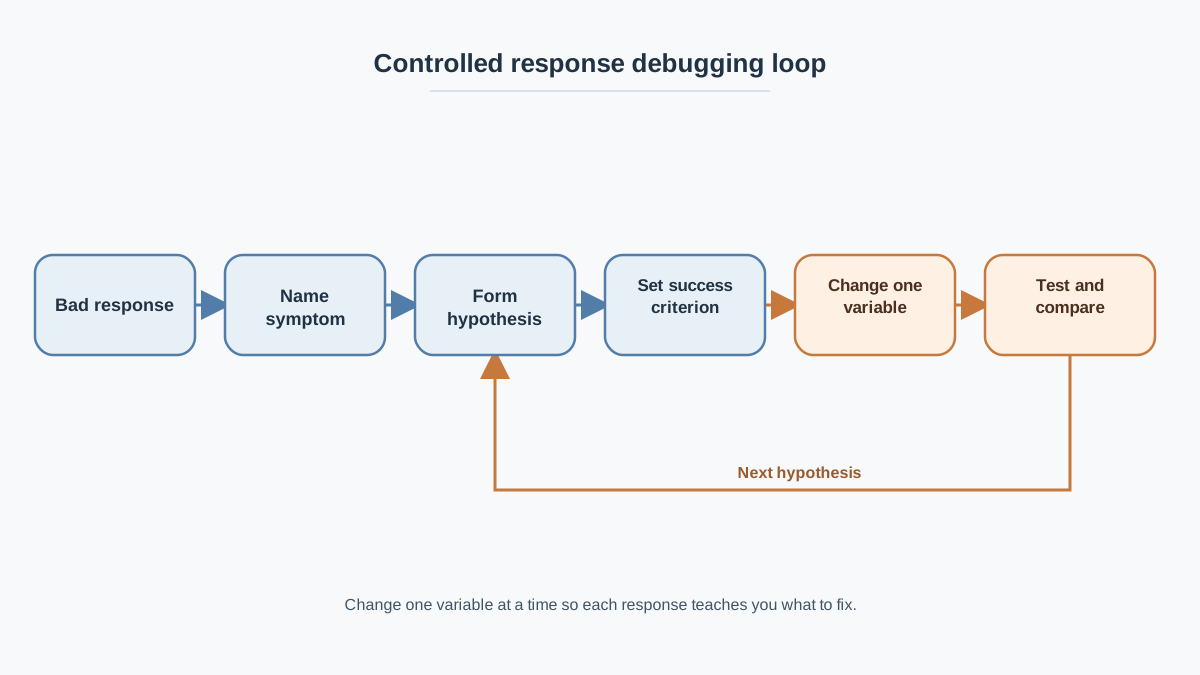
Here is the full method, tied together:
- Read the bad output and name the symptom.
- Form a hypothesis about the failure category.
- Define one success criterion: what would "good" look like for this task?
- Change the single variable that matches your hypothesis.
- Run the prompt again.
- Compare the new output against your success criterion, not against how confident it sounds.
If the first fix does not work, move to the next hypothesis. Do not rewrite randomly.
Here is a compact example walking one weak output through the full method.
Original prompt: "Help me plan a team offsite."
Weak output: A generic list of advice about team building, venues, and icebreakers—none of it specific to your situation.
Step 1 — Read the output. The response is generic and makes assumptions about your team size, budget, and goals.
Step 2 — Form a hypothesis. The task is vague. "Plan a team offsite" could mean anything from booking a room to designing a three-day agenda. Ambiguity is the most likely culprit, so test that first.
Step 3 — Define success. A good answer would propose a concrete schedule matched to a specific team size, location, budget, and goal.
Step 4 — Change one variable. Add the goal and audience:
Help me plan a one-day team offsite for 12 people in Austin, Texas. The goal is to align on Q3 priorities.
Step 5 — Test. The new output should be more specific to your team size, location, and goal. If it is still generic, add the next variable: budget and schedule constraints.
Help me plan a one-day team offsite for 12 people in Austin, Texas, with a budget of $2,000. The goal is to align on Q3 priorities. Propose a schedule from 9 AM to 5 PM, including one team-building activity and two working sessions.
Step 6 — Compare against your criteria. Is the schedule concrete? Does it respect the budget? Does it serve the goal? If yes, ambiguity was the problem. If the output is specific but poorly organized, test format next. If it contains venue recommendations you cannot verify, check the claims.
Notice what this walkthrough did differently from your old loop: it changed one variable at a time and checked the result against a defined success criterion. That is the difference between debugging and gambling.
Your Next Step
Take one recent weak output you have received. Run it through the checks in order. Name the symptom. Form a hypothesis. Define what "good" would look like. Then change only the single variable that matches your hypothesis.
Debugging is a repeatable skill, and every bad output is evidence. Each weak response teaches you which category to check next—if you take the time to read it before you rewrite.
Knowledge check
Final check
Finish the article by checking the ideas you just learned.
References
Want a more structured LLMOps path?
Use the LLMOps Practical Starter Bundle to connect RAG, evaluation, observability, and production patterns.
Large Language Models Starter Pack
A 12-chapter guide connecting LLM fundamentals with prompting, RAG, agents, tool calling, evaluation, security, and application engineering.
- 227-page Illustrated PDF edition
- 12 guided LLM engineering chapters
- Visual concept diagrams
- Self-assessment quizzes
- Bonus deep-dive sections
- Prompt design, structured output, context windows & RAG pipelines
- Agents, tool calling, prompt injection, evaluation & application lifecycles
Coming soon


