
Zero-Shot vs One-Shot vs Few-Shot Prompting
More examples do not automatically mean better results. Examples cost tokens, take time to write, and can even steer a model in the wrong direction. The…

More examples do not automatically mean better results. Examples cost tokens, take time to write, and can even steer a model in the wrong direction. The real skill is knowing when to add them—and when to leave them out.
What "shots" actually mean
A "shot" is simply one example of the task you want done, placed inside your prompt. If you want the model to classify customer feedback as positive, negative, or neutral, one shot would be a single piece of feedback with its correct label attached.
Here is the key thing to understand: these examples are not training data. The model does not learn permanently from them. Zero-shot, one-shot, and few-shot prompting all use the exact same underlying model. The only difference is how many temporary examples you include in your current request.
Think of it like giving a new teammate a written rule versus walking them through a finished case. The rule tells them what to do. The finished case shows them what the result should look like. Neither changes their underlying skills—both just make the current assignment clearer.
The three levels are simple:
- Zero-shot: No examples. Just instructions.
- One-shot: A single example paired with your instructions.
- Few-shot: Two or more examples showing the pattern.
This builds directly on clear prompt design. If you already know how to write a solid instruction, you are ready to decide whether examples should join it.
Knowledge check
Check your understanding
Answer this question before you continue.
Zero-shot prompting: the default starting point
Zero-shot prompting means giving the model instructions and context, then letting it rely on what it already knows from training. No examples.
Here is what that looks like for sentiment classification:
Classify the sentiment of this review as positive, negative, or neutral.
Review: "The battery lasts all day and the screen is gorgeous."
Sentiment:
The expected output is "positive." The model has seen countless reviews during training, and common tasks like this are well represented in what it knows.
Zero-shot is your default for a good reason. It is the shortest prompt you can write, which means the lowest token cost and the fastest setup. For general questions, straightforward classification, brainstorming, or quick prototyping, it is often all you need.
The trouble starts when the task is ambiguous or the output format is unusual. Ask the model to classify reviews using a custom five-point scale with specific labels, and zero-shot results can drift. The model understands the general idea but not your particular standard. That inconsistency is the signal that you might need an example.
Keep in mind that task familiarity is only a starting heuristic, not a guarantee. A common task can still need examples if your labels, format, or quality threshold are custom. And a specialized task can sometimes work fine zero-shot if your instructions are precise. Judge by the output you actually see, not by the task name alone.
Knowledge check
Check your understanding
Answer this question before you continue.
One-shot prompting: one example to anchor the pattern
One-shot prompting adds a single example to your instruction. That one example can remove a surprising amount of guesswork.
Consider the same classification task with a custom format:
Classify each review into one of these categories: praise, complaint, or mixed.
Review: "Shipping was fast but the packaging arrived damaged." Category: mixed
Review: "Setup took ten minutes and everything worked perfectly." Category:
The example tells the model two things at once: what the categories mean and what the output should look like. A single example is often enough when the main problem is format confusion or mild ambiguity.
One example has a clear limitation, though. It cannot show variation. If your reviews range from angry rants to subtle disappointment, one example only anchors one corner of that space. The model may lock onto the format while missing the range of judgment calls you need.
Treat one-shot as a cheap diagnostic step. If zero-shot output is inconsistent, add one example and test again. Sometimes that is the entire fix.
Knowledge check
Check your understanding
Answer this question before you continue.
Few-shot prompting: multiple examples for pattern and consistency
Few-shot prompting means including two or more examples. The goal is to show enough variation that the model can infer the pattern you actually want.
Here is the same task with three examples:
Classify each review into one of these categories: praise, complaint, or mixed.
Review: "Shipping was fast but the packaging arrived damaged." Category: mixed
Review: "Setup took ten minutes and everything worked perfectly." Category: praise
Review: "The app crashes every time I try to export my data." Category: complaint
Review: "The price is fair, but I wish the manual explained things better." Category:
Multiple examples buy you consistency. The model can see how you handle edge cases, which complaints count as complaints, and which mixed feelings count as mixed. This matters for nuanced classifications, custom output formats, or any task where "correct" depends on your internal standards.
A crucial distinction: consistency is not the same as correctness. Examples can make outputs follow a pattern more reliably, but they cannot make a wrong example right. If your examples encode a flawed judgment, the model will faithfully reproduce that flaw.
Few-shot is not free. Longer prompts cost more tokens—tokens being the small pieces of text the model processes and that many providers bill by. A longer example set also leaves less room in the prompt for the actual task and any other context you need to include. Writing good examples takes effort. And bad examples actively mislead: if your examples are inconsistent or unrepresentative, the model will copy the wrong pattern.
Note: For multi-step reasoning tasks like math or logic problems, examples can sometimes constrain the model more than they help. Modern models often reason better when asked to think step by step without being anchored to a few potentially flawed example solutions. As always, test rather than assume.
Knowledge check
Check your understanding
Answer this question before you continue.
Zero-shot vs few-shot: how to choose
The decision rule is simple: start with zero-shot, test the output, and escalate only when the results demand it.
| Approach | Best for | Prompt length | Cost | When to use |
|---|---|---|---|---|
| Zero-shot | Common tasks, general questions, quick prototypes | Shortest | Lowest | Default starting point |
| One-shot | Format clarity, mild ambiguity | Short | Low | When zero-shot output is inconsistent |
| Few-shot | Nuanced tasks, custom formats, edge cases | Longer | Higher | When one example cannot show enough variation |
Before you add examples, run through this checklist:
- Is the instruction clear? If you can describe the task and the output format precisely, zero-shot may be enough.
- Is the output format standard? If you need a specific structure or custom labels, one example may anchor it.
- Are results consistent? Run the same prompt a few times. If the output varies in ways you cannot accept, escalation is justified.
- Do I have good examples? Quality matters more than quantity. One carefully chosen example beats three sloppy ones.
My rule of thumb: escalate one step at a time, and test after each step. Do not jump straight to five examples because you assume more is better. The smallest prompt that produces consistent, correct output is the best prompt.
Common mistakes beginners make
These four mistakes show up constantly. Each one is useful evidence about what the model is actually responding to.
Mistake 1: Adding examples to every prompt out of habit. If zero-shot already works, examples add cost without adding value. Test the simple version first.
Mistake 2: Choosing examples that are too similar. Three positive reviews teach the model nothing about how to handle a negative one. Your examples should span the range of inputs you expect.
Mistake 3: Copying flawed examples. If your examples contain inconsistent labels or messy formatting, the model will reproduce those flaws. Treat examples as code: they need to be correct before you ship them.
Mistake 4: Ignoring token costs. A few-shot prompt that works beautifully for one request becomes expensive when you run it ten thousand times in an automated pipeline. If a shorter prompt produces acceptable results at scale, use it.
Each mistake is a signal. The model is telling you what it noticed in your prompt—sometimes including the parts you did not mean to show it.
The escalation ladder in practice
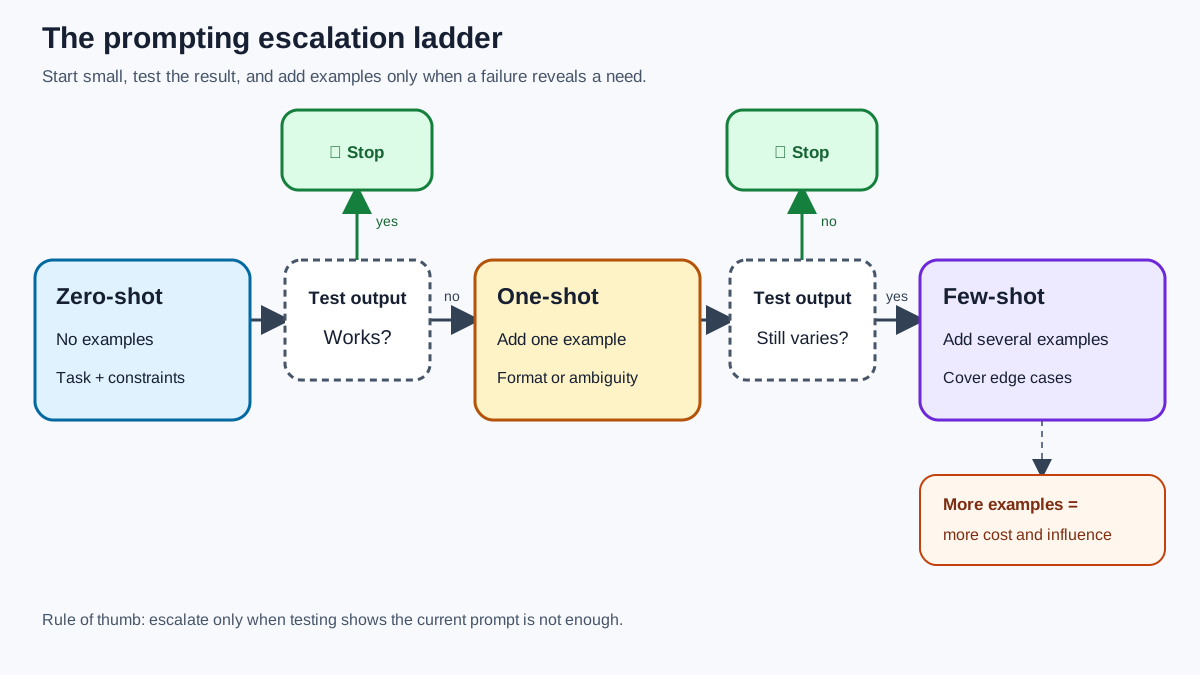
Here is the workflow I use, and the one I recommend you try on your own task:
- Write a clear zero-shot prompt with specific instructions.
- Test it on several different inputs.
- If the output is consistent and correct, stop. You are done.
- If the format is wrong or the judgment is off, add one well-chosen example.
- Test again. If one example fixed the problem, stop.
- Only if variation across inputs still causes failures, add more examples that cover the missing cases.
The pattern is always the same: escalate only when the current level fails, and escalate by the smallest step that could plausibly fix the problem.
Examples are a tool, not a ritual. Used deliberately, they turn vague instructions into precise standards. Used carelessly, they add cost and confusion. Start small, test honestly, and let the model's output tell you when you need more.
Knowledge check
Final check
Finish the article by checking the ideas you just learned.
References
Want a more structured LLMOps path?
Use the LLMOps Practical Starter Bundle to connect RAG, evaluation, observability, and production patterns.
Large Language Models Starter Pack
A 12-chapter guide connecting LLM fundamentals with prompting, RAG, agents, tool calling, evaluation, security, and application engineering.
- 227-page Illustrated PDF edition
- 12 guided LLM engineering chapters
- Visual concept diagrams
- Self-assessment quizzes
- Bonus deep-dive sections
- Prompt design, structured output, context windows & RAG pipelines
- Agents, tool calling, prompt injection, evaluation & application lifecycles
Coming soon


