
Key LLM Terms Explained
If you've tried to learn about large language models and felt like you hit a wall of unfamiliar jargon, you're not alone. LLM discussions can feel like…

If you've tried to learn about large language models and felt like you hit a wall of unfamiliar jargon, you're not alone. LLM discussions can feel like walking into a workshop where every tool has a strange name and nobody stops to explain what each one does. But these terms aren't just labels—they're the handles you'll use to actually build, debug, and use AI tools. Let's turn the wall of LLM terminology into a practical toolkit, one concept at a time.
Why LLM Terminology Feels Overwhelming
You start reading about LLMs, maybe to build a chatbot or automate a task, and suddenly you're lost in a maze of words: tokens, prompts, context windows, transformers, embeddings. It's easy to feel like you're drowning in new vocabulary before you've even written your first prompt.
Why does this happen? AI and LLMs are built from layers of concepts, each with its own purpose. The field moves quickly, so new terms appear fast, and people discussing LLMs often assume you already know the basics.
But memorizing a long list of terms won't help you use LLMs effectively. What matters is understanding the mechanism behind each term—how it changes what the model does, or how you interact with it. Once you see how these pieces fit, the jargon becomes a set of tools, not a barrier.
Tip: Every term you learn is a tool you can use. You don't need to know every tool at once—start with the ones that solve your current problem.
How to Approach LLM Vocabulary as a Beginner
Here's the mental model I recommend: imagine you're building a toolkit, not memorizing a dictionary. Not every tool is needed for every job. Focus first on the terms that keep showing up in practical tasks—these are your core tools.
Ask yourself:
- Does this term describe something I can see or change in an LLM workflow?
- Is it coming up again and again in examples or error messages?
- Does it explain a mechanism, not just a label?
If the answer is yes, that term is worth learning now. The rest can wait until you hit a real need.
Analogy: If you're learning woodworking, you don't start by memorizing the names of every tool in the shop. You learn hammer, saw, and tape measure first—because you'll use them right away.
The LLM Workflow: How the Terms Connect
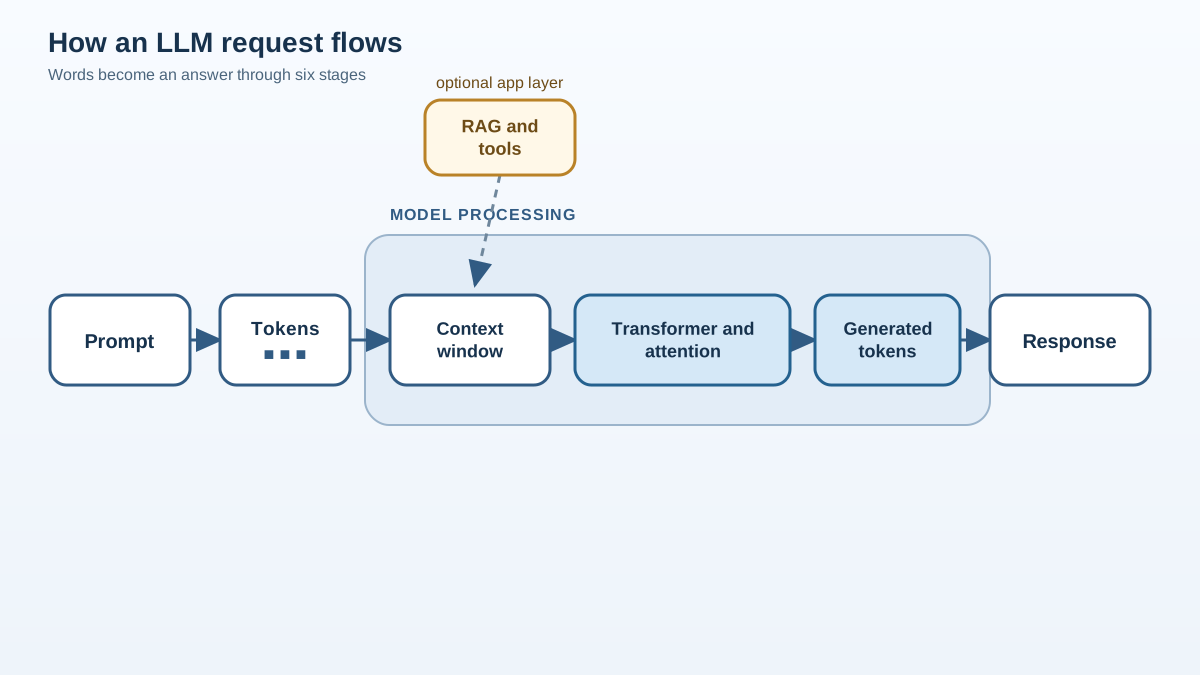
Before we dive into the glossary, let's walk through a typical LLM request. This will help you see how the terms fit together as parts of a system—not just isolated vocabulary.
- You write a prompt. This is your instruction or question.
- The prompt is broken into tokens. The model doesn't see whole sentences; it sees tokens—chunks of text.
- Tokens must fit in the context window. The model can only "see" a certain number of tokens at once, like a desk with limited space.
- The transformer architecture processes the tokens. Inside, the attention mechanism helps the model relate each token to the context available so far and predict what comes next.
- The model generates a response. This comes out as tokens, which are turned back into text.
- Optional: Retrieval or tools. Some systems add retrieval-augmented generation (RAG) to fetch external information, or agents to take actions beyond just replying. These are application-layer additions—they sit around the model, not inside it.
Keep this flow in mind as you learn the terms below. Each one is a handle for a step in the process.
Three Layers of LLM Terminology
Before we define individual terms, let's draw one boundary that will keep the vocabulary from blurring together. LLM terms fall into three layers:
- What the model learns during training. Pre-training and fine-tuning change the model's internal parameters. Once training is done, those parameters are fixed until the next training run.
- What you supply at request time. Your prompt, the conversation history, and any retrieved documents all live in the context window. They influence the current response but don't permanently change the model.
- What the surrounding application does. RAG, agents, and prompt engineering are application-layer decisions. They control how information flows into and out of the model, but they don't alter the model itself.
This distinction matters because beginners often confuse "the model learned this" with "the model was told this five minutes ago." When you hit a problem, knowing which layer it lives in tells you where to look. Each section below is organized by layer, and each term ends with the question that layer answers when something goes wrong.
Layer One: What You Supply at Request Time
These are the terms you'll touch every time you use an LLM. Start here.
LLM (Large Language Model)
An LLM is an AI system trained to understand and generate human language. Think of it as a very advanced autocomplete: you give it a prompt, and it predicts what text should come next, based on patterns it learned from huge amounts of data.
You'll see LLMs behind chatbots, code assistants, writing tools, and more.
Prompt
A prompt is the input you give to an LLM. It's the question, instruction, or text you want the model to respond to.
Example:
Prompt: "Write a short story about a robot learning to cook."
The model reads your prompt and generates a response. The quality of your prompt directly shapes the quality of the output—garbage in, garbage out applies here just as much as anywhere else in computing.
What this changes in practice: The prompt is the only place you can steer the model without retraining it. If the output misses the mark, your first question is whether the instruction was clear enough to guide the model.
Token and Tokenization
A token is a chunk of text that the LLM processes as a unit. Depending on the model, a token might be a word, part of a word, or even a single character.
Tokenization is the process of breaking input text into tokens. For example, the sentence "Chatbots are helpful." might become these tokens:
["Chat", "bots", " are", " helpful", "."]
LLMs don't see whole sentences—they see streams of tokens. This matters because models have limits on how many tokens they can handle at once, and because tokenization directly affects what the model can "read" and what it costs you. Most API pricing is per token, so understanding tokenization helps you estimate cost and stay within limits.
Use this when: you're estimating API costs, debugging why the model ignored part of your input, or trying to fit a long document into a model with a known token limit.
Context Window
The context window is the amount of text (measured in tokens) the LLM can consider at one time. If the window is 4,000 tokens, the model can only "see" that much of your conversation or document at once.
Imagine the context window as the model's working desk: it can only fit so much on the desk before something falls off the edge.
Common mistake: The context window is not long-term memory. Once information falls outside the window, the model forgets it. If you're building a long conversation, you need a strategy for keeping the important bits on the desk.
Use this when: the model seems to forget something you said earlier in a conversation, or when you're deciding how much background information to include in a single request.
Knowledge check
Check your understanding
Answer this question before you continue.
Layer Two: How the Model Learns and Processes
These terms describe what happens inside the model and how it acquires its capabilities. You won't change these at request time, but understanding them helps you know what the model can and cannot do.
Transformer
The transformer is the neural network architecture that powers most modern LLMs. Its main innovation is the attention mechanism, which lets the model relate each token to the other tokens in the input, rather than just looking at words in order. This makes transformers especially good at handling long, complex text.
Relationship: The transformer is the overall system; attention is the key mechanism inside it that helps the model weigh information across the input.
Attention Mechanism
The attention mechanism lets each token gather information from the context around it when the model computes what comes next. In plain terms: the model doesn't read left to right in isolation. For each position, it weighs how much the surrounding tokens should contribute, then blends those contributions into a new representation.
One boundary is worth keeping straight. During ordinary text generation, the model predicts the next token from the context that already exists—your prompt and whatever it has generated so far. It cannot peek at the answer tokens it hasn't produced yet. Attention is powerful because it lets the model pull relevant context from far back in the input, not because it lets the model see the future.
Analogy: Attention is like a highlighter that marks the most relevant words for the current prediction—but it's not a conscious selector, and "relevant" means mathematically related in the model's learned representation space, not factually important. The highlighter analogy gets you started; the formal mechanism is a weighted sum over token representations.
Knowledge check
Check your understanding
Answer this question before you continue.
Pre-training and Fine-tuning
- Pre-training is when the model learns general language patterns from massive datasets. It's like reading a large portion of the internet to learn how people write and speak.
- Fine-tuning is when the model is further trained on a smaller, specialized dataset to perform a specific task, such as medical Q&A or legal writing.
Common mistake: Pre-training gives the model general knowledge. Fine-tuning adapts it for a particular job. They are not interchangeable.
Decision boundary: If you want your LLM to answer questions using up-to-date or changing information—like new articles or company docs—you usually want retrieval (RAG), not fine-tuning. Fine-tuning is for teaching the model a specialized style or behavior that doesn't change often.
Embedding
An embedding is a way to turn words, sentences, or documents into numbers (vectors) that capture their meaning. LLMs use embeddings to compare, search, or cluster similar pieces of text.
Example: The words "cat" and "kitten" will have similar embeddings because they mean similar things. Embeddings are what make semantic search possible—finding documents by meaning, not just by matching keywords.
What this changes in practice: Embeddings are how you find the right text to feed the model. They don't change the model itself—they help you decide which documents deserve space on the context-window desk.
Use this when: you need to search a collection of documents by meaning rather than exact keyword match, or when you want to find similar pieces of text without retraining a model.
Layer Three: What You Build Around the Model
These terms describe what you build around the model to control its behavior, supply it with information, and connect it to the outside world.
Prompt Engineering
Prompt engineering is the craft of designing prompts to get better results from an LLM. Sometimes, a small change in wording can make a big difference in the model's output.
Example:
- Prompt: "Summarize this article."
- Improved prompt: "Write a one-sentence summary of the following article, focusing on key facts."
Note: Prompt engineering is more than just rewording—it's about structuring information, giving examples, and testing outputs systematically. It's the application-layer skill that turns a raw prompt into a reliable instruction.
Zero-shot, One-shot, Few-shot Learning
These terms describe how much example data you give the model for a new task:
- Zero-shot: The model gets only instructions, no examples. Example: "Translate this to French."
- One-shot: The model gets one example.
- Few-shot: The model gets a few examples to learn from.
This is possible because LLMs can generalize from patterns they learned during pre-training.
Use this when: you need the model to follow a specific output format or style and you don't want to fine-tune. Few-shot prompting is often the cheapest way to steer a model toward a consistent output pattern.
Hallucination
A hallucination is when an LLM generates text that sounds plausible but is factually incorrect or made up.
Example: You ask for a summary of a news event, and the model invents details that never happened.
Common mistake: Hallucination doesn't mean the model is broken—it's a known limitation of how LLMs predict text. Always double-check critical facts, especially when the model sounds confident.
Temperature and Top-k
These settings control how varied the model's output is:
- Temperature: Higher values (like 1.0) make the output more varied and less predictable; lower values (like 0.2) make it more consistent and repetitive.
- Top-k: Limits the model to choosing from the top k most likely next words.
Common mistake: Lowering temperature does not make the model more truthful. It makes the output more consistent—which can mean it repeats a confident-sounding mistake just as reliably. If you need facts your model wasn't trained on, ground the answer with retrieval or verify it yourself. Temperature is a variation knob, not a truth switch.
Use this when: you want more varied phrasing (raise temperature) or a steadier, more repeatable style (lower it). These are knobs you can turn without changing the underlying model.
Knowledge check
Check your understanding
Answer this question before you continue.
RAG (Retrieval-Augmented Generation)
RAG combines an LLM with external data sources. Before answering, the model retrieves relevant documents or facts, then uses them to generate a response.
Example: A customer support bot using RAG can pull up the latest troubleshooting guide before answering your question.
Here's how RAG connects to the terms you've already met. Embeddings can help find the most relevant passages in a document collection—that's the retrieval step. Those selected passages then get placed in the context window alongside your question, and the model writes the answer from what it can now see. RAG is the broader workflow; embeddings are one common way to power the retrieval part. RAG can also use other retrieval methods, so the two ideas stay distinct.
Decision boundary: Use RAG when the answer depends on changing documents or specific facts you can retrieve. Think about fine-tuning when you need the model to consistently behave in a specialized style or task pattern.
Knowledge check
Check your understanding
Answer this question before you continue.
Agent and Agentic AI
An agent is an AI system that can take actions or use tools—not just generate text. Agentic AI can plan, call APIs, or interact with other systems to complete tasks.
Example: An agent might read your email, check your calendar, and schedule a meeting for you.
Boundary: Not every chatbot is an agent. A chatbot mainly generates a response. An agent uses the model inside a loop that can choose tools, inspect results, and take real-world actions.
Putting the Terms to Work: Diagnosing a Real Failure
Let's prove the toolkit idea with one realistic problem. Suppose you build a chatbot that answers questions from your company's manual, and a user asks, "What's the refund policy for damaged items?" The bot replies with a confident but wrong policy.
Now walk the failure through the layers instead of guessing:
- Check the input layer. Did the relevant refund section actually fit in the context window, or did it fall off the desk? If your manual is long, the answer may have been cut off before the model ever saw it.
- Check retrieval. If you're using RAG, did the search pull the right passage? A keyword mismatch—say, the manual says "returns" and the user said "refunds"—can send the wrong chunk into the context.
- Check the prompt. Did you ask the model to answer only from the supplied text, or did you leave it free to draw on its own training? A clear instruction to stay grounded narrows the room for invention.
- Check generation. If the model still sounds too loose, lower temperature for a steadier answer. But remember: temperature won't fix a missing fact. If the right passage never reached the context, no setting will make the answer true.
- Verify. For anything that matters, treat the model's answer as a draft and confirm it against the source. Hallucination is a design limitation, not a bug you can tune away.
This is the payoff of learning the vocabulary. Each term names a place to look, so a confusing output becomes a checklist instead of a mystery.
Your Diagnostic Path: One Ordered Way to Troubleshoot
When a real LLM workflow fails, don't jump between settings. Follow one ordered path, and reach for the term that matches each step:
- Ask what information reached the model. Check the context window and token count. If the right facts never arrived, no prompt or setting can save the answer. This is where context window, tokens, and embeddings live.
- Ask how the model was guided. Review the prompt and prompt engineering. Did you give clear instructions, examples, or a format to follow? This is where prompt, zero-/few-shot, and temperature live.
- Ask whether the surrounding system acted correctly. If you built RAG or an agent, check whether retrieval pulled the right documents and whether the agent chose the right tools. This is where RAG, embeddings, and agents live.
That's the difference between memorizing terms and thinking like a builder. You don't need every tool at once—just the right one for the problem in front of you.
Knowledge check
Final check
Finish the article by checking the ideas you just learned.
References
Want a more structured LLMOps path?
Use the LLMOps Practical Starter Bundle to connect RAG, evaluation, observability, and production patterns.
Large Language Models Starter Pack
A 12-chapter guide connecting LLM fundamentals with prompting, RAG, agents, tool calling, evaluation, security, and application engineering.
- 227-page Illustrated PDF edition
- 12 guided LLM engineering chapters
- Visual concept diagrams
- Self-assessment quizzes
- Bonus deep-dive sections
- Prompt design, structured output, context windows & RAG pipelines
- Agents, tool calling, prompt injection, evaluation & application lifecycles
Coming soon


