
LLM Generation Settings Explained: Temperature, Top-P, and Token Limits
You asked for a summary and got a rambling essay. You asked for a story and got three bullet points that stopped mid-thought. You asked a factual question…

Key topics
You asked for a summary and got a rambling essay. You asked for a story and got three bullet points that stopped mid-thought. You asked a factual question and got a confident answer that was simply wrong.
Your first instinct is probably to open the settings panel and start sliding dials. Slow down. Most output problems are not settings problems. Before you touch temperature or top-p, name which problem you are actually looking at. Only some of them have a settings fix at all.
Why Your Output Looks Wrong: Four Different Problems
When an LLM produces bad output, the cause almost always falls into one of four buckets:
Variation problems. The output wanders, jumps between topics, or feels unfocused. The model seems unable to pick a direction and stay with it.
Repetition problems. The output loops on the same phrase, sentence, or idea. It sounds robotic or stuck.
Truncation problems. The response ends mid-sentence or mid-thought. The model clearly had more to say, but something stopped it.
Instruction or evidence problems. The output is confidently wrong, off-topic, or missing information it should have included. The model answered a question you did not ask, or it answered yours with facts it never had.
Here is the key insight: each bucket has a different fix, and only some involve generation settings. The last bucket is a prompt problem or a knowledge problem. No slider in the settings panel will fix it.
Before you change anything, name the problem. If you cannot name it in those terms, a setting change is a guess, not a fix.
If you need a refresher on how temperature works under the hood, the concept article on temperature covers the sampling mechanism in detail. Here, we will focus on how temperature sits alongside the other controls and which problem each one actually solves.
Temperature: The Variation Control
Temperature is the setting most people reach for first, and for good reason. It controls how much variation the model allows in its word choices.
Here is the plain-language mechanism. At each step of generation, the model ranks every possible next word by probability. Temperature reshapes that ranking. A low temperature concentrates probability on the top-ranked words, so the model picks the safest, most predictable option almost every time. A high temperature spreads probability across more words, giving less-likely candidates a real chance to win.
Think of it as a dial between consistency and variety:
- Low temperature (near 0): Consistent, focused, predictable. The model plays it safe.
- High temperature (1.0 and above): Varied, creative, unpredictable. The model takes more risks.
A concrete example makes this tangible. Ask for a factual summary of how HTTP requests work. At temperature 0.2, you will get a tight, accurate explanation. At temperature 1.2, you might get the same facts wrapped in an unexpected analogy or a slightly unusual structure. For factual work, you want the low setting. For brainstorming product names or drafting creative angles, the high setting gives you more to choose from.
One boundary worth stating clearly: temperature 0 is more predictable, not guaranteed identical. "More deterministic" is not the same as "guaranteed the same every time."
My decision rule is simple. Lower the temperature when output wanders or feels unfocused. Raise it when output feels flat, robotic, or overly cautious. That covers most cases.
But here is the warning that matters: lowering temperature on a vague prompt does not make the model smarter. It makes the model more confidently produce the wrong thing. If your prompt lacks detail, the model will pick its safest guess and commit to it with total conviction. Temperature shapes how the model says something. It does not improve what the model knows.
Knowledge check
Check your understanding
Answer this question before you continue.
Top-P: Trimming the Candidate Pool
Top-p is the setting that confuses the most beginners, partly because it sounds like it does what temperature does. It does not.
Top-p, also called nucleus sampling, works by limiting which words are even considered at each step. The model looks at its ranked list of possible next words and keeps only the smallest set whose combined probability reaches a threshold. If top-p is 0.9, the model keeps adding words to the candidate pool—starting with the most likely—until their combined probability hits 90%. Everything below that cutoff is excluded from consideration entirely.
The contrast with temperature is worth making precise. Temperature reshapes the odds of every word in the race. Top-p removes the long-shot horses from the track before the race even starts.
Here is the image I use with beginners. Imagine the model has a list of a thousand possible next words, ranked from most to least likely. Temperature changes how often the top-ranked word wins. Top-p decides how many words get to compete at all. Set top-p to 1.0, and every word stays in the pool. Set it to 0.5, and only the words that collectively make up the top half of probability get a chance.
So when do you reach for top-p instead of temperature? My rule is to adjust temperature first for broad control. Temperature is the coarse dial. If you lower temperature and the output still feels too loose, or if lowering it further makes the text sound robotic, top-p gives you a finer way to prune unlikely words without flattening everything.
One mistake I see constantly: changing both at once. If you move temperature and top-p together and the output changes, you will not know which setting caused the change. Change one, observe the result, then decide whether the second adjustment is still needed.
Knowledge check
Check your understanding
Answer this question before you continue.
Max Tokens: The Length Ceiling, Not a Target
Max tokens is the most misunderstood setting in the panel, because its name sounds like a request. It is not a request. It is a ceiling.
To understand max tokens, you need to know what a token is. Models do not read text as words. They read it as tokens—chunks of text that can be whole words, parts of words, or even single characters. A token is roughly three-quarters of a word in English, but that ratio varies by language and by how the model was trained. The important point is that token count and word count are not the same thing.
Max tokens sets the upper limit on how many tokens the model can generate in one response. It does not force the model to reach that number. If the model finishes its answer in 50 tokens and your cap is 500, the response stops at 50. The cap is a speed limit, not a destination.
This distinction produces two opposite failure modes.
The first is a cap that is too low. Set max tokens to 100 for a task that needs 300, and the response will stop mid-sentence or mid-thought. The model did not run out of ideas. It ran out of room. This is a truncation problem, and the fix is raising the cap.
The second failure mode is subtler. A high cap does not make a short answer longer or better. If the model gives you a thin two-sentence answer, raising max tokens to 4000 will not produce more substance. The model stopped because it considered the answer complete. The fix for a thin answer is a better prompt, not a bigger ceiling.
There is also a budgeting issue. Max tokens shares the model's context window with your prompt, conversation history, and any reference material you supplied. If your context window is 8000 tokens and you set max tokens to 6000, you only have 2000 tokens of space for everything else. A long prompt plus a high output cap can crowd each other out. Set the cap to comfortably fit the longest reasonable answer for your task, not the longest answer the model could theoretically produce.
Different providers expose this setting under different names—max tokens, max output tokens, max_new_tokens. Same idea, different labels. When you see any of these, you are looking at the length ceiling.
Knowledge check
Check your understanding
Answer this question before you continue.
Which Setting Fixes Which Problem
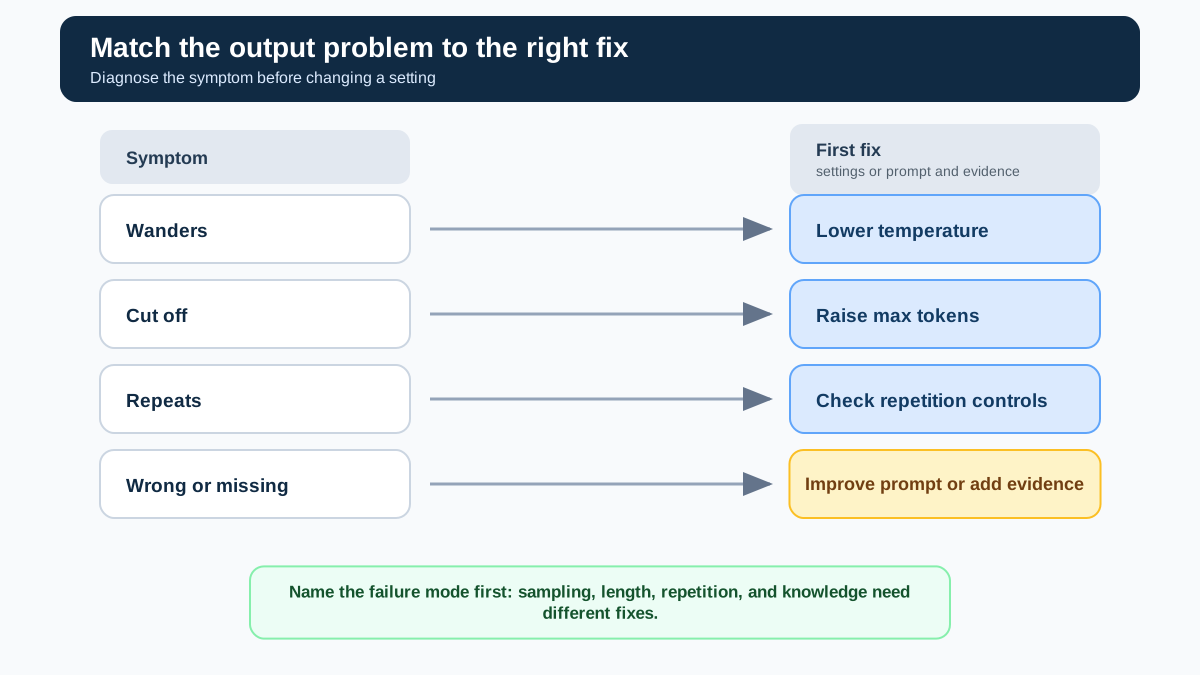
Here is the compact reference I wish every beginner had on day one. When you see a symptom, look up the cause, then check whether a setting is even the right fix.
| Symptom | Likely cause | Recommended action |
|---|---|---|
| Output wanders, jumps topics, feels unfocused | Randomness too high | Lower temperature first |
| Output repeats itself or sounds robotic | Repetition is a distinct failure mode | Check repetition penalties or adjust output length; temperature alone may not fix it |
| Response stops mid-sentence | Max tokens cap too low | Raise max tokens |
| Response is short but complete | Model considered the answer done | Improve the prompt, not the settings |
| Output is off-topic or confidently wrong | Weak prompt or missing instructions | Rewrite the prompt with clearer direction |
| Output ignores facts or lacks key information | Missing evidence in context | Add the information to the prompt or retrieve it |
| Output format keeps breaking | Unclear format instructions | Specify the format explicitly in the prompt |
Notice the pattern. The first row is a sampling problem with a settings fix. Repetition gets its own row because it is not a clean randomness signal—lowering temperature can actually make repetition worse. The third and fourth rows are length problems with a cap fix. The last three rows are not settings problems at all. They are prompt quality and evidence problems.
This is the central rule: settings shape how the model says something, not what it knows. If the model lacks the information or the instruction clarity to answer well, no combination of temperature, top-p, and max tokens will save you.
Knowledge check
Check your understanding
Answer this question before you continue.
How to Test a Setting Change
When you do adjust a setting, do not judge the result by one lucky output. Generation can vary from run to run, so a single good response might be chance.
Here is the loop I use:
- Hold the prompt and model constant.
- Run the task once and record the baseline output.
- Change exactly one setting.
- Run the same task several times and compare the outputs against one criterion—focus, variety, or completeness.
- Keep the change if it consistently helps. Revert it if it does not.
This turns "change one setting and observe" into a repeatable experiment. It also protects you from the most common beginner trap: chasing a single impressive output instead of building reliable behavior.
Common Mistakes Beginners Make With Settings
After watching enough beginners work through these controls, I can predict the mistakes before they happen. Here are the ones worth avoiding.
Mistake 1: Turning temperature to zero to force correctness. Predictability is not accuracy. A temperature of zero makes the model pick its highest-probability answer every time. If the prompt is vague or the model lacks the right knowledge, the highest-probability answer can still be wrong. You have just made the model confidently wrong with no variation to expose the problem.
Mistake 2: Stacking every setting at once. Temperature down, top-p down, penalties on, all in one change. If the output improves, you will not know which change mattered. If it gets worse, you will not know which change hurt. Change one setting, run the output, observe the difference, then decide the next move.
Mistake 3: Blaming sampling settings for a truncation problem. If your response ends mid-sentence, the problem is almost always the max tokens cap or the context window budget. Lowering temperature will not give the model more room to finish. Raise the cap or shorten your prompt.
Mistake 4: Expecting a setting to add knowledge. No generation setting can give the model information it never had or that your prompt never supplied. If the task requires facts outside the model's training or outside your prompt, the fix is retrieval or added context, not a settings adjustment.
Mistake 5: Using temperature to fix repetition. Repetition is not a clean signal of high randomness. In fact, a temperature that is too low can make output dull and repetitive. If the model loops on the same phrasing, look for repetition-specific controls or shorten the requested output before you keep pushing temperature around.
The recovery pattern for all of these is the same: change one thing, run the output, observe what changed, then decide. Treat settings like an experiment, not a ritual.
The Decision Rule That Matters
Here is where this leaves you. When output looks wrong, name the problem before you touch anything. Is it unfocused? Lower temperature. Is it cut off? Raise max tokens. Is it repeating? Check repetition controls or shorten the task. Is it off-topic, wrong, or missing information? Rewrite the prompt or add the missing evidence.
Settings are the fine-tuning knobs on top of a foundation. The foundation is the prompt you write and the information you provide. A well-crafted prompt with clear instructions matters more than any setting adjustment you can make.
Start with the prompt. Then, if the output still needs shaping, change one generation setting at a time and observe the result. That discipline will save you more time than any settings guide—including this one.
When you are ready to go deeper, the natural next step is learning how to request structured output, so your responses come back in a consistent format you can actually use.
Knowledge check
Final check
Finish the article by checking the ideas you just learned.
References
Want a more structured LLMOps path?
Use the LLMOps Practical Starter Bundle to connect RAG, evaluation, observability, and production patterns.
Large Language Models Starter Pack
A 12-chapter guide connecting LLM fundamentals with prompting, RAG, agents, tool calling, evaluation, security, and application engineering.
- 227-page Illustrated PDF edition
- 12 guided LLM engineering chapters
- Visual concept diagrams
- Self-assessment quizzes
- Bonus deep-dive sections
- Prompt design, structured output, context windows & RAG pipelines
- Agents, tool calling, prompt injection, evaluation & application lifecycles
Coming soon


