
Practice Diagnosing LLM Output Problems from Generation Settings
The output looks wrong, and your hand is already on the temperature slider. Before you drag it, notice what you are actually doing: guessing. The same…

Key topics
The output looks wrong, and your hand is already on the temperature slider. Before you drag it, notice what you are actually doing: guessing. The same broken-looking answer can come from four unrelated causes, and only one of them lives in the settings panel. This is a drill, not a lecture. You will read request configurations and symptoms, commit to a diagnosis, and let a checker tell you where your reasoning broke.
Why the Settings Slider Is the Wrong First Move
Changing a setting feels productive because it is fast, reversible, and visible. You move a number, you re-run, something different comes back. Motion feels like progress.
But a setting change can only fix a symptom that the setting actually produces. Temperature, top-p, and token limits shape how the model selects tokens and when it stops. They do not shape what the model knows, what your prompt asked for, or whether the evidence you supplied was usable. Reach for a slider when the problem is mechanical. Reach for the prompt when the problem is epistemic.
The trouble is that the symptom rarely tells you which one you have. A cut-off answer, a vague answer, and a confidently wrong answer all look like "the model failed." They are not the same failure.
You will classify every case into one of five buckets:
| Bucket | What it means | Where the fix lives |
|---|---|---|
| Truncation | Output stopped before it finished | Token limit |
| Sampling variation | Output drifts between runs | Temperature, top-p |
| Missing context | The needed facts were never in the request | Prompt or retrieval |
| Task/evidence problem | Facts were present but the task or evidence was unusable | Prompt |
| Insufficient evidence | The case does not contain enough to choose | Nothing yet — gather more |
If you already know what temperature, top-p, and token limits do mechanically, this article is about using that knowledge as a diagnostic instrument. If you need a refresher, the generation-settings reference on this site covers the mechanics; here we only care about what each setting can and cannot repair.
Set Up the Practice Harness
The exercise runs on the Python 3 standard library alone. No pip install, no API key, no network calls. If you can run python3, you can run this.
You need three files in the same folder:
diagnose_cases.py— the checker script.cases.json— the supplied request configurations plus the observed output symptoms.answers.json— where you write your diagnoses and rationales.
If your course or site bundle already includes these files, download them into one directory and skip to the run command. If you do not have them yet, create them yourself. The script is short, and building it is part of the lesson: you cannot diagnose a system you have not looked inside.
Here is a minimal diagnose_cases.py you can save as-is:
import json
import sys

def load(path):
    with open(path, "r", encoding="utf-8") as f:
        return json.load(f)

def main():
    cases = {c["id"]: c for c in load(sys.argv[1])}
    answers = {a["id"]: a for a in load(sys.argv[2])}
    hits, misses = 0, 0
    for cid, case in cases.items():
        answer = answers.get(cid)
        if not answer:
            print(f"{cid}: no answer submitted")
            misses += 1
            continue
        expected = case["expected"]
        ok = answer["diagnosis"] == expected["diagnosis"]
        if ok:
            hits += 1
            print(f"{cid}: correct ({answer['diagnosis']})")
        else:
            misses += 1
            print(f"{cid}: expected {expected['diagnosis']}, got {answer['diagnosis']}")
            print(f"    feedback: {expected['feedback']}")
    print(f"\n{hits} correct, {misses} to review")

if __name__ == "__main__":
    main()
And here is a tiny cases.json with two cases so you can see the shape before you write your own:
[
  {
    "id": "case-01",
    "config": {"temperature": 0.9, "top_p": 1.0, "max_tokens": 200},
    "task": "Summarize the attached article in three paragraphs.",
    "symptom": "Output ends mid-sentence in paragraph two.",
    "expected": {
      "diagnosis": "truncation",
      "feedback": "Output is cut, not concluded. The token limit is low relative to the requested length."
    }
  },
  {
    "id": "case-02",
    "config": {"temperature": 0.7, "top_p": 1.0, "max_tokens": 800},
    "task": "Answer the question using only the supplied document.",
    "symptom": "Confident, specific answer that cites facts not present in the document.",
    "expected": {
      "diagnosis": "missing context",
      "feedback": "The needed facts were never in the request. No setting supplies them."
    }
  }
]
Your answers.json mirrors that structure with your own judgment:
[
  {"id": "case-01", "diagnosis": "truncation", "rationale": "..."},
  {"id": "case-02", "diagnosis": "missing context", "rationale": "..."}
]
Run the checker:
python3 diagnose_cases.py cases.json answers.json
The checker compares your diagnosis against expected feedback. It grades your reasoning, not your vocabulary. A right label with a wrong rationale is still a miss, because the label is the cheap part and the reasoning is the skill.
What success looks like on the first pass is not a perfect score. It is a visible list of which cases you misread and why. That list is the actual output of this exercise.
Note: The checker reads the
expectedfield fromcases.json. If you are writing your own cases, fill that field honestly — a case with a guessed expected answer teaches you nothing.
Read the Case Before You Read the Settings
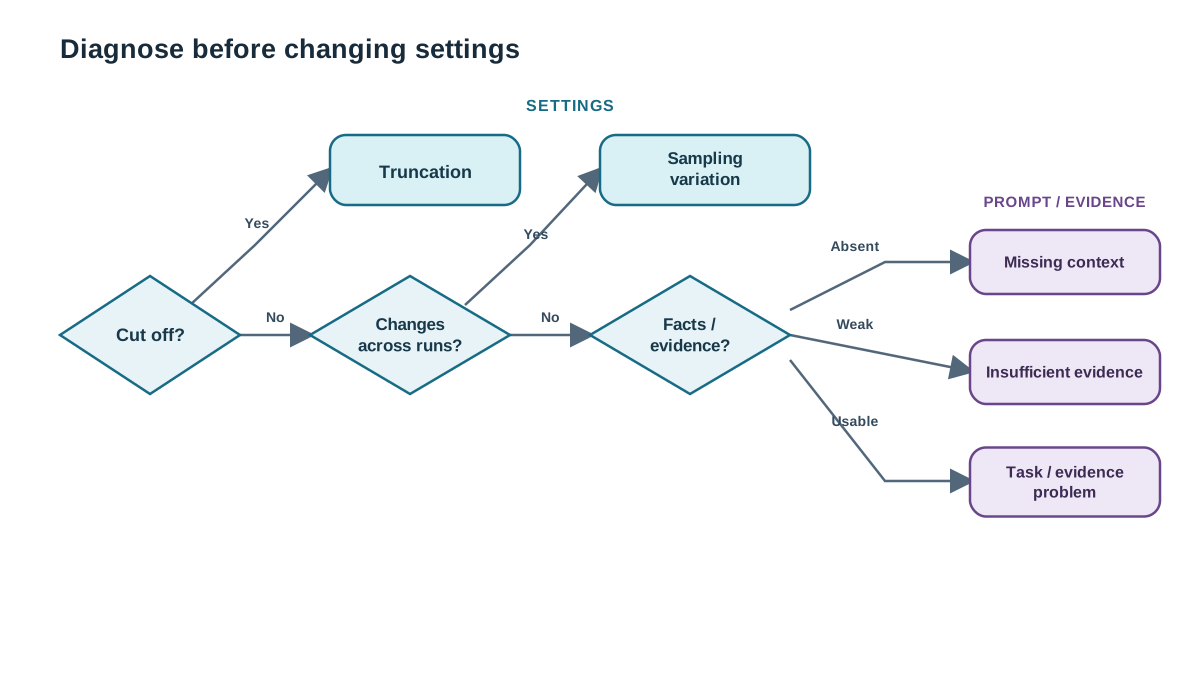
Each case record contains three things: the request configuration, the prompt or task description, and the observed output symptom.
Read them in that order — symptom first, config second, hypothesis third. If you read the config first, you start hunting for a setting to blame instead of asking what the output is telling you. That is how a missing-document problem gets "fixed" by lowering temperature, which changes nothing except your confidence.
Ask three questions of every symptom:
- Is content missing at the end? If the output stops mid-sentence or mid-structure, truncation is a candidate.
- Does the answer change between runs? If the same request produces different wording, ordering, or detail selection, sampling variation is a candidate.
- Is the needed information present anywhere in the request? If it is absent, no setting will conjure it. If it is present but the output ignored or misused it, the problem is in the task or the evidence.
Here is a worked read-through. Suppose a case shows a request asking for a three-paragraph summary of a supplied article, with a token limit set, and the observed output is two and a half paragraphs that end mid-word. Symptom first: content is missing at the end, and it is cut rather than concluded. Config second: the token limit is low relative to the requested length. Hypothesis: truncation. The confirming test is to run it again — truncation repeats, because the limit is a hard stop, not a dice roll.
Knowledge check
Check your understanding
Answer this question before you continue.
Truncation vs. Sampling Variation
These two are the setting-adjacent buckets, and beginners confuse them because both feel like "the model stopped short of what I wanted."
Truncation signals: the output ends mid-sentence or mid-structure, the ending looks cut rather than concluded, and the symptom is stable across repeated runs.
Sampling variation signals: the same request produces different answers on different runs, and the differences are in wording, ordering, or detail selection rather than in missing content.
The discriminating test is simple: run it again. Truncation repeats. Sampling variation drifts.
The bounded interventions follow from the mechanism. For truncation, raise the token limit — you are giving the model more room to finish. For variation, lower temperature or top-p — you are narrowing the pool of tokens the model samples from.
Now the part that matters more than the fix: what each one cannot do. A higher token limit will not make a wrong answer right; it will just let the model be wrong for longer. A lower temperature will not add information the model never had; it will make the model more consistent about not having it.
Common mistake: Treating low temperature as a correctness dial. It is a consistency dial. Consistent wrong answers are still wrong.
Knowledge check
Check your understanding
Answer this question before you continue.
Missing Context vs. Task and Evidence Problems
These are the non-setting buckets, and the boundary between them is where this exercise's real lesson lives.
Missing context: the request never supplied the facts the answer needed — no document, no data, no prior turn. The model filled the gap, which is why the output reads confidently. Fluent wrongness is the signature of a model doing its best with nothing.
Task/evidence problem: the information was present, but the instruction was ambiguous, the format was underspecified, or the supplied evidence contradicted itself. The model had what it needed and still could not use it cleanly.
The distinguishing question: was the needed information absent from the request, or present but unusable?
Neither one yields to a setting change. Temperature, top-p, and token limits shape how the model selects and stops. They do not shape what the model knows. If the evidence was never in the request, no slider will put it there.
Then there is the honest bucket: insufficient evidence. Sometimes a case does not contain enough information to choose a diagnosis. Saying so is the correct answer, not a cop-out. A diagnosis you cannot support is a guess wearing a label.
Tip: If you find yourself arguing for a bucket with no specific evidence from the case, you are probably in the insufficient-evidence bucket and resisting it.
Knowledge check
Check your understanding
Answer this question before you continue.
Write a Rationale the Checker Can Grade
A correct label is half the work. The rationale is the other half, and it has three parts:
- Name the bucket.
- Cite the specific evidence in the case that supports it.
- State what your chosen intervention cannot fix.
The third part matters most. It is the difference between "I changed a setting" and "I understood what the setting controls." Anyone can move a slider. Naming the boundary of what that slider can do is the skill this exercise is built to train.
Here is a weak rationale and a strong one for the same case — a request that supplied no source document and produced a confident, specific, unsupported answer:
Weak: "The answer is wrong, so I lowered the temperature to make it more accurate."
Strong: "This is missing context. The request contains no source document, and the output asserts specifics that appear nowhere in the prompt. Lowering temperature cannot fix this because the model never had the facts; it would only make the same unsupported answer more consistent."
The weak version restates the symptom and proposes an intervention that does not match the diagnosis. The strong version names the bucket, points at the evidence, and closes the door on the wrong fix.
Knowledge check
Check your understanding
Answer this question before you continue.
Edit a Case and Diagnose Again
Now the experiment. Pick one case, change a single field in cases.json, and predict what the diagnosis should become before you re-run the checker.
Two edits are worth trying:
Raise the token limit on a truncation case. The symptom should resolve — the output finishes. You have confirmed that the limit was the cause, not a coincidence.
Remove the source document from a missing-context case. The symptom stays. The model still produces fluent output; it just produces the wrong fluent output. No setting rescues it, because the evidence is gone. This is the edit that proves the core lesson — settings cannot supply missing evidence.
After each edit, read the checker's feedback carefully. Did the diagnosis change for the reason you predicted, or did you change the case in a way that muddied the signal?
Warning: Change one variable at a time. Change two fields and you learn nothing about either.
When to Reach for a Setting, and When Not To
Compress the whole exercise into a rule you can carry into real work.
Reach for a setting when the symptom is mechanical: output cut off, output unstable across runs, output repetitive.
Do not reach for a setting when the symptom is epistemic: the answer is wrong, unsupported, or built on information that was never supplied.
The one-line version: settings control how the model chooses and stops; they do not control what the model knows.
That rule also tells you where diagnosis sits in your workflow. Diagnosis comes before prompt rewriting, and both come before touching a slider. If you skip the diagnosis, you are optimizing a system you have not understood.
One limit worth stating plainly: this exercise uses supplied cases with expected feedback. It teaches classification discipline, not a guarantee about any specific production model's behavior. Real systems are messier, and the buckets are a starting frame, not a verdict.
Before you touch a setting, name the symptom, name the bucket, and ask whether the missing thing is a mechanism or a fact. If it is a mechanism, the slider is yours. If it is a fact, the slider was never going to help.
Your next move: re-run the exercise with your own real request configurations and symptoms. Take three outputs that disappointed you this week, write them up as cases, and diagnose them cold. The debugging workflow on this site picks up where the non-setting cases lead — task ambiguity, missing context, format failure, and unsupported claims — and turns the classification habit into a repeatable repair process.
Knowledge check
Final check
Finish the article by checking the ideas you just learned.
References
Want a more structured LLMOps path?
Use the LLMOps Practical Starter Bundle to connect RAG, evaluation, observability, and production patterns.
Large Language Models Starter Pack
A 12-chapter guide connecting LLM fundamentals with prompting, RAG, agents, tool calling, evaluation, security, and application engineering.
- 227-page Illustrated PDF edition
- 12 guided LLM engineering chapters
- Visual concept diagrams
- Self-assessment quizzes
- Bonus deep-dive sections
- Prompt design, structured output, context windows & RAG pipelines
- Agents, tool calling, prompt injection, evaluation & application lifecycles
Coming soon


