
LLM Temperature Explained: What It Changes and What It Cannot Fix
You turned the temperature down to 0.1 because you wanted the AI to stop making mistakes. It still gave you a wrong answer—just a more confident, more…

You turned the temperature down to 0.1 because you wanted the AI to stop making mistakes. It still gave you a wrong answer—just a more confident, more consistent wrong answer. If that scene feels familiar, you are not alone. The temperature setting is one of the most misunderstood controls in AI tools, and the confusion usually starts with one mistaken assumption: that temperature controls whether the model is smart or correct.
It does not. Temperature controls randomness. Once you see that distinction clearly, the setting stops being a source of frustration and becomes a practical tool you can adjust with intention.
Why Your Temperature Setting Didn't Fix the Answer
Here is the mental model most beginners start with: lower temperature equals better answers. You slide the dial down, expecting the model to become more accurate, more intelligent, or more careful. Then the model confidently tells you that the capital of Australia is Sydney, and you wonder what the point of the setting even was.
The problem is not the model. The problem is what you asked the temperature dial to do.
Temperature does not control whether an answer is right. It controls how much variety the model allows itself when choosing its next word. Think of an LLM as a machine that, at every step, looks at everything it has written so far and produces a ranked list of possible next words. Some words are very likely. Others are long shots. Temperature decides how strictly the model sticks to the top of that list.
If you have not yet seen how LLMs predict text one piece at a time, the short version is this: the model does not think up a full sentence and then type it out. It predicts the next word, then the next word after that, building the response step by step. Each step involves a choice among many possible continuations. Temperature shapes how those choices get made.
Knowledge check
Check your understanding
Answer this question before you continue.
What Temperature Actually Does Under the Hood
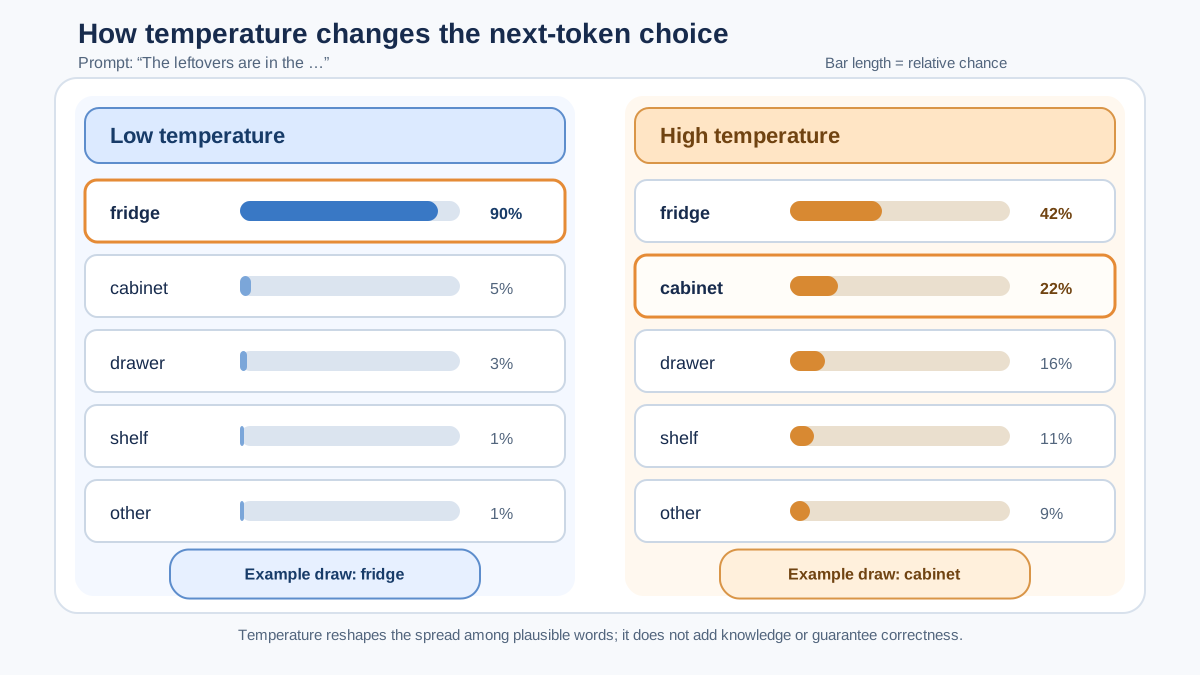
Every time an LLM picks the next word, it assigns a probability to each candidate. Some candidates get high probabilities; most get very low ones. Temperature reshapes that probability spread before the model makes its pick.
A useful analogy: imagine a crowd voting on the next word. At a low temperature, the model almost always picks the crowd favorite—the word with the highest probability. At a high temperature, the model occasionally lets an underdog win, choosing words that were less likely but still plausible.
Here is a concrete example. Suppose the model is generating the sentence "She walked into the kitchen and opened the ___." The candidates might look something like this:
- fridge — very high probability
- cabinet — high probability
- drawer — medium probability
- window — low probability
- book — very low probability
At a low temperature, the model will pick "fridge" almost every time. At a high temperature, "cabinet" or "drawer" become real possibilities, and even a word like "book" gets a small chance. The response stays grammatical, but the specific choice varies.
This process of choosing from the weighted candidates—instead of always taking the top one—is called sampling. Temperature is the dial that controls how much sampling spreads its bets. When sampling is disabled, the model simply takes the most likely word every time, and temperature has little or no visible effect.
Most chat tools use a temperature range from 0 to 1, though some allow values up to 2. A setting of 1 is usually the default, meaning the model uses its natural probability distribution without much reshaping. At 0, the model picks the single most likely word, which is why low-temperature output feels the most consistent and predictable.
Note: Even at temperature 0, you may occasionally see tiny variations in output. Behind the scenes, hardware and implementation details can introduce small differences. For practical purposes, though, temperature 0 is as close to deterministic as most tools get.
Knowledge check
Check your understanding
Answer this question before you continue.
Low Temperature: Consistency, Not Correctness
Low temperature is the right tool when you want the same style, structure, and format every time. If you are asking for a one-line summary, a JSON-style response, or a classification task where the output needs to follow a strict pattern, a low setting keeps the model on a tight leash.
The tradeoff is that low temperature can make output feel stiff or repetitive. The model plays it safe, choosing the most obvious word at every step. You lose variety, and sometimes you lose a bit of naturalness in the writing.
But here is the critical boundary: low temperature does not make the model more knowledgeable. If the model has a wrong fact stored in its training data, it will deliver that wrong fact with the same confidence at temperature 0.1 as it would at 0.9. A confident, consistent wrong answer is still wrong.
Research backs this up. Studies examining temperature changes in the 0-to-1 range have found no statistically significant impact on problem-solving accuracy across different models and tasks. In plain English: if the model cannot solve the problem at temperature 0.7, lowering the temperature to 0.1 will not suddenly make it smarter.
Common mistake: Treating low temperature as a correctness dial. It is a consistency dial. Use it to stabilize formatting and style, not to fix factual errors.
Knowledge check
Check your understanding
Answer this question before you continue.
High Temperature: Variety, Not Creativity Guarantees
High temperature is for tasks where you want options. Brainstorming product names, drafting multiple versions of a tagline, exploring creative writing angles—these are jobs where variety is the point. If you ask for five different tagline ideas at a low temperature, you may get five variations of the same sentence. Crank the temperature up, and the model starts exploring less obvious territory.
A setting around 0.8 to 1.0 is a reasonable starting point for open-ended creative work. Some tools allow going higher, but this is where you need to be careful.
Very high temperatures flatten the probability distribution so much that the model starts picking words that are statistically unlikely. The result can be rambling, repetitive, or outright incoherent text. The model drifts away from the most probable continuations and wanders into territory that sounds plausible but makes less sense the longer it goes.
The tradeoff is structural: more variety means a higher chance of the model wandering into nonsense or stating things that are less likely to be true. You are trading coherence for exploration, and at the extreme end, you lose both.
| Task Type | Temperature Range | What to Expect |
|---|---|---|
| Structured output, extraction, classification | 0.0–0.3 | Consistent formatting, predictable choices |
| General chat, summarization, Q&A | 0.5–0.7 | Balanced tone with moderate variation |
| Brainstorming, creative writing, naming | 0.8–1.0 | More variety, some risk of wandering |
| Experimental or chaotic output | Above 1.0 | High variety, frequent incoherence |
Note: These ranges are illustrative starting points, not universal recipes. Temperature scales and available controls differ by model and interface. Start with your tool's default and compare outputs rather than assuming the numbers transfer everywhere.
Knowledge check
Check your understanding
Answer this question before you continue.
Choosing a Temperature for Your Task
My rule of thumb is simple: start near 0 for structured and consistent output, around 0.7 for balanced general chat, and higher for open-ended brainstorming. Then test.
Temperature is not a fixed law. It is a starting point you adjust based on what you observe. The most useful experiment you can run takes about two minutes:
- Pick one prompt you use regularly.
- Run it at a low temperature, like 0.2.
- Run the exact same prompt at a high temperature, like 0.9.
- Compare the two outputs.
When you compare, look at three dimensions separately:
- Format consistency: Did the structure, length, and style stay similar?
- Content stability: Did the core facts and main points hold up across both runs?
- Unwanted variation: Did either run introduce rambling, repetition, or odd phrasing?
If the structure and facts are identical but the phrasing differs slightly, you have found your balance point. If the low-temperature output is too stiff, nudge it up. If the high-temperature output is too chaotic, bring it down.
If you see a different answer at high temperature, that is evidence to inspect, not proof that one temperature is more correct. A high-temperature run may explore a different reasoning path or include an unsupported claim. The question is whether that variation helps your task or hurts it.
One caution: temperature is one knob among several. You may also see settings like top-p, frequency penalties, or repetition controls in advanced tools. Those controls change which candidates are eligible or how repetition is treated. Beginners should master temperature first before stacking other settings. Changing multiple dials at once makes it impossible to tell which one caused the effect you are seeing.
What Temperature Cannot Fix
Temperature is a variety dial, not a quality dial. That distinction becomes obvious when you look at the problems it cannot solve:
- Wrong facts. If the model does not know something, no temperature setting will help.
- Vague prompts. A poorly specified request stays vague at 0.1 and 0.9 alike.
- Missing context. If the model does not have the information it needs, randomness will not conjure it.
- Model knowledge limits. Temperature cannot add knowledge the model never learned.
Consider a vague prompt like "Write something about productivity." At a low temperature, you will get a generic, safe paragraph about productivity. At a high temperature, you will get a more varied generic paragraph about productivity. The prompt was the bottleneck, not the temperature. A well-specified prompt—"Write three specific strategies for reducing context-switching during deep work, aimed at software developers"—is the real lever.
This is the lesson that ties everything together: temperature shapes style and variety, while prompt quality and model knowledge shape substance. If you want better answers, improve the prompt. If you want more consistent formatting, lower the temperature. If you want more options, raise it. Each tool has its job.
Your Next Step
Run the experiment. Take one prompt you actually use, try it at a low and a high temperature, and observe what changes and what stays the same. You will likely discover that the structure stays recognizable, the phrasing varies, and the core content shifts only when the model explores a genuinely different path. That is proof that temperature was never deciding what the model knew. It was only deciding how the model chose among the continuations it had available.
Once you can see temperature for what it is—a randomness control, not a correctness control—you will stop chasing it as a fix for problems it was never designed to solve. The next natural step is learning how other generation settings interact with temperature, and how prompt design gives you far more control over answer quality than any single dial ever will.
Knowledge check
Final check
Finish the article by checking the ideas you just learned.
References
Want a more structured LLMOps path?
Use the LLMOps Practical Starter Bundle to connect RAG, evaluation, observability, and production patterns.
Large Language Models Starter Pack
A 12-chapter guide connecting LLM fundamentals with prompting, RAG, agents, tool calling, evaluation, security, and application engineering.
- 227-page Illustrated PDF edition
- 12 guided LLM engineering chapters
- Visual concept diagrams
- Self-assessment quizzes
- Bonus deep-dive sections
- Prompt design, structured output, context windows & RAG pipelines
- Agents, tool calling, prompt injection, evaluation & application lifecycles
Coming soon


