
Structured Output Prompting: Getting Consistent Data from LLMs
You ask an LLM for a list of three book recommendations. What comes back is a friendly paragraph: "If you're looking for something thought-provoking, you…

Key topics
You ask an LLM for a list of three book recommendations. What comes back is a friendly paragraph: "If you're looking for something thought-provoking, you might enjoy The Left Hand of Darkness, which explores... Another great option is Project Hail Mary, a fast-paced sci-fi adventure that..." Somewhere in that prose, the titles exist. But they're buried in sentences, wrapped in opinions, and impossible to feed into a spreadsheet, a database, or a line of code without manual work.
That paragraph is the default behavior. And it's the exact behavior that breaks down the moment you want to use an LLM as part of a real system.
This is where structured output prompting comes in. Instead of asking for prose and hunting through it, you ask the model to return data in a predictable shape—named fields, lists, records. The answer stops being something you read and becomes something you can use.
But here's the lesson that separates a useful demo from a reliable workflow: a well-shaped answer can still be wrong. Structured output solves the shape problem. It does not solve the truth problem. Keeping those two apart is the real skill.
Why conversational answers break your workflow
Prose is great for reading. It's terrible for code.
Think about what happens when you need to process fifty product descriptions, extract the price from each one, and drop those prices into a spreadsheet. If the LLM returns fifty friendly paragraphs, you now have a parsing problem on your hands. You're writing fragile text-matching logic, hoping the model phrased things consistently, and debugging every edge case where it didn't.
Structured output means asking the model to return data in a predictable shape instead. Fields, lists, records. The kind of shape that a spreadsheet column, a database row, or a JSON parser can consume directly.
This builds on the prompt design fundamentals you already know: clear instructions, concrete examples, explicit constraints. Structured output prompting takes those same principles and applies them to the shape of the answer, not just its content.
Knowledge check
Check your understanding
Answer this question before you continue.
The mental model: you are writing a contract, not a request
Here's the shift that makes everything click: when you ask for structured output, you're not making a request. You're writing a contract.
Imagine handing someone a blank page and saying "tell me about this book." You'll get whatever they feel like writing. Now imagine handing them a form with three labeled fields: Title, Author, Genre. The form tells them exactly where each piece of information goes. You still don't know if they'll fill it out correctly, but you've dramatically improved the odds.
That form is your schema-like contract. It's a description of the fields you want, their names, and what kind of value each one holds.
The critical detail: an LLM predicts text. It doesn't execute your instructions like a computer program. When you describe a shape in your prompt, you're giving the model a strong hint about what to produce—not a guarantee. The model has seen countless JSON examples in its training data, so it's usually good at following a well-specified format. But "usually" is not "always."
This is why saying "return JSON" is so weak. JSON is a format, not a contract. If you don't name your fields and describe what belongs in each one, the model will invent its own structure. It might call the field title in one response and book_title in the next. The format is valid JSON. The data is useless.
Knowledge check
Check your understanding
Answer this question before you continue.
Designing your first structured request
Let's walk through a small example you can follow without writing any code.
The task: Extract the title, author, and genre from a book description.
Step 1: Name your fields. Decide exactly what you want back. In this case: title, author, genre.
Step 2: Describe what belongs in each field. Don't assume the model knows what you mean by "genre." Is it a single category like "science fiction"? A list like ["science fiction", "space opera"]? The more precisely you define each field, the more consistent the output.
Step 3: Show the expected shape. This is the most powerful part of the prompt. Give the model a concrete example of the output you want:
{
  "title": "Project Hail Mary",
  "author": "Andy Weir",
  "genre": "science fiction"
}
Step 4: Use "only" deliberately. A single word that discourages extra commentary: "Return only the JSON object above, with no additional text."
Here's what the full prompt might look like:
Extract the title, author, and genre from the following book description. Return only a JSON object with exactly these fields:
title: the book's full title as a stringauthor: the author's name as a stringgenre: the primary genre as a single stringExample format:
{
  "title": "Project Hail Mary",
  "author": "Andy Weir",
  "genre": "science fiction"
}
Book description: [paste description here]
Notice what this prompt does. It doesn't just say "return JSON." It defines the fields, explains what belongs in each one, and shows an example of the exact shape you expect. The word "only" reinforces that you don't want commentary, explanations, or pleasantries wrapped around the data.
Prompt-only versus schema-constrained output
There are two ways to get structured data from an LLM, and it helps to know which one you're using.
Prompt-only formatting is what we just did. You describe the shape in natural language and trust the model to follow along. It works surprisingly often, but compliance is probabilistic. The model might add a stray sentence, rename a field, or omit one entirely.
Schema-constrained output is a built-in feature in many LLM tools and APIs. Instead of asking politely, you pass a formal schema—a machine-readable description of the fields and types you expect—and the system constrains the response to match it. This is much stronger than a prompt hint. It can guarantee the shape of the response in a way that words alone cannot.
Both approaches have a shared limit: they control format, not facts. A schema can force the model to return a string in the author field. It cannot force that string to be the correct author.
For this tutorial, we're focused on the prompt-only approach because it teaches you the underlying skill: deciding what fields matter and how to describe them. Once you can design a good contract in plain language, handing that same contract to a schema-constrained tool is a small step.
Knowledge check
Check your understanding
Answer this question before you continue.
Common mistakes that break structured output
Beginners hit the same walls. Here's what goes wrong and how to fix it.
Mistake 1: Asking for JSON without defining the fields. "Return the book info as JSON" gives the model freedom to invent its own structure. One response uses book_title, the next uses name. Fix it by naming every field explicitly.
Mistake 2: Leaving field names vague. A field called info could hold anything. A field called publication_year holds one thing: a year. The more specific your field names and descriptions, the less room the model has to guess.
Mistake 3: Forgetting to show an example. Describing a shape in words is good. Showing the shape with a concrete example is better. The example anchors the model's output in a way that abstract instructions can't match.
Mistake 4: Assuming the model will always comply. Even with a perfectly written prompt, the model can occasionally return a missing field, a wrong type, or a stray sentence of commentary. Structured output prompting raises the odds of compliance. It does not guarantee it.
Why validation is still your job
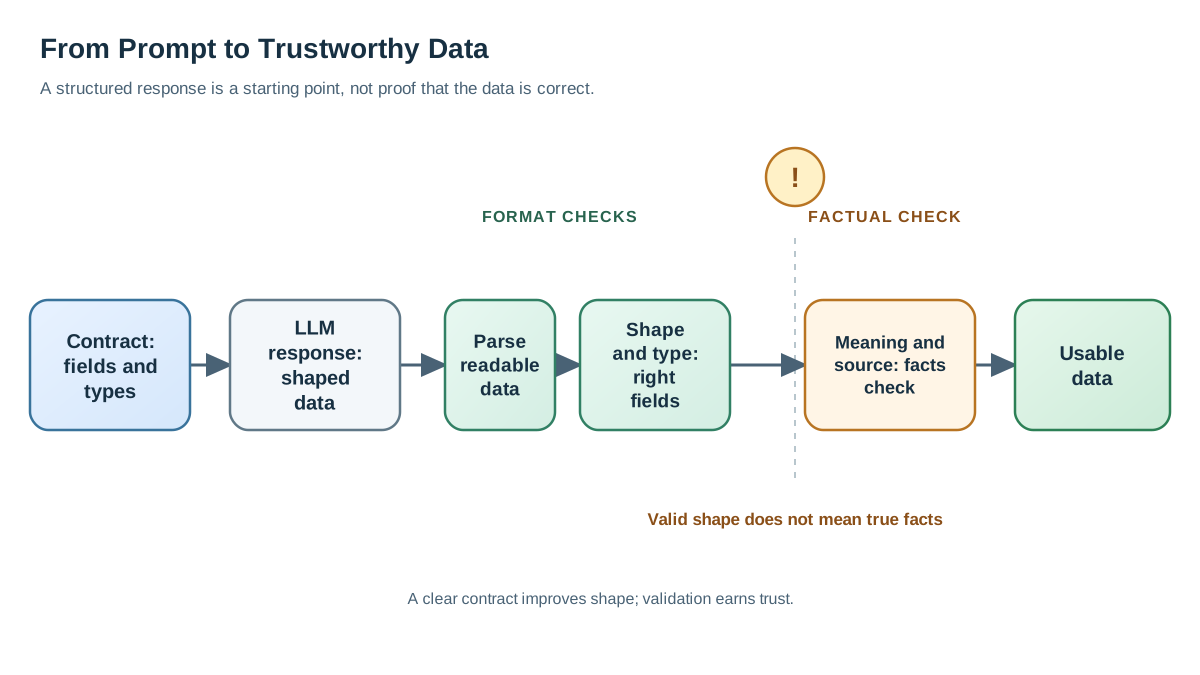
Here's the uncomfortable truth about LLMs: they predict text. A clear prompt is a strong influence on what text gets predicted, but it's not a logical constraint. The model isn't running your JSON schema through a validator before it responds. It's generating the most probable next tokens, and your carefully written prompt makes the structured format highly probable—but not certain.
This is why real systems add a validation step. Before using the model's output, you check it against the expected shape:
- Do all the required fields exist?
- Does each field have the right type? (Is
publication_yearactually a number?) - Do the values make sense? (Is the genre a real category, not a paragraph of explanation?)
Validation is the safety net that catches the occasional non-compliant response. When you're using a schema-constrained tool or API, that enforcement often happens automatically. But when you're prompting directly, validation is your job.
Think of it this way: the prompt is a strong hint. Validation is the guarantee. You want both.
The shape can be perfect and the answer still wrong
Here's the failure mode that surprises most beginners. Consider this response to our book-extraction prompt:
{
  "title": "Project Hail Mary",
  "author": "Isaac Asimov",
  "genre": "science fiction"
}
Every field exists. Every type is correct. The JSON parses cleanly. And the author is wrong. Project Hail Mary was written by Andy Weir, not Isaac Asimov.
This is the critical distinction: format compliance and factual correctness are separate layers. A schema can enforce the first. It cannot enforce the second.
That's why validation has three layers, and each one catches a different kind of problem:
| Layer | What it checks | What it catches | What it misses |
|---|---|---|---|
| Parsing | Is the response valid JSON? | Stray commentary, truncated output | Wrong values inside valid JSON |
| Shape and type | Do the right fields exist with the right types? | Missing fields, renamed fields, numbers as strings | Correctly typed but incorrect content |
| Meaning and source | Does each value match the source material? | Invented authors, guessed genres, omitted qualifiers | Nothing—this is the final check |
The first two layers are mechanical. You can automate them with a JSON parser and a schema validator. The third layer requires judgment: comparing each extracted value against the source text and asking whether the model had enough evidence to produce it.
This is why I treat the third layer as a sampling problem, not a one-time check. When you're extracting data from fifty documents, you don't need to verify all fifty by hand. But you should review a handful of outputs against their sources before you trust the pattern. If the model invented an author in one record, it probably did in others.
When to use structured output (and when not to)
Structured output isn't always the right tool. Here's the decision rule I use:
Use it when a system will consume the answer. If the output feeds code, a database, a spreadsheet, or any downstream step that needs consistent fields, structure it. If you're processing many similar items the same way—fifty invoices, a hundred support tickets, a weekly batch of product descriptions—structured output is the approach that scales.
Skip it when a human needs to read and interpret the answer. If you want a conversational explanation, a brainstorm, or a nuanced analysis, rigid fields will squeeze out the value. A forced structure can reduce the richness of the model's reasoning in some cases. When the goal is understanding, not data extraction, let the model write prose.
The rule in one line: if a human reads the answer and interprets it, prose is fine. If a system must consume it, structure it.
One boundary worth naming: structure does not replace retrieval, business rules, or human review. A structured extraction pipeline can still pull the wrong document, miss a critical qualifier, or produce duplicates. Structured output makes those problems easier to spot and fix. It does not make them disappear.
Your next step
Pick one small real task. A product description you want to extract fields from. A meeting notes document you want turned into action items. A list of customer reviews you want summarized into ratings.
Write a structured request with named fields and an example shape. Test it. Look at what actually comes back. Then run the three-layer check:
- Does the response parse as valid JSON?
- Do the right fields exist with the right types?
- Compare each value against the source. Did the model invent anything? Did it guess when the source was silent?
You'll likely find that the first attempt isn't perfect. That's normal. Adjust your field descriptions, tighten your example, and try again. The pattern of request, inspect, revise is exactly how this skill develops.
Once you're comfortable getting consistent structured data from a single request, you're ready for the natural next step: applying this pattern inside a real tool or workflow where that structured output feeds something larger.
Knowledge check
Final check
Finish the article by checking the ideas you just learned.
References
Want a more structured LLMOps path?
Use the LLMOps Practical Starter Bundle to connect RAG, evaluation, observability, and production patterns.
Large Language Models Starter Pack
A 12-chapter guide connecting LLM fundamentals with prompting, RAG, agents, tool calling, evaluation, security, and application engineering.
- 227-page Illustrated PDF edition
- 12 guided LLM engineering chapters
- Visual concept diagrams
- Self-assessment quizzes
- Bonus deep-dive sections
- Prompt design, structured output, context windows & RAG pipelines
- Agents, tool calling, prompt injection, evaluation & application lifecycles
Coming soon


