
AI Tools Practice Exercises
Reading about AI tools builds recognition, not skill. Skill comes from running the tool, inspecting the output, and making one small change to see what…

Reading about AI tools builds recognition, not skill. Skill comes from running the tool, inspecting the output, and making one small change to see what happens.
There is a gap between watching someone use an AI tool well and being able to use one yourself. Watching a demo feels like learning to swim by reading about water. The only way to build the mental model is to get in, move around, and notice what works.
This article is a short workout. Each exercise takes five to ten minutes, uses a chat tool you already have set up, and builds one specific skill. You do not need anything fancy. You need a tool like ChatGPT or Gemini, a willingness to produce some weak output, and about an hour total.
Note: These exercises assume you already have a chat tool ready to go. If you have not set one up yet, start with a setup guide for ChatGPT, Gemini, or an open-source option, then come back here.
Why Practice Beats Watching
Here is the uncomfortable truth about AI tools: recognizing good output is not the same as producing it. You can watch someone craft a brilliant request and understand exactly why it worked. Then you sit down to write your own, and the result comes out generic and useless.
That is not a sign you are doing it wrong. It is evidence about what the tool needs from you.
Every exercise below is short and repeatable. You can run any of them with whatever chat tool you already have. The mistakes are the point. A weak output tells you something specific: your request was missing context, the goal was unclear, or the tool needed a constraint you did not provide.
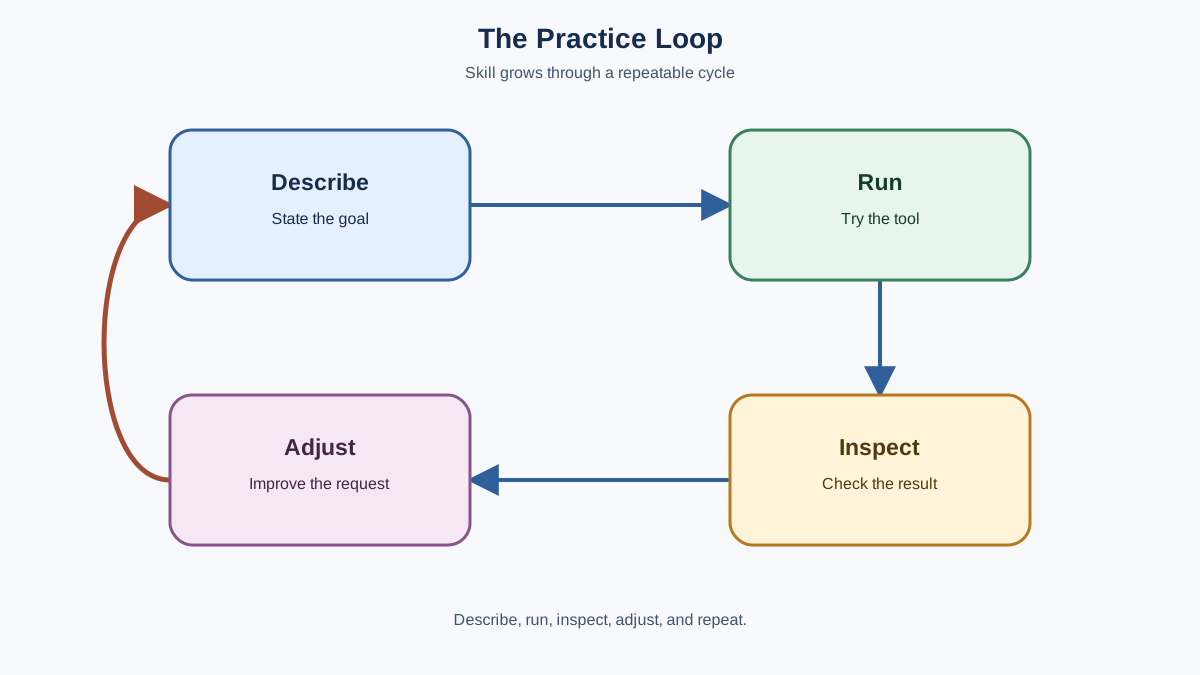
The core loop you will practice in every exercise is simple: describe the task, run the tool, inspect the result, adjust the request. Keep that loop in mind as you work through the five skills below.
Exercise 1: Add Context
Skill: giving the tool enough context to produce something specific instead of generic.
Vague requests produce vague output. This exercise proves it to you in about five minutes.
Step 1. Open your chat tool and type this exactly:
Give me tips on productivity.
Read the response. It will be a list of generic advice you have seen a hundred times: sleep well, prioritize, avoid distractions. Nothing wrong with it. Nothing useful either.
Step 2. Now rewrite the same request with three additions: who you are, what you are trying to do, and what a good answer looks like. Something like this:
I am a freelance graphic designer who works from home. I struggle to start work in the morning and often lose focus after lunch. Give me three specific strategies for protecting deep work time, and tell me how to set up each one in under ten minutes.
Step 3. Compare the two responses side by side.
The second one should feel noticeably more specific and usable. It might suggest blocking your calendar, using a start ritual, or scheduling client communication for specific windows. Those suggestions exist because you told the tool what your actual problem is.
Your deliverable: keep the before/after pair. You now have a concrete example of how context changes output.
Success check: the second response gives you at least one suggestion you could act on today. If it does not, add more detail about your situation and run it again.
The takeaway: the tool mirrors the clarity you give it. A request is a spark, not an engine. The more context you provide, the more the tool has to work with.
Knowledge check
Check your understanding
Answer this question before you continue.
Exercise 2: Ask for an Explanation
Skill: using follow-up questions to push past surface-level answers.
AI tools are patient explainers. They never get tired, never judge your confusion, and will rephrase the same concept as many times as you need. This exercise builds the habit of using them that way.
Step 1. Pick a concept you have met but not fully grasped. It can be anything: a work term, a hobby topic, something from the news. The only requirement is that you half-understand it.
Step 2. Ask the tool to explain it simply:
Explain what a mortgage pre-approval actually is. I am new to buying a home, so please avoid jargon and use a concrete example.
Step 3. Read the response, then ask one follow-up question that pushes past the surface. Ask about the part that still feels fuzzy, or ask for the specific scenario you are worried about:
That makes sense. What happens if I get pre-approved and then the house I want costs more than my pre-approval amount?
Notice what happened. The first answer gave you the foundation. The follow-up gave you the part you actually needed. That conversational loop—ask, read, ask again—is what makes AI tools genuinely useful for learning.
Your deliverable: write down one sentence summarizing what the second answer added that the first one missed.
Success check: you can explain the concept to someone else without reading from the tool's response. If you cannot, ask one more follow-up question.
The takeaway: the first answer is rarely the answer you need. The skill is knowing what to ask next.
Knowledge check
Check your understanding
Answer this question before you continue.
Exercise 3: Spot the Weak Output
Skill: detecting vague, unsupported, or slightly off content.
AI output is a draft, not a verdict. The tool can produce confident-sounding text that is vague, unsupported, or slightly off. Your job is to catch that. This exercise trains your editor's eye.
Step 1. Ask the tool to write something short. A product description, a summary of a topic you know well, or a draft email all work. Pick something where you can judge quality.
Step 2. Read the output like an editor. Underline anything that sounds generic, unsupported, or just slightly off. Ask yourself: would this work for a real person in a real situation? Or does it sound like it was written by a machine that has never met one?
Step 3. Pick one specific weakness and ask the tool to fix it:
The second paragraph is too generic. Every competitor could say the same thing. Rewrite it with specific details about what makes this product different.
Step 4. Compare the revision to the original.
Your deliverable: write down one specific defect you found and the exact change you requested.
Success check: the revision actually fixes the defect you named. If it does not, point at the remaining problem and ask again.
Common mistake: accepting the first output because it sounds confident. Confidence is not accuracy. The tool will happily state something wrong with perfect grammar. Your judgment is the part the tool cannot supply.
The takeaway: weak output is not a failure. It is a signal that tells you what to fix next.
Knowledge check
Check your understanding
Answer this question before you continue.
Exercise 4: Compare Tools on the Same Task
Skill: choosing the right tool for the job based on observed output.
Different AI tools have different strengths. The only way to learn which fits which job is to run the same task through more than one and compare.
Step 1. If you have access to two different tools, run the same request through both. If you only have one tool, compare two different phrasings of the same request instead.
Step 2. Compare the outputs on three simple criteria:
| Criterion | What to look for |
|---|---|
| Clarity | Is the response easy to follow, or does it wander? |
| Usefulness | Could you act on this, or is it generic filler? |
| Tone | Does the voice fit the task? |
Step 3. Note what you find. One tool might explain concepts more clearly while another writes with more personality.
Your deliverable: write a three-row comparison note, one row per criterion, with a one-line observation for each.
Success check: you can state which tool you would open for which kind of task, and why.
The decision rule: comparison matters when the task or your constraints make the difference consequential. If both tools give you equally usable answers, stop comparing and pick one. If you are drafting something sensitive, handling private data, or need a specific capability, that is when the choice matters.
Note: neither tool is "better." They are different tools for different jobs. A tool that shines at explanation might produce mediocre creative writing. Knowing which one to open for which job is a skill you can only build by comparing.
The takeaway: "best" depends on the task. The comparison is not about declaring a winner. It is about learning what each tool gives you.
Knowledge check
Check your understanding
Answer this question before you continue.
Exercise 5: Turn a Real Task Into a Workflow
Skill: applying the describe-run-inspect-adjust loop to something you actually need.
This is where practice becomes skill. Pick something you actually need to do, and use the tool to do it.
Step 1. Choose one small real task. Good options: drafting a message you have been putting off, planning meals for the week, outlining a post you want to write, or summarizing an article you need to understand.
Step 2. Break it into a single clear request with context. Describe the task, who you are, and what a good result looks like:
I need to email my landlord about a broken dishwasher. We reported it ten days ago and nothing has happened. I want to be firm but not hostile. Draft a message that includes the original date we reported it and asks for a specific repair date.
Step 3. Run it. Read the result. Adjust the request based on what you got. Maybe the tone is too soft, or it is missing a detail. Tell the tool what to change and run it again.
Step 4. Before you send or use anything the tool produced, review it like you did in Exercise 3. Check the facts, the tone, and the details. If the message names dates, amounts, or commitments, verify them against what you actually know.
Your deliverable: a final revised version of your task output that you would be comfortable using.
Success check: the final version is accurate, sounds like you, and does what you needed it to do.
Warning: never send or act on a generated message without checking facts, tone, recipients, and private information. The tool does not know your landlord, your deadline, or what you promised last week. You do.
The takeaway: this loop—describe, run, inspect, adjust—is the same loop used in far more complex AI workflows. Practice it small now, and it will scale later.
What to Do When the Output Misses
Every beginner hits the same wall: the tool gives a wrong answer, a generic answer, or a confidently stated piece of nonsense. The instinct is to blame the tool. The fix depends on what went wrong.
Here is a recovery playbook for the most common failures:
The tool misunderstood you. Add missing context. If you asked for advice on "a project" and got generic tips, specify what the project is, who it is for, and what you are trying to achieve.
The output is generic. Add a constraint. Ask for three specific strategies instead of general advice. Ask for an example. Ask for the answer to be grounded in your specific situation.
The tool states something wrong. Do not assume a second attempt will fix it. For important facts, verify against a trusted source or a document you already have. If you are working from your own materials, paste the relevant section into the conversation and ask the tool to base its answer on that. Treat the tool's second answer as another draft, not as proof.
The tone is off. Say so. The tool can rewrite the same content in a different voice as many times as you need.
Rule of thumb: if the output is unclear or generic, the fix is usually in the request. If the output contains a factual claim that matters, the fix is verification, not another prompt.
The Loop Becomes Automatic
Here is the thing about these exercises: none of them are complicated. That is the point. The skill is not in knowing a special trick or a perfect request formula. The skill is in the loop—describe, run, inspect, adjust—and the judgment you build by running it repeatedly.
Tomorrow, pick one of these exercises and run it again with a different real task. Use the tool to draft something you actually need. Notice how the loop starts to feel automatic: you add context without thinking about it, you spot weak output faster, and you know what to do when the answer misses.
That is the habit. The skill compounds the more you run the loop on real tasks. Start small, run it often, and let the reps do the work.
Knowledge check
Final check
Finish the article by checking the ideas you just learned.
References
Want a more structured LLMOps path?
Use the LLMOps Practical Starter Bundle to connect RAG, evaluation, observability, and production patterns.
Large Language Models Starter Pack
A 12-chapter guide connecting LLM fundamentals with prompting, RAG, agents, tool calling, evaluation, security, and application engineering.
- 227-page Illustrated PDF edition
- 12 guided LLM engineering chapters
- Visual concept diagrams
- Self-assessment quizzes
- Bonus deep-dive sections
- Prompt design, structured output, context windows & RAG pipelines
- Agents, tool calling, prompt injection, evaluation & application lifecycles
Coming soon


