
Getting Started with Claude: A Beginner’s First Interaction
The first prompt is not a test of Claude. It is a test of whether you described the task.

Key topics
The first prompt is not a test of Claude. It is a test of whether you described the task.
You open the chat box, and it stares back at you. So you type something vague — write me a blog post — and you get something vague back. That is not a broken tool. That is an undefined task meeting a system that can only work with what you gave it.
This guide fixes that. In the next ten minutes, you will complete one small, bounded task with Claude, learn how to check the result instead of trusting it, and know exactly what to try next. Before any of that, we name the two boundaries that matter: what access actually requires, and what you should never paste into a chat box.
What Claude Is Before You Type Anything
Claude is a large language model built by Anthropic, presented as a conversational assistant. That means it generates a text response to your message rather than looking up a fixed answer in a database. The message you send is called a prompt.
Here is the mental model that will save you the most time: Claude responds to what is in the conversation in front of it. If your request is underspecified, you get a generic answer — not because the model is weak, but because the task was never defined.
Think of your first message as a brief you would hand a capable colleague who has never seen your project. Everything they cannot infer, you have to say. Audience, length, tone, what to preserve, what to avoid — if it matters, it goes in the brief.
The metaphor has two hard edges. Unlike a colleague, Claude does not carry your context across separate conversations by default, so a new chat starts from zero. And unlike a colleague, Claude can produce confident, fluent text that is simply wrong. Hold both of those in mind. They shape everything below.
Before You Start: Access, Accounts, and Limits
You can reach Claude through a web browser at claude.ai, a desktop app for Mac and Windows, or mobile apps for iOS and Android. The workflow in this article works the same way in all of them, so pick whichever you already have open.
A few constraints are worth knowing before you invest effort:
- Location matters. You must be in a supported location to access the service.
- There is an age requirement. You must be at least 18 years old to use it.
- Free usage is session-based. On the free plan, usage limits reset periodically, and the number of messages you can send varies with demand. Claude notifies you when you hit a limit or when your prompt exceeds the available context window.
- Paid plans exist for additional usage. That is a fact, not a recommendation — this is not a plan comparison.
Note: Some details here are stable and some drift. Stable: you need an account, you type a message, you get a response. Drifting: plan names, exact limits, and interface labels. When an article and the product disagree, trust the notice in front of you — including over this page.
Knowledge check
Check your understanding
Answer this question before you continue.
The One Rule That Matters Most: What Not to Paste
Before you type anything real, set the boundary.
Do not paste credentials, API keys, passwords, private keys, customer records, medical or financial details, or anything covered by an NDA or confidentiality obligation.
The practical test is simple: would you be comfortable if this text appeared in a support ticket or a shared document? If not, do not send it.
Redaction works, and it usually costs you nothing. Replace names, account numbers, and identifiers with placeholders like [CLIENT] or [ACCOUNT_ID] and keep the structure of the task intact. Claude can still help you rewrite the paragraph, restructure the argument, or tighten the instructions without ever seeing the real names.
Be honest about the asymmetry here. A chat conversation is convenient, but convenience is not the same as a controlled data boundary. If a task genuinely requires sensitive data, that is your signal to stop and check your organization's policy first.
Knowledge check
Check your understanding
Answer this question before you continue.
Your First Task: Rewrite Something You Already Wrote
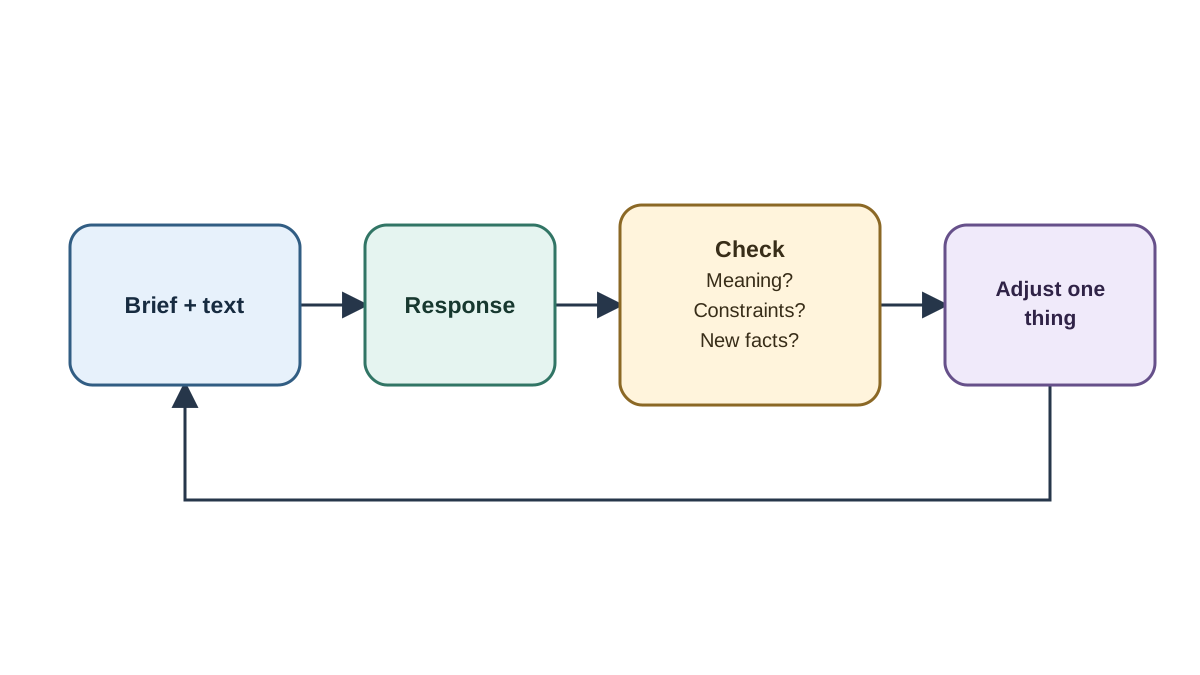
Here is the task, and the reason for it: you already know the correct answer. You wrote the original, so you can judge the output instead of trusting it. That is what makes this a good first run.
Pick something short and non-sensitive — a paragraph from an email, a product description, a short bio, a set of instructions.
Step 1: State the task and the audience. Put the instruction first, before the text:
Rewrite the paragraph below for a non-technical reader.
Keep it under 80 words.
Do not add facts that are not in the original.
Step 2: Paste the text after the instruction, clearly separated. A blank line and a label like Text: is enough.
Step 3: Read the response against three checks. Did it follow the length constraint? Did it keep the meaning? Did it invent anything that was not in your original?
Step 4: Send one follow-up that changes a single variable. Now make it more formal. Or: now cut it to 40 words. This is the actual skill — iteration, not one-shot perfection.
The loop looks like this:
instruction + context + your text → response → check against the task
You succeeded if: you got a usable rewrite, you can point to at least one place where your instruction visibly changed the output, and you can name one thing you would specify differently next time. That third one is the real signal. It means you are now thinking in briefs.
Knowledge check
Check your understanding
Answer this question before you continue.
Reading the Response Like a Reviewer, Not a Customer
Claude produces fluent text, and fluency is not evidence. A confident paragraph can still contain a wrong number, a fabricated citation, or a claim that never appeared in your source text.
Three cheap checks catch most first-run problems:
- Does it answer the task I actually gave? Not a related task. Yours.
- Does every claim trace back to something I provided or something I can verify?
- Did it silently drop a constraint I set? Length, tone, and "do not add facts" are the usual casualties.
The most common beginner failure is not a bad answer. It is accepting a good-sounding answer without reading it against the original.
When the answer is wrong, say what is wrong and what you expected. You changed the meaning in the second sentence — the original said the deadline is optional. Correction is part of the workflow, not a restart.
Warning: For anything that will be published, sent to a customer, or used in a decision, treat the output as a draft that needs an independent check — not as a finished artifact.
Knowledge check
Check your understanding
Answer this question before you continue.
When the First Run Goes Wrong
Most first-run problems have a one-line cause and a one-line fix.
| Symptom | Likely cause | Fix |
|---|---|---|
| Generic, bland output | Underspecified prompt | Add audience, length, format, and what to preserve |
| Claude asks for clarification or gives a vague answer | The request is genuinely unclear, not sensitive | Answer the clarifying question, or restate the task with a narrower scope and a concrete example |
| Claude declines a request that involves sensitive data or a safety boundary | The task itself crosses a line, not a wording problem | Stop. Remove the sensitive content, redact it, or check your organization's policy. Do not rephrase to get past the refusal |
| You hit a usage limit or context warning | Plan and session boundary, not a bug | Wait for the reset, start a fresh conversation, or shorten what you paste |
| You cannot access the service at all | Location or account requirement | Check supported locations and account requirements before assuming it is broken |
| Answers get worse as the thread grows | Conversation drift | Start a new conversation with a clean, better-specified prompt |
That last row deserves emphasis. Long, messy threads carry their own confusion forward. Starting over is often faster than repairing.
The third row is the one beginners get wrong most often. A refusal is not always a puzzle to solve. If the request involves credentials, private records, or anything you would not put in a shared document, the correct move is to change the task, not the phrasing.
What to Explore Next
Three directions, in the order I would take them.
Prompt specificity. The same task, described with more constraints, produces a noticeably better result. This is the highest-leverage skill to practice next, and it compounds across everything else you do with Claude.
Longer, multi-turn work. Give Claude a document or a set of notes and work through it in stages rather than one giant request. This is where the conversational model starts to pay off.
Attaching files or images. This changes what the model can work from. Available features vary by plan and platform, so check what your account actually offers before assuming something is missing.
Note: Building with the API, SDKs, and API keys is a different track with its own setup and credential-handling rules. Do not mix it into a first chat session.
The Habit, Not the Demo
Here is the one rule worth keeping: a prompt is a brief, and a response is a draft you check.
Your next action is concrete. Run the same rewrite task again, but add three constraints up front — audience, length, and tone. Then put the two outputs side by side. The comparison is your own evidence that specificity, not luck, produced the better result.
That is the whole arc: from a single checked interaction to a repeatable habit of specifying, checking, and correcting. Everything else you learn about Claude builds on it.
Knowledge check
Final check
Finish the article by checking the ideas you just learned.
References
Want a more structured LLMOps path?
Use the LLMOps Practical Starter Bundle to connect RAG, evaluation, observability, and production patterns.
Large Language Models Starter Pack
A 12-chapter guide connecting LLM fundamentals with prompting, RAG, agents, tool calling, evaluation, security, and application engineering.
- 227-page Illustrated PDF edition
- 12 guided LLM engineering chapters
- Visual concept diagrams
- Self-assessment quizzes
- Bonus deep-dive sections
- Prompt design, structured output, context windows & RAG pipelines
- Agents, tool calling, prompt injection, evaluation & application lifecycles
Coming soon


