
What Are Multimodal LLMs? Understanding Text, Images, and More
You upload a photo of a handwritten recipe to your AI chatbot and ask it to turn the ingredients into a shopping list. A moment later, the list…

You upload a photo of a handwritten recipe to your AI chatbot and ask it to turn the ingredients into a shopping list. A moment later, the list appears—organized, readable, and mostly right. One ingredient looks like "cilantro," but the handwriting was smudged, and you are not entirely sure it did not say "parsley."
That small moment of doubt is exactly where understanding multimodal LLMs begins. The model accepted your image, understood the task, and produced something useful. It also left you with a question only you could answer. Why?
The short answer: you just used a multimodal LLM. The longer answer—what that term means, how these models handle images, and where they quietly fail—is what this guide explains.
From Text-Only Chat to Multimodal Inputs
If you have chatted with a large language model, you already know the basic pattern: you type a question or request, and the model replies with text. That model works with one type of data—words. It reads your prompt, predicts a useful response, and writes it out.
Now imagine handing the model something it cannot read as words: a photograph, a chart, a scanned document. A text-only model would have no way in. You would have to describe the image yourself, typing something like "There is a bar chart showing sales by quarter, and the third quarter looks highest." You become the translator.
A multimodal LLM removes that translation step. The word multimodal simply means "multiple types of data." A modality is a kind of data—text, image, audio, video. A multimodal model can accept several of these directly, not just text.
The practical shift matters more than the terminology. Instead of describing a screenshot in words, you hand the model the screenshot itself. Instead of typing out the numbers on a receipt, you upload a photo of it. The model reads the image the way it reads your sentences—as input it can reason about.
That capability is what makes tools like ChatGPT, Google Gemini, and similar assistants feel different from earlier chatbots. They are not just better at text. They accept a wider range of what you give them.
What Kinds of Input Can a Multimodal LLM Handle?
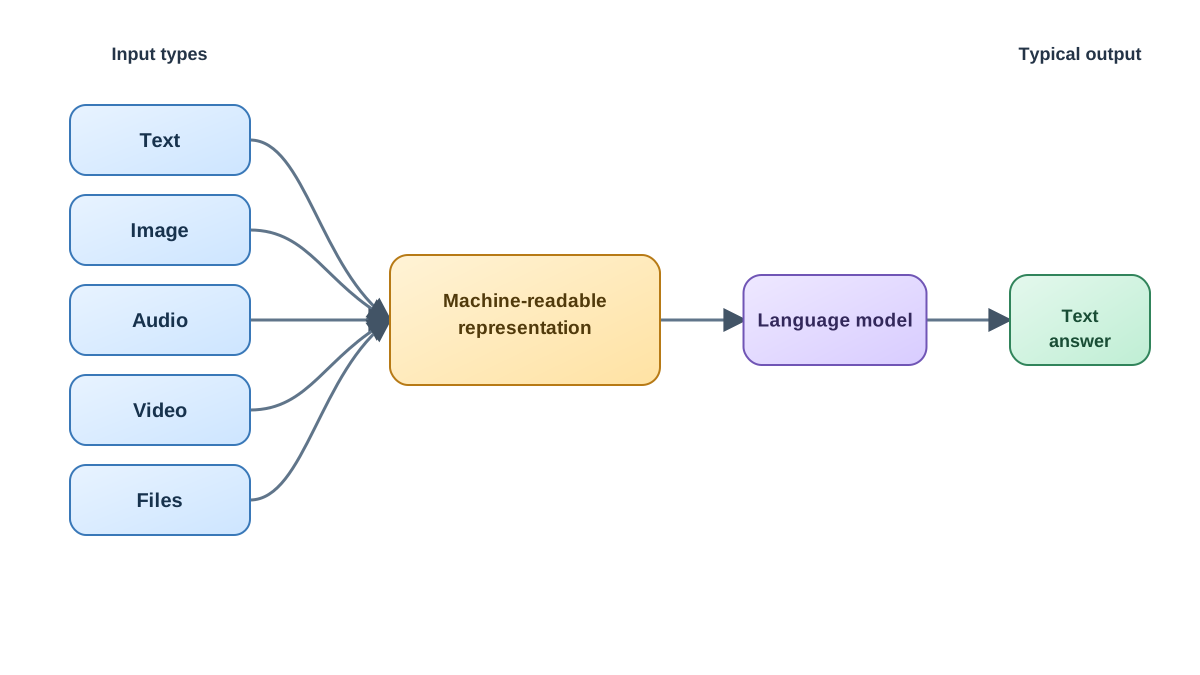
Most consumer AI tools focus on text plus images. That pairing is common enough that these models have their own name: vision language models, or VLMs—models that pair image understanding with language.
Beyond images, the input list is growing:
- Text—the familiar prompt you type.
- Images—photos, screenshots, charts, diagrams, drawings.
- Audio—spoken questions, voice memos, meeting recordings.
- Video—clips the model can watch and describe.
- Files—PDFs, spreadsheets, slides, and other documents.
For each input type, the model does something useful. It describes a photo of a hiking trail. It reads a bar chart and explains what the trend means. It transcribes an audio recording into clean text. It summarizes a long PDF you uploaded instead of pasting in chunks.
One detail keeps beginners confused, so it is worth stating plainly: multimodal describes what the model can accept, not what it returns. Most multimodal models still answer in text. You feed it an image of a dog; it replies with a sentence about a dog. The output modality stays the same—the input is what expanded.
Knowledge check
Check your understanding
Answer this question before you continue.
How a Multimodal Model "Sees" an Image
Here is where the mental model gets interesting. A multimodal model does not look at an image the way you do. It has no eyes, no visual cortex, no experience of what "seeing" feels like. So what happens when you upload that photo?
Think of it as translation between two languages. Your image arrives as a grid of pixels—thousands of tiny colored squares. The model breaks that image into smaller pieces and converts each piece into a form its language engine can work with.
This is a simplified picture, but it captures the stable idea: each input type gets converted into a machine-readable representation, those representations get connected to the language model, and the system uses the combined information to generate an answer. The exact implementation varies between models—some use dedicated image encoders, others align visual and textual information differently. For everyday use, you do not need the engineering details. You need the consequence: the model is not seeing the image the way you do. It is working with a translated version of it.
That is why the term vision language model fits so well. The model is not a vision system that happens to talk. It is a language system that has learned to accept visual input and convert it into a form it can reason about.
The boundary matters: the model reasons about images through language-like processing, not through human-like perception. It has learned patterns—millions of images paired with descriptions—and it matches what it sees against those patterns. That works impressively well most of the time. It also explains why the model fails in very specific, very human ways.
Knowledge check
Check your understanding
Answer this question before you continue.
Reading vs. Really Seeing: Where Multimodal Models Fall Short
Here is the central lesson of this article, and the one that will save you the most frustration: a multimodal model can accept an image, but that does not mean it perceives it accurately or reliably.
The model is matching patterns and describing through language. It is not measuring the world. That distinction produces predictable failures:
- Counting objects. Ask the model how many people are in a crowded photo, and it may guess confidently—and wrongly. It saw a pattern that resembles people, not a precise count.
- Reading fine print. Small text, dense labels, or blurry document scans push the model past its reliable limit.
- Judging precise colors or measurements. The model can tell you a shirt is "reddish," but it cannot tell you the exact hex code from a photo under mixed lighting.
- Understanding cluttered or low-quality images. A busy background, poor lighting, or a partially cropped subject degrades its interpretation quickly.
Research supports this boundary. Studies of multimodal models have found that a model can describe an image fluently while its underlying reasoning does not fully use what it "saw." In beginner terms: fluent description is not the same as accurate perception.
This is not a reason to avoid multimodal tools. It is a reason to use them with judgment. Treat multimodal input as a way to give the model more context, not as a guarantee that the model sees everything you see.
Knowledge check
Check your understanding
Answer this question before you continue.
Practical Uses That Play to Multimodal Strengths
Where do multimodal models genuinely help? The pattern is consistent: they are excellent first-pass assistants, not final authorities.
Use them for:
- Describing or summarizing an image. "What is happening in this photo?" works reliably.
- Extracting text from a clean photo or PDF. This is called OCR—optical character recognition—and modern models handle it well when the document is legible.
- Explaining a chart or diagram. "What does this graph show?" is a strength, especially for clear, well-labeled visuals.
- Brainstorming from a screenshot. Show the model a design, a webpage, or an error message and ask for suggestions.
Treat with caution when:
- The task involves precise counting of objects in a complex scene.
- The text is dense, small, or poorly scanned, and a single wrong character matters.
- The answer depends on exact colors, measurements, or quantities from an image.
- A wrong answer carries real cost—medical images, legal documents, safety-critical measurements.
The rule that separates these two lists is not "understanding versus measurement." It is a staged approach: let the model do the first pass, then verify what matters.
Here is what that looks like in practice. Upload that scanned contract page and ask for a summary of the key terms. The model will give you a useful overview in seconds. Then check the specific fields that matter—the renewal date, the payment amount, the termination clause—against the original page. The model saved you the reading time. You still own the verification.
The same logic applies to your handwritten recipe. The model turned the ingredients into a tidy list. Before you shop, compare the quantities and the uncertain words against the photo. The model gave you a fast draft. You supply the final check.
Knowledge check
Check your understanding
Answer this question before you continue.
A Simple Rule for Working With Multimodal Models
If you remember one thing from this guide, make it this: multimodal means more input types, not perfect perception.
That single sentence explains both the power and the limits. The power: you can hand the model a photo, a chart, or a PDF and get useful understanding back in seconds. The limit: the model's understanding is pattern matching through language, not human-like seeing.
Build one habit to stay safe: for anything where accuracy matters, verify the model's reading against the original image or document. If you asked it to extract a tracking number from a shipping label photo, check the number. If you asked it to summarize a contract page, spot-check the key clauses. The model is a fast first pass, not a final authority.
And when the model gets something wrong—miscounts the objects, misreads a word, misjudges a color—do not treat it as your mistake. This is a boundary of the technology, not a personal failure. Every experienced user hits these limits. The skill is learning where they are.
Try It Yourself
The fastest way to make this mental model stick is to test both sides of it. Open the AI tool you already set up, upload an image or document, and run two experiments.
First, test a strength: upload a photo and ask the model to describe what is happening. Then upload a chart or a page from a document and ask for a summary. Notice how natural and useful the responses feel.
Second, test a boundary: ask the model to count a specific set of objects in a busy photo, or read a line of very small text. Watch where it hesitates, guesses, or gets it wrong.
You will come away with something more durable than a definition. You will know exactly what these models do well, where they stumble, and how to work with both sides. That judgment is the real skill—and it only grows with practice.
Knowledge check
Final check
Finish the article by checking the ideas you just learned.
References
Want a more structured LLMOps path?
Use the LLMOps Practical Starter Bundle to connect RAG, evaluation, observability, and production patterns.
Large Language Models Starter Pack
A 12-chapter guide connecting LLM fundamentals with prompting, RAG, agents, tool calling, evaluation, security, and application engineering.
- 227-page Illustrated PDF edition
- 12 guided LLM engineering chapters
- Visual concept diagrams
- Self-assessment quizzes
- Bonus deep-dive sections
- Prompt design, structured output, context windows & RAG pipelines
- Agents, tool calling, prompt injection, evaluation & application lifecycles
Coming soon


