
Vision-Language Models vs Image Generators: What Each System Does
You asked a chat tool to describe a photo and got a polite apology instead. You asked an image tool to draw a picture and got something that looked…

Key topics
You asked a chat tool to describe a photo and got a polite apology instead. You asked an image tool to draw a picture and got something that looked right—until you noticed the extra finger. Both tools "handle images," so why do they fail so differently?
Because they move in opposite directions.
One system reads images into words. The other writes words into images. Confusing the two is the most common mistake beginners make with image-capable AI, and it leads to asking a tool to do something its design simply cannot do.
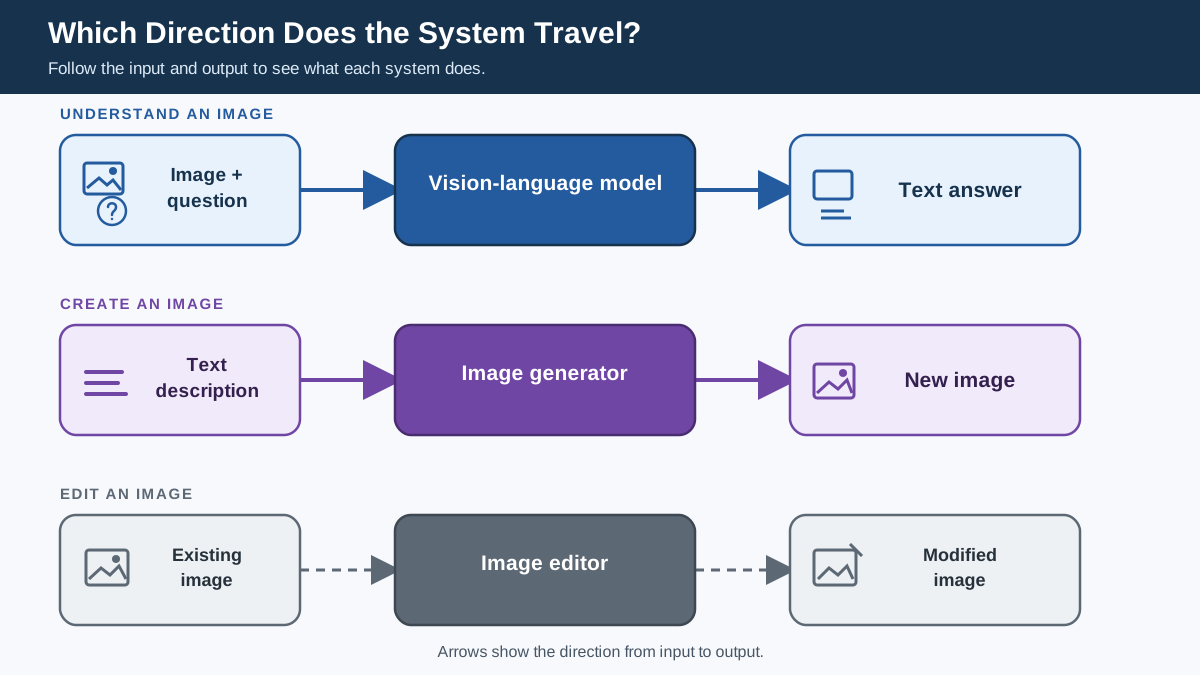
Here is the mental model that fixes it: a vision-language model turns pictures into text. An image generator turns text into pictures. Once you know which direction a tool travels, you will know which one fits your task.
The Confusion: Two Systems, One Word
When people say "AI that works with images," they usually mean one of two very different systems:
- Vision-language models (VLMs) that understand images
- Image generators that create images
The confusion is understandable. Both accept text input. Both produce something impressive. But they are built for opposite jobs.
If you have ever uploaded a photo to an image generator and asked it to "look at this and tell me what you see," you have hit this wall. The generator did not ignore you—it genuinely cannot see your photo. It has no mechanism for reading an existing image.
The cost of this confusion is practical: you waste time, blame the wrong tool, and conclude that "AI is broken" when the real problem is that you handed a writer a paintbrush and asked it to read you a book.
Before we go further, one clarification. There is a third job in this space: modifying an image you already have. Tools that do that—image editors—are related but distinct, and we will come back to them. For now, focus on the two main directions: understanding and creating.
What a Vision-Language Model Actually Does
A vision-language model takes an image plus text as input and produces text as output. You give it a photo and ask a question. It gives you an answer in words.
Everyday tasks a VLM handles well:
- Describing what is in a photo
- Answering questions about an image ("What color is the car?")
- Reading text out of a document or screenshot
- Counting objects ("How many people are in this picture?")
- Interpreting a chart or graph
- Locating things ("Draw a box around the dog")
If you have used a chat assistant that lets you upload an image and ask about it, you have used a VLM. These models are a type of multimodal AI: they combine a vision component with a large language model so the system can reason about what it sees.
The mechanism, lightly: the model converts the image into a form its language engine can process, then generates text based on both your question and the visual content. It does not "see" the way you do. It analyzes patterns in the image and connects them to language.
Some VLMs can also point to or locate objects in an image—drawing a box around a face or highlighting a specific region. That is still understanding, not creating. The output is information about an image that already exists.
What a VLM cannot do: invent a brand-new image that does not exist. If you ask it to "create a picture of a cat wearing a spacesuit," it will describe one to you in words. It cannot produce the pixels.
Knowledge check
Check your understanding
Answer this question before you continue.
What an Image Generator Actually Does
An image generator takes a text description as input and produces a brand-new image as output. You type "a watercolor painting of a lighthouse at sunset" and it creates an image that never existed before.
Familiar tools in this category include DALL-E, Midjourney, and Stable Diffusion. These are the systems people mean when they say "AI art."
Everyday tasks an image generator handles well:
- Creating illustrations for a blog post or presentation
- Generating concept art or design mockups
- Producing product visualizations before anything is built
- Making a custom image to accompany your writing
The mechanism, lightly: the generator starts with random noise and refines it step by step, guided by your text description, until it produces an image that matches your words. It is not retrieving a photo from a library. It is synthesizing new pixels.
What an image generator cannot do: understand or analyze an image you already have. You cannot upload a photo of your living room and ask it to "describe what furniture is here." It has no mechanism for reading your image. It only knows how to create new ones from text.
There is a second limitation worth knowing: because generators are not reasoning about a real scene, they can produce images that look convincing but contain wrong details. Text in images often comes out garbled. Hands and fingers frequently look off. The generator is not lying—it is assembling patterns that look like what you asked for, without understanding the underlying reality.
Note: Some generators accept an existing image as a style reference or starting point. That is not the same as understanding the image. Using a photo to guide the appearance of new output is different from answering factual questions about what is in that photo. If you need reliable answers about an image's contents, you need a VLM.
Knowledge check
Check your understanding
Answer this question before you continue.
Side by Side: Input, Output, and Direction
| Vision-Language Model | Image Generator | |
|---|---|---|
| Input | Image + text question | Text description |
| Output | Text answer | New image |
| Direction | Image → Words | Words → Image |
| Typical tasks | Describing photos, answering questions about images, reading documents, interpreting charts | Creating illustrations, mockups, concept art, custom images |
| Primary limitation | Cannot create a new image | Cannot analyze your existing image |
| Example prompt | "Here is a photo of my garden. What plants do you see?" | "A small cottage garden with lavender and roses, watercolor style" |
The direction row is the one to remember. A VLM reads. A generator writes. They are mirror images of each other.
Knowledge check
Check your understanding
Answer this question before you continue.
How to Choose the Right System for Your Task
Here is the decision rule I teach beginners. Ask two questions:
- What do you already have? An image, words, or both?
- What must come out? An explanation, a new image, or a modified image?
Match your answers to the system:
- Image in, explanation out → Vision-language model
- Words in, new image out → Image generator
- Image in, modified image out → Image editor (a related but separate category)
Run your task through that test and the choice becomes obvious.
Scenario 1: You took a photo and want to know what is in it. You have an image. You need understanding. → Vision-language model.
Scenario 2: You need a logo for your new side project. You have a description in your head. You need new pixels. → Image generator.
Scenario 3: You have a sales chart and want to know which quarter had the highest revenue. You have an image (the chart). You need an answer in words. → Vision-language model.
Scenario 4: You want to turn a photo of your dog into a watercolor painting. You have an image. You need a modified version of it. → Image editor or a generator that supports image-conditioned editing.
Now the negative cases, because they matter just as much:
- Do not ask a generator to analyze your existing photo. It cannot see it. You will get an apology or a hallucinated answer.
- Do not expect a VLM to invent an image that does not exist. It will describe one to you, but it cannot produce the picture.
One honest caveat: some newer tools blur these lines and can do a bit of both. A few chat assistants can generate images inside the conversation, and some generators accept an image as a style reference. For a beginner, though, the clean mental model is more useful than chasing edge cases. Learn the two main directions first. The hybrid tools will make more sense once you know what they are combining.
Knowledge check
Check your understanding
Answer this question before you continue.
Common Mistakes Beginners Make
Mistake 1: Asking an image generator to "look at" or "fix" an existing photo. You upload a blurry picture and ask the generator to sharpen it or describe it. It cannot. The generator never sees your photo. The fix: Use a vision-language model for understanding. If you genuinely need to edit an image, use an image editor—not a generator.
Mistake 2: Expecting a vision-language model to create or edit an image. You ask your chat assistant to "make this photo look like a painting" and it gives you a text description of what that painting would look like. The fix: If you need a new image, switch to a generator. If you need to edit an existing one, look for an image-editing tool.
Mistake 3: Judging a system as "broken" when the task does not match the tool. This is the deepest version of the problem. The tool worked exactly as designed. You asked it to do something its architecture cannot do. The fix: Before you blame the AI, check the direction. Are you asking a reader to write? Are you asking a writer to read? Switch the tool or rephrase the task.
A Simple Way to Remember the Difference
Compress the whole lesson into one line:
One system reads pictures into words. The other writes words into pictures.
Here is a quick self-test you can run right now with any AI tool you already have:
- Hand it an image and ask a question about what is in it.
- Hand it a text description and ask for a picture.
Watch what happens in each case. One of those requests will work. One will fail. The one that works tells you which direction your tool travels.
Run that test once and you will never confuse the two again. The distinction stops being abstract the moment you watch a tool fail at the task its architecture was never built to handle. That failure is not a bug—it is the clearest possible proof of which direction the system moves.
Knowledge check
Final check
Finish the article by checking the ideas you just learned.
References
Want a more structured LLMOps path?
Use the LLMOps Practical Starter Bundle to connect RAG, evaluation, observability, and production patterns.
Large Language Models Starter Pack
A 12-chapter guide connecting LLM fundamentals with prompting, RAG, agents, tool calling, evaluation, security, and application engineering.
- 227-page Illustrated PDF edition
- 12 guided LLM engineering chapters
- Visual concept diagrams
- Self-assessment quizzes
- Bonus deep-dive sections
- Prompt design, structured output, context windows & RAG pipelines
- Agents, tool calling, prompt injection, evaluation & application lifecycles
Coming soon


