
Practice Verifying a Multimodal LLM's Answers About Images
The model wrote three confident sentences about your screenshot. You still don't know if it actually looked.

Key topics
The model wrote three confident sentences about your screenshot. You still don't know if it actually looked.
That gap—between a fluent answer and a grounded one—is the whole problem. A multimodal model can describe an image it barely used, and the prose will sound exactly as polished as when it read every pixel. You cannot hear the difference. You have to test for it.
This is a short drill that turns that vague unease into a repeatable check. You will ask a model a few questions about one image, mark every claim against what you can actually see, and sort the answer into one of three buckets: supported, ambiguous, or unsupported. No special tools. No new account. Just an image, a chat window, and ten minutes of honest note-taking.
If you are new to how these models handle images at all, the short version is enough to start: a multimodal model accepts an image alongside your text and produces a text answer. What it does not guarantee is that the image drove the answer. That is what we are here to check.
Why Confident Image Answers Are Not Evidence
Here is the uncomfortable part. The quality of the writing tells you nothing about whether the model read the picture.
A model can produce a clean, well-organized paragraph that leans almost entirely on your wording and general priors—what it "expects" to be true about receipts, charts, or product labels—rather than on the specific pixels you uploaded. The output looks the same either way. This is why text-only sanity checks miss it: the failure is not general factuality. The failure is broken grounding—the answer is not anchored to the visual input.
Note: Grounding means the answer's claims trace back to something visible in the image. An ungrounded answer can still be fluent, plausible, and wrong about your picture.
So we need a working rule for the whole exercise:
Every factual claim in the answer must be traceable to something you can point at in the image.
When you apply that rule, each claim lands in one of three buckets:
| Bucket | What it means |
|---|---|
| Supported | You can point to the exact spot in the image that backs the claim. |
| Ambiguous | The image genuinely does not settle it—blur, occlusion, tiny text, two reasonable readings. |
| Unsupported | The image is clear, and the claim contradicts it or invents something not there. |
That sorting is the skill. Everything below is practice for it.
Set Up Your Image-Question Drill
Pick any multimodal assistant you already have access to. The drill does not depend on which one.
Choose one image with a few checkable facts. Good candidates:
- A receipt with a total and a date.
- A chart with labeled bars or a visible peak.
- A product label with a size or ingredient.
- A screenshot showing a settings toggle or a value.
- A photo with a countable number of objects.
Now write three questions of increasing specificity:
- Broad: "What is this image showing?"
- Exact: "What is the total on this receipt?" or "What is the value of the tallest bar?"
- Small or partially hidden: "What does the fine print under the total say?" or "What color is the small icon in the corner?"
Keep a simple record. A plain text file is enough—four columns:
Image | Question | Model answer (verbatim) | My reading of the image
Copy the model's answer word for word before you judge it. Paraphrasing early hides the exact claim you are trying to test.
Knowledge check
Check your understanding
Answer this question before you continue.
Run the Baseline Pass
Ask each question once, in a fresh conversation, and paste the answer into your record.
Now underline every factual claim the model makes about the image. Not the filler, not the framing—the claims. "The total is $47.20." "The chart peaks in the second quarter." "There are three bottles."
Mark each one:
- I can point to it in the image.
- I cannot tell.
- The image contradicts it.
Here is what usually happens on a first run. The broad question looks fine—the model gets the gist, and the gist is easy. The exact question is where the cracks show. It might nail the total, or it might give you a number that is close but wrong, or confidently report a value that is not on the page at all.
That contrast is the lesson, not a failure. The broad answer was never the hard part. The specific value is where grounding either holds or breaks.
Common mistake: Treating a good broad answer as proof the model read the image. It is not. A model can describe the general scene from context alone.
Separate Ambiguity From Perception Error
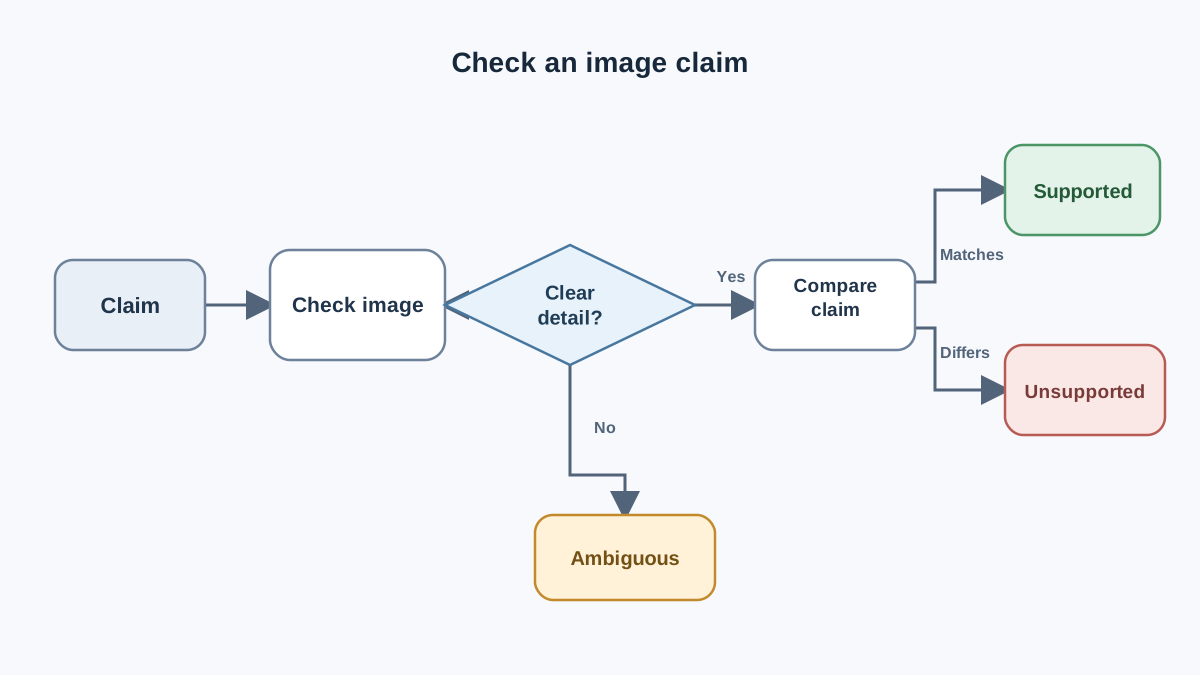
When a claim fails, you need to know where the failure lives, because the fix is different.
Ambiguity lives in the image. Blur, occlusion, small text, dense tables, or a layout where two readings are both reasonable. If you cover the model's answer, read the image yourself, and genuinely cannot decide—that is ambiguity. The model is not wrong; the image is not clear.
Perception error lives in the model. The image is clear, but the answer names the wrong number, label, color, or object. You can see the right answer plainly, and the model missed it.
Small visual details are a known weak spot. A model can be right about the big picture and wrong about the one number you actually needed—the total, the date, the toggle state. That is exactly the kind of error that matters most, because it is the kind you would act on.
The practical test: cover the answer, read the image yourself, then compare. If you cannot decide from the image alone, it is ambiguity. If you can, and the model disagreed with you, it is a perception error.
Knowledge check
Check your understanding
Answer this question before you continue.
Probe the Model With Follow-Up Questions
One answer is a data point. A few sharp follow-ups help you decide which claims deserve a closer look—but they are not proof of grounding on their own. Treat them as triage, not as a verdict.
Try these:
- Ask it to point. "Where in the image did you find that?" A vague gesture—"in the document"—gives you nothing to check. A specific location gives you a spot to verify yourself. The model's account of where it looked is not independent evidence; it is a lead.
- Re-ask with different wording. Same question, new phrasing. If the answer flips, the wording was doing some of the work. That instability is a reason to verify the claim against the image, not a conclusion about what the model used.
- Ask about something that is not there. "What does the warranty section say?" when there is no warranty section. Watch whether the model says "I don't see one" or invents something. An invented answer is a clear unsupported claim—and a useful signal about how this model handles missing details.
The pattern to watch for: if the answer changes with your wording, treat that claim as unstable and check it against the image yourself. Instability flags a claim for inspection. It does not tell you whether the model used the picture, and it does not replace your own reading.
Warning: Do not let a confident follow-up, a stable rephrase, or a model's self-explanation stand in for visual evidence. The image is the ground truth. Everything else is a hint about where to look.
Knowledge check
Check your understanding
Answer this question before you continue.
When to Ask for Clarification and When to Verify Independently
After a claim fails, you have a decision to make. Here is the rule I use:
- If the image is ambiguous, the right move is a better image or a narrower question—not a different model. A sharper crop or a clearer photo often resolves it.
- If the model misread a clear detail, re-ask once with the detail called out. "Look at the total line specifically." If it still fails, treat that claim as unreliable.
- If the claim will drive a real decision, confirm it against the source itself: the original document, the live screen, or a second independent method. Do not act on a model's reading of a number you can check yourself.
State the boundary plainly: this drill tells you whether a claim is supported, not whether the model is generally trustworthy. A model that nails your receipt today may misread your chart tomorrow. You are testing claims, one at a time—not certifying the model.
Knowledge check
Check your understanding
Answer this question before you continue.
Extend the Drill: Change One Variable
The drill becomes a habit when you change one thing and watch what happens.
- Crop or downscale the image. Run the same questions. If the answers change, the model was sensitive to detail size—useful to know.
- Try a different assistant. Same image, same questions. Note where the two disagree. Disagreement is a reason to verify the claim yourself, not proof that either model guessed.
- Remove the image entirely. Ask the same question with no picture attached. If the answer barely changes, the model was never using the picture.
Keep the record short and comparable across runs. After a handful of images, the pattern becomes visible: which questions your model handles well, and which ones it fakes.
Your Next Move
Run this drill on one image this week. Keep the four-column record—image, question, verbatim answer, your reading. Sort every claim into supported, ambiguous, or unsupported.
Then adopt the standing rule: any image-based claim that drives a real decision gets checked against the source before you act on it. The model can be your fast first pass. It does not get to be your last word on a number you can verify yourself.
Knowledge check
Final check
Finish the article by checking the ideas you just learned.
References
Want a more structured LLMOps path?
Use the LLMOps Practical Starter Bundle to connect RAG, evaluation, observability, and production patterns.
Large Language Models Starter Pack
A 12-chapter guide connecting LLM fundamentals with prompting, RAG, agents, tool calling, evaluation, security, and application engineering.
- 227-page Illustrated PDF edition
- 12 guided LLM engineering chapters
- Visual concept diagrams
- Self-assessment quizzes
- Bonus deep-dive sections
- Prompt design, structured output, context windows & RAG pipelines
- Agents, tool calling, prompt injection, evaluation & application lifecycles
Coming soon


