
The RAG Pipeline Explained: From Documents to Grounded Answers
You know RAG retrieves documents and feeds them to a language model. But if someone asked you what actually happens between a source PDF and a grounded…

You know RAG retrieves documents and feeds them to a language model. But if someone asked you what actually happens between a source PDF and a grounded answer, could you trace it?
Most beginners can't—and that gap matters. When a RAG system returns a wrong answer, the instinct is to blame the model. But the model is only the last link in a chain. The real culprit is usually hiding in an earlier stage you never thought to inspect.
A RAG pipeline is a context-selection system. Think of it this way: the model has a limited working desk, and every piece of retrieved evidence competes for space on it. The pipeline's job is to decide which evidence deserves that space before the model starts writing. Each stage in that decision has its own job, its own tradeoffs, and its own quiet way of breaking.
This article traces the full retrieval augmented generation workflow—from raw documents to a cited answer—so you can see the whole architecture at once and, more importantly, know where to look when something goes wrong.
Why the Pipeline Matters More Than the Acronym
The beginner mental model of RAG goes something like: retrieve some docs, stuff them in the prompt, get a better answer. That model hides where quality is actually lost.
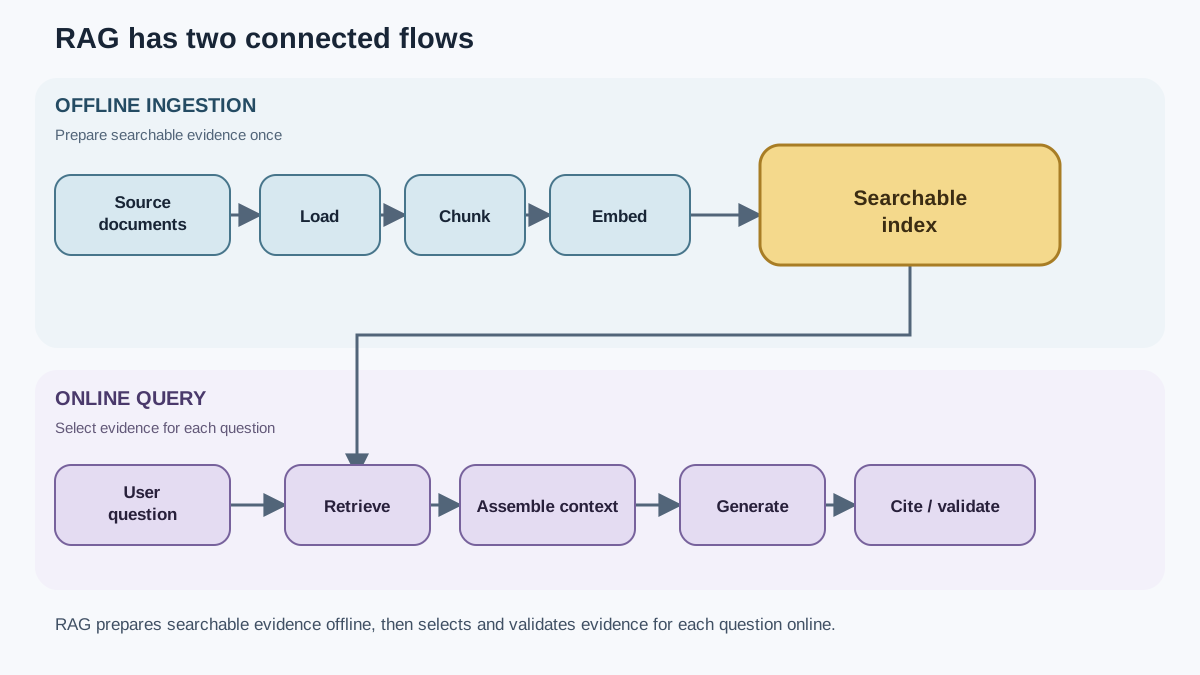
A real RAG architecture runs two separate flows:
The offline ingestion flow runs once, or whenever your source data changes. It takes raw documents, cleans them, splits them into pieces, converts those pieces into numbers, and stores them in a searchable index. This flow prepares your knowledge base for every future question.
The online query flow runs for every single question. It takes the user's query, searches the prepared index, pulls back the most relevant pieces, assembles them into a prompt, and generates an answer.
Both flows matter, but they fail in different ways. Ingestion failures are silent—they corrupt your data before anyone asks a question. Query failures are visible—they produce wrong answers you can actually see.
Here's the map we'll follow through the retrieval augmented generation steps: ingestion, chunking, embedding, retrieval, context assembly, generation, and citation or validation. Each stage is a handoff. Each handoff can drop the ball.
Stage 1: Ingestion and Document Loading
Every RAG pipeline starts with source material: PDFs, web pages, emails, databases, Confluence pages, CSV exports. None of these arrive as clean text.
The ingestion stage uses document loaders to extract usable content from whatever format your sources come in. A PDF loader handles page layouts. A web loader strips navigation chrome. A database connector pulls structured records. Each loader is a translation layer between a messy real-world format and the plain text your pipeline can work with.
This is where formatting, tables, scanned pages, and metadata get lost or mangled. And here's the cruel part: that damage is permanent downstream. The model never knows what it missed because it never sees the original document. It only sees whatever survived ingestion.
The rule: garbage in at ingestion becomes invisible garbage later. If a table gets flattened into unreadable text, or a scanned page comes through as gibberish, no later stage can recover it. The pipeline will happily retrieve that corrupted chunk and generate a confident answer from it.
First artifact to inspect when answers seem wrong: the raw extracted text, before any chunking. If the source material is garbled there, you've found your problem.
Knowledge check
Check your understanding
Answer this question before you continue.
Stage 2: Chunking
Once documents are loaded, they're too large to work with as single units. An embedding model has a maximum input length, and even if it didn't, you can't meaningfully retrieve against a 200-page manual as one blob. So the pipeline splits text into smaller pieces called chunks.
Chunk size is a real design decision, not a default to accept blindly. It's a tradeoff in both directions:
- Chunks too large bury the relevant sentence in surrounding noise. The retrieval stage might find the chunk, but the model has to dig through paragraphs of irrelevant material to locate the actual answer.
- Chunks too small lose the surrounding context that makes a passage meaningful. A sentence about "the refund policy" is useless if the chunk doesn't include which product or time period it applies to.
Naive splitting makes this worse. Cutting text every N characters splits sentences mid-thought and separates ideas from their context. Better approaches respect structure: split on headings, paragraphs, or semantic boundaries where one idea ends and another begins.
The failure mode here is subtle. A question that spans two chunks—or an answer that lives exactly at a chunk boundary—gets missed entirely, even though the document contains it. The information exists. The retrieval stage just can't see it because it was cut in half.
First artifact to inspect: the chunk contents and their boundaries. If a relevant passage is split across two chunks, or a chunk starts mid-sentence, chunking is your culprit.
Knowledge check
Check your understanding
Answer this question before you continue.
Stage 3: Embedding and Vector Storage
Now the chunks need to become searchable by meaning, not just by keyword. That's the job of embeddings.
An embedding model converts a chunk of text into a high-dimensional vector—a long list of numbers that captures the semantic content of the text. The key property: texts with similar meanings end up close together in this vector space. "How do I reset my password?" sits near "I forgot my login credentials," even though they share almost no exact words.
These vectors get stored in a vector database, which is built for one specific job: fast similarity search. When a query arrives later, the database can quickly find the stored vectors closest to the query vector.
Two choices here shape retrieval quality more than anything else.
First, the embedding model itself. Different models capture meaning differently, and a model trained on general web text may handle your specialized domain poorly. If your documents are full of legal jargon or medical terminology, a general-purpose embedding model will miss important distinctions.
Second, and more commonly overlooked: the embedding model must be consistent. If your documents were embedded with Model A and your query gets embedded with Model B, the similarity comparisons are comparing vectors from two different coordinate systems. The results are unreliable, and the system fails in ways that are hard to diagnose because nothing reports an error.
The deeper failure mode: embeddings capture meaning imperfectly. A query phrased very differently from the source text can retrieve nothing useful even when the answer exists in your knowledge base. The meaning was there. The embedding just couldn't bridge the gap between how the document said it and how the user asked it.
First artifact to inspect: which embedding model was used for documents versus queries, and whether the two match.
Knowledge check
Check your understanding
Answer this question before you continue.
Stage 4: Retrieval at Query Time
Now the online flow begins. A user submits a question. The system embeds that question with the same model used for the documents, then asks the vector database: which stored chunks are closest to this query?
The database returns the most similar chunks, usually a fixed number called top-k. If you ask for the top 5, you get the 5 closest matches.
Top-k is a real dial, and it deserves more attention than most beginners give it:
- Too few chunks and the answer may simply not be in the retrieved set. The model can only work with what it's given.
- Too many chunks and the prompt fills with marginally relevant evidence that crowds out what actually matters. The model's desk gets cluttered, and it starts pulling from less relevant material.
Some pipelines add a reranking stage here. Initial retrieval is fast but coarse—it pulls a wider net of candidates. A reranker then scores those candidates with a more precise relevance model and reorders them, so the best evidence rises to the top before generation.
The failure mode at this stage is the most dangerous in the entire pipeline: retrieval returns the wrong chunks, and the model confidently answers from whatever it was given. The model doesn't know the chunks are wrong. It has no access to the full knowledge base. It only sees the evidence on its desk, and it will write an answer that sounds authoritative regardless of whether that evidence supports it.
A bad retrieval stage produces a confident wrong answer. That's not a model problem. That's a retrieval problem wearing a model's costume.
First artifact to inspect: the actual retrieved chunks and their similarity scores. If the right information isn't in the candidate list, no amount of model swapping will fix it.
Knowledge check
Check your understanding
Answer this question before you continue.
Stage 5: Context Assembly and Generation
Retrieval succeeded. Now the system has to turn retrieved chunks into an answer.
The retrieved chunks get combined with the user's question into a single prompt, usually with instructions telling the model to answer only from the provided context. This assembled prompt is what the model actually sees.
This is the moment where grounding happens—or fails to happen. The model does not reason over your whole knowledge base. It reasons over whatever fits in its context window at this moment. Retrieval quality sets the ceiling; the model can only be as good as the evidence you gave it.
Two things commonly go wrong here.
First, poor prompt assembly. If the chunks are dumped in without clear separation, or the instructions are weak, the model may not understand which parts are evidence and which parts are conversation. It might treat retrieved text as something to continue rather than something to answer from.
Second, the model may ignore the context instruction entirely. Language models are trained to answer questions from their internal knowledge. Telling them to answer only from provided context is a strong hint, not a guarantee. When the retrieved evidence is thin or ambiguous, the model's training memory starts leaking in, and the answer drifts back toward hallucination.
The result is an answer that sounds plausible, reads fluently, and has nothing to do with your actual documents.
First artifact to inspect: the final assembled prompt exactly as the model received it. Check whether the evidence is clearly separated, whether the instructions are explicit, and whether the context window actually fit everything retrieval returned.
Stage 6: Citation and Validation
The final stage actually contains two distinct jobs, and conflating them is a common beginner mistake.
Citation exposes provenance. A grounded answer should be able to point back at the source chunks it came from. When an answer cites chunk 47 from the employee handbook, a user can click through and confirm the claim actually says what the answer says it says. This transforms the system from an authority into an assistant—one that shows its work.
Validation tests claim-to-evidence support. This is a separate check: does each claim in the answer actually follow from the retrieved evidence? Validation can be automatic or human. Automatic validation checks the generated answer against the retrieved evidence, flagging claims that don't appear to be supported. Human validation relies on showing citations so a person can make the final judgment call.
Here's the distinction that matters: citations make an answer inspectable, but they don't make it correct. An answer can cite a chunk that doesn't actually support its claim—the citation is present, the validation failed. Conversely, an answer can be perfectly faithful to the evidence while having no user-facing citations at all. Citation is a transparency feature. Validation is a correctness check. A production system needs both, but they are not the same operation.
This stage is the most commonly skipped in beginner builds, and it's exactly why demos feel impressive but fail in real use. A demo answer that sounds right is convincing. A production answer that sounds right but cites nothing—or worse, cites a chunk that doesn't actually support the claim—is a silent trust killer. Users don't need many of those before they stop trusting the system entirely.
First artifact to inspect: the claim-to-source alignment. For each claim in the answer, can you point to the exact chunk that supports it?
Where RAG Pipelines Break: A Quick Failure Map
When an answer goes wrong, the fastest path to a fix is isolating which stage failed. Here's the mental checklist I use:
| Symptom | First artifact to inspect | Likely stage |
|---|---|---|
| Wrong or missing answer | Retrieved chunk IDs and scores | Retrieval or chunking |
| Confident but unsupported answer | Claim-to-source alignment | Context assembly or validation |
| Answer that ignores your documents entirely | Query and document embedding configuration | Embedding mismatch |
| Answers that sound right but cite weak evidence | Retrieved candidate order | Reranking or top-k tuning |
| Garbled or missing source content | Raw extracted text | Ingestion |
The debugging rule: isolate the stage before blaming the model. Each stage has a distinct signature of failure. Retrieval failures produce missing information. Chunking failures produce information that exists but can't be found. Context assembly failures produce answers that drift from the evidence. Validation failures produce confident claims with no support.
Here's what this means in practice: when your RAG system returns a bad answer, the model is usually the last place to look. Improving a RAG pipeline almost always means improving retrieval and chunking, not swapping the LLM for a bigger one. A better model can't compensate for evidence that was never retrieved, chunks that were cut mid-thought, or a knowledge base that was corrupted at ingestion.
The pipeline is only as strong as its weakest stage. Find the weak stage, fix that, and the whole system gets better—often dramatically, with no model change at all.
The practical next step: take a real RAG answer and trace it backward. Which chunks did the system retrieve? Were they the right ones? Were they chunked well? Did the source document survive ingestion intact? Walk each stage and ask where quality was lost. That backward trace is the skill that separates someone who can build a RAG demo from someone who can build a RAG system that survives real use.
Knowledge check
Final check
Finish the article by checking the ideas you just learned.
References
Want a more structured LLMOps path?
Use the LLMOps Practical Starter Bundle to connect RAG, evaluation, observability, and production patterns.
Large Language Models Starter Pack
A 12-chapter guide connecting LLM fundamentals with prompting, RAG, agents, tool calling, evaluation, security, and application engineering.
- 227-page Illustrated PDF edition
- 12 guided LLM engineering chapters
- Visual concept diagrams
- Self-assessment quizzes
- Bonus deep-dive sections
- Prompt design, structured output, context windows & RAG pipelines
- Agents, tool calling, prompt injection, evaluation & application lifecycles
Coming soon


