
Types of Prompts for LLMs
Most beginners assume a prompt is just a question you type. Ask something, get an answer. That works, but it leaves a lot of quality on the table.

Most beginners assume a prompt is just a question you type. Ask something, get an answer. That works, but it leaves a lot of quality on the table.
Here's what I want you to understand instead: prompts are not one thing. They are a small toolkit of formats, and each format is tuned for a different job. The same request, framed three different ways, can return three very different results.
Let me show you what I mean, then walk through the formats you'll actually use.
Why Prompt Types Matter
Imagine you ask an assistant to summarize a meeting. If you just say "Summarize this," you might get a paragraph. If you say "Summarize this in three bullet points, one per decision," you get something structured. If you add "Write it for a teammate who missed the meeting," you get context the other versions lacked.
The underlying request never changed. The format did.
That's the mental model to hold onto: choosing a prompt type is a design decision, not a wording preference. Once you can recognize the formats, you can pick the one that fits the job. This builds on the basics of writing clear instructions—specific verbs, explicit constraints, and a defined output shape. The formats below assume you already know how to do that part.
One thing to know before we dive in: these labels don't form one neat list. Some names describe how many examples you provide. Others describe what you add to the instruction—context, a role, or a request for reasoning. A single prompt can combine several of these at once. Think of them as building blocks you can stack, not competing categories you must choose between.
Knowledge check
Check your understanding
Answer this question before you continue.
Zero-Shot Prompts: Just the Instruction
The simplest prompt type is a direct instruction with no examples. You state the task, and the model relies on what it already learned during training.
"Summarize this paragraph in three bullet points."
"Translate this email into Spanish."
"Classify this review as positive, negative, or neutral."
Modern LLMs are trained to follow instructions on their own, so zero-shot prompting handles a surprising amount of everyday work. It's best for straightforward tasks: summarizing, translating, drafting, quick classification.
The limitation shows up when you need a very specific format or style. Without an example to anchor the output, the model may drift. Ask for a "brief summary" and you might get three paragraphs. Ask for a "professional tone" and you might get corporate-speak you didn't want.
My rule: start zero-shot. It costs nothing and often works. Reach for examples only when the output misses.
Knowledge check
Check your understanding
Answer this question before you continue.
One-Shot and Few-Shot Prompts: Teaching by Example
When a plain instruction isn't enough, show the model what you want.
One-shot prompting gives a single example. That one example anchors style, structure, and level of detail. Few-shot prompting gives several examples, which teaches a pattern the model can generalize.
Here's a before-and-after. Suppose you want to classify customer feedback by urgency:
Zero-shot: "Classify this feedback as urgent or not urgent: 'The checkout page crashes every time I try to pay.'"
The model will probably get it right. But ask for a specific output format and things get looser.
Few-shot:
"Classify each piece of feedback as URGENT or ROUTINE.
URGENT: 'The checkout page crashes every time I try to pay.' ROUTINE: 'It would be nice if the dashboard had a dark mode.' URGENT: 'I cannot log in after the update and my work is blocked.' ROUTINE: 'The font on the settings page looks small.'
Now classify: 'The export button does nothing when I click it.'"
The examples teach the pattern: what counts as urgent, what counts as routine, and the exact label format. This is the prompt format to reach for when you need consistent output—classifications, structured summaries, brand voice, templates.
The tradeoff is cost. More examples mean more tokens and more effort to write. Use only as many as you need. One example often does the job; three rarely hurt; ten is usually overkill unless you have edge cases.
Knowledge check
Check your understanding
Answer this question before you continue.
Role-Based Prompts: Assigning a Persona
Sometimes the best way to shape an answer is to tell the model who it is.
"You are a friendly tutor explaining this concept to a 10-year-old."
"You are a senior editor reviewing this draft for clarity."
"You are a customer support agent writing a calm, helpful reply."
Role framing steers vocabulary, tone, and what details get included. The same technical explanation sounds completely different when the model is told to act as a patient teacher versus a peer engineer.
This works well for creative writing, audience-specific explanations, and domain framing. If you need a concept explained to a non-technical stakeholder, a role prompt will naturally skip the jargon and reach for analogies.
One boundary worth naming: a role is a framing device, not a guarantee of accuracy. The model still only knows what it learned in training. Telling it to act as a lawyer doesn't make its legal advice reliable. Use roles to shape communication, not to conjure expertise.
Knowledge check
Check your understanding
Answer this question before you continue.
Instructional and Contextual Prompts
Two everyday formats deserve their own labels.
Instructional prompts lead with an action verb and state the output format. "Write an executive summary of this memo, under 100 words." "Compare these two proposals across cost, timeline, and risk." "Explain the difference between HTTP and HTTPS in one paragraph."
The instruction does the heavy lifting. Clear verb, clear constraint, clear shape.
Contextual prompts add background before the request. The context tells the model who the answer is for and what situation it serves.
"This text is for a beginner who has never written code. Rephrase it in simpler language."
"We are preparing a pitch for investors who care about revenue, not technical details. Summarize this product update with that audience in mind."
These two formats combine naturally. An instruction plus the context it needs to act on is often the most practical prompt you can write. The context filters what the model considers relevant; the instruction shapes the output.
The judgment call is knowing when context helps versus when it just adds noise. If the background doesn't change what a good answer looks like, leave it out.
Common mistake: Confusing role with context. Use audience context to describe who the output is for—"this is for a non-technical stakeholder." Use a role to suggest how the assistant should approach the task—"you are a product manager explaining tradeoffs." Audience context often matters more than a theatrical persona, and you can combine both when they serve different jobs.
Reasoning-Oriented Prompts: Asking for the Steps
Some tasks benefit from the model showing its work. Reasoning-oriented prompting asks the model to solve a problem in visible steps instead of jumping straight to an answer.
The trigger can be as simple as "Let's think step by step" or "Explain your reasoning."
This matters most for math, logic, planning, and any multi-step problem where the path to the answer matters. When the model works in visible steps, you get a trace you can inspect.
Ask "A store has 15 apples, sells 6, then receives a shipment of 20. How many does it have?" and the model may answer correctly or may fumble silently. Ask it to work through the problem and you get intermediate results you can check.
Here's the boundary beginners often miss: visible reasoning is not proof of correctness. A model can produce a fluent, confident step-by-step explanation and still reach the wrong conclusion. The steps help you spot where the logic went off track, but they don't guarantee the logic was sound.
The tradeoff is cost. Reasoning requests add tokens and slow the response. You don't need them for simple recall, creative writing, or any task where the answer is the point, not the reasoning.
Choosing the Right Prompt Type
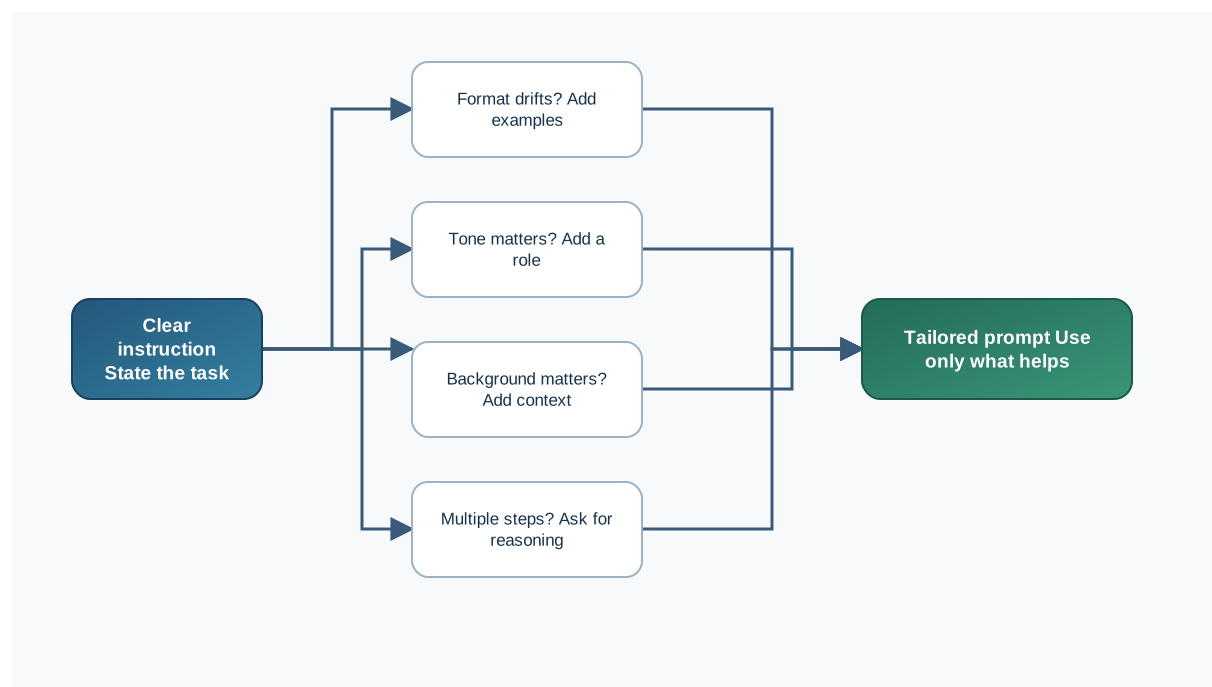
Here's the decision rule I use:
- Start zero-shot. Give a clear instruction and see what comes back.
- Add examples when the format drifts or the output shape is inconsistent.
- Add a role when the tone or approach matters.
- Add context when background information changes what a good answer looks like.
- Add reasoning when the task has multiple steps and you want to inspect the path.
| Building Block | What It Adds | Best For | Skip It When |
|---|---|---|---|
| Zero-shot | Direct instruction, no examples | Summaries, translations, quick drafts | Output format must be exact |
| One-shot / few-shot | Examples that teach a pattern | Consistent formats, classifications, brand voice | The plain instruction already works |
| Role-based | A persona that shapes tone and approach | Audience-specific tone, creative writing | Accuracy matters more than framing |
| Instructional | Action verb plus output format | Any task with a clear deliverable | The task is open-ended exploration |
| Contextual | Background about the audience or situation | Answers tailored to a specific setting | Background doesn't change the answer |
| Reasoning request | Visible step-by-step problem solving | Math, logic, planning | Simple recall or creative tasks |
A few beginner mistakes are worth naming. Don't overload one prompt with every technique—a role, five examples, and a reasoning request can fight each other. Don't add examples that contradict your instruction. And don't use a role when a plain instruction is clearer; "You are a helpful assistant" adds nothing.
When output misses, change one thing at a time. Run the same request through two formats and compare. That's the fastest way to learn which format your task actually needs.
Your Next Step
Take one real task you already do—summarizing a meeting, drafting an email, classifying feedback—and run it through two different prompt types. Compare the results. Notice what changed and what didn't.
That experiment will teach you more than reading about formats ever will. Prompt types are a small toolkit, and the skill is matching the format to the job. Once you can do that consistently, you're ready to layer on the finer points of prompt design.
Knowledge check
Final check
Finish the article by checking the ideas you just learned.
References
Want a more structured LLMOps path?
Use the LLMOps Practical Starter Bundle to connect RAG, evaluation, observability, and production patterns.
Large Language Models Starter Pack
A 12-chapter guide connecting LLM fundamentals with prompting, RAG, agents, tool calling, evaluation, security, and application engineering.
- 227-page Illustrated PDF edition
- 12 guided LLM engineering chapters
- Visual concept diagrams
- Self-assessment quizzes
- Bonus deep-dive sections
- Prompt design, structured output, context windows & RAG pipelines
- Agents, tool calling, prompt injection, evaluation & application lifecycles
Coming soon


