
Practice Choosing an AI Tool from Realistic Constraints
Most beginners pick an AI setup the way they pick a restaurant: the one that sounds best, then hope the bill and the wait are tolerable. Then the…

Key topics
Most beginners pick an AI setup the way they pick a restaurant: the one that sounds best, then hope the bill and the wait are tolerable. Then the constraint they ignored—privacy, hardware, or maintenance—shows up after they've committed. This exercise forces the decision out of your head and into a matrix you can inspect, where every choice must point back to stated evidence.
Why Your Gut Pick Fails Under Real Constraints
The default beginner move is to choose the most popular or most capable-sounding option, then retrofit constraints afterward. That works in exactly one narrow case: one person, one low-stakes task, no sensitive data, no budget ceiling, and nobody depending on the result. If all five are true, pick whatever you like and move on.
The trouble starts when a hidden constraint surfaces later. The data turns out to be confidential. The laptop turns out to have no usable GPU. The "quick setup" turns out to be a weekend of dependency wrangling. The free tier turns out to have a limit you hit in week two. None of these are exotic failures—they are the ordinary reasons a tool choice that felt obvious becomes a problem you now have to unwind.
So let's reframe the whole question. A tool choice is not a ranking of products. It is a fit between a stated situation and an option's properties. When you write the situation down as constraints and the options down as properties, the decision becomes something you can argue with—instead of something you argue with yourself about.
The payoff of this exercise is modest and honest: a provisional fit, plus a list of what you still don't know. That second part is often the more valuable output.
What You Need Before You Start
If you've read the site's comparisons of cloud versus local setups and open-weight versus closed approaches, you already have the criteria vocabulary: setup effort, data control, hardware, cost, capability, maintenance. This article supplies the practice—turning those words into a decision you can actually run.
Here's what you need:
- Python 3 installed and a terminal.
- No API keys, no accounts, no network calls. The exercise is fully self-contained and offline.
- A small option table and a few fictional scenarios, both of which I'll give you below.
The checker reads each scenario's constraints, compares them against the option table, and prints either a provisional fit, a conflict, or a list of unresolved fields. Success looks like this: every printed choice traces back to stated scenario evidence, and anything time-sensitive—prices, terms, data-handling policies—is flagged for verification rather than assumed.
Build the Option Table First
Each option is a row of properties, not a product name. Brands change, prices change, terms change—properties are what your constraints actually touch. Here's a deliberately small illustrative table. It is not a current market survey; it's a set of shapes to reason against.
OPTIONS = {
    "hosted_api": {
        "hosting": "hosted",
        "data_leaves_machine": True,
        "needs_gpu": False,
        "setup_effort": "low",
        "cost_shape": "usage_based",
        "maintenance": "low",
    },
    "local_open_weight": {
        "hosting": "local",
        "data_leaves_machine": False,
        "needs_gpu": True,
        "setup_effort": "high",
        "cost_shape": "hardware_upfront",
        "maintenance": "medium",
    },
    "managed_open_weight": {
        "hosting": "hosted",
        "data_leaves_machine": True,
        "needs_gpu": False,
        "setup_effort": "medium",
        "cost_shape": "usage_based",
        "maintenance": "low",
    },
}
Why so few rows? Because a matrix with twenty options hides the constraint that decides the outcome. Three rows force the interesting question into the open: which property actually eliminates which candidate?
Knowledge check
Check your understanding
Answer this question before you continue.
Write Scenarios as Constraints, Not Wishes
A scenario is a set of fields: what data is involved, what hardware exists, what capability is required, how much setup time you have, what cost ceiling applies, and who maintains it. Compare a wish—"I want the best model"—with a constraint: "the data cannot leave the machine." The first is a feeling. The second is a test.
SCENARIOS = {
    "clinic_notes": {
        "data_sensitive": True,
        "has_gpu": False,
        "max_setup_effort": "medium",
        "cost_ceiling": "low",
        "maintainer": "solo",
    },
    "hobby_chatbot": {
        "data_sensitive": False,
        "has_gpu": True,
        "max_setup_effort": "high",
        "cost_ceiling": None,          # deliberately missing
        "maintainer": "solo",
    },
    "team_drafting": {
        "data_sensitive": True,
        "has_gpu": True,
        "max_setup_effort": "low",
        "cost_ceiling": "medium",
        "maintainer": "shared",
    },
}
Notice two things. hobby_chatbot has a missing cost_ceiling—that's your unresolved field in action. And team_drafting asks for sensitive data and low setup effort, which no single option satisfies. That's your conflict. Writing constraints down changes the decision because you can now point at the field that did the work.
Knowledge check
Check your understanding
Answer this question before you continue.
Run the Checker and Read the Output
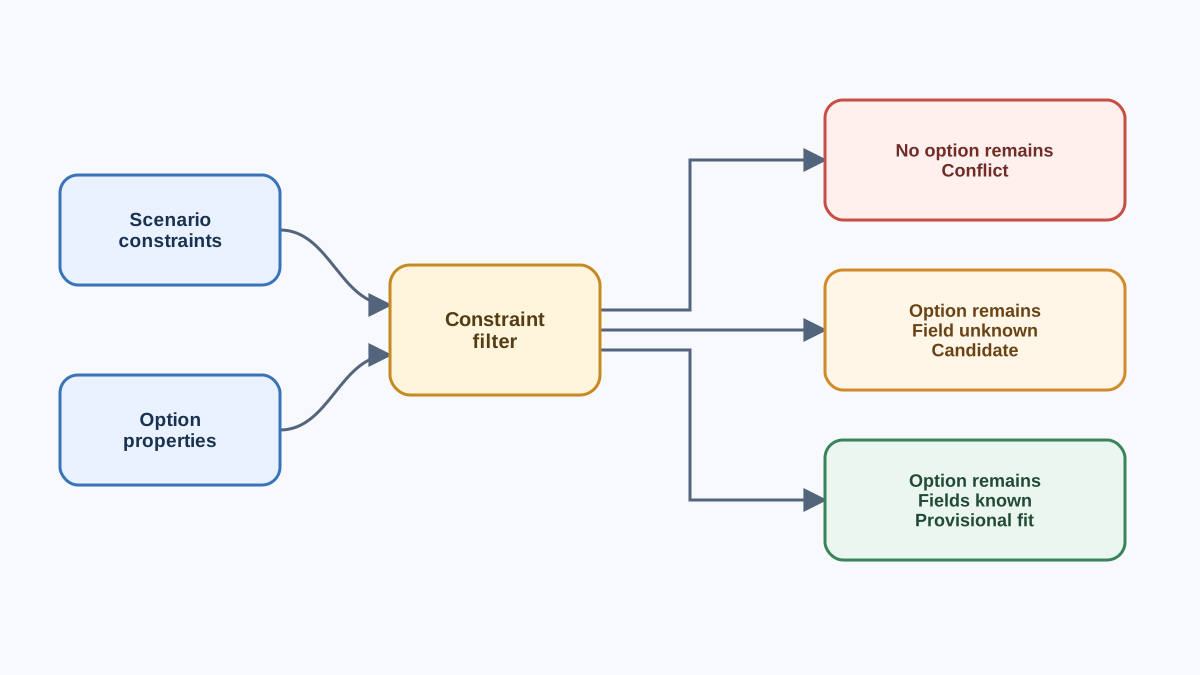
The checker logic is plain: for each scenario, test each constraint against each option's properties, and collect the reasons. When a scenario has an unresolved field, the checker reports it and withholds the fit—because a choice made on incomplete information is not a choice yet.
def check(scenario_name, scenario):
    fits, conflicts, unresolved = [], [], []

    if scenario.get("cost_ceiling") is None:
        unresolved.append("cost_ceiling")

    for name, opt in OPTIONS.items():
        reasons = []
        if scenario.get("data_sensitive") and opt["data_leaves_machine"]:
            reasons.append("sensitive data would leave the machine")
        if scenario.get("has_gpu") is False and opt["needs_gpu"]:
            reasons.append("no GPU available")
        if scenario.get("max_setup_effort") == "low" and opt["setup_effort"] == "high":
            reasons.append("setup effort exceeds limit")
        if reasons:
            conflicts.append((name, reasons))
        else:
            fits.append(name)

    print(f"\n=== {scenario_name} ===")
    if unresolved:
        print(f"UNRESOLVED FIELDS: {unresolved} — choice blocked until known")
    if fits and not unresolved:
        print(f"PROVISIONAL FIT: {fits[0]}")
    elif fits:
        print(f"CANDIDATE (pending unresolved fields): {fits[0]}")
    else:
        print("CONFLICT: no option satisfies all constraints")
    for name, reasons in conflicts:
        print(f"  ruled out {name}: {'; '.join(reasons)}")

for name, scenario in SCENARIOS.items():
    check(name, scenario)
Run it and you should see output shaped like this:
=== clinic_notes ===
CONFLICT: no option satisfies all constraints
  ruled out hosted_api: sensitive data would leave the machine
  ruled out local_open_weight: no GPU available
  ruled out managed_open_weight: sensitive data would leave the machine

=== hobby_chatbot ===
UNRESOLVED FIELDS: ['cost_ceiling'] — choice blocked until known
CANDIDATE (pending unresolved fields): hosted_api

=== team_drafting ===
CONFLICT: no option satisfies all constraints
  ruled out hosted_api: sensitive data would leave the machine
  ruled out local_open_weight: setup effort exceeds limit
  ruled out managed_open_weight: sensitive data would leave the machine
Look at clinic_notes first. It wants sensitive data kept local, but the machine has no GPU. The only local option needs one. So the matrix does not hand you a winner—it hands you a conflict, and the conflict is the real finding: your constraints cannot all be satisfied by the options you listed. That is a more useful answer than a false fit.
hobby_chatbot shows the other case. Nothing rules out hosted_api, but the cost ceiling is missing, so the checker labels it a candidate, not a fit. You cannot decide until you know the budget.
The checker reports reasons, not scores. A score would hide which constraint did the work. Here, the matrix is a filter, and the filter's value is the constraint it removes.
Knowledge check
Check your understanding
Answer this question before you continue.
When the Matrix Says Nothing Useful
A matrix that always agrees with you is not testing anything. Watch for these four signals.
Everything conflicts. Usually a constraint written as an absolute that should have been a preference. "Setup effort must be low" is a preference; "data cannot leave the machine" is a hard rule. Demote the preference and re-run.
Everything fits. Your constraints are too loose to discriminate. Tighten one field—say, add a maintenance obligation—and watch the field start cutting.
Unresolved fields everywhere. The scenario is underspecified. That's a real answer, not a bug. Go find the missing fact before you choose.
Silent mismatch. A property name in the option table doesn't match the constraint key, so the check passes by accident. Print the keys you compared. A typo that makes everything fit is worse than an error that stops the run.
Knowledge check
Check your understanding
Answer this question before you continue.
Change One Constraint and Watch the Answer Move
Now the experiment that turns one run into a habit. Change a single field and re-run. Give clinic_notes a GPU, or relax team_drafting's setup limit to high. Watch which scenarios flip and which hold.
The field that flips a recommendation is the decision boundary—the condition that actually decides the outcome. In clinic_notes, the boundary is hardware: add a GPU and the local option survives the privacy filter. In team_drafting, the boundary is setup effort. Knowing the boundary is more useful than knowing the answer, because the boundary tells you what to verify first.
This one-field-at-a-time move is how you test any setup decision before you commit money or data. Keep the script. It becomes a reusable asset you can re-run when prices, terms, or your situation change.
Why the Result Is Provisional, Not a Verdict
The matrix only knows what you typed into it. It cannot verify vendor claims, current pricing, or terms of service. Time-sensitive inputs—prices, free-tier limits, data-handling policies, model availability—must be flagged for verification against current sources, not trusted from memory.
So be precise about what this exercise establishes and what it doesn't. It establishes that your constraints are internally consistent, and it names the constraint doing the deciding. It does not establish which product is best today. Treat the output as a hypothesis to test with a small real trial, not a purchase decision.
My rule is simple: traceable to stated evidence, or marked unknown. If a choice can't point back to a scenario field, it isn't a decision yet—it's a preference wearing a lab coat.
Write the constraints first. Let the matrix remove options. Then treat whatever remains as provisional until the time-sensitive facts are verified. Your next move is to run a small real trial on the provisional fit—or, if you want to replace an assumed hardware constraint with an observed one, move on to the hands-on exercise that runs a small local model and measures its resource use.
Knowledge check
Final check
Finish the article by checking the ideas you just learned.
References
Want a more structured LLMOps path?
Use the LLMOps Practical Starter Bundle to connect RAG, evaluation, observability, and production patterns.
Large Language Models Starter Pack
A 12-chapter guide connecting LLM fundamentals with prompting, RAG, agents, tool calling, evaluation, security, and application engineering.
- 227-page Illustrated PDF edition
- 12 guided LLM engineering chapters
- Visual concept diagrams
- Self-assessment quizzes
- Bonus deep-dive sections
- Prompt design, structured output, context windows & RAG pipelines
- Agents, tool calling, prompt injection, evaluation & application lifecycles
Coming soon


