
Real-World LLM Examples
You have probably already leaned on a large language model this week without naming it. That support chat that understood your question instead of forcing…

You have probably already leaned on a large language model this week without naming it. That support chat that understood your question instead of forcing you through a menu? Likely an LLM. The sentence your email client finished for you? Possibly an LLM. The code your editor suggested before you finished typing? Maybe.
Notice the hedge. Not every smart text feature is an LLM. Some autocomplete, routing, and suggestion systems run on simpler rules or older AI. So instead of memorizing a list of products, this article gives you a sharper tool: a way to recognize where a large language model is actually doing the language work, what job it is performing, and when it belongs in a system—and when it does not.
The LLM Is the Language Layer, Not the Whole Application
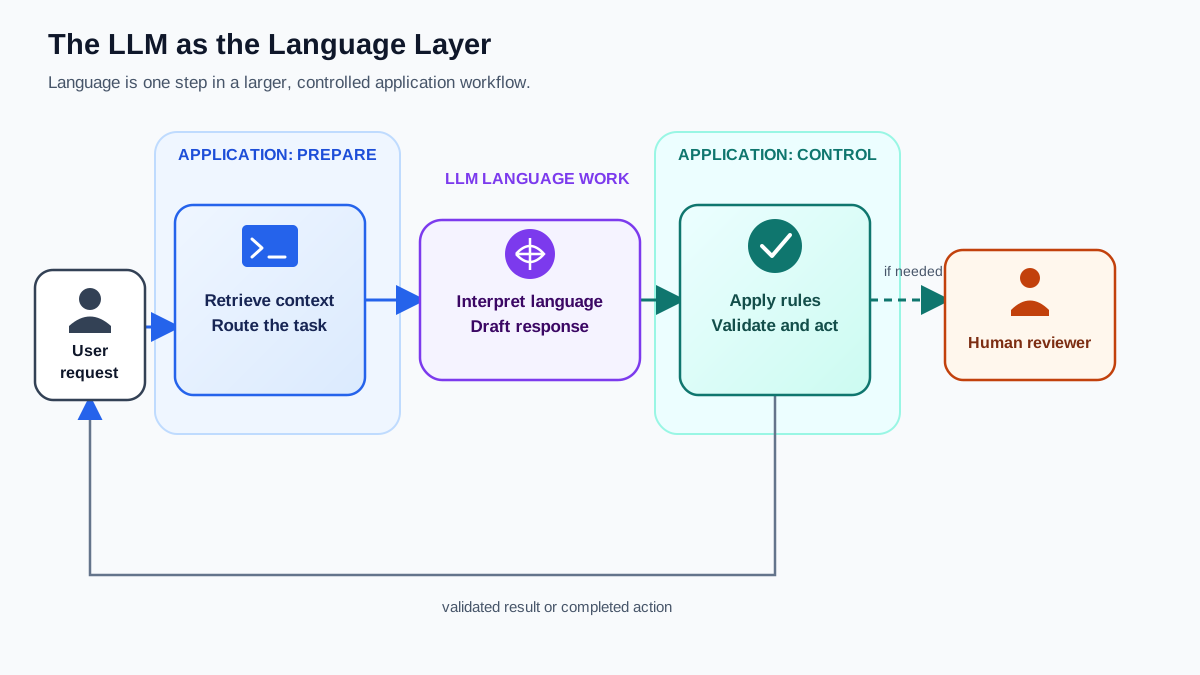
Before we look at any example, draw one line that prevents most later confusion.
An LLM does one thing well: it reads text and generates text. It does not retrieve documents from a database. It does not route tickets. It does not run code or enforce business rules. Those jobs belong to the application wrapped around the model.
Picture a customer support chatbot answering a question about your order. The LLM interprets your message and drafts a natural-language reply. But the surrounding application is what looks up your order, checks the shipping status, and decides whether to escalate to a human. The model is the language layer. The application is the operational layer.
Keep that separation in mind. Every example that follows works the same way: the LLM handles language, and the application handles everything else.
Knowledge check
Check your understanding
Answer this question before you continue.
What Job Is the LLM Actually Doing?
Every LLM-powered feature you will meet performs one of four jobs:
- Generate or transform language. Write, rewrite, summarize, translate, or adjust tone.
- Answer from provided context. Read a document, email thread, or knowledge base placed in front of it and produce an answer grounded in that material.
- Interpret and route. Read a request, figure out what the person actually wants, and send it to the right place.
- Assist with a technical workflow. Suggest code, explain an error, or generate boilerplate while a human stays in control.
This frame is your reusable lens. When you meet a new LLM-powered feature, ask which job it is doing. The answer tells you what to expect and where the boundaries sit.
Conversation and Question Answering
The most visible LLM use case is the direct chat interface. ChatGPT, Claude, and Gemini are the headline examples, but the pattern is the same: you ask a question in plain language, and the model generates an answer.
Job: generate or transform language, sometimes answer from provided context.
What makes this different from a search engine? A search engine retrieves links. An LLM synthesizes the text that has been placed in its context and produces a single coherent response. That is why people use LLMs to explain concepts, summarize documents, brainstorm ideas, and draft text—tasks where the output is a finished answer, not a list of places to look.
One distinction matters here. A chat model answering from its own learned patterns is a different setup from an application that retrieves current documents and hands them to the model. In the second case, the retrieval system supplies the sources; the LLM does not go out and find them itself. When you see a chatbot cite a specific policy or a live fact, the surrounding application is usually doing the searching.
Note: LLMs can sound confident and be wrong. This is a feature of the category, not a bug in one product. The model does not know what it does not know, and it will produce plausible-sounding text even when the underlying facts are missing. Treat the output as a first draft, not a final authority.
Knowledge check
Check your understanding
Answer this question before you continue.
Writing and Content Assistance
LLMs help people draft, edit, summarize, and transform text. This category shows up in tools you probably already use:
- Email drafting and smart replies. Many email clients now suggest completions and generate full drafts from a short prompt. Some of these features use LLMs; others use lighter predictive models. When the suggestion reads like a full sentence you did not type, an LLM is often doing the work.
- Document summarization. Paste a long report into an LLM and ask for a paragraph summary. The model compresses the content while preserving the key points.
- Tone adjustment. Take an email you wrote and ask the model to make it more formal, friendlier, or more concise. The content stays yours; the phrasing gets a second pass.
- Grammar and style improvement. Beyond basic spellcheck, LLMs can restructure sentences for clarity, catch awkward phrasing, and suggest alternatives.
Job: generate or transform language.
The mental model matters: the LLM is not replacing the writer. It is acting as a thinking partner and a first-draft accelerator. You decide what to say and whether the output is good enough. Drafts and suggestions are useful when you check them. Exact policy answers, legal language, or anything where a single wrong word carries real cost still need a human review.
Coding and Software Development
You do not need to be a programmer to understand this category, but if you have written any code recently, you have probably encountered it. GitHub Copilot, Cursor, and in-IDE autocomplete tools are the headline examples.
What these tools actually do:
- Suggest code. Start typing a function, and the model predicts the rest.
- Explain errors. Paste an error message and ask what it means in plain English.
- Generate boilerplate. Ask for a standard project structure, a configuration file, or a common pattern, and the model produces it.
- Translate between languages. Give the model a function in Python and ask for the equivalent in JavaScript.
Job: assist with a technical workflow.
The mental model is a pair programmer, not an autonomous software factory. The model suggests; you decide. Beginners use these tools to understand error messages and learn syntax. Experienced developers use them to skip repetitive typing and stay in flow.
The boundary is important: the LLM generates text that looks like code. It does not run it, test it, or verify it. The surrounding application—your editor, your test suite, your deployment pipeline—handles execution and validation. Code suggestions are useful when you can read, test, and verify them. Production code, security-sensitive logic, or anything where a subtle bug could cause real damage still needs tests, review, and human judgment. The assistant accelerates the typing; it does not replace the thinking.
Knowledge check
Check your understanding
Answer this question before you continue.
Customer Support and Business Automation
Businesses embed LLMs into support workflows in a few recurring patterns:
- LLM-powered chatbots. These handle common questions—order status, return policies, account issues—without a human in the loop. When the question goes beyond the bot's scope, it escalates to a person.
- Ticket classification and routing. An LLM reads an incoming support request and sends it to the right team. No manual tagging required.
- Internal knowledge-base search. Employees ask questions against company documentation in plain language. The LLM finds the relevant policy, procedure, or answer buried in internal wikis.
Job: interpret and route, then answer from provided context.
Here the separation between model and application is clearest. Walk through one concrete scenario to see it. A customer asks, "Can I return this jacket after three weeks?"
- The application retrieves the store's return policy from its knowledge base and places it in the model's context.
- The LLM interprets the question, checks the policy text against the request, and drafts a natural-language answer.
- The application enforces the rules—checking the order date, applying the policy, and deciding whether to escalate to a human.
Three separate jobs, one smooth experience. The model handled the language. The application handled retrieval, rule enforcement, and escalation. When the question demands exact policy details or carries legal weight, the system should surface the source document, not just the model's paraphrase.
Knowledge check
Check your understanding
Answer this question before you continue.
The Fit Test: When an LLM Belongs—and When It Does Not
LLMs handle ambiguity that traditional software cannot. You do not need exact keywords or rigid menus. You can type a messy, incomplete question and still get a reasonable answer. That flexibility is the core value.
The tradeoff is real: flexibility comes with unpredictability. Traditional software is deterministic—the same input usually produces the same output. LLMs are probabilistic—the same prompt can produce different responses, and sometimes the response is wrong.
Here is a practical filter. Before you trust an LLM for a task, ask three questions:
- Is the input or output language? If yes, an LLM might help. If the task is pure calculation, structured data lookup, or deterministic rule enforcement, ordinary software is the better tool.
- Is some variation in the result acceptable? If the answer must be identical every time—a compliance rule, a financial calculation, a medical dosage—the model's strength becomes its weakness.
- Can a person or downstream check review the output? If nobody will verify the result before it matters, the risk is too high.
Apply this to a good fit: summarizing a long document. The input is language. Variation is fine—two good summaries can use different words. And a human can skim the result before relying on it. All three questions pass.
Now apply it to a poor fit: calculating a tax liability. The input includes numbers and rules, not just language. Variation is unacceptable—the answer must be exact. And if nobody reviews the output, the cost of a wrong number is real. The filter says no.
One refinement keeps this from becoming too binary. The decision is often not "LLM or no LLM" but "where does the LLM sit in the workflow?" Let the model interpret messy language and draft a reply, then hand exact calculations and rule enforcement to ordinary software. A well-built system combines both: the LLM handles the ambiguity, and deterministic code handles the precision.
Common mistake: assuming that because an LLM can produce an answer, it should. Capability is not the same as suitability. The fit test exists to separate the two.
Where to Go Next
You now have a lens, not just a list of llm examples. The four-job framework tells you what any LLM-powered feature is doing. The fit test tells you whether it belongs there. Together they turn "I have seen this feature" into "I understand what is happening and whether to trust it."
Try one small experiment this week. Pick one LLM-powered tool you already use—email autocomplete, a chat interface, a coding assistant—and classify it using the four-job framework. Then run it through the three-question fit test. Notice what it does well. Notice where it stumbles. The goal is not to evaluate the product. It is to build the instinct for what LLMs are good at and where they need a human in the loop.
If you want to understand how these models actually produce their output, the mechanics build on everything you have just learned to recognize.
Knowledge check
Final check
Finish the article by checking the ideas you just learned.
References
Want a more structured LLMOps path?
Use the LLMOps Practical Starter Bundle to connect RAG, evaluation, observability, and production patterns.
Large Language Models Starter Pack
A 12-chapter guide connecting LLM fundamentals with prompting, RAG, agents, tool calling, evaluation, security, and application engineering.
- 227-page Illustrated PDF edition
- 12 guided LLM engineering chapters
- Visual concept diagrams
- Self-assessment quizzes
- Bonus deep-dive sections
- Prompt design, structured output, context windows & RAG pipelines
- Agents, tool calling, prompt injection, evaluation & application lifecycles
Coming soon


