
LLM Caching Explained: Reducing Cost Without Serving Stale Answers
The invoice climbs the moment your prototype starts running regularly. The same system prompt is reprocessed from scratch on every call. The same FAQ is…

The invoice climbs the moment your prototype starts running regularly. The same system prompt is reprocessed from scratch on every call. The same FAQ is answered as if the model has never seen it. Your first instinct is to "add caching"—but caching is not one knob. It's three different layers that solve different problems and carry very different risks of serving stale answers.
Why Repeated LLM Calls Are the First Cost Leak
When a prototype becomes a real service, the cost structure changes. Each request carries a long system prompt, maybe a persona definition, a few examples, or retrieved context. The model recomputes its internal representations of that entire prefix on every single call, even when the prefix hasn't changed. Meanwhile, users ask the same questions repeatedly—"What's your return policy?" appears dozens of times a day—and each occurrence triggers a full model call.
The real decision isn't whether to cache. It's how much staleness risk you can tolerate in exchange for lower cost and latency. Each caching layer sits at a different point in the request path, saves a different amount, and introduces a different correctness risk. Understanding which layer fits your situation matters more than memorizing vendor features.
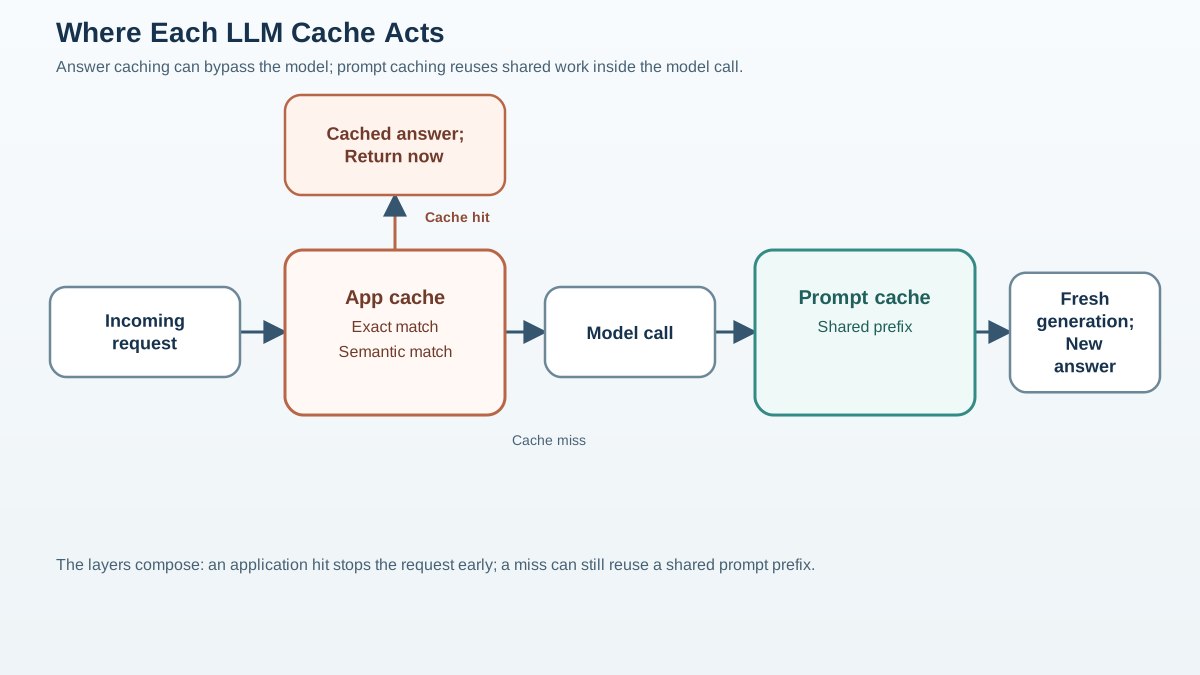
Before we go further, one distinction will keep every later decision clear: some caching happens on the provider's side during inference, and some happens in your application before the request ever reaches the model. Provider-side caching reuses computation. Application-side caching reuses answers. Those are very different things.
Prompt Caching: Pay Once for the Shared Prefix
Prompt caching is the layer you should probably enable first—but not because it's risk-free. It's because it reuses computation, not answers.
When your requests share a long prefix—a system prompt, few-shot examples, retrieved context—the provider stores the computed state for those tokens and reuses it across requests that start with the same text. The model still generates a fresh answer for each request. That's the key distinction: prompt caching makes each generation cheaper, but it doesn't skip the generation.
So where does the risk come from? Not from reusing an old answer, but from reusing old context. If your shared prefix contains retrieved documents or reference material that has changed, the model will generate a fresh answer over stale evidence. The generation is new. The context it reasons over may not be.
Prompt caching shines when you have long static prefixes. A customer support bot with a detailed system prompt, a RAG pipeline that injects the same reference document into every call, a persona definition that never changes—these are ideal candidates. The longer the shared prefix, the bigger the savings.
One practical constraint matters: the prefix must match exactly. A small change—an added timestamp, a reordered instruction, a dynamic variable inserted before your static content—can defeat the cache entirely. Design your prompts so the static portion stays stable and the dynamic portion comes at the end.
Tip: If you're using a long system prompt, check whether your provider supports prompt caching before building anything more complex. It's the lowest-effort cost reduction available—but keep freshness-sensitive context out of the reusable prefix, or rebuild that prefix when the underlying data changes.
Knowledge check
Check your understanding
Answer this question before you continue.
Response Caching: Skip the Model Call Entirely
Response caching operates at a different layer, and it's the first one you control entirely in your application. Instead of caching the prompt prefix, you store full request-response pairs. When an identical request arrives, you return the stored answer without calling the model at all.
The savings are larger: you skip both input and output token costs, and the response returns in milliseconds instead of seconds. But you've introduced a new risk. The stored answer can go stale. If the underlying facts change—a price, a policy, a product's availability—your cache keeps serving the old answer until you invalidate it.
Response caching fits static, high-volume requests. FAQ-style content where answers rarely change, pre-computed answers to known questions, reference information that's stable over time. You can enumerate the requests that qualify and cache only those.
It fails when answers are personalized or time-sensitive. If the same question should produce different answers for different users—or different answers on different days—response caching will serve confidently wrong results.
Here's the subtle part: "identical request" doesn't just mean identical user text. In an LLM application, the answer can depend on model settings, tools, retrieved context, user identity, locale, and application state. Two requests with the same wording can be genuinely different requests if any of those inputs change the answer. Your cache key needs to capture every answer-relevant input, not just the visible prompt.
Common mistake: Caching personalized responses. "What's my account balance?" and "What's the status of my order?" look like repeatable questions, but the answer depends on who's asking. A shared cache entry leaks one user's data to another.
Knowledge check
Check your understanding
Answer this question before you continue.
Semantic Caching: Matching Meaning, Not Spelling
Semantic caching exists because exact matching misses most real-world traffic. Users ask the same question in different words: "How do I return something?" and "Can I send this back?" mean the same thing, but a string match never sees it.
The mechanism works like this: embed the incoming query, search a vector store for a semantically similar cached question above a similarity threshold, and if you find a match, return the stored answer without calling the model.
Semantic caching is the most dangerous layer because the failure mode is subtle. A similarity threshold that's too loose returns a wrong answer with total confidence. The cached response looks authoritative—it was generated by the model, after all—but it answers a question the user didn't ask. A threshold that's too tight defeats the purpose, giving you low hit rates and little savings.
It also adds overhead: an embedding step and a vector search on every request. That overhead only pays off at sufficient volume. If your traffic is modest, the embedding and search costs can approach what you're trying to save.
Warning: Semantic caching multiplies your risk. A wrong exact match is obvious. A wrong semantic match is invisible—until a user complains about an answer that sounds plausible but addresses a different question entirely.
Knowledge check
Check your understanding
Answer this question before you continue.
Choosing a Strategy: Four Questions, Not Three
Four questions determine which layer fits your use case:
- How repeatable is the request? Identical requests benefit from response caching. Semantically similar but differently phrased requests need semantic caching. A shared prefix benefits from prompt caching.
- How fresh must the answer be? Static information tolerates long cache lifetimes. Time-sensitive information—prices, availability, news—demands short TTLs or active invalidation.
- Does the answer depend on who's asking? Personalized responses should never be cached by exact or semantic match, because the same question legitimately produces different answers.
- What must stay out of the shared cache? Tenant, user identity, locale, permissions, tool state, and context version can all change what a correct answer looks like. If any of these affect the answer, they belong in the cache key—or the request shouldn't be cached at all.
| Layer | What it saves | Staleness risk | Best fit |
|---|---|---|---|
| Prompt caching | Input tokens on shared prefix | Low, but stale context is possible | Long static system prompts, stable RAG context |
| Response caching | Entire model call | Moderate (stored answer can go stale) | Static, identical, high-volume requests |
| Semantic caching | Entire model call on similar queries | High (near-match can be wrong intent) | High-volume FAQ-style traffic with varied phrasing |
The layers compose. A production system often stacks prompt caching with response or semantic caching. The prompt cache handles the shared prefix on every request; the response or semantic cache handles the repeated questions that would otherwise reach the model. They solve different problems at different points in the path.
Knowledge check
Check your understanding
Answer this question before you continue.
Common Mistakes That Serve Stale Answers
The failure modes that turn a cost-saving cache into a correctness bug follow a pattern: caching something that changes, or matching something that isn't actually the same.
Caching personalized answers. The same question from two users should not share one cached response. If user context, account state, or location affects the answer, exclude it from caching entirely.
Ignoring freshness. No TTL or invalidation on answers that depend on changing facts. A cached response about pricing or availability becomes a liability the moment the underlying data changes.
Overly loose semantic thresholds. A near-match that isn't actually the same intent returns a confident wrong answer. The model didn't make this mistake—your similarity threshold did.
Caching the wrong layer. Expecting response caching to help when the real cost is a long shared prefix, or vice versa. Diagnose where your tokens actually go before choosing a strategy.
Treating cache hits as evidence of quality. A cached answer can be confidently wrong and never rechecked. The cache doesn't validate the answer; it just repeats it.
A Practical Starting Point for a Small Team
Start with the lowest-risk win. Enable prompt caching on any long shared prefix that stays stable. It requires minimal code changes and cuts input token costs immediately—just keep freshness-sensitive context out of the reusable portion.
Add response caching only for a narrow set of static, high-volume requests you can enumerate. If you know the top twenty questions your support bot receives and the answers don't change, cache those exact request-response pairs.
Hold off on semantic caching until you can measure that repeated-but-differently-phrased queries are a real share of your traffic.
And here's the operational piece that makes all of this safe: give every cache entry a small contract. Record what the cache key covers, which context version or source it came from, when it was created or when it expires, and whether each request was a hit or a miss. When a user reports a wrong answer, you need to be able to tell whether it came from a cache hit, what version of the context produced it, and how long it had been sitting there. Without those signals, you can't tell a stale-answer problem from a model-quality problem.
My rule for small teams: enable prompt caching first, add response caching only for enumerated static requests, and treat semantic caching as a volume-justified upgrade with explicit staleness guardrails. The layers that save the most money are the ones most likely to serve stale answers—so earn the right to use them by proving your traffic justifies the risk.
Knowledge check
Final check
Finish the article by checking the ideas you just learned.
References
Want a more structured LLMOps path?
Use the LLMOps Practical Starter Bundle to connect RAG, evaluation, observability, and production patterns.
Large Language Models Starter Pack
A 12-chapter guide connecting LLM fundamentals with prompting, RAG, agents, tool calling, evaluation, security, and application engineering.
- 227-page Illustrated PDF edition
- 12 guided LLM engineering chapters
- Visual concept diagrams
- Self-assessment quizzes
- Bonus deep-dive sections
- Prompt design, structured output, context windows & RAG pipelines
- Agents, tool calling, prompt injection, evaluation & application lifecycles
Coming soon


