
LLM Cost, Latency, and Quality Tradeoffs Explained
Most early builders ask which LLM is the smartest. That is the wrong first question. The right question is: what does your feature actually need, request…

Most early builders ask which LLM is the smartest. That is the wrong first question. The right question is: what does your feature actually need, request by request, and which model should handle each one?
Picking an LLM is not a one-time "best model" decision. It is a system-design problem shaped by your request mix, your latency budget, and the quality floor your task can tolerate. The tradeoff among cost, latency, and quality is not something you resolve once. It is something you manage continuously as your traffic grows.
The tradeoff is a constraint problem, not a three-way fight
Here is the beginner mistake: pick one model for everything, treat quality as the only axis, and assume the biggest model is the best default. That approach bleeds money on easy requests and slows down every response for users who needed a fraction of the capability.
Cost, latency, and quality do pull against each other, but not always in a simple three-way opposition. A flagship model gives you the best quality but charges more per token and generates slowly. A small model responds fast and costs little but fumbles complex instructions. Yet some changes improve more than one dimension at once: caching repeated work, trimming unnecessary output, or switching to a newer model can cut cost and latency without sacrificing quality.
The sharper mental model is constrained optimization. First set the minimum acceptable quality and the response-time target your feature needs. Then optimize cost within those constraints. The question is not "which model is best?" It is "which model clears my quality floor within my latency budget at the lowest cost?"
That reframe matters because your feature is not one request. It is a stream of requests with different difficulty levels. Some are trivial. Some are genuinely hard. Treating them all the same means paying flagship prices for the trivial ones and making every user wait for the slowest possible path.
Consider a support triage feature. Most incoming messages are routine: "Where is my order?" "How do I reset my password?" A small fraction are genuinely complicated edge cases. A single-model approach sends everything to the most capable model you can afford. A smarter approach sends routine messages to a cheap fast model and escalates only the hard cases. Same feature. Dramatically different bill and response time.
Knowledge check
Check your understanding
Answer this question before you continue.
How LLM pricing actually works
Providers charge per token, and the split between input and output matters more than most beginners expect. Input tokens—your prompt, the instructions, any context you include—are typically several times cheaper than output tokens. Within a model family, smaller variants are cheaper and faster but weaker at instruction-following and complex reasoning. The pricing gap is not marginal. A mini model in the same family can cost a fraction of the flagship and generate several times faster.
Two tendencies worth internalizing:
- Newer models are often both cheaper and better than older flagships. Check current pricing before assuming last year's biggest model is the best value.
- Output tokens often dominate cost for generation-heavy features. If your feature produces long responses, that is where much of your budget goes.
But treat those as tendencies, not universal rules. The actual breakdown depends on your request pattern. Long retrieved context, repeated conversation history, and provider pricing differences can shift the balance. A 1,000-token prompt with a 500-token answer will usually be dominated by output cost, but a feature that stuffs five pages of retrieved documents into every request may find input tokens are the real expense.
Before optimizing one token class, inspect your actual breakdown: input tokens, output tokens, number of calls per request, and the per-token pricing of the models you are comparing. Multiply by your monthly request volume and you have a working budget estimate before you write any code.
Knowledge check
Check your understanding
Answer this question before you continue.
Where latency comes from
Latency splits into two phases, and confusing them leads to bad design decisions.
Time to first token is how long the user waits before the first character appears. This determines how responsive the app feels. Generation speed, measured in tokens per second, determines how quickly the full answer arrives.
Output token count drives latency more than input token count for the generation phase. A model generating 500 tokens takes much longer than one generating 50, regardless of prompt length. Smaller models can be many times faster than flagship models on the same task.
Two more distinctions matter for real features. First, typical latency describes the usual request, but tail latency describes the slowest slice users encounter. A good average can hide occasional severe delays, especially in multi-call workflows or fallback paths. When you set a latency target, plan for the slow requests, not just the typical one.
Second, streaming changes what users perceive. In a chat interface, tokens appearing one by one hide generation latency because the user reads while the model writes. But streaming does not help workflows that need the full result before proceeding. If your feature validates the output, extracts structured data, or makes a decision based on the complete response, the user waits for everything.
Multi-call workflows stack latency. Each sequential LLM call adds its own delay. An agent that makes three calls in a row feels three times slower than a single-call feature, even if each call is fast.
Knowledge check
Check your understanding
Answer this question before you continue.
Quality is a floor, not a score
Quality is not one number. It is whether the output is good enough for your specific task and error tolerance. A summarizer and a code generator have very different floors. A summary that misses a minor point is acceptable. A code change that introduces a bug is not.
Define your quality floor before comparing models. What counts as a failure for your feature? How often can failures occur before users notice or the business suffers? The answers determine which models are even in consideration.
The expensive mistake is over-provisioning quality you do not need. Paying flagship prices for tasks a smaller model handles fine is the most common budget leak I see in early LLM features. The fix is cheap to test: run a small sample of real requests through a cheaper model and judge the outputs against your own criteria. Not a benchmark. Your criteria, on your actual traffic.
Routing: send easy requests to cheap models
Model routing is the pattern that escapes the single-model trap. Classify each request and send easy or routine ones to a small cheap model, hard ones to a capable model. The classification can be as simple as a rule: task type, prompt length, user tier, or a keyword check.
Routing cuts effective cost because most request streams contain many easy requests. It also cuts average latency because most requests hit the fast model. Quality stays near the flagship level because the hard requests still reach the capable model.
A concrete sketch: suppose 70 percent of your requests are routine and 30 percent are complex. Sending everything to a flagship model means paying flagship rates for all traffic. Routing the routine 70 percent to a small model and the complex 30 percent to the flagship cuts your effective cost substantially while keeping quality on the cases that matter.
Routing is not free, though. A classifier, quality check, and observability add operational complexity. Routing earns its keep when request volume is high enough that the savings outweigh that complexity, and when easy-versus-hard cases can be detected reliably. For a prototype with a hundred requests, a single capable model is the better choice.
Keep routing simple at first. Start with a rule you can explain in one sentence. Learned routers that predict query difficulty are an active research area, but they add complexity you do not need until your traffic justifies it.
Knowledge check
Check your understanding
Answer this question before you continue.
Caching and fallbacks: two levers with different jobs
Two levers change your economics immediately, and each solves a different problem.
Caching removes repeated work. It stores responses for identical or near-identical requests. If many users ask the same question, or the same user repeats a request, you skip the model call entirely. Caching eliminates whole classes of cost and latency. Most early builders skip it because they are focused on model choice rather than request patterns. The cost is system complexity: you need a cache, an invalidation policy, and a way to detect near-duplicate requests.
Fallbacks recover from uncertain outputs. You try the cheap model first, run a lightweight quality or format check, and escalate to the capable model only on failure. The cheap model handles most requests. The check catches the failures. The capable model handles the rare hard case. This trades a little latency on the uncommon failure for large savings on the common case.
Fallbacks differ from routing in one important way. Routing chooses a model before execution based on predicted difficulty. Fallbacks choose after execution based on observed output. Routing is a bet. A fallback is a verification.
Before you ship, set guardrails: a maximum cost per request, a tail-latency ceiling, and a minimum quality check. Watch them in production. The guardrails tell you when your assumptions break down before the bill does.
A decision sequence for your first feature
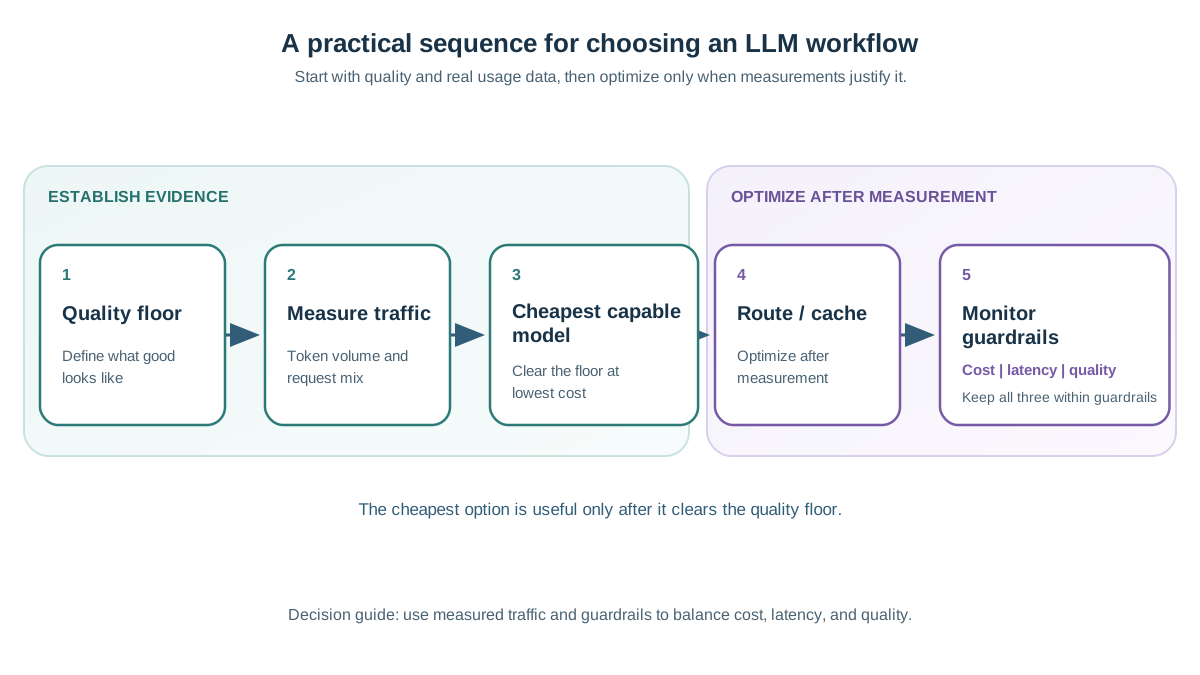
Run this sequence in order, and do not skip ahead.
Step 1: Define the quality floor. What counts as a failure for your specific task? How much error can you tolerate? Write it down before you look at models.
Step 2: Estimate token volume and request mix from real usage. Not guesses. If you have logs, use them. If you do not have traffic yet, estimate conservatively and plan to measure.
Step 3: Pick a default model that clears the floor at the lowest cost. Check current pricing. Newer models change the value equation constantly.
Step 4: Add routing and caching only after measuring. Do not optimize before you have traffic. A prototype with a hundred requests does not need a router. It needs the cheapest capable model.
Step 5: Set budget and latency guardrails and watch them in production. The first real traffic will surprise you. Let the data drive the next optimization.
When not to bother: tiny traffic, internal tools, or prototypes where the cheapest capable model is already fine. Routing and caching are leverage, and leverage only matters when there is weight to move.
The core decision rule: quality is a floor, cost follows token volume, and routing plus caching are the levers you control. Define the quality floor for one real feature. Estimate its token mix. Run a small sample through the cheapest model that plausibly clears the floor. Measure what actually happens. Then optimize.
Knowledge check
Final check
Finish the article by checking the ideas you just learned.
References
Want a more structured LLMOps path?
Use the LLMOps Practical Starter Bundle to connect RAG, evaluation, observability, and production patterns.
Large Language Models Starter Pack
A 12-chapter guide connecting LLM fundamentals with prompting, RAG, agents, tool calling, evaluation, security, and application engineering.
- 227-page Illustrated PDF edition
- 12 guided LLM engineering chapters
- Visual concept diagrams
- Self-assessment quizzes
- Bonus deep-dive sections
- Prompt design, structured output, context windows & RAG pipelines
- Agents, tool calling, prompt injection, evaluation & application lifecycles
Coming soon


