
How to Find a Good LLM Use Case: A Practical Screening Framework
Most LLM projects don't die during the build. They die because someone picked a flashy demo and then went hunting for a problem it could solve. That's…

Key topics
Most LLM projects don't die during the build. They die because someone picked a flashy demo and then went hunting for a problem it could solve. That's backwards. The question isn't "what can an LLM do?" It's "which recurring task deserves one?" This framework will help you answer that question honestly—before you write a line of code.
Why Most LLM Use Cases Fail Before They Ship
Here's the trap I see builders fall into constantly: they watch a demo of an LLM doing something impressive—drafting emails, summarizing documents, answering questions—and immediately start looking for ways to bolt it onto their product. The demo becomes the starting point, and the search for a problem becomes an afterthought.
That inverts the entire decision process.
A good LLM use case starts with the task, not the model. The unit of analysis should be the recurring job you're trying to automate, and the LLM is just one candidate tool among several. The question you should be asking is whether that task genuinely needs flexible language understanding—or whether it just feels like it should.
Here's the anchor criterion I use: does this task require understanding language that varies in unpredictable ways, and can the output be checked before it ships? If the answer to either part is no, you're probably forcing an LLM into a problem it doesn't fit.
This builds on the decision guide for when not to use an LLM. That piece covers the negative screen—when rules, search, or traditional software win. Here, we're running the positive screen: when a task genuinely qualifies for LLM treatment.
The Five-Filter Screening Framework
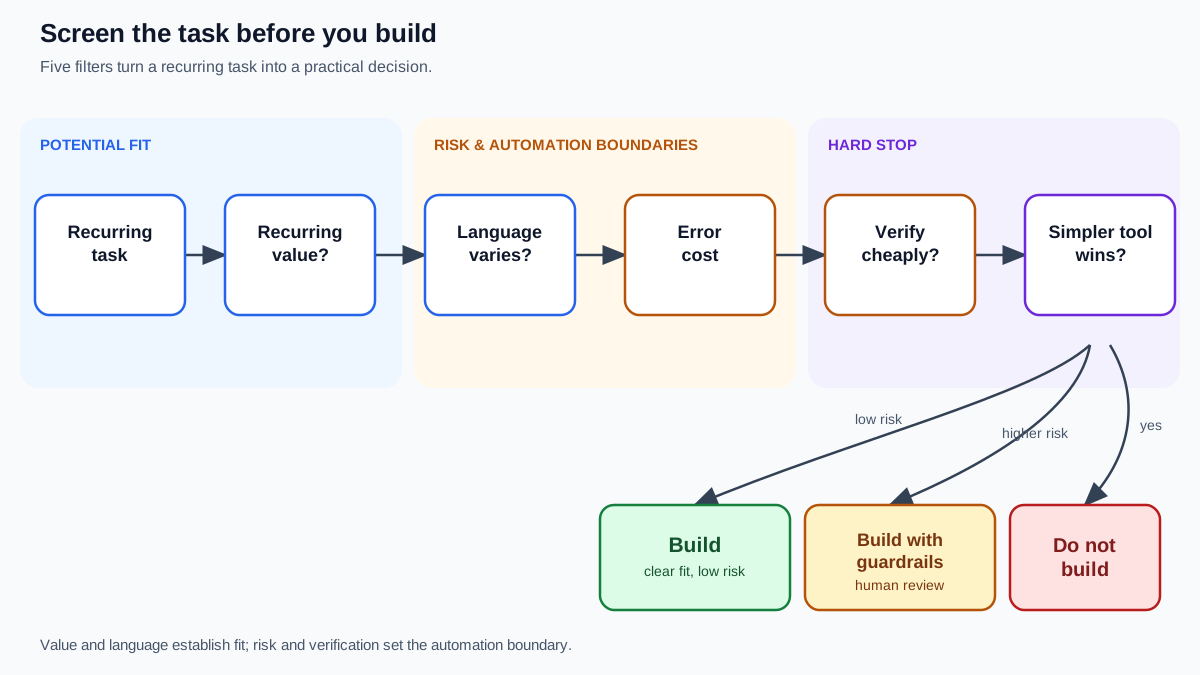
Think of this as a funnel. Each filter eliminates a class of weak use cases before you invest in a prototype. But not every filter plays the same role. Some establish whether the task could fit an LLM. Others determine how much automation is safe. One can stop you cold.
| Filter | The Question | What It Eliminates |
|---|---|---|
| 1. Value | Does the task recur often enough to pay for its complexity? | One-off automations |
| 2. Language variability | Does the input vary in ways rules can't capture? | Tasks better served by templates |
| 3. Error cost | What happens when the model is wrong? | High-stakes automation |
| 4. Verification | Can someone check the output cheaply? | Unreviewable outputs |
| 5. Simpler alternatives | Would a lookup table or script do the job? | Over-engineered solutions |
Filters 1 and 2 are potential-fit filters: they tell you whether the task has enough recurring value and language complexity to justify an LLM at all. Filters 3 and 4 are risk filters: they tell you how much automation is safe, not whether the task is interesting. Filter 5 is a hard stop: if a simpler tool solves the task adequately, the LLM loses regardless of what the other filters say.
Run every candidate task through all five. If it fails Filter 5, stop. If it fails Filter 1 or 2, stop. If it fails Filter 3 or 4, you haven't found a "no"—you've found a constraint on how you build.
Knowledge check
Check your understanding
Answer this question before you continue.
Filter 1: Does the Task Recur and Pay for Itself?
The first filter is about honesty. LLM workflows carry real overhead: prompt maintenance, output monitoring, error handling, and the occasional model update that changes behavior. That overhead only makes sense if the task happens often enough and matters enough to justify it.
Ask two questions:
- How often does this task occur? Weekly? Daily? Hundreds of times per day?
- What does each occurrence cost today? In time, money, or delayed work?
Frequency is a proxy, not an absolute gate. The real comparison is between the value the workflow returns and what it costs to build, review, and maintain. A rough way to think about it: recurring volume × cost per occurrence × realistic automation fraction, compared against your build and maintenance burden.
Contrast two examples. Triaging inbound support tickets happens constantly, and each ticket costs real money in human time. That's a high-frequency, high-cost task worth automating. Drafting a quarterly report happens four times a year. Even if the LLM saves you three hours each time, you're looking at twelve hours of annual savings against an ongoing maintenance burden. The math rarely works.
That said, don't treat recurrence as a universal requirement. A one-off task can justify an LLM when the value is unusually high and the review burden is low—say, converting a messy legacy dataset into structured records. The default economic advantage belongs to recurring tasks, but the filter is really asking whether the value justifies the overhead.
Filter 2: Is the Input Language-Variable Enough to Need an LLM?
This is the filter that separates genuine LLM use cases from tasks that rules handle better. The core question: does the input arrive in unpredictable phrasing, structure, or intent?
If your inputs are near-identical every time—same form fields, same structure, same vocabulary—a template, rule, or dropdown beats an LLM on cost and reliability. You don't need a model that understands language when the language never varies.
But if inputs arrive in messy, human phrasing that maps to a fixed set of outcomes, an LLM can be the right parser. Consider routing a support email: "my order never arrived, refund me" and "I've been waiting three weeks and I'm done" both mean the same thing, but no keyword list will reliably catch both. The LLM handles the variability that rules can't.
Here's the reverse mistake to watch for: assuming every free-text input needs an LLM. A structured query like "TV under $500 with 3 HDMI ports" is often better served by search over a product database than by an LLM generating an answer. The input looks like language, but it's really a structured request with clear filters. Don't let surface form fool you.
There's also an important boundary to keep in mind. An LLM may be the right tool for interpreting messy language—turning "I've been waiting three weeks and I'm done" into a structured intent like refund_request—while search, databases, and business rules remain the authoritative systems that act on that interpretation. The model handles the front door; deterministic systems handle the house. When you separate those roles, you often find the LLM is one component in a pipeline, not the whole solution.
Knowledge check
Check your understanding
Answer this question before you continue.
Filter 3: What Happens When the Model Is Wrong?
LLMs don't fail like deterministic software. When a script has a bug, it fails loudly and consistently. When an LLM is wrong, it fails fluently—producing confident, well-structured output that's simply incorrect. That makes errors harder to spot and easier to trust.
So you need to classify your task's error tolerance. Is a wrong output annoying, costly, or dangerous?
- Low stakes: drafting marketing copy, summarizing internal notes, generating first drafts. Errors are visible, fixable, and cheap.
- Medium stakes: customer-facing responses, data extraction. Errors cause real problems but are caught in review.
- High stakes: medical advice, hiring decisions, financial eligibility. Errors have serious consequences.
The hiring example is instructive. Automated resume screening touches what's often called "automated determinations of eligibility"—a category that carries both accuracy and policy risk. Even if the model performs well on your test set, the cost of a wrong screening decision isn't just a bad hire; it's potential discrimination and regulatory exposure. The specific rules vary by jurisdiction and platform policy, so treat this as a risk to investigate, not a conclusion to assume.
The decision rule: the higher the error cost, the more the task needs a human in the loop or a deterministic fallback. And don't hope hallucinations away—research on LLM hallucination shows even strong models produce unsupported claims at meaningful rates depending on the task. Assume errors will happen and design for them.
Filter 4: Can You Verify the Output Cheaply?
Here's the hidden cost of LLM automation that most people discover too late: verification, not generation, is often the bottleneck. The model produces output in seconds. Checking that output can take minutes—or hours, if the task requires deep expertise.
Ask yourself: can a human skim the output and catch errors in seconds? Or does checking require slow, careful reading by someone who already knows the answer?
The best-fit tasks have outputs that are easy to verify against a source. Summarizing a known document, extracting data from a fixed field, classifying a support ticket into a defined category—these have clear ground truth. A reviewer can spot mistakes quickly.
The worst-fit tasks produce open-ended output where correctness is subjective. If you're asking an LLM to write a strategic memo or evaluate a candidate's cultural fit, what does "correct" even mean? Checking that output costs as much as doing the original work—which means your "automation" still needs a full-time reviewer.
One design pattern helps enormously: bound the output. Constrain the model to a schema, a checklist, or a fixed set of categories. Bounded output makes verification cheaper and errors more visible. Verification quality still depends on the task and the checker, but a constrained output gives both a much easier job.
Knowledge check
Check your understanding
Answer this question before you continue.
Filter 5: Would a Simpler Tool Do the Job?
The final filter is discipline: treat the LLM as the last tool you reach for, not the first. Before committing to a model, run the task against the simpler alternatives.
- Would a lookup table work?
- Would a search index over structured data work?
- Would a regex or rule set work?
- Would a structured database query work?
The product-recommendation case is the canonical example. Someone asks for "a TV under $500 with 3 HDMI ports." That's not a language problem—it's a structured query over a product database. Search handles it faster, cheaper, and with zero hallucination risk. An LLM isn't adding value; it's adding a failure surface.
An LLM earns its place only when the task's language variability defeats the simpler tools. If the input is genuinely messy and the mapping is genuinely complex, the model earns its keep. If not, you're over-engineering.
This filter is where most LLM projects die—and that's the point. This connects to the cost, latency, and quality tradeoffs you'll face in the actual build, but the decision to use an LLM at all comes first.
Knowledge check
Check your understanding
Answer this question before you continue.
Running the Framework on Three Real Tasks
Let's see how the filters combine on concrete examples.
Example A: Drafting personalized replies to routine customer emails.
- Value: high frequency, real cost per ticket. Passes.
- Variability: customers phrase the same issues dozens of different ways. Passes.
- Error cost: a draft that's slightly off is caught by a human before sending. Moderate.
- Verification: easy—a human skims the draft and spots problems in seconds. Passes.
- Simpler alternatives: rules can't handle the phrasing variability. Passes.
Verdict: build. This is a strong LLM use case.
Example B: Screening resumes against structured criteria.
- Value: high frequency, expensive human time. Passes.
- Variability: resumes vary enormously in phrasing and structure. Passes.
- Error cost: a wrong screening decision affects someone's livelihood and carries policy risk. Fails or strains.
- Verification: checking the model's reasoning requires reading the resume yourself. Fails.
Verdict: build with guardrails, or don't build. The error cost and verification burden are too high for full automation. If you proceed, you need human review on every decision and careful attention to policy constraints. The filters didn't say "no LLM"—they said "no unsupervised LLM."
Example C: Recommending products from a structured catalog.
- Value: high frequency. Passes.
- Variability: the query looks like language but is really structured filters. Passes superficially.
- Error cost: a wrong recommendation loses a sale. Moderate.
- Verification: checking requires knowing the catalog. Moderate.
- Simpler alternatives: search over structured data wins on cost, speed, and reliability. Fails.
Verdict: don't build. This is a search problem wearing a language costume. An LLM might help interpret a genuinely messy query into structured filters, but the catalog lookup itself belongs to search.
Common Screening Mistakes and How to Avoid Them
Each of these mistakes is really a skipped filter. Catch them in your own evaluation:
Mistake 1: Skipping the value filter. You build for a task that recurs too rarely to matter. The demo looks great; the usage data is empty.
Mistake 2: Assuming free-text input means LLM. The variability is actually low, and rules would do the job at a fraction of the cost. You skipped Filter 2.
Mistake 3: Underestimating error cost because the demo output looked right. Demos show you the best case. Production shows you the average case. You skipped Filter 3.
Mistake 4: Ignoring verification effort. You discover your "automation" still needs a full-time reviewer because checking the output costs as much as doing the work. You skipped Filter 4.
Mistake 5: Never running the simpler-alternatives filter. Your LLM is solving a problem search already solved. You skipped Filter 5.
The framework is the antidote to all five. Run every candidate task through every gate, and write down the verdict before you touch any code.
Your Next Step
Take one recurring task you already own—a task you do weekly, that eats real time, that you've wondered about automating. Run it through the five filters on paper. Write down your verdict for each gate. Then write down the final decision: build, build with guardrails, or don't build.
A good LLM use case is a recurring, language-variable task whose errors are cheap to catch and whose value outlasts the build. If your task clears all five filters, you've found one. If it fails the simpler-alternatives filter, you've saved yourself weeks of work. If it fails the risk filters, you've learned something just as valuable: the task may deserve an LLM, but only inside carefully drawn boundaries.
Once a task clears the screen, you're ready to think about the real build: cost, latency, and quality tradeoffs that determine whether your workflow survives contact with production.
Knowledge check
Final check
Finish the article by checking the ideas you just learned.
References
Want a more structured LLMOps path?
Use the LLMOps Practical Starter Bundle to connect RAG, evaluation, observability, and production patterns.
Large Language Models Starter Pack
A 12-chapter guide connecting LLM fundamentals with prompting, RAG, agents, tool calling, evaluation, security, and application engineering.
- 227-page Illustrated PDF edition
- 12 guided LLM engineering chapters
- Visual concept diagrams
- Self-assessment quizzes
- Bonus deep-dive sections
- Prompt design, structured output, context windows & RAG pipelines
- Agents, tool calling, prompt injection, evaluation & application lifecycles
Coming soon


