
The LLM Application Request Lifecycle: From User Input to Verified Result
That single distinction separates a demo from a system. When you chat with an LLM directly, you are the pipeline: you judge the output, check the facts,…

The model produces a draft. The application produces a result.
That single distinction separates a demo from a system. When you chat with an LLM directly, you are the pipeline: you judge the output, check the facts, and decide whether to ask again. When you build an application, the system must carry that judgment for every user, on every request, without you in the loop.
Most beginners know the individual pieces—prompting, retrieval, tool calling, evaluation—but cannot see how they connect. The missing piece is not knowledge. It is a map.
Here is that map: a single request travels through five internal stages, each with a job, a failure mode, and a design decision. Once you can trace a request through all of them, you stop debugging by guessing and start debugging by looking at the right stage.
Input → Validate → Assemble Context → Model Call → Act → Verify → Return
Input and return are the boundaries of the journey. The five stages in between are where your application earns its keep.
Why a Single Prompt Is Not an Application
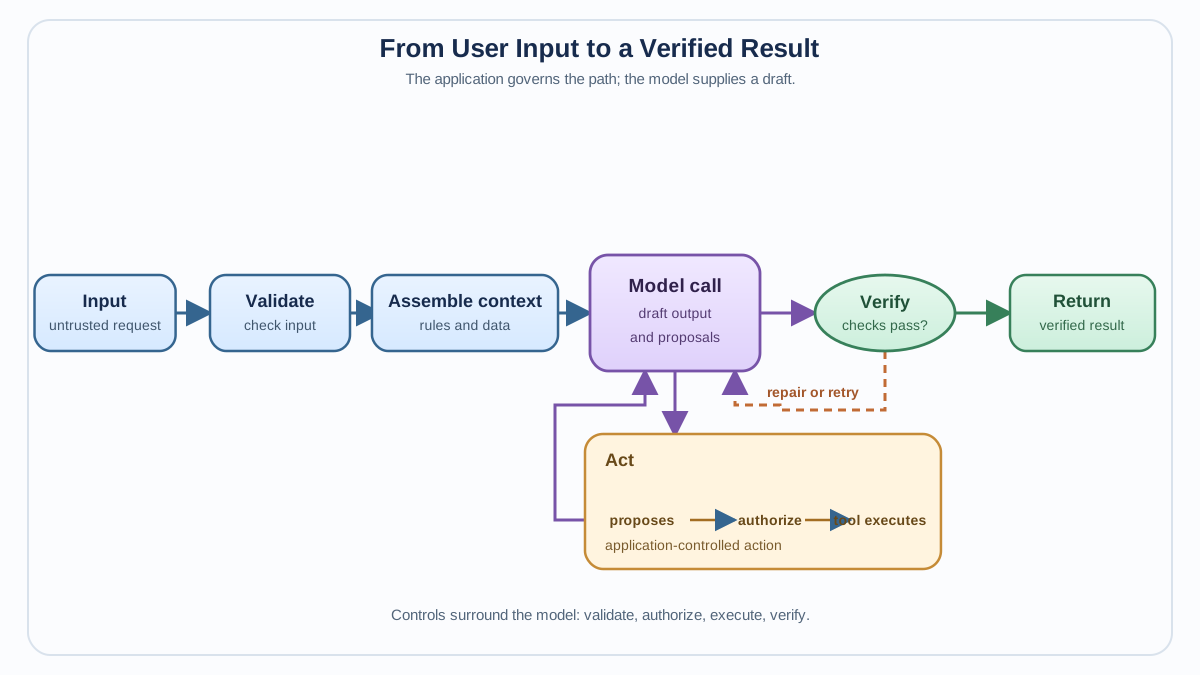
A raw model call takes text in and produces text out. That is a powerful primitive, but it is not an application. An application has constraints. It must reject bad input, ground itself in the right evidence, respect cost and latency budgets, take actions safely, and return output you can trust.
Each stage of the lifecycle exists to absorb a specific kind of failure so that failure never reaches the user. The model is not the least important part of your system—but it is far from the whole system. A better model cannot repair a pipeline that feeds it garbage, lets it act without permission checks, or ships its output without verification.
Stage 1: Validate the Input Before the Model Sees It
The first gate sits before the model ever sees a token. Treat user input as untrusted data, because that is exactly what it is.
Validation protects you from three problems. First, garbage in: missing fields, wrong types, malformed formats. Second, abuse: prompt-injection attempts, policy violations, or inputs designed to make the model misbehave. Third, economics: a user pastes a 200,000-token document into an app with a smaller context window, and your model call fails—or worse, silently truncates and produces a confident but incomplete answer.
The common checks include:
- Required fields: Does the request contain what downstream stages need?
- Type and format: Is this an order ID, a date, a JSON payload?
- Length and token budget: Does the input fit your context and cost constraints?
- Abuse signals: Does the input match known injection patterns or policy violations?
The tradeoff is real. Too little validation lets garbage reach the model, where it costs you money, latency, and unpredictable output. Too much validation rejects legitimate requests and frustrates users. Start with the cheap, structural checks, and add stricter screening only where you have evidence of real abuse.
A common beginner mistake is skipping validation entirely because "the model can handle anything." The model can respond to anything. That is not the same as your application surviving contact with it.
Note: This stage is a lighter gate than the full output-validation loop you may have seen elsewhere. Here, you only decide what enters the system. Checking what leaves it comes later.
Knowledge check
Check your understanding
Answer this question before you continue.
Stage 2: Assemble the Context the Model Actually Needs
Once input passes validation, the application decides what else the model gets to see. This is the context-assembly stage, and it is where most LLM pipelines quietly succeed or fail.
Think of the model's context window as a limited working desk, not a memory bank. Every token you place on that desk competes for the model's attention and adds to your cost. The design question is not "what can I fit?" It is "what deserves space before the model makes a decision?"
A typical context stack includes several layers:
| Layer | Purpose | Failure mode |
|---|---|---|
| System prompt | Defines role, constraints, output format | Vague instructions produce vague behavior |
| User input | The validated request | Already checked in Stage 1 |
| Retrieved evidence | Documents or data from a RAG pipeline | Irrelevant or contradictory passages |
| Conversation history | Prior turns in a multi-turn session | Old context distracts from the current request |
| Tool schemas | Descriptions of available functions | Too many tools confuse the model's choice |
Retrieval is really a context-selection decision. When your RAG pipeline fetches documents, it is choosing what earns a spot on the desk. If retrieval returns ten irrelevant chunks and one useful passage, the model has to sort through noise to find the signal—and it may not bother.
The common mistake here is pasting everything into the prompt and hoping the model sorts it out. That approach burns tokens, raises latency, and actively degrades quality by distracting the model with contradictory or irrelevant material. Context assembly is a curation problem. Curate.
Knowledge check
Check your understanding
Answer this question before you continue.
Stage 3: The Model Call—and the Choices Hidden Inside It
The model call looks like a single step, but it is a decision point hiding several choices.
First, which model? Different requests in the same application may warrant different models. A quick intent classifier does not need a frontier reasoning model. A complex multi-step analysis may need the best model you can afford. This is model routing, and it belongs inside the lifecycle as a per-request decision.
Second, what parameters? Temperature, max tokens, and other sampling settings are per-request decisions too. A structured data-extraction task wants low temperature and deterministic output. A creative writing assistant may want more variety.
Third, and most important: the model call produces tokens, not guarantees. The output is a draft. It may be wrong, malformed, hallucinated, or subtly off-target. The remaining stages exist because you cannot trust the draft simply because it sounds confident.
A common mistake is assuming a bigger or smarter model fixes problems that actually live in earlier or later stages. If your retrieval returns garbage, a better model will produce more eloquent garbage. If your output verification is weak, a smarter model will still occasionally make mistakes. Model quality matters, but it is not a substitute for pipeline design.
Stage 4: Act—When the Model Calls a Tool
Some requests do not just need an answer. They need the application to do something: query a database, call an API, run code, update a record.
This is where tool calling enters the lifecycle, and it changes the shape of the request. The model does not execute anything itself. It proposes a tool call—a structured suggestion that names a function and its arguments. The application decides whether to execute it.
That distinction matters more than it looks. The model is a text generator making a recommendation. Your application is the authority that decides whether the recommendation is safe, permitted, and well-formed. When the model proposes delete_user(user_id="42"), the application should check permissions before running anything.
Execution returns results that feed back into the loop. The model may need another call to interpret the tool's output, decide on a follow-up action, or synthesize a final answer. This is where a request stops being a straight line and becomes a loop:
Model proposes → Application executes → Result returns → Model interprets → Repeat
The failure modes multiply here. The model may propose a tool that does not exist, pass arguments in the wrong format, or call the right tool with the wrong parameters. The application needs schema validation on tool calls, permission checks before execution, and error handling when tools fail.
A common mistake is letting the model drive tool execution without guardrails. The model is an excellent planner and a terrible auditor of its own actions. Your application must be the auditor.
Note: For a deeper look at how tool schemas, execution, and result handling work together, the dedicated tool-calling workflow covers that ground. Here, the key point is where tool use sits in the larger request: it is an action stage, not the whole story.
Knowledge check
Check your understanding
Answer this question before you continue.
Stage 5: Verify the Output Before You Trust It
The final answer is a draft until something verifies it. This is the stage beginners skip most often, and the one that separates demos from production systems.
Verification comes in two flavors. Structural checks confirm the output is usable: is it valid JSON? Does it match the expected schema? Are all required fields present and correctly typed? These checks are cheap, deterministic, and should run on every response.
Semantic checks confirm the output is right: is it grounded in the retrieved evidence? Does it answer the user's actual question? Is it safe and policy-compliant? These checks are harder. They may involve rules, a second model acting as a judge, or a human reviewer.
The decision boundary depends on risk. Low-risk internal tasks—extracting data, classifying text, summarizing internal documents—can often auto-verify with structural checks plus lightweight semantic rules. High-stakes or user-facing answers may need a human gate before the response ships.
Common mistake: Shipping model output straight to the user and discovering errors only in production logs. Verification is not a quality-of-life feature. It is the mechanism that turns model output from a gamble into a deliverable.
When verification fails, the request can loop back: repair the output, retry the model call with corrective feedback, or escalate to a human. A verification loop turns a single bad draft into a recoverable event instead of a user-facing failure.
Knowledge check
Check your understanding
Answer this question before you continue.
A Quick Note on Vocabulary: Validation, Authorization, Verification
Beginners often collapse these into one fuzzy idea of "checking." They are different control jobs, and the lifecycle makes the difference visible:
- Validation asks: Is this input or output well-formed and usable? It runs at the boundaries—before the model sees input, and after it produces output.
- Authorization asks: Is this action permitted? It belongs before any tool executes, and it checks identity, ownership, and permissions.
- Verification asks: Is this result actually correct? It runs after the model produces its draft, and it compares the draft against evidence, API results, or policy.
One sentence to keep them straight: validate the shape, authorize the action, verify the claim.
Where Evaluation and Observability Fit
The five-stage lifecycle describes what happens inside one request. But a single request is a data point, not evidence. Evidence comes from logging what happened across many requests and evaluating where the system fails.
Three layers work together here:
- Runtime controls affect the current request: validation, authorization, verification, retries.
- Observability records what happened: which model was called, what context was assembled, which tools ran, what verification caught.
- Evaluation judges performance across representative requests and feeds changes back into the design.
Evaluation is not a stage inside one request. It is the loop that runs across requests, and it only works if you can separate failures by stage. Was that bad answer a retrieval miss in Stage 2? A model reasoning error in Stage 3? A tool failure in Stage 4? A verification gap in Stage 5?
Here is the practical payoff. Suppose a user asks for a refund and the bot wrongly says it was processed. A trace shows the retrieval step fetched the wrong order record. That is a Stage 2 failure, not a model failure. You fix retrieval, not the prompt. Without stage-level diagnosis, every failure looks like "the AI was wrong," and you have no idea what to change.
Log the decisions and outputs at every stage. When quality degrades, trace the failure to its stage before changing anything.
A Worked Example: Tracing One Request End to End
Let us make the LLM application workflow concrete. Imagine a customer-support bot for an online store, asked to process a refund request.
The request: "I want a refund for order #48291. The shoes arrived with a broken strap."
Stage 1 — Validate: The application checks that the message contains an order ID and that the ID matches the expected format. It passes. The application also checks message length and flags no abuse signals. The request moves forward.
Stage 2 — Assemble context: The application retrieves the order record for #48291, confirms it belongs to the authenticated user, and pulls the store's refund policy. The system prompt instructs the model to check policy compliance before approving refunds. The context stack is assembled: user message, order details, policy text.
Stage 3 — Model call: The application routes this request to a model with tool-calling capability and a low temperature setting, because refund decisions should be deterministic. The model reads the context and determines that a refund may be warranted—but it needs to check the order status first.
Stage 4 — Act: The model proposes a tool call: check_order_status(order_id="48291"). The application validates the call against the tool schema, confirms the user owns this order, and executes the function. The result returns: the order was delivered 14 days ago, within the 30-day refund window. The model receives this result and proposes a second call: issue_refund(order_id="48291", amount=89.99).
Here is where the application earns its keep. The authorization layer checks: does this user have refund authority? Is the amount within the bot's approval limit? The refund is under the threshold, so the application executes it.
Stage 5 — Verify: The refund API returns a confirmation. The model drafts a response: "Your refund for order #48291 has been processed. You should see the funds in 3–5 business days." The application runs structural checks (the response is well-formed) and semantic checks (the response matches the refund confirmation, the order ID is correct, and the amount is not mentioned incorrectly). A final policy check confirms the response does not promise faster delivery than the refund policy allows.
The response ships to the user.
Now trace the failure version. Suppose the refund API returns an error: the order was already refunded yesterday. The model, unaware of this, drafts a cheerful confirmation. Stage 5 verification catches the mismatch between the API result and the drafted response. The application loops back: it feeds the error to the model, which revises its response to explain that the refund was already processed. The user gets an accurate answer instead of a false promise.
Every stage in that journey had a job. Validation kept garbage out. Context assembly gave the model the policy and order data it needed. The model call produced a proposal, not an action. The tool stage executed safely with permission checks. Verification caught the one failure that would have reached the user.
Note: This example uses an approval threshold to keep the illustration simple. In a real system, the question of whether an irreversible action like a refund can be automated—and at what amount—is a product and risk decision, not just a technical one. The lifecycle shows you where that decision belongs; your business rules decide what it should be.
Your Next Step: Trace Your Own Request
The lifecycle is not a diagram to memorize. It is a debugging tool to use.
Take one request from an application you are building—or one you want to build—and trace it through all five stages. Name the decision at each step. Then ask the harder question: which stage is most likely to fail, and where would you add a check?
For most beginners, the honest answer is Stage 5. They have no verification layer at all, because they have been treating model output as the final product. The fix is not a better prompt. It is a verification loop that treats the model's answer as a draft requiring proof.
Build the narrow version of your pipeline. Trace one request through it. Watch where it breaks. Then add the check that catches that specific failure. Reliability in LLM applications is not achieved in a single clever design. It is assembled stage by stage, around the model call, until the system survives contact with real users.
Knowledge check
Final check
Finish the article by checking the ideas you just learned.
References
Want a more structured LLMOps path?
Use the LLMOps Practical Starter Bundle to connect RAG, evaluation, observability, and production patterns.
Large Language Models Starter Pack
A 12-chapter guide connecting LLM fundamentals with prompting, RAG, agents, tool calling, evaluation, security, and application engineering.
- 227-page Illustrated PDF edition
- 12 guided LLM engineering chapters
- Visual concept diagrams
- Self-assessment quizzes
- Bonus deep-dive sections
- Prompt design, structured output, context windows & RAG pipelines
- Agents, tool calling, prompt injection, evaluation & application lifecycles
Coming soon


