
A Reliable LLM Coding Assistant Workflow: Specify, Run, Review, Test
Most developers don't fail with AI coding assistants because the code is wrong. They fail because the code looks right.

Most developers don't fail with AI coding assistants because the code is wrong. They fail because the code looks right.
The pattern is familiar. You ask for a change. The assistant produces a clean, confident diff. The logic reads well. The function names make sense. You accept it, move on, and discover the bug three days later when it surfaces in production—or worse, when a teammate finds it for you.
The root cause isn't the model's capability. It's your mental model of what the assistant is doing. Treat the assistant as an oracle and you'll accept its first answer as truth. Treat it as a bounded implementation partner—a fast, fluent collaborator whose output is a hypothesis until proven—and you'll build a workflow that catches mistakes while they're still cheap to fix.
That workflow has four gates: specify, run, review, test. Each gate answers a different question and catches a different class of failure. Together they turn a plausible diff into verified code.
| Gate | Question it answers | Evidence it produces | Failure it catches |
|---|---|---|---|
| Specify | What should change, and what must not? | A written contract for the work | Scope creep and misunderstood intent |
| Run | Does the code execute in your environment? | Observed runtime behavior | Crashes and silent wrong output |
| Review | Should this change exist at all? | A critical read of the diff | Unrequested edits and hidden assumptions |
| Test | Does it behave correctly under defined conditions? | Repeatable pass/fail results | Edge cases and mis-specified requirements |
The sequence is cumulative. Each gate narrows what the next one has to check. Skip one and the others carry more weight than they can bear.
Why a Plausible Answer Is Not a Working Change
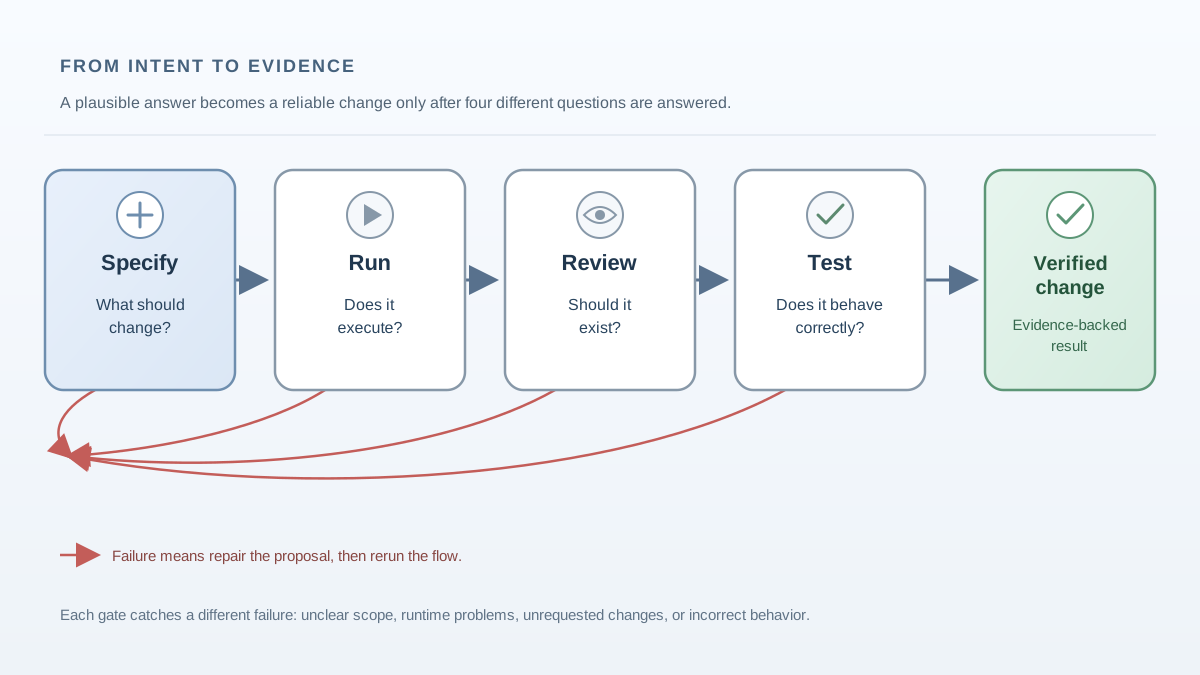
LLMs are masters of the known. They've seen enough code to produce diffs that look exactly like what a competent developer would write. That fluency is the trap.
A plausible diff is a prediction about what working code looks like. It is not verified code. The model cannot execute what it writes, cannot observe your runtime environment, and cannot see the shape of your actual data. It generates text that resembles correct solutions—and resemblance is not correctness.
The failure mode is specific: you accept a diff that reads well but breaks at runtime, mishandles an edge case, or quietly assumes something false about your integration points. The code doesn't look wrong. That's the problem.
Using AI coding assistants effectively starts with a reframe. The assistant is not an authority. It is a bounded implementation partner. You own the outcome. The model proposes; you dispose. The workflow below is how you dispose responsibly.
Step 1: Specify the Change Before You Prompt
The single biggest predictor of a risky diff is a vague prompt. "Fix this function" or "improve this code" hands the model something dangerous: the freedom to choose scope.
A precise specification removes that freedom. Before you prompt, write down:
- The target: which file, function, or module changes
- The desired behavior: what the code should do, in observable terms
- The inputs and outputs: what goes in, what comes out, and what counts as valid
- The constraints: performance limits, library versions, style rules, error-handling requirements
- The boundaries: what should not change
That last point matters more than most people realize. Scope boundaries prevent the assistant from "helpfully" refactoring unrelated code, renaming variables you didn't ask about, or modernizing a style you deliberately chose. Every file the assistant touches outside your spec is a file you now have to review and test.
Keep requests small and single-purpose. A focused change to one function is easy to verify. A multi-file epic is a cascade of unexamined assumptions. Each request should be small enough that you can fully understand its consequences.
Common mistake: Prompting with "fix this" and letting the model decide what "this" means. The model will always find something to fix—often things you didn't want touched.
Knowledge check
Check your understanding
Answer this question before you continue.
Step 2: Run the Code Before You Trust It
Reading a diff tells you what changed. Running it tells you whether the change works. These are different kinds of knowledge, and you need both.
The run is your first and cheapest verification gate. Execute the code in the narrowest realistic case: the happy path first, then one edge case. Watch what happens.
Running reveals what reading cannot. The code might throw an exception on real input. It might produce the wrong result silently—no error, just incorrect output. It might behave perfectly in isolation and fail the moment it touches your actual data structures, environment variables, or third-party service responses.
The assistant cannot see any of that. It doesn't know what your production database returns, what your API actually sends, or which version of a library is installed in your environment. You can see those things. The run is how you look.
Common mistake: Skipping the run because the code "looks right" or because the model is well-known. Reputation is not evidence. Execution is evidence.
Knowledge check
Check your understanding
Answer this question before you continue.
Step 3: Review the Diff Like a Human Reviewer
Once the code runs, your job shifts from "does it execute?" to "should this change exist at all?" That requires a critical review pass over the diff—the AI generated code review that separates careful builders from trusting passengers.
Read the diff as if a stranger wrote it. Because one did.
Check for scope creep first. Did the assistant change files or functions you never mentioned? Did it "fix" formatting in unrelated code? Did it refactor a function you only asked it to extend? Every unrequested change is a new risk surface you didn't sign up for.
Then look for hidden assumptions. Does the code assume your data has certain fields? Does it rely on a library version you don't have? Does it handle null values the way your codebase does, or the way the model's training data did? Models encode generic patterns, not your specific context. The gap between those is where integration bugs live.
Finally, verify the change against your spec's constraints—not just its intent. You asked for a function that returns the first matching record. The assistant delivered a function that returns the first matching record and logs every call and adds a retry loop. The extra behavior might be fine. It might not be. The point is that you decide, consciously, rather than accepting it by default.
Note: A diff review is where you catch expensive mistakes before they reach the test suite. Read carefully here and you save hours later.
Knowledge check
Check your understanding
Answer this question before you continue.
Step 4: Test the Behavior, Not the Code
A run proves the code executes. A test proves it behaves correctly under defined conditions. Those are not the same thing, and confusing them is one of the most common LLM coding best-practice violations.
When the assistant writes tests for its own code, review those tests with extra suspicion. A test can encode the same wrong assumption as the implementation. If the model misunderstood the requirement, it will write a test that validates the misunderstanding. A passing test is data, not permission to stop thinking.
Write or run tests that cover the acceptance criteria from your spec. Include edge cases: empty inputs, missing fields, boundary values, unexpected types. The happy path proves the code works when everything goes right. Edge cases prove it works when reality intervenes.
Treat the test result as evidence in a larger argument. A passing test suite tells you the code meets the conditions you defined. It does not tell you the conditions were the right ones. That judgment stays with you.
Common mistake: Treating "it runs without error" as equivalent to "it does the right thing." Running is necessary. It is not sufficient.
Knowledge check
Check your understanding
Answer this question before you continue.
A Worked Example: One Change Through All Four Gates
Let's make this concrete. Suppose you need to change a function that parses a configuration string like "port=8080;timeout=30" into a dictionary.
Specify. You write: "Update parse_config in config.py to return a dict. Keys are the text before =, values are the text after ;. Do not change how callers handle missing keys. Do not modify any other function."
Run. You call the function with your real config string. It returns {"port": "8080", "timeout": "30"}. Good. Then you try an empty string. It returns {} instead of raising an error. That may be fine—or it may hide a bug in code that expects at least one key. You note the behavior and move to review.
Review. Reading the diff, you notice the assistant added a strip() call on each value. Your spec didn't ask for that. It's probably harmless, but it changes behavior for values with intentional leading spaces. You decide to keep it—or remove it. Either way, the decision is yours, not the model's.
Test. You write a test for the happy path and one for a malformed entry like "port=8080;timeout". The second case reveals the assistant's code silently drops the malformed segment. Is that the right behavior? Your spec didn't say. Now you know the gap and can close it deliberately.
Each gate caught something different: the run exposed an edge case, the review found an unrequested change, the test revealed an undefined behavior. No single gate would have caught all three.
When This Workflow Is Overkill
The specify-run-review-test loop is a tool, not a ritual. Match its weight to the risk of the change.
For a one-line fix or a renamed variable, the full ceremony wastes time. Run it, glance at the diff, move on. For exploratory or throwaway code—a script you'll delete tomorrow, a prototype meant to test an idea—the review pass adds little value. The code's lifespan is too short to justify the overhead.
The workflow earns its cost when the change touches shared code, production paths, or data you care about. The more code that depends on this change, the more gates it should pass. A utility function used by fifty call sites deserves the full loop. A scratch script you'll run once does not.
My rule: match verification depth to blast radius. If a mistake costs you five minutes, a quick run suffices. If a mistake costs you a production incident, run everything, review everything, test everything.
For test selection, the same logic applies. For low-risk changes, the happy path plus one edge case is enough. For shared or production code, require three cases: the acceptance case from your spec, the most likely failure case, and the highest-cost plausible failure. That third one is the test that saves you at 2 a.m. when the pager goes off.
Make the Workflow a Habit
The four steps are not a checklist to complete. They are a stance to adopt: the assistant proposes, you dispose, and nothing ships until it has survived execution, inspection, and testing.
Here's a drill to build the habit. Take a small, real change you need to make—not a toy example, something you'd actually ship. Run it through all four steps deliberately. Then notice which step caught the most mistakes. For most people, it's the run or the review. For everyone, it's the step they're tempted to skip.
That awareness is the real payoff. The workflow's purpose isn't to add ceremony to your day. It's to make the assistant's errors visible, bounded, and repairable—so the tool that generates code quickly never becomes the reason your code breaks quietly.
Knowledge check
Final check
Finish the article by checking the ideas you just learned.
References
Want a more structured LLMOps path?
Use the LLMOps Practical Starter Bundle to connect RAG, evaluation, observability, and production patterns.
Large Language Models Starter Pack
A 12-chapter guide connecting LLM fundamentals with prompting, RAG, agents, tool calling, evaluation, security, and application engineering.
- 227-page Illustrated PDF edition
- 12 guided LLM engineering chapters
- Visual concept diagrams
- Self-assessment quizzes
- Bonus deep-dive sections
- Prompt design, structured output, context windows & RAG pipelines
- Agents, tool calling, prompt injection, evaluation & application lifecycles
Coming soon


