
Practice Validating and Recovering Structured LLM Outputs
A response that parses is not a response you can trust. Here is a small exercise that turns that sentence into a working habit.

Key topics
A response that parses is not a response you can trust. Here is a small exercise that turns that sentence into a working habit.
You asked a model for JSON. You got JSON back. It loaded with json.loads(), so you moved on and wired it into your code.
Then a field went missing in production. Or a status came back as "urgent" when your system only understands "low", "medium", and "high". Or the payload was perfectly shaped and quietly wrong.
This is the gap between parsing and validating. Parsing answers one question: is this text valid JSON? Validating answers the question you actually care about: does this data satisfy the contract my code depends on?
In this exercise, you will run one small Python validator against four sample model responses and decide accept, repair, or reject for each. No API key, no network, no waiting on a model. The responses are stored as strings so the exercise is deterministic and you can re-run it as many times as you want.
If you have not yet seen how to ask a model for structured output, the short version is enough here: you describe the shape you want, the model tries to produce it, and you still have to check the result. That last part is the whole point of this exercise.
Set Up the Exercise
You need Python 3 and nothing else. Create a file called validate.py.
We will work with a simple support-ticket classifier. The model's job is to read a customer message and return a structured decision. Here is the contract:
category— a string, one of"billing","technical","account","other"priority— a string, one of"low","medium","high"summary— a string, non-empty, at most 200 charactersconfidence— a number between 0 and 1- Business rule: if
priorityis"high",confidencemust be at least 0.7
That last rule is the interesting one. A schema can prove confidence is a number. It cannot prove that a high-priority ticket was flagged with enough confidence to act on automatically.
Now the four fixtures. Each is a raw string, exactly as a model might return it:
FIXTURES = {
    "clean": '{"category": "billing", "priority": "high", "summary": "Customer charged twice for the same order.", "confidence": 0.91}',
    "malformed": '{"category": "technical", "priority": "medium", "summary": "App crashes on launch", "confidence": 0.8,}',
    "incomplete": '{"category": "account", "priority": "low", "summary": "Cannot reset password"}',
    "unsafe": '{"category": "billing", "priority": "high", "summary": "Refund requested.", "confidence": 0.2}',
}
Before you write a single line of validation, predict what should happen to each one. Write your guesses down. The exercise is more useful when your mental model is on the record and the output can contradict it.
Your success criterion: the validator prints a verdict for each fixture, and only the clean one is accepted on the first pass.
Knowledge check
Check your understanding
Answer this question before you continue.
Check Structure First
Structure is the first layer. Parse the raw string, then check required fields, then types, then allowed values — in that order.
Order matters because each failure points at a different fix. A parse failure means the text was not JSON at all. A missing field means the model dropped information. A wrong type means the model understood the shape but not the format. A bad enum value means the model invented a category your system has never heard of.
import json

REQUIRED = ["category", "priority", "summary", "confidence"]
CATEGORIES = {"billing", "technical", "account", "other"}
PRIORITIES = {"low", "medium", "high"}

def check_structure(raw):
    try:
        data = json.loads(raw)
    except json.JSONDecodeError as e:
        return None, f"parse failed: {e}"

    if not isinstance(data, dict):
        return None, "top level is not an object"

    for field in REQUIRED:
        if field not in data:
            return None, f"missing required field: {field}"

    if not isinstance(data["category"], str) or data["category"] not in CATEGORIES:
        return None, f"bad category: {data.get('category')!r}"
    if not isinstance(data["priority"], str) or data["priority"] not in PRIORITIES:
        return None, f"bad priority: {data.get('priority')!r}"
    if not isinstance(data["summary"], str) or not data["summary"].strip():
        return None, "summary must be a non-empty string"
    if not isinstance(data["confidence"], (int, float)) or isinstance(data["confidence"], bool):
        return None, "confidence must be a number"

    return data, None
Run this against the fixtures and watch where each one dies.
The malformed fixture fails at json.loads. Look closely at the string: there is a trailing comma after 0.8. That is a syntax error, not a content error. The model knew what it wanted to say; it just wrote invalid JSON.
The incomplete fixture parses fine. It fails at the required-field check because confidence is missing. The model produced a well-formed object that does not contain everything your code needs.
The clean fixture passes structure. So does the unsafe one — and that is the trap.
Common mistake: Treating a passing schema check as proof of correctness. A schema proves shape. A
summaryfield can be a valid string and still contain nonsense, a hallucinated order number, or text you would never want to display.
Knowledge check
Check your understanding
Answer this question before you continue.
Check Meaning and Safety
Structure told you the payload is well-formed. It did not tell you the payload is usable. That is the second layer, and it is where beginners get hurt.
This layer encodes rules the schema cannot express. Three kinds show up constantly:
- Range limits — a number that must fall inside a specific window.
- Cross-field consistency — two fields that must agree with each other.
- Disallowed content — values your application should never act on.
def check_meaning(data):
    if not (0.0 <= data["confidence"] <= 1.0):
        return None, f"confidence out of range: {data['confidence']}"
    if len(data["summary"]) > 200:
        return None, "summary too long"
    if data["priority"] == "high" and data["confidence"] < 0.7:
        return None, "high priority requires confidence >= 0.7"
    return data, None
Now re-run the fixtures. The unsafe fixture passes structure and fails here: it claims "high" priority with confidence of 0.2. Every field is the right type. Every value is in the allowed set. And the payload is still something you should not auto-route, because the model is telling you it is not confident enough to justify that priority.
This is the case beginners miss most often, because nothing looks broken. The JSON is clean. The types are correct. The failure is semantic, and only a rule you wrote on purpose can catch it.
That is the boundary to internalize: this layer is your judgment, written down. It is not inferred from the schema, and it is not something the model can be trusted to enforce on itself. If you do not write the rule, nothing checks it.
Note: Provider-side schema enforcement — the kind that constrains the model's output during generation — reduces malformed output. It does not remove the need for this layer. A constrained
confidencefield will always be a number. It will not always be a sensible number.
Knowledge check
Check your understanding
Answer this question before you continue.
Repair Within Limits, Then Reject
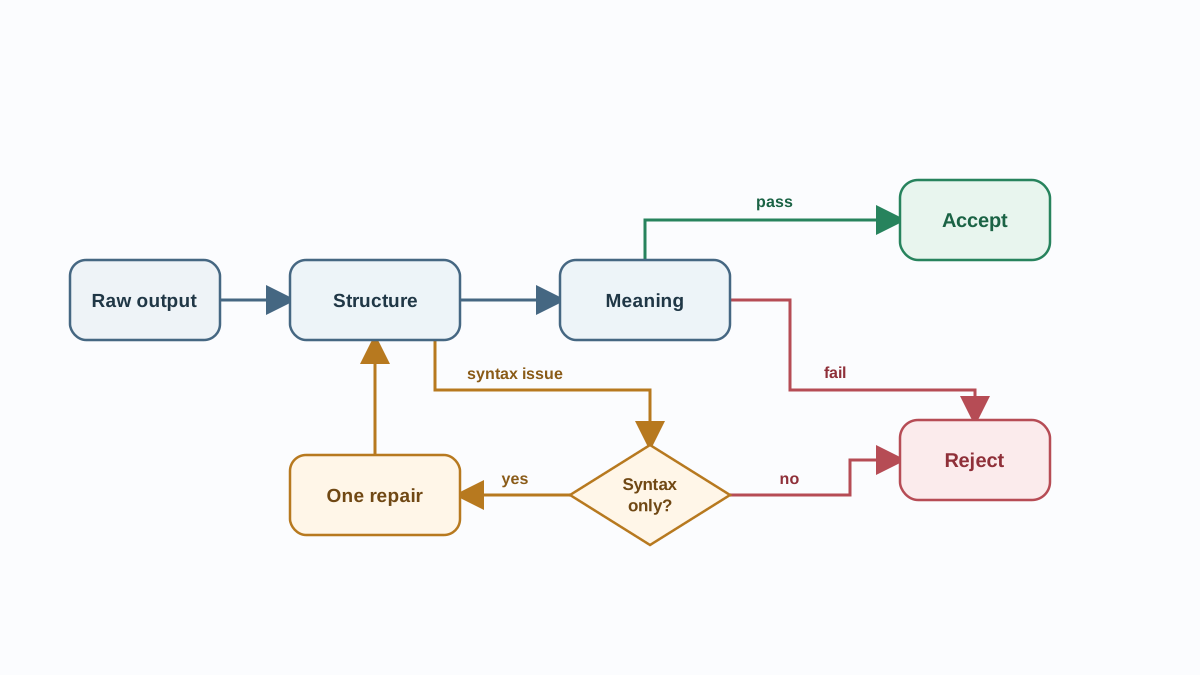
Some failures are mechanical. A trailing comma, an unquoted key, a stray newline. These are safe to fix because the repair does not add information — it only removes a syntax mistake.
Other failures are not repairable. A missing confidence value cannot be invented. A high-priority ticket with low confidence cannot be "fixed" by editing the confidence. The moment your repair code starts guessing at values, you have stopped validating and started fabricating.
So bound the repair. One attempt, one narrow class of fix, then stop.
import re

def repair(raw):
    fixed = re.sub(r",\s*([}\]])", r"\1", raw)  # drop trailing commas
    return fixed

def validate(raw, allow_repair=True):
    data, err = check_structure(raw)
    if err and allow_repair:
        data, err = check_structure(repair(raw))
        if err is None:
            data, err = check_meaning(data)
            return ("repaired", data) if err is None else ("rejected", err)
    if err:
        return "rejected", err
    data, err = check_meaning(data)
    return ("accepted", data) if err is None else ("rejected", err)
Now add the driver that ties everything together and prints the verdicts:
for name, raw in FIXTURES.items():
    verdict, result = validate(raw)
    print(f"{name:10} -> {verdict:8} | {result}")
Run python validate.py and you should see:
clean      -> accepted | {'category': 'billing', 'priority': 'high', 'summary': 'Customer charged twice for the same order.', 'confidence': 0.91}
malformed  -> repaired | {'category': 'technical', 'priority': 'medium', 'summary': 'App crashes on launch', 'confidence': 0.8}
incomplete -> rejected | missing required field: confidence
unsafe     -> rejected | high priority requires confidence >= 0.7
If your output matches, the exercise worked. If it does not, the mismatch is the lesson — read the error string and trace which check produced it.
The verdicts fall out of the design:
| Fixture | First failure | Verdict |
|---|---|---|
| clean | none | accepted |
| malformed | parse (trailing comma) | repaired |
| incomplete | missing confidence | rejected |
| unsafe | business rule | rejected |
The malformed fixture is the only one repair touches, and it works because the fix is purely syntactic. The incomplete fixture is rejected because the missing value is information, not punctuation. The unsafe fixture is rejected because no amount of editing makes a low-confidence high-priority ticket safe to auto-route.
The decision rule, stated plainly:
- Repair syntax. Trailing commas, unquoted keys, minor formatting.
- Re-request missing data. Do not invent it. Ask the model again, or route to a human.
- Reject anything that fails the meaning check. No repair path exists for a value that should not be used.
Warning: An unbounded retry loop is not recovery. It is a way to burn tokens and time while hiding a contract problem. Set an attempt limit — one repair pass is a reasonable default — and a clear stop condition.
Knowledge check
Check your understanding
Answer this question before you continue.
Verify Accepted Outputs
Here is the habit that separates a demo from software: re-validate every accepted payload, including repaired ones, before it reaches downstream code.
The repaired fixture passed structure after the fix, but it never went through the meaning check on the original string. Re-running the full pipeline on the repaired output closes that gap. Nothing gets a free pass because it was "already fixed."
Two more habits make this durable:
Log the raw response alongside the verdict. When something fails in production three weeks from now, you want the original string, not a reconstructed guess. The raw text is the evidence.
Turn the four fixtures into a regression set. Every time you tighten a contract rule, re-run the fixtures and see which ones flip. A contract change that silently breaks a previously accepted case is exactly the kind of bug that shows up at the worst possible moment.
This matters more than any single prompt improvement. Prompts drift, models change, providers update their APIs. A validator you own is the part of the system that stays honest when everything upstream moves.
Break It on Purpose
Now test whether you understood the contract or just copied the code.
Add a fifth fixture that exposes a real gap. The current code checks that summary is non-empty and at most 200 characters, but it never checks that summary is actually about the ticket. A structurally perfect payload can still carry a summary that contradicts the category — for example, a "billing" ticket whose summary reads "The login page returns a 500 error." Every field passes structure. Every value passes the meaning checks you wrote. The verdict will be accepted, and that is the point: the contract has a hole, and the exercise just showed you where.
Predict the verdict before you run it. Then decide whether the fix belongs in check_meaning() — a keyword rule, a category-summary consistency check — or in a re-request path. Either answer is defensible; what matters is that you noticed the gap instead of trusting the green checkmark.
Tighten one rule. Change the high-priority threshold from 0.7 to 0.85 and re-run. Which fixtures flip? The clean one has 0.91, so it survives. Watch how a single number changes the accept/reject boundary for everything downstream.
Swap in a real response. Take a structured output from your own prompt, scrub anything sensitive, and drop it in as a fixture. Real model output has a texture that hand-written examples do not — odd whitespace, unexpected casing, fields you did not ask for. That is the fixture that teaches you the most.
The natural next step is wiring this validator into a retry path: on rejection, re-request with a tightened prompt, and on a second failure, route to a human. That is where validation stops being an exercise and becomes a pipeline.
The Rule You Keep
Parse. Check structure. Check meaning. Repair only what is mechanical. Reject the rest. Re-validate before use.
That sequence is the whole discipline. It is short enough to remember and strict enough to save you. The next time a model hands you a clean-looking JSON object, you will know the difference between "it parsed" and "it is safe" — and you will have a validator that proves which one you are holding.
Knowledge check
Final check
Finish the article by checking the ideas you just learned.
References
Want a more structured LLMOps path?
Use the LLMOps Practical Starter Bundle to connect RAG, evaluation, observability, and production patterns.
Large Language Models Starter Pack
A 12-chapter guide connecting LLM fundamentals with prompting, RAG, agents, tool calling, evaluation, security, and application engineering.
- 227-page Illustrated PDF edition
- 12 guided LLM engineering chapters
- Visual concept diagrams
- Self-assessment quizzes
- Bonus deep-dive sections
- Prompt design, structured output, context windows & RAG pipelines
- Agents, tool calling, prompt injection, evaluation & application lifecycles
Coming soon


