
LLMs in Coding and Development
An LLM can draft a working function in seconds. The harder truth is that the code it writes still needs to be tested, debugged, and understood before it…

An LLM can draft a working function in seconds. The harder truth is that the code it writes still needs to be tested, debugged, and understood before it ships. That gap between the impressive demo and the daily reality is the most useful thing to grasp about LLMs in coding.
The common misconception is that coding with LLMs means outsourcing your thinking. It does not. The model handles the drafting; you own the judgment. Think of it as a fast, knowledgeable intern who never sleeps — not an oracle. The intern drafts, you decide, and you always verify.
What LLMs actually do in a developer's workflow
Strip away the hype and an LLM is doing one thing: predicting the next token in a sequence. Writing code is largely stringing tokens together in the right order, which is why these models turn out to be genuinely useful for programming.
In practice, that mechanism translates into several real jobs:
- Generating and completing code — turning a described task into a function, or filling in the next lines inside your editor.
- Explaining unfamiliar code — summarizing what a function, file, or library actually does.
- Suggesting fixes — taking an error message and proposing a likely cause and remedy.
- Writing tests and documentation — producing docstrings, comments, and test scaffolding.
- Translating between languages or frameworks — moving logic from Python to JavaScript, or from one library to another.
The honest boundary: LLMs are strongest at well-defined, popular, well-documented tasks. They are weakest at novel, project-specific, or convention-heavy work where the answer depends on context the model cannot see.
Knowledge check
Check your understanding
Answer this question before you continue.
The verification loop: how LLM coding actually works
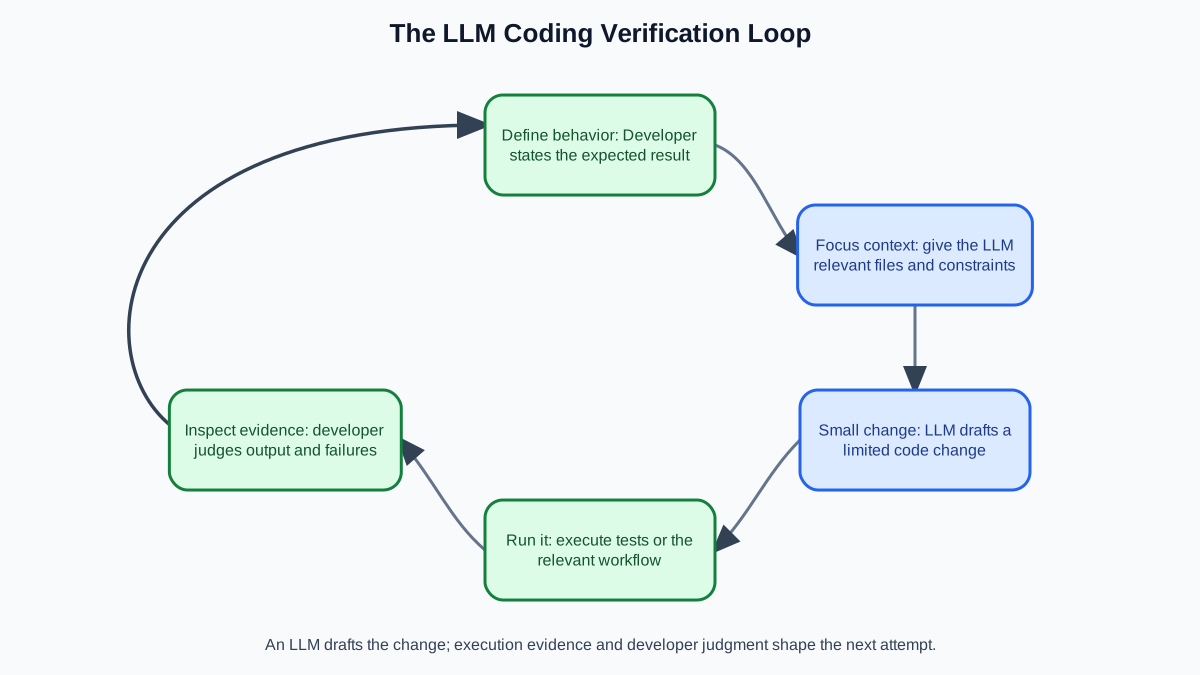
Here is the mental model that ties everything together: an LLM coding workflow is a context-and-verification loop, not a one-shot magic trick.
The loop has five steps:
- Define the expected behavior. What should the code do? What inputs will it receive? What counts as success?
- Supply focused context. Give the model the relevant function, file, or error — not your entire project.
- Generate a small change. Ask for the narrowest useful draft or fix.
- Run it. Execute the code against a real input or test.
- Inspect the evidence. Read the error, check the output, and decide whether the behavior matches your expectation.
Then repeat. Each failed run is not a dead end — it is feedback that sharpens the next attempt.
A concrete debugging example shows the loop in action. Say you hit a confusing error in a Python script. You paste the traceback and the relevant function into a chat interface and ask what is going wrong. The model points to a likely culprit — maybe a variable that is None when you expect a list. That saves you twenty minutes of staring.
But the loop does not end there. You run the suggested fix against your actual data. The traceback disappears, but the output is still wrong — the function now returns an empty list instead of raising an error. That new evidence tells you the real problem is upstream: the variable was never populated in the first place. You feed that observation back into the conversation, and the model revises its approach.
The model guessed based on the snippet you gave it. You have the full picture. Execution output is feedback, not automatic proof that the next suggestion is correct.
Common mistake: Pasting a failure back into the model without inspecting the evidence first. Read the error. Trace the state. Then ask for the fix.
Knowledge check
Check your understanding
Answer this question before you continue.
Where LLMs shine — and where they quietly fail
The decision boundary matters more than the feature list. Lean on an LLM when the task is common and well-documented. Be suspicious when it is not.
Strong territory: popular languages and frameworks, standard patterns, small self-contained functions, boilerplate, and anything with many public examples. If millions of similar functions exist on the internet, the model has seen them.
Weak territory: large unfamiliar codebases, project-specific conventions, edge cases, security-sensitive logic, and anything where the surrounding context matters. The model only sees what you give it. It does not know your whole repository, your team's style, or the hidden requirements that never made it into a ticket.
The failure modes are quietly expensive. The model can be confident and wrong. It can hallucinate a library API that does not exist. It can produce subtle logic errors that look correct at a glance and break at runtime. The code passes inspection and fails execution.
Warning: The model can draft, but you must verify. If you have not run the code, you do not have a working system.
Knowledge check
Check your understanding
Answer this question before you continue.
How to prompt an LLM for better code
The quality of what you get back depends less on clever prompt formulas than on how you frame the task. The pattern that works: treat the model like a digital intern hired to type code from your detailed instructions.
Give it a focused, specific task instead of dumping a whole project. Name the language, the function, the inputs, and the expected behavior. Include the relevant code snippet rather than the entire repository — the model works best with a small, targeted context.
State your constraints explicitly. Performance needs, error handling, style preferences, the library you want used — put them in the request. A vague "fix this" produces a guess. A precise "rewrite this function to handle empty input and return a default value" produces something you can actually use.
Iterate like a conversation. Get a simpler version working first, then refine toward the full implementation. And when a conversation stops being useful, start a fresh one. Context accumulates and can steer the model off course.
Tip: For complex tasks, ask for a working prototype first. Prove the core requirement can be met, then build out the sophistication.
Knowledge check
Check your understanding
Answer this question before you continue.
Choosing the right tool for the job
AI coding tools come in different shapes, and the shape should match the task. The real difference between them is not the model behind the scenes — it is who supplies the context, what actions the tool can take, and who verifies the result.
| Tool shape | Context source | What it can do | Verification boundary |
|---|---|---|---|
| Chat interface | What you paste in | Explain, draft, answer questions | You run and inspect everything |
| Editor-integrated tool | Your current file and session | Complete code, suggest in-place edits | You run and inspect everything |
| Agent-style tool | Files, commands, and prior steps it gathers | Iterate, run code, fix its own output | You review what it changed and why |
Chat interfaces — the web or app versions of tools like ChatGPT and Claude — are good for explaining code, drafting functions, and one-off questions. You control exactly what context goes in, which makes them ideal for learning.
Editor-integrated tools — like Copilot or Cursor — pull context from your current file and session automatically. They shine at completion and in-place edits where the surrounding code matters.
Agent-style tools can iterate, run code, and fix their own output. They are powerful but demand more oversight and a clearer task boundary. An agent is not a colleague with independent judgment — it is a workflow that lets the model take multiple tool-using steps. You still define what success looks like and check the final result.
My advice for beginners: start in a chat interface where you can see exactly what context goes in. Once you understand the pattern, move to editor tools that automate the context-gathering for you.
Common mistakes beginners make with coding LLMs
The most expensive mistakes are consistent across every beginner I have watched learn this:
- Trusting output without running it. The single most common and most costly error. The model's confident tone is not evidence of correctness.
- Pasting an entire codebase and expecting useful help. Isolate the relevant function or file instead.
- Asking vague questions. "Fix this" tells the model nothing about intended behavior or constraints.
- Using the model as a substitute for understanding. If you cannot judge or repair what it produces, you cannot ship it.
- Treating confidence as correctness. LLMs are masters of the known, not pioneers of the unknown.
Your first step toward coding with LLMs
Start small and real. Take a function you wrote or are studying, paste it into a chat interface, and ask the model to explain it line by line. Then ask it to suggest one improvement. Compare its suggestion to what you would write.
Then try a generation task. Describe a small, well-defined function in plain language — inputs, expected behavior, edge cases — and compare the model's draft to your own version.
The habit that matters most: run whatever the model produces and verify it behaves as expected. That single discipline separates developers who use LLMs well from developers who get burned by them.
The developer's real job — judgment, testing, and ownership of the outcome — does not disappear when an LLM enters the workflow. It becomes more important. The model drafts, you decide, and you always verify.
Once you have this foundation, the natural next direction is building systems that give LLMs more context and capability — retrieval-augmented generation and agents. That is where coding with LLMs moves from helpful autocomplete to a tool that can gather its own evidence. The verification loop you practice here is exactly the skill those systems demand.
Knowledge check
Final check
Finish the article by checking the ideas you just learned.
References
Want a more structured LLMOps path?
Use the LLMOps Practical Starter Bundle to connect RAG, evaluation, observability, and production patterns.
Large Language Models Starter Pack
A 12-chapter guide connecting LLM fundamentals with prompting, RAG, agents, tool calling, evaluation, security, and application engineering.
- 227-page Illustrated PDF edition
- 12 guided LLM engineering chapters
- Visual concept diagrams
- Self-assessment quizzes
- Bonus deep-dive sections
- Prompt design, structured output, context windows & RAG pipelines
- Agents, tool calling, prompt injection, evaluation & application lifecycles
Coming soon


