
LLM Document Extraction: Turning Messy Text into Reviewable Data
An LLM that reads a document and returns JSON is not performing a database import. It is performing an act of reading—and reading, even by a very capable…

An LLM that reads a document and returns JSON is not performing a database import. It is performing an act of reading—and reading, even by a very capable model, is an act of interpretation. The practical difference matters more than most beginners expect.
Imagine an invoice where the line items sum to $1,847.50, but the model returns a total of $1,847.00. When you look closely, you find the model "corrected" the total to match a line item it misread. Nothing in your pipeline caught it because the JSON was well-formed, the total was numeric, and the date parsed cleanly. The extraction looked perfect. It was wrong.
This is the core lesson of LLM document extraction: every value the model returns is a claim, not a fact. Your job is to build a workflow that treats it that way.
Why Extraction Is Not a Database Import
When you query a database, the system either has the record or it doesn't. When you ask an LLM to extract data from a document, the model has no ground truth. It has the text you gave it, a schema you described, and a strong statistical inclination to produce something plausible.
That inclination is useful—and dangerous. Models fill gaps, guess from context, and occasionally "fix" what they believe are typos in the source document. A model that sees an invoice total that doesn't match its line items may quietly adjust the number rather than flagging the discrepancy. From the model's perspective, it is being helpful. From your perspective, it has silently corrupted your data.
The mental model that will serve you well: claims with receipts. Every extracted value should carry evidence of where it came from in the document. A bare JSON field is a claim you cannot verify. A value with a source quote, page number, or section reference is a claim you can check.
This changes how you design everything downstream. You are not building a pipeline that moves data from documents into a database. You are building a pipeline that produces well-supported claims, verifies them, and only then commits the ones that hold up.
Knowledge check
Check your understanding
Answer this question before you continue.
The Extraction Workflow at a Glance
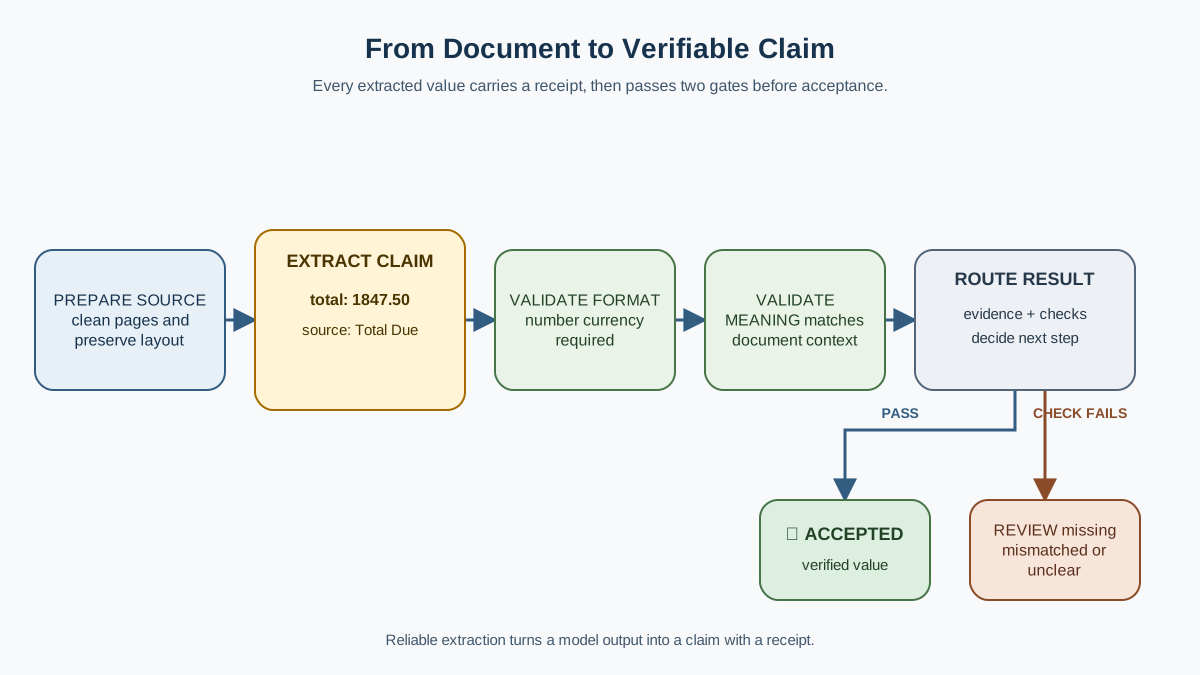
A reliable LLM document extraction workflow has five stages:
- Prepare the document — get the content into a form the model can read well.
- Define the schema — specify exactly which fields matter and what counts as a valid value.
- Extract with evidence — ask the model to return source references alongside each value.
- Validate the output — check format, meaning, and consistency against the source.
- Route uncertain cases to review — send anything questionable to a human.
The model call sits in the middle of this pipeline, but it is rarely where extraction fails. Failures cluster at the boundaries: an unclear schema that invites invention, missing source references that make verification impossible, or weak validation that accepts a well-formed but wrong value.
This workflow builds on two ideas you may have already encountered: structured-output prompting gives you a reliable JSON contract, and validation treats model output as untrusted data. Document extraction adds a layer on top of both—the source document itself becomes part of your validation logic.
Preparing the Document: Text vs. Layout
How a document reaches the model changes what the model can extract. This is the stage beginners skip, and it shows.
Plain text extraction—from a PDF text layer or OCR—strips away layout. Tables lose their rows and columns. Multi-column pages merge into a single stream. A checkbox next to "Yes" becomes text floating in a void. For simple invoices and emails, this loss rarely matters. The fields you care about live in labeled lines: "Invoice Number: INV-2024-0137."
For forms, dense tables, or scanned documents, layout carries meaning. A table cell's value depends on its column header and row label. If your text extraction scrambles that structure, the model has to guess which number belongs to which field. Sometimes it guesses right. Sometimes it guesses with total confidence and complete wrongness.
The tradeoff is real:
| Approach | Strengths | Weaknesses |
|---|---|---|
| Plain text (OCR or PDF text layer) | Cheap, simple, fast | Loses tables, columns, spatial relationships |
| Layout-aware or vision-based parsing | Preserves structure, handles complex layouts | More expensive, more complex, slower |
A practical decision rule: if the document is mostly labeled fields in a linear layout, plain text is usually enough. If the document is a table, a form with checkboxes, or a scan with mixed columns, you need layout-aware parsing or a vision-capable model that can see the page.
The common mistake here is feeding raw OCR text with broken table structure and expecting the model to reconstruct the original layout. The model cannot reliably rebuild what the extraction step destroyed. Garbage in, plausible-sounding garbage out.
Knowledge check
Check your understanding
Answer this question before you continue.
Designing the Schema: Define What "Good" Looks Like
Your schema is a contract. It tells the model which fields matter, what types they should have, and what values are acceptable. A vague schema is an invitation to invent.
Consider an invoice schema. You want the invoice number, date, vendor, line items, and total. Each field needs a precise definition. What counts as the vendor—the company name at the top, or the remit-to entity at the bottom? What if the invoice has both a subtotal and a total? If you do not specify, the model will decide for you, and its decision may not match yours.
Two design decisions matter more than the rest:
Required vs. optional fields. Decide which fields must always be present. Then decide how to represent two very different situations: "this field is not present in this document" versus "I could not find this field." The first is a legitimate outcome. The second is a failure that may need human help.
Schema breadth. A schema that is too narrow misses useful data. A schema that is too broad invites hallucination. When you ask for twenty fields and the document only supports fifteen, the model faces pressure to fill the remaining five. It will often invent values rather than admit absence. My rule: if you do not have a downstream use for a field, do not extract it.
This is where you define the JSON contract the model must return. The structured-output techniques you already know apply directly here—the schema you design is the schema the model must honor.
Knowledge check
Check your understanding
Answer this question before you continue.
Extracting with Evidence: Grounding Every Value
Here is where document extraction diverges from ordinary structured output. Ask the model to return, alongside each value, a reference to where it found it.
That reference can be a quoted snippet, a page number, a section heading, or a line identifier. The form matters less than the principle: every value should be traceable to a location in the source document.
Compare these two outputs:
{
  "invoice_number": "INV-2024-0137",
  "total": 1847.50
}
{
  "invoice_number": {
    "value": "INV-2024-0137",
    "source": "Line 3: 'Invoice Number: INV-2024-0137'"
  },
  "total": {
    "value": 1847.50,
    "source": "Line 42: 'Total Due: $1,847.50'"
  }
}
The first is a claim. The second is a claim with a receipt. When a value fails validation, the receipt tells you whether the model misread the document or the document itself is inconsistent.
Grounding also makes hallucination detectable. When the model knows it must cite its source, an invented value becomes visible—the citation will not match anything in the document. Some vision-based extraction systems go further and localize values to specific regions of a document image, storing bounding-box coordinates alongside each extracted field. That is a stronger form of the same principle. The mechanism matters less than the traceability.
Validating the Output: Treat the Model as Untrusted
Validation is not optional polish. It is the gate that decides whether extracted data is safe to use downstream.
You need two layers of checks:
Format checks. Does the date parse? Is the total numeric? Does the vendor field match an allowed enum? These catch malformed output. They are necessary and insufficient.
Semantic checks. Does the total plausibly equal the sum of the line items? Does the invoice date fall within a reasonable range? Does the quoted source text actually support the extracted value? These catch well-formed but wrong output—the far more dangerous failure.
The second layer is where document extraction gets interesting. You collected source evidence in the previous step. Now you use it. Cross-check each extracted value against its quoted source. If the model claims the total is $1,847.50 but the quoted line says $1,847.00, you have caught a silent corruption.
The common failure here is validating only the JSON shape—checking that the output parses and types match—while skipping the harder question of whether the values match the document. A well-formed date that is wrong is worse than a malformed date that gets flagged. The first passes silently. The second triggers a repair or review.
This extends the validation-and-repair pattern you already know: treat model output as untrusted data, but add document-specific checks that compare values against their source.
Knowledge check
Check your understanding
Answer this question before you continue.
Routing Uncertainty: When to Ask a Human
Not every extraction deserves the same confidence. Design for a review queue, not a binary accept-or-reject.
Route to review when any of these conditions hold:
- A value fails a semantic check—even if it passes format validation.
- The source quote is ambiguous or does not clearly support the extracted value.
- A required field is missing entirely.
- The model reports low confidence on a value.
That last trigger deserves a warning. A model's confidence score is itself a model output—untrusted, like everything else it produces. Treat it as a hint that something may need attention, not as a verdict. A high-confidence value with no source evidence should still fail. A low-confidence value that passes every evidence check may be perfectly fine. Confidence can trigger review; it cannot override evidence.
The cost tradeoff is real. Reviewing everything defeats the purpose of automation. Auto-accepting everything ships silent errors into your downstream systems. The middle path: accept only values that pass format checks, have a matching source reference, and pass semantic checks. Route everything else to a human.
A decision rule that works well in practice: accept automatically only what you can verify automatically. If your validation logic cannot confirm a value against its source, a human should look at it.
The review queue is not a failure state. It is the mechanism by which your extraction system earns trust. Every item a reviewer catches is an error that would otherwise have propagated into your database, your reports, or your customer-facing systems.
What the Pipeline Produces: One Field, End to End
Let's follow one invoice through the whole workflow to see how these stages connect.
The document contains a line reading "Total Due: $1,847.50" and line items that sum to $1,847.50. Your schema defines total as a required numeric field. The model extracts it with a source quote: "Total Due: $1,847.50".
The format check passes—the value is numeric. The semantic check passes—the total matches the sum of the line items. The source quote matches the extracted value. The record is accepted automatically:
{
  "field": "total",
  "value": 1847.50,
  "source": "Line 42: 'Total Due: $1,847.50'",
  "status": "accepted",
  "validation": "format: pass; semantic: pass; source: match"
}
Now consider a second invoice where the line items sum to $1,847.50, but the model returns a total of $1,847.00 with a source quote that reads "Total Due: $1,847.00." The format check passes. The semantic check fails—the total does not match the line items. The record routes to review:
{
  "field": "total",
  "value": 1847.00,
  "source": "Line 42: 'Total Due: $1,847.00'",
  "status": "review",
  "validation": "format: pass; semantic: fail (line items sum to 1847.50)"
}
A human reviewer can now see exactly what happened: the model extracted a value that exists in the document, but the document itself contains an inconsistency. That is a different problem from hallucination, and it needs a different fix. The receipt made the distinction visible.
Now consider a third case: the model returns a total with no source quote at all. The format check passes. The semantic check cannot run—there is no evidence to check against. The record routes to review, not because the value is wrong, but because you cannot verify it automatically.
This is the shape of a trustworthy extraction pipeline. Every field ends with a status you can act on: accepted, reviewed, or repaired.
Common Mistakes and How to Avoid Them
Most extraction failures trace back to a missing workflow stage. Here are the patterns I see most often:
Treating the model's JSON as ground truth. Skipping source evidence means you cannot verify anything. Every value becomes an act of faith.
Designing a schema so broad the model invents values to fill it. If you ask for twenty fields from a document that supports ten, the model will often fabricate the missing ten rather than report absence.
Validating format but not meaning. Accepting a well-formed date that is wrong is worse than rejecting a malformed one. Format checks catch sloppiness. Semantic checks catch corruption.
Assuming one prompt works across every document layout. Invoices from different vendors, forms from different agencies, emails from different senders—each layout variation can break assumptions your prompt silently made.
Auto-accepting everything to save review cost. This ships silent errors downstream, where they cost far more to fix than a review queue would have.
Each mistake is a symptom of a missing stage in the pipeline. Skip the schema, and the model guesses what you want. Skip the evidence, and you cannot verify what you got. Skip the validation, and you commit errors unknowingly. Skip the review queue, and you have no mechanism for catching what the model got wrong.
Start with One Document Type
Take one document type you actually work with—an invoice template, a client intake form, a batch of incoming emails. Define a small schema: five to eight fields, each with a clear definition and a required-or-optional designation. Run an extraction that returns source references for every value. Then manually inspect the output.
Look for where the model's claims hold and where they break. Did it misread a table? Did it invent a value to fill a gap? Did it struggle with a layout variation you did not anticipate? Those failures are not evidence that extraction is broken. They are evidence about where your workflow needs reinforcement.
The rule to carry forward: extraction output is evidence to review, not data to trust. Once you have a workflow that produces verifiable claims, you can measure how often those claims hold across a sample of documents—and that measurement is where extraction quality really begins.
Knowledge check
Final check
Finish the article by checking the ideas you just learned.
References
Want a more structured LLMOps path?
Use the LLMOps Practical Starter Bundle to connect RAG, evaluation, observability, and production patterns.
Large Language Models Starter Pack
A 12-chapter guide connecting LLM fundamentals with prompting, RAG, agents, tool calling, evaluation, security, and application engineering.
- 227-page Illustrated PDF edition
- 12 guided LLM engineering chapters
- Visual concept diagrams
- Self-assessment quizzes
- Bonus deep-dive sections
- Prompt design, structured output, context windows & RAG pipelines
- Agents, tool calling, prompt injection, evaluation & application lifecycles
Coming soon


