
Make Your First Programmatic LLM API Request
The four-line API call is not the hard part. The hard part is the key, the bill, and the error message you cannot read. So let's get all three out of the…

Key topics
The four-line API call is not the hard part. The hard part is the key, the bill, and the error message you cannot read. So let's get all three out of the way in one sitting.
By the end of this tutorial, you will have a working Python script that sends one request to a hosted large language model, prints the generated text, and shows you the token counts behind it. You will also know what to do when the first run fails — because it often does, and the failure is usually more informative than the success.
We are deliberately not locking into one vendor. You will use a provider-neutral client so the same call shape works across providers. That shared shape is the abstraction. It is not a promise that switching providers is free — more on that boundary in a moment.
What You Are Actually Sending
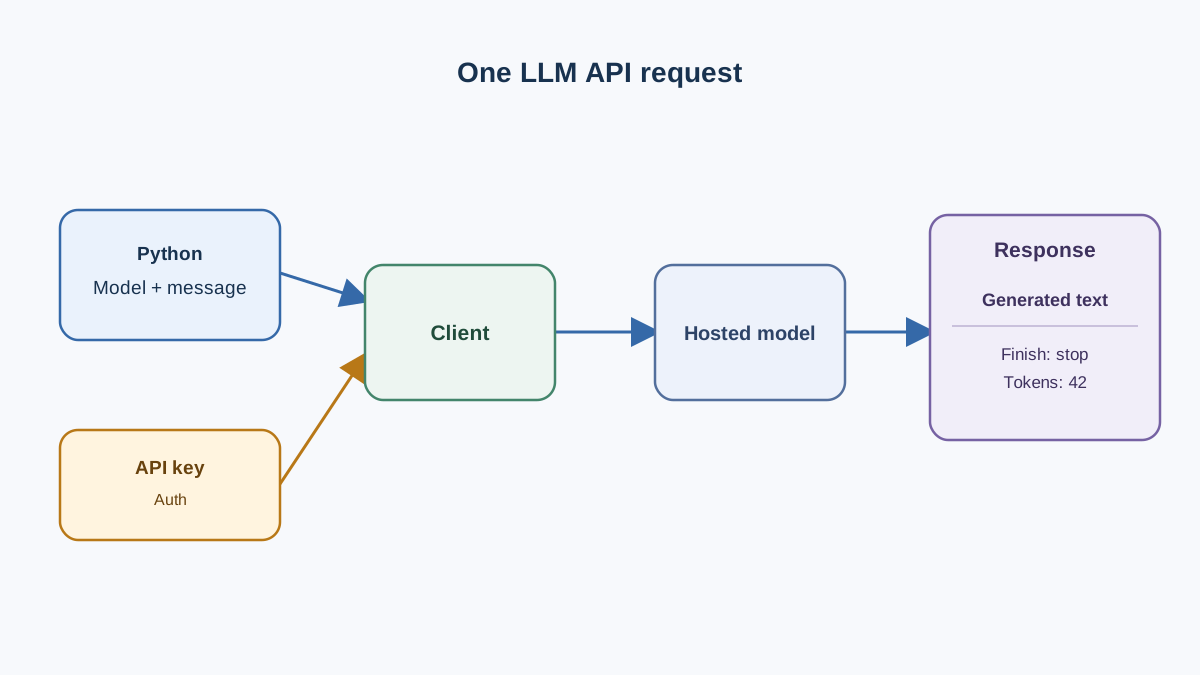
Before any code, get the mental model right. An LLM API call is an ordinary authenticated HTTP request. It has an endpoint, headers, a JSON body, and a JSON response. If you have ever called any REST API, nothing about the transport will surprise you.
What is unusual is the payload. The response is generated, not looked up. That single fact is why prompt wording, token limits, latency, and cost become your problem instead of the provider's.
The request body carries two things you care about right now:
- A model name — a string that selects which model handles the request.
- A messages list — an ordered list of role/content pairs, typically a
systemmessage for instructions and ausermessage for the actual input.
The response carries the generated text plus metadata: why generation stopped, and how many tokens were consumed.
Provider-neutral clients exist because every major provider converged on roughly this shape. The client library translates your call into whatever the provider expects. You write one call; the model string picks the destination.
Note: Model identifiers, package versions, and response field names change over time. Treat every string in this tutorial as a placeholder to verify against your provider's current documentation, not as a permanent fact.
Set Up Python, a Client, and One Provider
You need three things: an isolated Python environment, a client library, and one provider account.
Isolate the environment
Assume Python 3.11 is installed. Create a virtual environment so this tutorial does not touch your system interpreter:
python3.11 -m venv .venv
source .venv/bin/activate   # Windows: .venv\Scripts\activate
Install a provider-neutral client
We will use LiteLLM as the worked example because it exposes a consistent interface across providers. Check its current documentation for the exact package name and version before installing:
pip install litellm
Get one API key
Pick one hosted provider. Create an account, then generate an API key from its dashboard. Follow that provider's current documentation for this step — key formats, prefixes, and dashboard locations change, and a copied snippet from an old blog post is the fastest way to start with a broken key.
Store the key in an environment variable
Never paste the key into your source file. An API key is a password. Anyone who has it can spend your credits.
export OPENAI_API_KEY="your-key-here"
The exact variable name depends on the provider. LiteLLM reads provider-specific variables, so check which one your chosen provider expects.
Before you commit anything, add your environment file to .gitignore:
echo ".env" >> .gitignore
Warning: Set a spend or usage limit in your provider dashboard now, before the first request. Not after the first surprise bill. This tutorial sends one short request, but a runaway loop in a later experiment will not announce itself.
To be clear about the boundary: this is one request, one provider, no retries, no streaming, no production concerns. That is the point.
Knowledge check
Check your understanding
Answer this question before you continue.
The Smallest Request That Works
Here is the entire script. Save it as first_call.py.
import os
from litellm import completion

response = completion(
    model="openai/gpt-4o-mini",
    messages=[{"role": "user", "content": "Explain what an API is in one sentence."}],
)

print(response.choices[0].message.content)
Run it:
python first_call.py
Expected output is one sentence of generated text, something like:
An API is a defined interface that lets one piece of software request data or actions from another.
The exact wording will differ every run. That is the success criterion: you got generated text back, not a stack trace.
Now the lines, one at a time.
import os is there because you will read the key from the environment in a moment. The client picks it up automatically, but you will want os for the next section.
model="openai/gpt-4o-mini" selects the destination. The prefix before the slash tells the client which provider to route to. Change the prefix and the model name, and the same call hits a different provider — provided you have also configured that provider's credentials and the model identifier is one it currently supports. The call shape is portable; the setup is not. That distinction is the whole reason the abstraction is useful and the whole reason it can mislead you.
messages=[...] is the conversation. A single user message is the minimum. Add a system message when you want to set behavior:
messages=[
    {"role": "system", "content": "You are terse. Answer in one sentence."},
    {"role": "user", "content": "Explain what an API is."},
]
The key is read from the environment by the client library. You never pass it as a literal. If you find yourself typing api_key="sk-..." into a file, stop — that file is one git push away from being a public secret.
Knowledge check
Check your understanding
Answer this question before you continue.
Read the Response, Not Just the Text
The text is the headline. The rest of the response is the story.
Print the whole object once, structured, so you see its real shape instead of trusting a summary:
import json
print(json.dumps(response.model_dump(), indent=2, default=str))
You will see something like this, simplified:
{
  "choices": [
    {
      "message": {"role": "assistant", "content": "..."},
      "finish_reason": "stop"
    }
  ],
  "usage": {
    "prompt_tokens": 14,
    "completion_tokens": 22,
    "total_tokens": 36
  }
}
Three fields matter right now.
finish_reason tells you why generation stopped. "stop" means the model finished normally. "length" means it hit the output limit and the answer may be cut off mid-sentence. A truncated answer looks like a bad model but is almost always a max_tokens setting you did not set high enough.
usage.prompt_tokens and usage.completion_tokens are the quantities you need to estimate cost. Input tokens are what you sent; output tokens are what came back. They are not the bill itself — the bill is those counts multiplied by the selected model's current per-token pricing, which differs across models and can change. Log the counts from day one, then combine them with the model's pricing page to see what a call actually costs. Cost stops being abstract the moment you can see it per call.
Common mistake: Reading only
response.choices[0].message.contentand throwing the rest away. You lose the truncation signal and the cost signal in the same line of code.
Field names and nesting vary by provider and client version. Verify against current docs rather than assuming the shape above is universal.
Knowledge check
Check your understanding
Answer this question before you continue.
When the First Run Fails
First-run errors are normal. They are also the fastest way to learn what the API actually does. Read the status code and the error body before changing code — the message is evidence, not noise.
| Symptom | Likely cause | Fix |
|---|---|---|
| Authentication failure (401) | Key missing, misspelled, expired, or not exported into the shell running the script | Re-export the variable in the same terminal, then rerun |
| Model not found / invalid request (400) | Model identifier does not match what the provider currently offers, or request shape is wrong | Copy the exact model string from current provider docs |
| Rate limit (429) | Too many requests too fast | Slow down; retry with backoff |
| Insufficient quota (402) | No credits on the account | Add credits or switch models |
| Timeout or provider error (408, 500–503) | Provider-side issue; your request may have been fine | Retry with backoff rather than rewriting the prompt |
| Context too large (400/413) | Input exceeded the model's window | Shorten the prompt or choose a larger-context model |
Two of these deserve a closer look because beginners conflate them.
A rate limit means you are asking too fast. The fix is timing. Insufficient quota means you have no credits. The fix is money. They are different problems with different fixes, and the status code tells you which one you have.
A timeout is not a prompt problem. If the request timed out, the model may have been mid-generation. Retrying with backoff is correct. Rewriting your prompt because of a network hiccup is wasted work.
Tip: When something fails, print the status code and the raw error body. Most client libraries attach the provider's response to the exception. That body usually names the exact problem.
Knowledge check
Check your understanding
Answer this question before you continue.
One Small Change to Prove You Understand It
A copied script is not knowledge. Change one variable at a time and watch the consequence.
Change the prompt text. Replace the question with something personal to you. If the output changes, your input is genuinely reaching the model. If it does not, something upstream is wrong.
Set a low output limit. Add max_tokens=10 to the call and rerun. The goal is to try to induce truncation and watch finish_reason change from "stop" to "length". A short prompt may finish inside ten tokens, in which case the finish reason stays "stop" and nothing is broken — you just did not push hard enough. Ask for something longer, or drop the limit further, until you see "length". Truncation stops being mysterious the moment you trigger it on purpose.
Swap the model string. Point at a second model from the same provider and compare latency and usage counts. Same call shape, different destination — that is the value of a provider-neutral client, and the reminder that credentials and model support still have to line up.
Log the usage numbers. Append them to a file alongside the answer:
with open("usage.log", "a") as f:
    f.write(f"{response.usage.total_tokens} tokens\n")
Cost becomes observable instead of abstract. One variable changed, one observation recorded.
Where This Fits Next
The rule I would give any beginner here: get one request working end to end before adding anything else. Retries, caching, routing, and output validation are separate problems with their own failure modes. Layering them onto a request you have not yet seen succeed is how debugging turns into archaeology.
This tutorial covered one request, one provider, no production concerns. The natural next concerns are distinct topics, not extensions of this script:
- Handling failures reliably when a request matters and the network does not cooperate.
- Validating model output before another piece of code consumes it.
- Choosing between models when quality, latency, and cost pull in different directions.
A first-run error is not a sign you did something wrong. It is the API telling you what it actually expects — which is more than any tutorial can. Run the script. Read the error. Fix the assumption. Then make the second request.
Knowledge check
Final check
Finish the article by checking the ideas you just learned.
Want a more structured LLMOps path?
Use the LLMOps Practical Starter Bundle to connect RAG, evaluation, observability, and production patterns.
Large Language Models Starter Pack
A 12-chapter guide connecting LLM fundamentals with prompting, RAG, agents, tool calling, evaluation, security, and application engineering.
- 227-page Illustrated PDF edition
- 12 guided LLM engineering chapters
- Visual concept diagrams
- Self-assessment quizzes
- Bonus deep-dive sections
- Prompt design, structured output, context windows & RAG pipelines
- Agents, tool calling, prompt injection, evaluation & application lifecycles
Coming soon


