
Practice Minimizing and Redacting Data Before an LLM Request
Most people agree with data minimization right up until the moment the task needs context. Then the full customer email goes into the chat window, because…

Key topics
Most people agree with data minimization right up until the moment the task needs context. Then the full customer email goes into the chat window, because anything less feels like guessing.
That is the gap this drill closes. Not with a lecture about privacy, but with three messy inputs, a repeatable three-pass routine, and a verification step that catches what the first pass missed. The rule I hold myself to: redaction that destroys the task is not safe — it is just useless, and useless redaction gets abandoned by week two.
If you have not yet seen the general workflow for masking sensitive text before a model call, treat that as background. This article is the practice range, not the definition.
Why Redaction Fails in Practice
There are exactly two ways a redaction attempt dies, and they pull in opposite directions.
The first is over-redaction. You strip so much that the prompt no longer carries the information the task depends on. Ask a model to draft a reply to a customer when every name, product, and date is gone, and you get generic filler. The task collapsed. You send the raw version next time.
The second is under-redaction. The prompt reads clean, but the remaining details still point at one person. A city, a rare job title, and an exact date can narrow a record to a single human even after the name is gone. The exposure happened anyway.
Both failures end the same way: you go back to pasting raw data.
So the whole exercise hangs on one anchor criterion:
Anchor criterion: A field stays only if removing it changes the answer the model can give. Everything else is a candidate for removal or transformation.
Notice the two verbs. Removal deletes text, which can break sentence structure and co-reference. Transformation replaces the value with a typed placeholder like [PERSON_1] or [ACCOUNT_ID], keeping the sentence readable while dropping the actual value. Most beginners reach for removal first. Transformation is usually the better move.
One asymmetry surprises people. A redaction layer that scans outbound requests may not scan responses, and provider error bodies can pass through untouched. Before you trust any tooling, confirm what it actually covers on the way out and on the way back. Do not assume symmetry.
Knowledge check
Check your understanding
Answer this question before you continue.
Set Up the Exercise
You need a plain text editor and a scratch file. No API key is required for the classification and transformation passes; a model call is optional, and only for the utility check at the end.
Here are three inputs of increasing difficulty. Write them into your scratch file as-is.
Input A — support ticket (summarize the issue):
Hi, this is Marcus Webb (marcus.webb@example.com, +1-555-0142).
I'm a pediatric oncologist in Bozeman, MT. On 2024-03-11 my account
#A-88213 was double-charged for the Pro plan. I need a refund before
my manager Dana files the quarterly report.
Input B — incident report (extract action items):
At 02:14 UTC on 2024-03-09, node db-prod-07 in us-east-1 failed over.
On-call engineer Priya N. paged the platform team. Root cause: a bad
migration pushed by contractor j.okafor@vendor.example. Customer
acme-corp reported 40 minutes of downtime.
Input C — meeting note (draft a follow-up email):
Met with Elena at Northwind Traders. She mentioned her son attends
the same school as our CFO's daughter. Budget is $240k. Legal contact
is Tomás R. (tom.r@northwind.example). Renewal decision by Q3.
For each input, produce two artifacts:
- A redacted prompt.
- A short note listing what you removed, what you transformed, and why.
One rule up front: you are not allowed to delete a field just because it looks sensitive. You must state what the task loses. That constraint is what makes this hard, and it is the whole point.
Pass 1: Classify Every Field
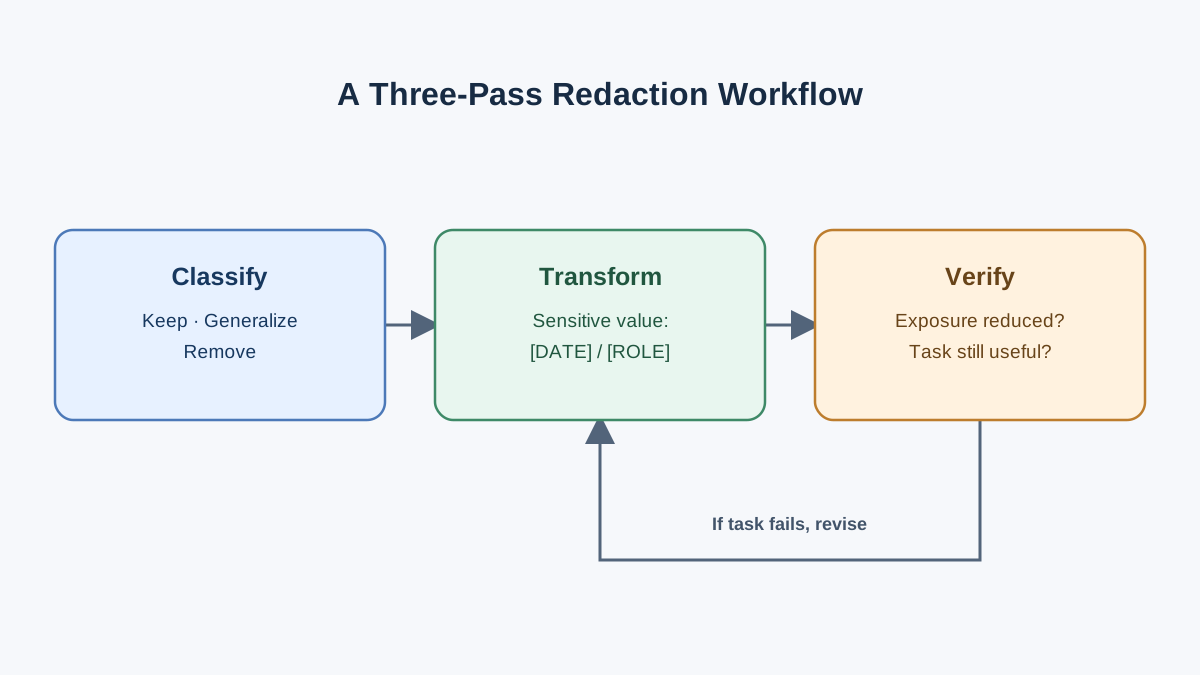
Stop relying on gut feel about what "looks sensitive." Walk the input field by field and sort each one into a category.
Three categories matter:
- Direct identifiers — name, email, phone, account number. These identify on their own.
- Quasi-identifiers — city, employer, rare job title, exact dates. These identify in combination.
- Task-relevant non-sensitive content — the actual complaint, the product, the error message. This is what you keep.
The quasi-identifier category is where beginners get lazy. In Input A, "pediatric oncologist in Bozeman, MT" is not a name, but there are very few people who match it. Remove the name, keep the title and city, and you have not anonymized anything. You have just made the reader work slightly harder.
There is a fourth category that almost everyone misses: inferred and co-referential detail. A pronoun, a nickname, or a phrase like "my manager Dana" re-identifies someone you already removed. If you strip Marcus's name but leave "Dana," you have leaked a second person and given a hook back to the first.
Before you change a single character, label every field with one of three marks: keep, transform, or remove. Write the label next to the field. Build a table like this for each input:
| Field | Label | Reason |
|---|---|---|
| Customer name | transform | Needed for co-reference in the reply |
| Email address | remove | Task does not use it |
| Account number | transform | Shape matters for the refund step |
| City + job title | remove | Quasi-identifier pair; task does not need it |
| The complaint itself | keep | This is the task |
Fill this in for all three inputs before moving on. The classification pass is mechanical on purpose — it forces the decision out of your instincts and into a visible record.
Knowledge check
Check your understanding
Answer this question before you continue.
Pass 2: Transform Without Breaking the Task
Now rewrite. The move is to replace values with typed placeholders that preserve grammar and reference.
Use [PERSON_1], [EMAIL_1], [ACCOUNT_ID]. The type tells the model what kind of thing it is; the number lets it track that two mentions are the same entity.
Here is Input A after transformation:
Hi, this is [PERSON_1] ([EMAIL_1], [PHONE_1]).
I'm a [ROLE] in [CITY]. On [DATE_1] my account
[ACCOUNT_ID] was double-charged for the Pro plan. I need a refund
before my manager [PERSON_2] files the quarterly report.
Two things to notice. First, consistency beats realism. If [PERSON_1] appears three times, all three mentions must map to the same placeholder — otherwise the model treats them as three different people and the summary falls apart. Second, when the task depends on a value's shape rather than its content, substitute a synthetic value of the same type: a different account number with the same format, a different date in the same range. The model can still reason about "a date in March" without knowing which date.
Common mistake: Replacing every name with the generic word "customer." It reads fine, but it destroys co-reference. The model loses track of who did what, and your action-item extraction turns into mush.
Apply the same move to Input B. The node name, the region, and the timestamp are probably fine to keep — they describe a system, not a person. The on-call engineer's name and the contractor's email are the fields to transform. The customer name acme-corp is a business identifier; decide whether the task needs it, and write down your reasoning.
Knowledge check
Check your understanding
Answer this question before you continue.
Pass 3: Check for Residual Exposure
This is the pass most people skip. Read your redacted prompt as an adversary, not as its author.
Go sentence by sentence and ask one question: could this sentence, combined with the rest, point at a specific person?
Then check the seams — the places where context leaks around your clean fields:
- Leftover context in the task instruction itself ("reply to Marcus about his refund").
- A filename or a pasted error message that carries an identifier.
- A quoted email signature.
- A date range that is too narrow to be safe.
Check the metadata you did not think of as content: the surrounding text you copied along with the field you meant to remove. Copy-paste is generous with context.
Then run the utility check in the other direction. Send the redacted prompt and confirm the model still produces a usable answer. If it does not, you removed something the task needed. That is a signal to transform instead of remove, not to give up and paste the raw version.
Warning: Redaction that only covers the request is half a control. If the model echoes or infers the sensitive value in its response, the exposure happened anyway. Confirm what your tooling scans on the way back before you assume you are covered.
Knowledge check
Check your understanding
Answer this question before you continue.
Modify the Exercise: Raise the Difficulty
Once the three inputs feel routine, change one variable at a time.
Change the task on the same input. Take Input A and switch from "summarize" to "draft a reply to the customer." Watch which fields you now have to keep. Task utility is not fixed — it moves with the goal. The same input demands a different redaction depending on what you are asking the model to do.
Add a second document that shares an entity. Give Input B and Input C a shared person, and check whether your placeholders stay consistent across both. If [PERSON_1] in one document is a different human than [PERSON_1] in the other, your pipeline is lying to the model.
Compare a regex-only pass against a manual pass. Regex catches formatted identifiers — emails, phone numbers, account numbers. It does not catch names, nicknames, or contextual references like "my manager Dana." Run both and record what each one misses. That gap is the reason detection usually combines pattern matching with entity recognition rather than relying on either alone.
Record which pass caught what. That record is the reusable asset. It becomes your checklist for the next real input.
When This Approach Is Not Enough
Manual minimization is a skill, not a control. Be honest about where it stops.
It does not scale to high-volume or automated pipelines. At that point the control belongs in a gateway or middleware layer that runs before the request leaves your boundary — not in a human remembering to check.
It does not change what the provider retains, logs, or trains on. Minimization reduces what you send. Those are separate decisions about the product and your organizational controls.
It is not anonymization. Removing a name does not make a record non-identifying if enough quasi-identifiers remain. Redaction and anonymization are different promises.
And if the data should not leave your environment at all, no amount of redaction fixes that. The correct move is a different deployment or a different task — not a cleverer placeholder.
What You Take With You
You now have a three-pass habit: classify, transform, verify. Classify every field before you touch it. Transform with typed placeholders instead of deleting. Verify by reading as an adversary and running the utility check.
The artifact that matters is not this article. It is the checklist you built from your own passes — the fields you missed the first time, the seams you only saw on the second read. Keep that file. It gets shorter as your instincts sharpen.
Your next step is the neighboring skill: deciding whether the data should be sent at all. Minimization assumes the request is worth making. Sometimes it is not. And once your volume makes manual passes impractical, the same three passes move into an automated layer that runs before the request crosses your boundary.
Knowledge check
Final check
Finish the article by checking the ideas you just learned.
References
Want a more structured LLMOps path?
Use the LLMOps Practical Starter Bundle to connect RAG, evaluation, observability, and production patterns.
Large Language Models Starter Pack
A 12-chapter guide connecting LLM fundamentals with prompting, RAG, agents, tool calling, evaluation, security, and application engineering.
- 227-page Illustrated PDF edition
- 12 guided LLM engineering chapters
- Visual concept diagrams
- Self-assessment quizzes
- Bonus deep-dive sections
- Prompt design, structured output, context windows & RAG pipelines
- Agents, tool calling, prompt injection, evaluation & application lifecycles
Coming soon


