
Vector Databases Explained: Where Semantic Search Finds Evidence
A vector database is not a fancy search box or a generic "database for AI." It is the retrieval engine that decides which evidence earns a seat on the…

Key topics
A vector database is not a fancy search box or a generic "database for AI." It is the retrieval engine that decides which evidence earns a seat on the model's limited working desk. Embeddings give you a way to compare meaning, but something has to store millions of those comparisons and return the closest ones fast enough to be useful. That something is a vector database.
Why RAG Needs a Search Engine, Not Just a Database
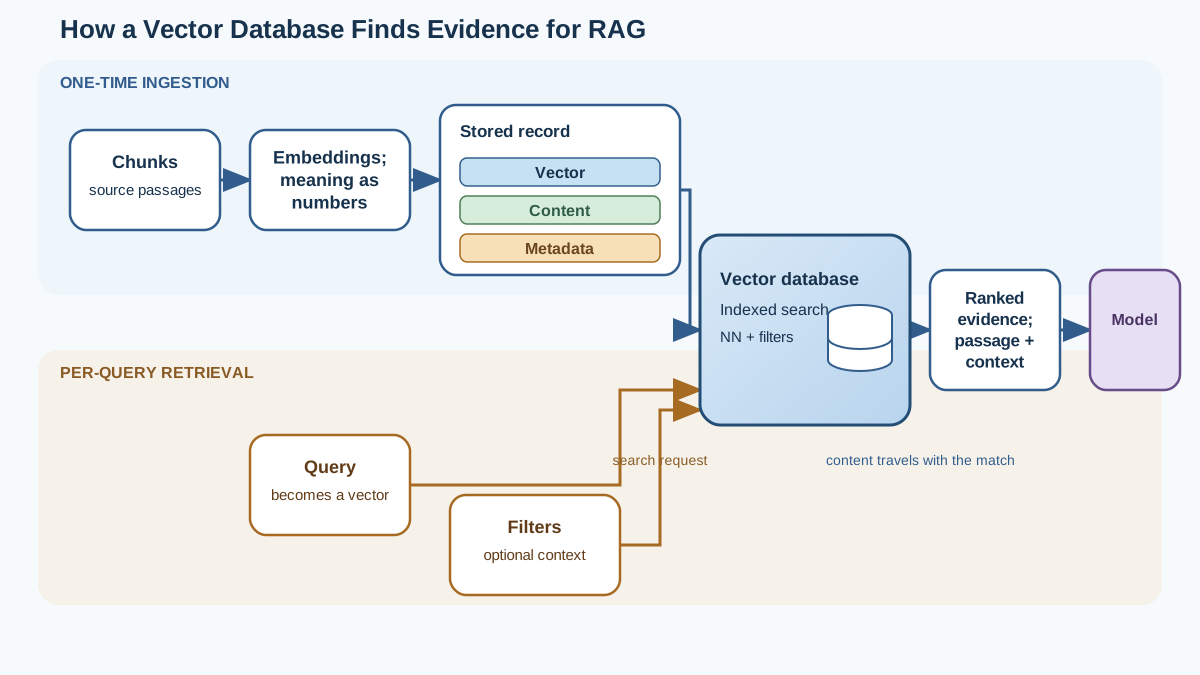
If you have worked with RAG, you already know the shape of the pipeline: documents get split into chunks, each chunk becomes an embedding, and when a user asks a question, you retrieve the most relevant chunks and hand them to the model as context.
The step that quietly does the heaviest lifting is retrieval. And retrieval has a scaling problem.
Imagine you have 100 document chunks. Comparing a query embedding against all 100 is trivial. Now imagine you have 10 million chunks from a year of support tickets, internal wikis, and product documentation. Checking every vector one by one means computing 10 million distance scores before you can answer a single question. That is not retrieval. That is a full scan disguised as a search.
A vector database solves this by indexing vectors so it can skip most of the data and jump straight to the neighborhood where similar vectors live. It is the difference between reading every page in a library to find one quote and walking directly to the shelf where the topic lives.
That is the core job: store vectors, index them for speed, and return the nearest neighbors to a query. Everything else a vector database does supports those three tasks.
Knowledge check
Check your understanding
Answer this question before you continue.
What a Vector Database Actually Stores
Here is where beginners often get the mental model wrong. A vector database does not store just numbers.
Each record in a vector database pairs three things:
- The vector itself — the embedding that acts as the search key.
- The original content — the text, chunk, or document the embedding came from.
- Metadata — structured fields like source, date, author, department, or document type.
The vector answers "what does this mean?" The content answers "what do I hand to the model?" The metadata answers "which slice of my data should I even consider?"
This distinction matters more than it looks. If you store only embeddings in a plain list or file, you can compute similarity scores, but you have no fast way to find the closest vectors, no way to filter by date or source, and no clean path back to the original text. You have similarity math, not a retrieval system.
For RAG, the content half of the record is what makes retrieval useful. You are not retrieving numbers to feed a model. You are retrieving evidence — actual passages the model can cite, quote, and ground its answer in. A vector database keeps that evidence attached to its search key so retrieval returns something the model can actually use.
Knowledge check
Check your understanding
Answer this question before you continue.
How Similarity Search Works Under the Hood
The mechanism behind vector search is straightforward: similarity is measured by distance. Vectors that point in similar directions — meaning their embeddings captured similar semantics — sit closer together in the vector space. Closer vectors mean more similar meaning.
The naive approach is exact nearest-neighbor search: compute the distance between the query vector and every stored vector, then return the closest ones. This works perfectly and scales terribly. At a few thousand vectors, it is fine. At a few million, every query becomes a computation marathon.
Vector databases get around this with approximate nearest neighbor (ANN) search. Instead of checking every vector, the database builds an index that organizes vectors so it can quickly narrow its search to a promising region of the space. Think of it as a librarian who does not read every book to find what you need — they know the shelf layout well enough to walk straight to the right section.
The tradeoff is baked into the name. Approximate means the database may occasionally miss the single best match in exchange for returning very close matches in a fraction of the time. Whether that trade is worth it depends on your situation. If you are serving queries to thousands of users and a response must arrive in milliseconds, approximate search is often the right call. If your corpus is small enough that exact search stays fast, or if your application genuinely needs the closest possible match every time, you may not need ANN at all.
The practical lesson: vector search is a speed-versus-recall tradeoff, and the right balance depends on your scale, your latency targets, and how much retrieval quality you are willing to trade for speed. Measure before you assume that approximate search is the answer.
Knowledge check
Check your understanding
Answer this question before you continue.
Why Metadata Filters Matter as Much as Similarity
Beginners often assume similarity alone is enough. Ask a question, get the most similar chunks, done. That assumption produces plausible-looking but contextually wrong results.
Consider the query "What were our sales last quarter?" Semantic similarity will happily retrieve chunks about sales performance, revenue trends, and quarterly forecasts. But if your corpus spans three years of reports, similarity alone cannot tell the database which quarter you mean. You get the right topic from the wrong time.
Metadata filters solve this. You combine vector search with structured conditions: date range, department, document type, author, or any field you attached at ingestion time. The query becomes "find chunks semantically similar to this question, but only from Q3 of this year, and only from the sales team's reports."
The key idea is candidate eligibility. Metadata constraints narrow which stored vectors the search is allowed to consider. Different systems apply those constraints at different points — some integrate filtering into the index itself, others apply it during candidate selection, and still others filter after retrieval. The exact order varies by system and query, but the practical issue is the same: a restrictive filter shrinks the pool of eligible neighbors, which can change both speed and result quality.
The common beginner mistake is treating the vector database as a pure semantic search tool and ignoring metadata entirely. That works in demos with a clean, single-topic corpus. It fails in production, where your data has time ranges, sources, access controls, and categories that determine whether a result is actually relevant.
Knowledge check
Check your understanding
Answer this question before you continue.
Vector Database vs. Embedding Store vs. Regular Database
The boundaries between these three tools confuse almost everyone at first. Rather than treating them as rigid categories, ask what each option can actually do:
| Regular database | Embedding store | Vector database | |
|---|---|---|---|
| Search type | Exact matches, structured queries | Similarity math only | Similarity plus metadata filtering |
| Vector indexing | Often absent, sometimes added as an extension | None or minimal | ANN index for fast vector search |
| Metadata filtering | Strong | Weak or manual | Strong, combined with similarity |
| Persistence | Strong | Varies | Strong |
| Best for | Customer records, orders, users | Prototypes and small experiments | Production semantic search at scale |
A regular database handles exact matches and structured queries beautifully but cannot search by meaning. Ask it for "documents about customer churn" and it will look for that exact phrase, not the concept. That said, many mainstream databases now offer vector support as an extension, so the line between "regular database" and "vector database" is blurring.
An embedding store — a file, an in-memory list, or a simple table holding vectors — can compute similarity but lacks the indexing, filtering, and persistence you need beyond small experiments.
A vector database combines fast similarity search, metadata filtering, and durability in one system. That combination is what makes it a strong retrieval engine for RAG. But the right choice depends on your workload, query patterns, and operational constraints — not on a fixed vector count.
Common Beginner Mistakes and How to Avoid Them
After watching people build their first RAG systems, I keep seeing the same four mistakes.
Mistake one: treating the vector database as the source of truth for meaning. The database stores whatever embeddings you give it. The embedding model determines what "similar" means. If your embeddings are weak, no vector database will fix that. The database is a search engine, not an interpreter.
Mistake two: skipping metadata filters. Pure similarity returns semantically close results regardless of context. If your data spans time periods, teams, or document types, you need filters to keep results relevant to the actual question.
Mistake three: assuming more similar always means better. The closest vector to your query is not always the most useful evidence. A chunk that is 90 percent similar but answers the question beats a chunk that is 98 percent similar but covers a tangential point. Relevance to the question matters more than raw similarity score.
Mistake four: over-indexing on database choice early. Beginners spend days comparing vector database vendors when their retrieval quality is limited by chunking strategy and embedding model. The database matters at scale, but it will not save a poorly designed ingestion pipeline.
Common mistake: Choosing a vector database before fixing your chunking and embedding strategy is like buying a faster delivery truck before checking whether your warehouse is organized. The truck is not the bottleneck.
When retrieval quality is poor, work backward: inspect the retrieved chunks first. Are they the right passages, or is the model working from weak evidence? Then check whether metadata filters excluded eligible content, whether chunk boundaries split the answer across pieces, and whether the query and your embeddings actually speak the same language. Only after those checks should you suspect the index or database itself.
My rule: pick the embedding model and chunking strategy first, measure retrieval quality, and only then choose the storage that fits your scale and filtering needs.
When You Need a Vector Database (and When You Don't)
Vector databases are genuinely useful, but they are also over-applied. Beginners reach for one because it feels like the "real" architecture, when a simpler approach would serve them better.
You likely need a vector database when your corpus is large, when you need metadata filtering at query time, or when you are serving retrieval requests in production where speed matters. Those conditions justify the operational overhead of running another system.
You can skip it when you are prototyping with a few dozen documents. Compare vectors directly in code. Store embeddings in memory or a file. See whether your retrieval quality is even good enough to justify the infrastructure. Most early RAG failures come from bad chunking or weak embeddings, not from the absence of a vector database.
The pragmatic path is to start simple, measure where retrieval slows down or filtering becomes painful, and adopt a vector database only when those problems actually appear. That moment will come if your project grows. It does not need to come on day one.
Try It Yourself
The fastest way to make this concrete is a small experiment. Take a dozen documents on a single topic, embed them, and store the vectors with metadata like date and category. Run a similarity query and look at the results. Then add a metadata filter — restrict the search to one date range or category — and watch how the results change.
That experiment will teach you more about vector databases than any vendor comparison. You will see similarity find meaning, filters find context, and the two working together produce evidence worth handing to a model.
A vector database is not magic. It is a retrieval engine that makes semantic search fast and filterable at scale. Understand what it stores, how it searches, and when it earns its place, and you will know exactly what it contributes to every RAG system you build.
Knowledge check
Final check
Finish the article by checking the ideas you just learned.
References
Want a more structured LLMOps path?
Use the LLMOps Practical Starter Bundle to connect RAG, evaluation, observability, and production patterns.
Large Language Models Starter Pack
A 12-chapter guide connecting LLM fundamentals with prompting, RAG, agents, tool calling, evaluation, security, and application engineering.
- 227-page Illustrated PDF edition
- 12 guided LLM engineering chapters
- Visual concept diagrams
- Self-assessment quizzes
- Bonus deep-dive sections
- Prompt design, structured output, context windows & RAG pipelines
- Agents, tool calling, prompt injection, evaluation & application lifecycles
Coming soon


