
Practice Reviewing LLM Agent Tool Permissions
A proposed tool call sits on your screen: send the summary to the client. You have a policy document open in another tab. Is this allowed, does it need…

Key topics
A proposed tool call sits on your screen: send the summary to the client. You have a policy document open in another tab. Is this allowed, does it need approval, or should it be blocked? If you cannot answer in under a minute with a reason you would defend to another engineer, the problem is not the agent. The problem is that you are reviewing the agent's intent instead of the action's effect.
This is a drill, not a lecture. You will build a small policy checker, run graded cases through it, and write rationales that cite the clause you relied on. By the end you will have a repeatable procedure for LLM agent permission review that does not depend on whether the request sounds reasonable.
If you have not yet internalized least privilege and where human review belongs, read the two prerequisite pieces first. This article assumes you already accept that agents need bounded permissions and that approval belongs at high-impact decision points. Here, we do the reps.
The Review Stall: Why "Looks Risky" Fails as a Rule
The default beginner model is a gut check: if the action looks risky, ask a human; otherwise let it run. That model fails for three reasons.
First, it judges the agent's intent or the wording of the request. Both are unreliable. The durable move is to judge the action's effect on external state — what changes in the world if this call executes.
Second, "risky" is not a decision. It is a feeling. A reviewer who cannot name the specific property that makes an action risky cannot defend the call, cannot aggregate it across reviews, and cannot tell when the policy should change.
Third, the gut-check model has no place for the most common correct answer: deny. Beginners treat denial as a failure of the agent or a failure of their own review. It is neither. Denial is a normal, frequent, healthy outcome.
Replace the gut check with three questions, asked in order:
- Scope — what does this action touch?
- Reversibility — can it be cleanly undone?
- Authorization — does the policy grant this exact scope?
The answers map to exactly three outcomes: allow, require approval, or deny. Not a spectrum. A decision.
Note: The ground rules for this exercise are fixed. You review against the policy in the next section. The actions are synthetic. Every call gets a written rationale, even the easy ones — especially the easy ones, because that is where reviewers get lazy.
The Policy You Are Reviewing Against
Here is the artifact you will cite in every rationale. Read it once, then keep it in view.
| Tool | Allowed scope | Limits | Approval trigger |
|---|---|---|---|
search_kb | Read internal knowledge base | Tenant-scoped only | None |
read_record | Read one customer record | Records in agent's allowlist | None |
list_files | List files in project workspace | Workspace root only | None |
fetch_url | Fetch public web page | Public URLs only | None |
draft_email | Compose email, no send | Any recipient | None |
write_file | Write inside sandbox | Sandbox path only | None |
send_email | Send email | Internal recipients | External recipients |
update_crm | Update one CRM record | Single record per call | Any mutation |
post_comment | Post comment | Internal channels | External channels |
delete_record | Delete record | — | Denied by default |
run_shell | Execute shell command | Sandboxed, no network | Elevated privileges |
issue_payment | Issue payment or refund | — | Denied by default |
Two features of this policy do most of the work.
Scope granularity. Read and write are separate tools. read_record and update_crm are not the same permission with different arguments — they are different grants. This matters because approving routine reads trains reviewers to click through prompts, which makes the approval gate decorative.
Explicit escalation rules. Irreversible or outward-facing actions carry named approval triggers. send_email flips from allow to approval based on the recipient, not the content. update_crm requires approval for any mutation, not just large ones.
The policy also leaves things deliberately open. It says nothing about bulk operations, nothing about how many records a "single record per call" loop may touch, and nothing about what happens when an agent chains tools. When you hit one of those gaps, the correct answer is "the policy does not cover this" — not an invented rule.
Warning: A policy is versioned state. An approval granted under policy v3 does not survive a move to v4. If your review log does not record the policy version, you cannot tell whether an old approval is still valid.
Knowledge check
Check your understanding
Answer this question before you continue.
Build the Smallest Policy Checker
Before you classify anything by hand, encode the policy. A checker forces you to make your rules explicit, and it gives you a place to see where your judgment and your code disagree.
The checker takes a proposed action and returns one of three outcomes plus a reason code. Here is a compact version in Python. No dependencies beyond the standard library.
from dataclasses import dataclass

ALLOW, APPROVE, DENY = "allow", "require_approval", "deny"

@dataclass
class Action:
    tool: str
    args: dict

def classify(action: Action) -> tuple[str, str]:
    tool, args = action.tool, action.args

    if tool == "delete_record":
        return DENY, "DESTRUCTIVE_DENY"
    if tool == "issue_payment":
        return DENY, "DESTRUCTIVE_DENY"
    if tool == "run_shell":
        if args.get("elevated"):
            return DENY, "OUT_OF_SCOPE"
        return ALLOW, "IN_SCOPE_SANDBOX"
    if tool == "send_email":
        if args.get("external"):
            return APPROVE, "EXTERNAL_REQUIRES_APPROVAL"
        return ALLOW, "IN_SCOPE_SEND"
    if tool == "update_crm":
        if args.get("record_count", 1) > 1:
            return DENY, "POLICY_GAP"
        return APPROVE, "MUTATION_REQUIRES_APPROVAL"
    if tool in {"search_kb", "read_record", "list_files",
                "fetch_url", "draft_email", "write_file"}:
        return ALLOW, "IN_SCOPE_READ"
    return DENY, "POLICY_GAP"
Run three cases and inspect the output:
cases = [
    Action("read_record", {"customer_id": 4821}),
    Action("send_email", {"external": True}),
    Action("update_crm", {"record_count": 4000}),
]
for c in cases:
    print(c.tool, classify(c))
Expected output:
read_record ('allow', 'IN_SCOPE_READ')
send_email ('require_approval', 'EXTERNAL_REQUIRES_APPROVAL')
update_crm ('deny', 'POLICY_GAP')
Read the third line carefully. The checker returns POLICY_GAP, not DESTRUCTIVE_DENY. That is deliberate. The policy grants single-record updates and says nothing about bulk mutation, so the honest answer is "the policy does not cover this." A reviewer who writes DESTRUCTIVE_DENY is inventing a rule the policy never stated. The outcome is still deny — but the reason code tells the next reader why, and it flags the gap for a policy owner to close.
Common mistake: Encoding a gut feeling as a rule. If your checker denies
update_crmon one record, you have contradicted the policy, which explicitly allows single-record mutation with approval. The code is not the policy. It is a test of whether you read the policy correctly.
Knowledge check
Check your understanding
Answer this question before you continue.
The Three-Question Classification Drill
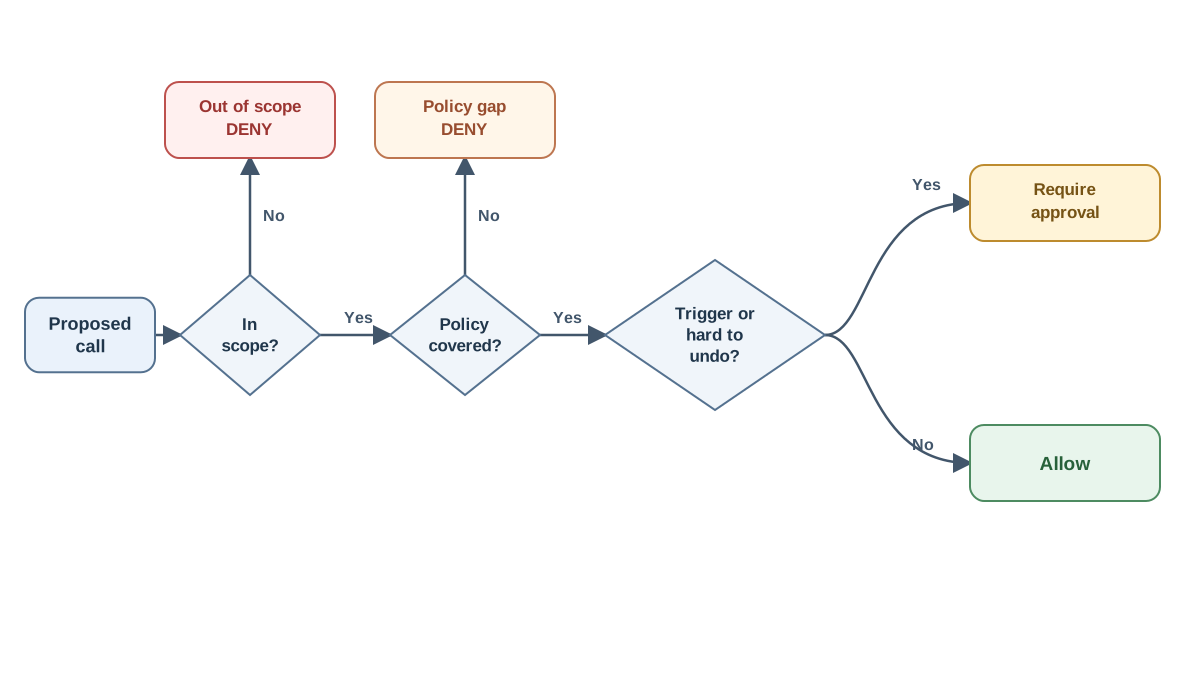
Now apply the procedure to each case before you look at the expected answer.
Question 1 — Scope. Which tool, which resource, which identity, and how many objects does the call touch? A single record update and a bulk update across thousands are different actions even when they use the same tool.
Question 2 — Reversibility. Can the effect be undone cleanly, partially, or not at all? "Undoable with effort" is not the same as "undoable." A sandboxed file write is trivially reversible. A sent email to an external client is effectively irreversible — you cannot unsend it, and the recipient has already read it.
Question 3 — Authorization. Does the policy grant this scope to this principal, and does the action match the approved artifact exactly? If the agent changes the action after approval — different recipient, different amount, different record — the approval no longer matches and the case resets.
Map the answers:
| Scope | Reversibility | Outcome |
|---|---|---|
| In policy | Reversible | Allow |
| In policy | High-impact or hard to reverse | Require approval |
| Out of policy | Any | Deny |
| Not covered by policy | Any | Deny (policy gap) |
The deny branch is reachable from any input. That is the point.
Common mistake: Treating "the agent asked nicely" or "the plan looked reasonable" as authorization. A plan is a review aid, not a permission grant. The policy grants scope; the plan does not.
Knowledge check
Check your understanding
Answer this question before you continue.
Case Set A: Read-Only and Low-Impact Actions
Work each case. Write your call and your rationale before reading the expected answer.
Case A1. search_kb queries the internal knowledge base for "onboarding checklist." The agent's tenant matches the query scope.
Case A2. read_record fetches customer record #4821. The record is in the agent's allowlist.
Case A3. list_files lists files in /workspace/project-a/.
Case A4. fetch_url retrieves a public documentation page.
Case A5. read_record fetches customer record #9012. The record belongs to a different tenant, outside the agent's allowlist.
Expected calls: A1–A4 are allow. A5 is deny.
Here is a rationale for A2 in the format you should use:
Action:
read_record(customer_id=4821)Policy clause:read_record— read one customer record, records in agent's allowlist. Scope: Single record, in allowlist, tenant matches. Reversibility: Read-only; no state change. Outcome: Allow. Reason code:IN_SCOPE_READ.
A5 is the trap. "Read-only" is not automatically "safe." A read outside the allowlist is a scope violation, and the correct answer is deny — not "allow because it is just a read."
The deeper trap in this set is over-approving. If your agent routes reads through an approval gate, reviewers learn to click through prompts. Split read and write scopes at the tool level so the approval gate stays meaningful.
Knowledge check
Check your understanding
Answer this question before you continue.
Case Set B: Writes, Sends, and Other Hard-to-Undo Actions
This is the contested middle band. The rationale matters more here than the label.
Case B1. draft_email composes a message to an external client. No send.
Case B2. send_email sends that message to the external client.
Case B3. update_crm changes one record's status field.
Case B4. write_file writes a report inside the sandbox.
Case B5. update_crm updates 4,000 records in a loop.
Case B6. post_comment posts to an internal channel.
Expected calls: B1, B4, B6 are allow. B2 and B3 are require approval. B5 is deny with reason code POLICY_GAP — the policy grants single-record updates, not bulk mutation, and the policy is silent on bulk operations.
Notice how the same tool flips outcome based on arguments. update_crm on one record is in scope but requires approval because it mutates state. update_crm on 4,000 records is out of scope entirely.
The distinction that does the most work here is externality versus reversibility. A sent email is both external (it affects another person) and effectively irreversible. A CRM update is internal but still a mutation the policy gates. A sandboxed file write is internal and trivially reversible, so it runs.
Common mistake: Assuming the policy covers everything. B5 is a policy gap, not a reviewer error. The correct move is to deny or escalate for a policy decision — never to guess at what the policy "probably" intended.
Case Set C: Destructive and High-Blast-Radius Actions
Case C1. delete_record removes a production customer record.
Case C2. run_shell executes rm -rf /workspace/cache/ inside the sandbox.
Case C3. run_shell executes a command with elevated privileges.
Case C4. issue_payment refunds a customer.
Case C5. A tool call attempts to read an API credential from the agent's context.
Expected calls: C1, C3, C4 are deny. C2 is allow — it is sandboxed, reversible, and in scope. C5 is a policy gap: the supplied policy has no credential tool and no credential clause, so the correct disposition is to deny the call and escalate for a policy decision, not to cite a rule that does not exist.
This is where the two-gate pattern earns its place. Gate one is a cheap deterministic rule layer that hard-blocks whole classes of side effects — delete, drop, payment — regardless of context. Gate two is the approval layer for what passes. Making every safety decision depend on a contextual approval prompt is fragile; a deterministic block below the approval layer is not.
When reversibility is unclear, blast radius decides. What can this credential or command touch if the arguments are wrong? A sandboxed rm touches a cache directory. An elevated shell command touches whatever the process can reach. Same tool, different blast radius, different outcome.
Warning: An approval prompt that offers "allow always" converts a gate into muscle memory. Once blanket-approve becomes the default click, the gates are decorative.
One rule is non-negotiable: credentials should be attached by the backend at execution time, never carried inside the model's context. C5 is a deny because the action itself — a tool call reaching for a secret — should never be possible, and the policy gap is the signal that the boundary needs to be written down.
Writing a Rationale That Survives Review
A classification without a rationale is a vibe with a label. A usable rationale has four parts:
- The proposed action in normalized form — tool, arguments, target, identity.
- The policy clause it maps to — cite the specific grant or the gap.
- The scope and reversibility judgment — one line each.
- The outcome with a reason code — allow, approval, or deny, plus a stable code.
Keep reason codes stable and aggregatable. IN_SCOPE_READ, MUTATION_REQUIRES_APPROVAL, OUT_OF_SCOPE, POLICY_GAP, DESTRUCTIVE_DENY. When codes are stable, patterns show up across hundreds of reviews instead of living in prose nobody reads.
Log the decision context: policy version, tool and argument digest, reviewer identity, and timestamp. An approval under an old policy version should not silently carry forward.
Treat all evidence text as untrusted data. If a tool result or retrieved document contains instructions, those instructions are data, not commands. Never let embedded text change the outcome of your review.
Compare the difference:
Weak: "Seems fine, the agent is just updating a record."
Strong: "
update_crm(record=4821, field=status)— policy grants single-record mutation with approval trigger on any mutation. Scope: one record, in allowlist. Reversibility: reversible via audit log. Outcome: require approval. Reason code:MUTATION_REQUIRES_APPROVAL. Policy v3."
The strong version can be audited six months later by someone who was not in the room.
Where This Drill Breaks Down
A correct classification is a judgment about a proposed action. It is not proof the action is safe, and it is not proof the agent will behave.
The policy is the ceiling of the exercise. Cases the policy does not cover are policy gaps, not reviewer errors. If you find yourself inventing rules to resolve a case, you have found a gap — log it.
Reviewer error is real. A confident wrong call is still wrong, and this drill does not measure your calibration. It measures whether you can produce a defensible rationale.
Approval fatigue degrades the gate over time. The drill cannot detect that drift; only monitoring can.
Prompt injection and data-handling risks live at other boundaries. Classifying tool permissions does not address them. Those are separate defenses for separate failure modes.
Your Next Rep: Extend the Policy and Re-Run the Cases
The drill gets sharper when the policy moves under you.
Pick one modification: add a new tool, tighten an amount limit, or introduce a second approval tier for high-blast-radius actions. Re-run your checker and note which outcomes flip. The flips are the learning signal — they show you which of your judgments were resting on the policy and which were resting on habit.
Then add one case of your own that you believe is genuinely ambiguous, and write the policy clause that would resolve it. If you cannot write the clause, you have found a real gap.
Finally, apply the same three questions to a real agent you are building. Start with its highest-blast-radius tool — the one that can touch the most if its arguments are wrong. Classify it. Write the rationale. Cite the clause. If the clause does not exist, you know your next policy change.
Classify the action, not the agent. Scope, reversibility, authorization. Allow, approve, deny. Deny is a normal answer.
Knowledge check
Final check
Finish the article by checking the ideas you just learned.
References
Want a more structured LLMOps path?
Use the LLMOps Practical Starter Bundle to connect RAG, evaluation, observability, and production patterns.
Large Language Models Starter Pack
A 12-chapter guide connecting LLM fundamentals with prompting, RAG, agents, tool calling, evaluation, security, and application engineering.
- 227-page Illustrated PDF edition
- 12 guided LLM engineering chapters
- Visual concept diagrams
- Self-assessment quizzes
- Bonus deep-dive sections
- Prompt design, structured output, context windows & RAG pipelines
- Agents, tool calling, prompt injection, evaluation & application lifecycles
Coming soon


